
A compiled model is your DbContext model generated ahead of time as C# source by dotnet ef dbcontext optimize and loaded with UseModel, instead of being built by reflection on first use.
It removes the one-time model building cost and nothing else, so it pays off for large models on cold-start-sensitive infrastructure.
Global query filters are not supported, which rules out most soft delete and multi-tenant models.
The first query your app sends through a DbContext is slow, and it has nothing to do with the database.
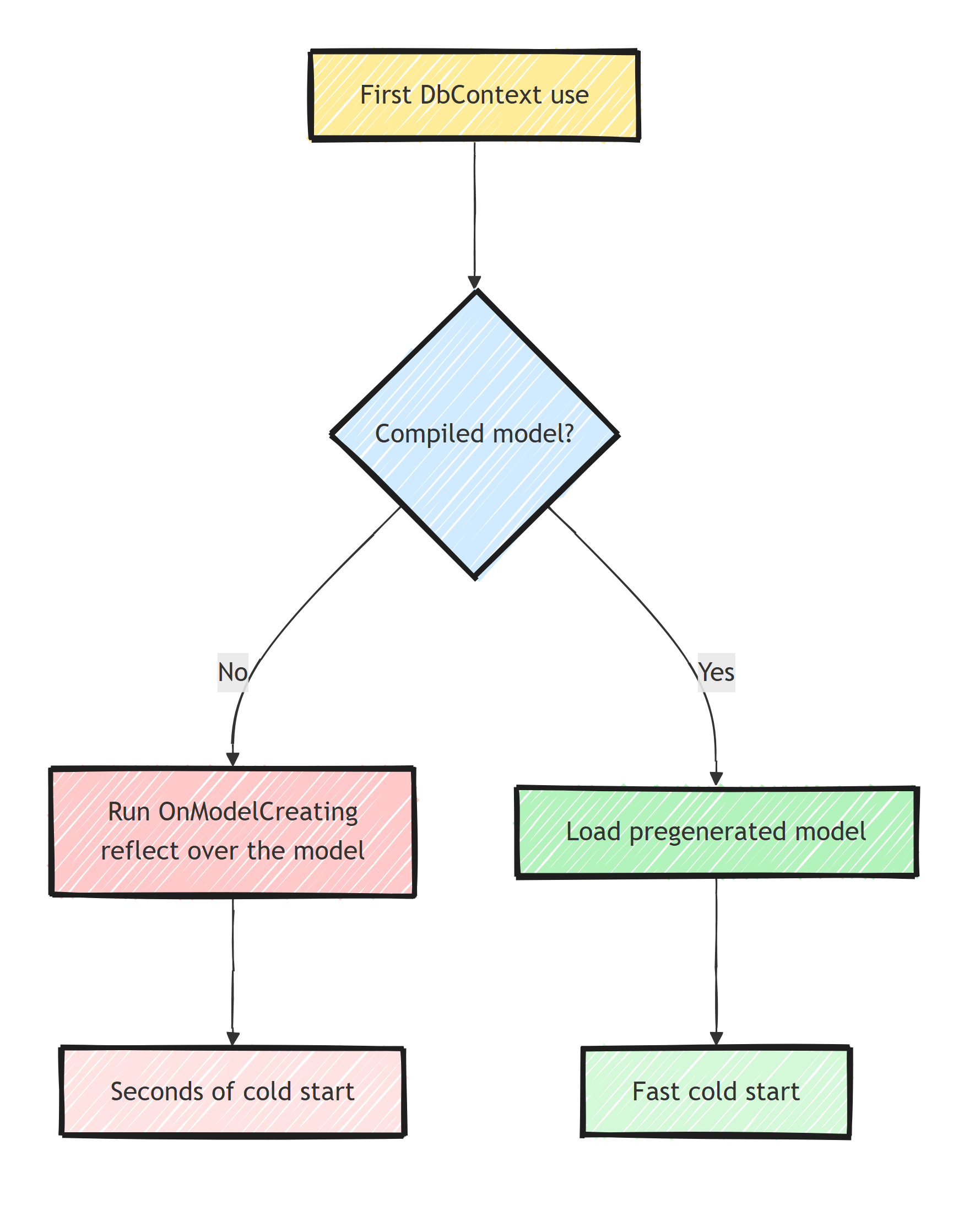
Before EF Core can translate anything, it has to build the model: run OnModelCreating, apply every configuration, discover every entity, navigation, and index via reflection, and validate the result.
For a 20-entity model, that is noise. For a 300-entity model, it can be seconds of cold start, paid on the first request after every deploy, scale-out, or scale-from-zero wake-up. Compiled models move that entire cost to build time.
Where the Time Actually Goes
Model building happens once per model, lazily, on first use of the context. EF caches the result, so request two is fast; this is strictly a cold start tax.
The cost scales with model complexity: entity count, relationships, inheritance hierarchies, conventions to run over all of it. Microsoft's own benchmarks used a synthetic model with 449 entity types and 6,390 properties, where model preparation on first query took around 2 seconds, and a compiled model cut that phase by roughly 10x. Under about 100 entities you will barely notice; past a couple hundred, the model build starts to dominate cold start ahead of even JIT and connection warmup.
Before optimizing, measure your own number.
The cheapest way is timing the first access to db.Model:
var stopwatch = Stopwatch.StartNew();

await using (var scope = app.Services.CreateAsyncScope())
{
    var db = scope.ServiceProvider.GetRequiredService<AppDbContext>();
    _ = db.Model; // forces the model build, nothing else
}

app.Logger.LogInformation(
    "Model build took {Elapsed} ms", stopwatch.ElapsedMilliseconds);
Accessing db.Model isolates model building from query compilation and database I/O, so you know exactly what a compiled model would buy you.
If that number is 40 ms, close this tab and go optimize something real.
If it is 900 ms and you run on scale-to-zero infrastructure, keep reading.
Generating a Compiled Model
The generator is part of the dotnet ef tooling:
dotnet tool update -g dotnet-ef

dotnet ef dbcontext optimize \
  --output-dir CompiledModels \
  --namespace MyApp.Infrastructure.CompiledModels
This runs your OnModelCreating once, at design time, and emits the finished model as C# source files into CompiledModels/.
You will see one file per entity type plus an AppDbContextModel entry point.
The files are large and generated; commit them, but exclude them from coverage and review noise.
Wire it up in your context options:
builder.Services.AddDbContext<AppDbContext>(options =>
    options
        .UseNpgsql(connectionString)
        .UseModel(MyApp.Infrastructure.CompiledModels.AppDbContextModel.Instance));
At startup, EF now loads the pregenerated model object instead of reflecting its way through your configuration.
OnModelCreating does not run at runtime.
Two scope notes:
- This affects model building only. Query translation, compilation, and execution are untouched. If your problem is slow queries, you want compiled queries and the usual query performance work, not compiled models. Despite the similar names, the two features are unrelated.
- It combines well with the other cold start levers, ReadyToRun and trimming, because each one removes a different chunk of first-request latency.
The Restrictions That Decide Everything
Global query filters are not supported.
If your model calls HasQueryFilter anywhere, dotnet ef dbcontext optimize refuses to generate.
Many systems depend on global query filters: they are the standard mechanism for soft delete and for multi-tenant row filtering.
The tool refusing at generation time is the good outcome.
The risk is a team that removes the filters to "make optimize work", or reworks them into repeating Where clauses that someone eventually forgets.
A missing tenant filter is not a performance bug, it is a data leak.
If query filters carry security semantics in the application, that limitation alone disqualifies compiled models until the filter can be expressed safely.
Lazy-loading and change-tracking proxies are not supported.
UseLazyLoadingProxies and UseChangeTrackingProxies do not work with a compiled model.
If you lean on lazy loading, that is a second disqualifier (and, separately, a reason to revisit loading strategies).
Custom IModelCacheKeyFactory scenarios do not fit.
The classic use is dynamic per-tenant model variation (different schemas per tenant, for example).
A compiled model is one fixed model, so it cannot vary with runtime state.
The model is a snapshot, and it can go stale. Add a property, change a relationship, tweak a value conversion, and the compiled model still loads, describing the old model. EF does not detect the drift. The symptoms are downstream and confusing: missing columns in generated SQL, or a pending model changes error from migrations that seems to contradict the code in front of you.
Keeping the Snapshot Fresh
Automate the regeneration:
EF Core 9+: let MSBuild do it.
The Microsoft.EntityFrameworkCore.Tasks package regenerates the compiled model during build:
dotnet add package Microsoft.EntityFrameworkCore.Tasks
<PropertyGroup>
  <EFOptimizeContext>true</EFOptimizeContext>
</PropertyGroup>
With that in place, the snapshot can never drift from the code that produced it.
If you are on EF 8 or earlier, the manual equivalent is a CI step: regenerate with dotnet ef dbcontext optimize and fail the build if git diff is non-empty.
Newer EF Core releases keep shaving time off model building itself, so re-measure on your current EF version before assuming you need this at all.
Who Should Actually Use This?
My decision list is short.
Good fit:
- Models in the hundreds of entity types, where the build cost is measured in seconds.
- Serverless and scale-to-zero deployments (Lambda, Azure Functions, Container Apps to zero) where cold start is a user-facing number you pay constantly.
- Modular systems with several large contexts, where each module pays its own model build. A modular monolith with 8 modules and 8 DbContexts multiplies this cost by 8.
- Pair it with
dotnet ef dbcontext optimizerunning from CI so freshness is automatic.
Bad fit:
- Any model using
HasQueryFilterfor soft delete or tenancy. Hard stop until EF lifts the limitation. - Lazy-loading proxy users.
- Small models. You take on generated code in the repo, a build step, and one more thing to understand, for a win measured in milliseconds.
- Long-running services that restart weekly. You would be optimizing an event that happens 50 times a year.
Compiled models are a deployment-profile optimization, in the same family as Native AOT and R2R. The steady state is untouched; only the first minute of process life improves.
Summary
- Model building is a one-time reflection cost on first
DbContextuse, and it scales with entity count: trivial at 20 entities, seconds at several hundred. dotnet ef dbcontext optimizeplusUseModelmoves that cost to build time, cutting the model preparation phase by roughly 10x on large models.- Three limitations decide whether you can adopt it: no global query filters (so most soft delete and multi-tenant designs are out), no lazy-loading or change-tracking proxies, no dynamic per-tenant models.
- EF does not detect a stale snapshot. On EF 9+, turn on
EFOptimizeContextso the build regenerates it; earlier, enforce regeneration in CI. - Adopt it for big models on cold-start-sensitive infrastructure. Skip it everywhere else and measure
db.Modelbuild time before deciding.
Frequently Asked Questions
What are EF Core compiled models?
A compiled model is your DbContext model generated ahead of time as C# source by dotnet ef dbcontext optimize. The app loads the pregenerated model at startup instead of running OnModelCreating and building it via reflection on first use.
How much faster is startup with a compiled model?
It scales with model size. Small models save little, but for models with hundreds of entity types Microsoft measured first-query model preparation dropping from seconds to a fraction, roughly a 10x or better improvement in that phase.
What are the limitations of compiled models?
Global query filters, lazy-loading and change-tracking proxies, and custom IModelCacheKeyFactory implementations are not supported. The compiled model is also a snapshot: change your entities or configuration and you must regenerate it, though EF Core 9 can automate that in the build.
Do compiled models make queries faster?
No. They only remove the one-time model building cost at startup. Query compilation and execution are unaffected, so steady-state performance is identical with or without a compiled model.
When should I use compiled models?
When cold start matters and your model is large: serverless functions, scale-to-zero containers, or apps with hundreds of entity types. Skip them if you rely on global query filters for soft delete or multi-tenancy.


