
DbContext is both a unit of work and the boundary around EF Core's tracked state.
In ASP.NET Core it belongs in DI as scoped, one instance per HTTP request, and never as a singleton, because it is not thread-safe.
The rest of the configuration that matters is where entity configuration lives, the default tracking behavior, connection retries, interceptors, and whether pooling is worth its constraints.
What Is DbContext?
DbContext is your session with the database. It tracks changes to your entities, generates SQL, and manages the connection and transactions.
Every EF Core operation goes through the DbContext.
Registration and Lifetime
Register your DbContext with the DI container using AddDbContext:
builder.Services.AddDbContext<AppDbContext>(options =>
    options.UseNpgsql(builder.Configuration.GetConnectionString("Database")));
The default lifetime is Scoped: one instance per HTTP request. This is correct for most web applications.
Never register DbContext as Singleton. It's not thread-safe, and you'll get concurrency exceptions.
For background services, create a scope manually:
public class OrderProcessingService(IServiceScopeFactory scopeFactory)
    : BackgroundService
{
    protected override async Task ExecuteAsync(CancellationToken stoppingToken)
    {
        using var scope = scopeFactory.CreateScope();
        var dbContext = scope.ServiceProvider.GetRequiredService<AppDbContext>();
        // Use dbContext within this scope
    }
}
For more on DI lifetimes, see Dependency Injection Lifetimes in .NET.
Applying Entity Configurations
Don't configure entities inline in OnModelCreating. Use IEntityTypeConfiguration<T> classes:
public class OrderConfiguration : IEntityTypeConfiguration<Order>
{
    public void Configure(EntityTypeBuilder<Order> builder)
    {
        builder.HasKey(o => o.Id);

        builder.Property(o => o.Status)
            .HasConversion<string>()
            .HasMaxLength(50);

        builder.HasMany(o => o.LineItems)
            .WithOne()
            .HasForeignKey(li => li.OrderId)
            .OnDelete(DeleteBehavior.Cascade);

        builder.ComplexProperty(o => o.TotalAmount, money =>
        {
            money.Property(m => m.Amount).HasColumnName("total_amount");
            money.Property(m => m.Currency).HasColumnName("total_currency");
        });
    }
}
Apply all configurations automatically:
protected override void OnModelCreating(ModelBuilder modelBuilder)
{
    modelBuilder.ApplyConfigurationsFromAssembly(typeof(AppDbContext).Assembly);
}
This keeps your DbContext class clean and each entity's configuration in its own file.
Connection Resiliency
Network issues happen. Configure retry logic for transient failures:
builder.Services.AddDbContext<AppDbContext>(options =>
    options.UseNpgsql(
        builder.Configuration.GetConnectionString("Database"),
        npgsqlOptions => npgsqlOptions
            .EnableRetryOnFailure(
                maxRetryCount: 3,
                maxRetryDelay: TimeSpan.FromSeconds(5),
                errorCodesToAdd: null)));
This handles temporary database outages without crashing your application. I cover the details (including the execution strategy gotchas with manual transactions) in EF Core connection resiliency.
Query Tracking Behavior
By default, EF Core tracks all entities returned by queries. This is useful for write operations but wasteful for read-only queries.
Option 1: Disable tracking globally, enable per query:
builder.Services.AddDbContext<AppDbContext>(options =>
    options.UseNpgsql(connectionString)
          .UseQueryTrackingBehavior(QueryTrackingBehavior.NoTracking));
Then opt in when you need tracking:
var order = await _dbContext.Orders
    .AsTracking()
    .FirstOrDefaultAsync(o => o.Id == orderId);
Option 2: Keep tracking on, use AsNoTracking for reads:
var orders = await _dbContext.Orders
    .AsNoTracking()
    .Where(o => o.Status == OrderStatus.Pending)
    .ToListAsync();
If you're using CQRS, query handlers should always use AsNoTracking() since they never modify data.
Interceptors
EF Core Interceptors let you hook into the database pipeline for cross-cutting concerns:
builder.Services.AddDbContext<AppDbContext>((sp, options) =>
    options.UseNpgsql(connectionString)
           .AddInterceptors(
               sp.GetRequiredService<PublishDomainEventsInterceptor>(),
               sp.GetRequiredService<AuditableEntityInterceptor>()));

builder.Services.AddScoped<PublishDomainEventsInterceptor>();
builder.Services.AddScoped<AuditableEntityInterceptor>();
Common interceptor use cases:
- Publishing domain events after
SaveChanges - Setting
CreatedAtandModifiedAttimestamps automatically - Audit logging and soft-delete behavior
- Query logging and diagnostics
Split Read/Write Contexts
For applications with different read and write patterns, consider separate DbContext classes:
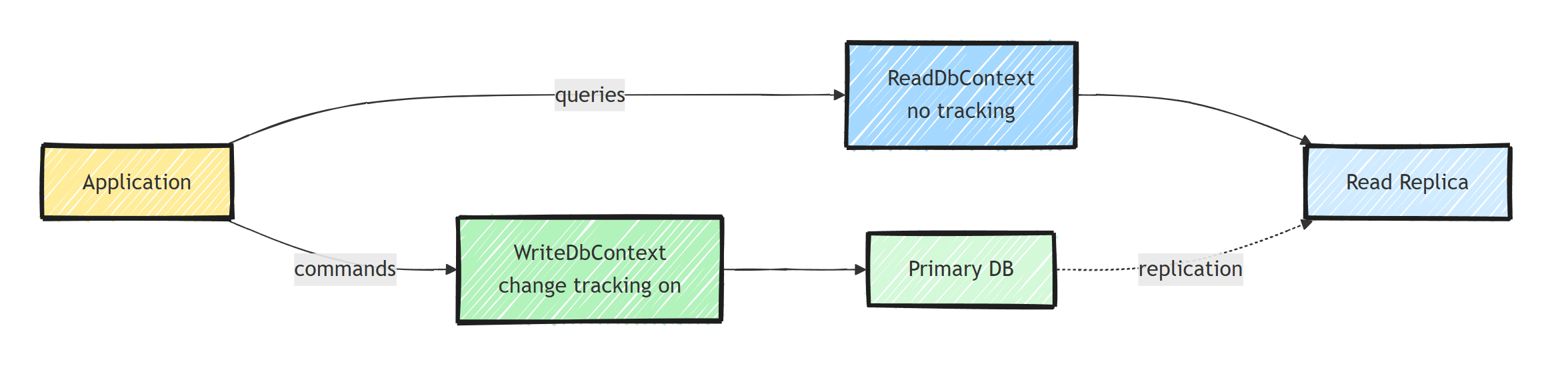
// Write context - full entity model with change tracking
public class WriteDbContext : DbContext
{
    public WriteDbContext(DbContextOptions<WriteDbContext> options) : base(options) { }

    public DbSet<Order> Orders { get; set; }
    public DbSet<Customer> Customers { get; set; }
}

// Read context - optimized for queries
public class ReadDbContext : DbContext
{
    public ReadDbContext(DbContextOptions<ReadDbContext> options) : base(options) { }

    // Read models, not domain entities
    public DbSet<OrderReadModel> Orders { get; set; }
}
Register them with different configurations:
builder.Services.AddDbContext<WriteDbContext>(options =>
    options.UseNpgsql(writeConnectionString));

builder.Services.AddDbContext<ReadDbContext>(options =>
    options.UseNpgsql(readConnectionString)
           .UseQueryTrackingBehavior(QueryTrackingBehavior.NoTracking));
This is particularly useful with read replicas. When the contexts point to separate stores rather than replicas, keep their models and migrations isolated as described in using multiple databases with EF Core.
Pooling
For high-throughput applications, use AddDbContextPool to reuse DbContext instances:
builder.Services.AddDbContextPool<AppDbContext>(options =>
    options.UseNpgsql(connectionString),
    poolSize: 128);
Pooling avoids the overhead of creating a new DbContext for every request. The default pool size is 1024.
Note: Pooled contexts come with constraints.
The context is reset and reused, so it needs a single public constructor accepting DbContextOptions.
Since EF Core 8 that constructor can take other services, but EF resolves them from the root service provider once, when the instance is created, so only stateless or singleton services are safe.
You also shouldn't store any private state on the context.
If your DbContext injects a tenant provider or current-user service, pooling isn't for you.
Pooling saves the allocation and setup cost of the context instance itself. It's measurable in benchmarks, but for most business applications the difference is negligible. Don't reach for it until profiling says so.
If you need to create contexts on demand (Blazor components, parallel operations, background jobs), use a context factory:
builder.Services.AddPooledDbContextFactory<AppDbContext>(options =>
    options.UseNpgsql(connectionString));
public class ReportGenerator(IDbContextFactory<AppDbContext> factory)
{
    public async Task GenerateAsync()
    {
        await using var dbContext = await factory.CreateDbContextAsync();
        // Each call gets its own context instance
    }
}
Unit of Work Pattern
DbContext already implements the Unit of Work pattern: SaveChangesAsync commits all tracked changes in a single transaction.
Expose it through an interface for Clean Architecture:
public interface IUnitOfWork
{
    Task<int> SaveChangesAsync(CancellationToken cancellationToken = default);
}

public class AppDbContext : DbContext, IUnitOfWork
{
    // SaveChangesAsync is already implemented by DbContext
}
Your Application layer depends on IUnitOfWork (abstraction), not on AppDbContext (implementation).
For more details, see Unit of Work Pattern With EF Core.
Common Mistakes
-
Injecting DbContext into singleton services: causes thread-safety issues. Use
IDbContextFactoryorIServiceScopeFactoryinstead. -
Not disposing DbContext: handled automatically by DI when registered as Scoped, but you must dispose contexts you create manually.
-
Loading too much data: always filter and project. Use
Selectto return only the columns you need. -
Ignoring the N+1 problem: use
Includefor related data or project withSelect. See N+1 Query Problem in EF Core. -
Not using transactions explicitly for multi-step operations:
SaveChangesAsyncis transactional, but if you call it multiple times, each call is a separate transaction. Wrap multi-save operations in an explicit transaction:
await using var transaction =
    await _dbContext.Database.BeginTransactionAsync();

_dbContext.Orders.Add(order);
await _dbContext.SaveChangesAsync();

_dbContext.Shipments.Add(shipment);
await _dbContext.SaveChangesAsync();

await transaction.CommitAsync();
With EnableRetryOnFailure from the resiliency section, this code throws an InvalidOperationException at the first SaveChangesAsync.
In that setup, run the whole block through _dbContext.Database.CreateExecutionStrategy().ExecuteAsync(...), as the connection resiliency article linked above shows.
- Sharing a DbContext across threads: the context is not thread-safe. Never run parallel queries on the same instance; create a context per parallel operation with
IDbContextFactory.
Summary
Treat a DbContext as one short-lived unit of work and never share it across concurrent operations.
Keep entity configuration external, match tracking to query intent, and use interceptors for persistence concerns that apply to every write.
Pooling and retry policies are workload-specific optimizations.
Frequently Asked Questions
What lifetime should DbContext have in ASP.NET Core?
Scoped, which is what AddDbContext registers by default. Each HTTP request gets its own DbContext instance. Never register it as a singleton, because DbContext is not thread-safe.
Should I use AddDbContext or AddDbContextPool?
AddDbContext is fine for most applications. AddDbContextPool reuses instances and can help when context setup is measurable, but a pooled context must not carry mutable request state. Constructor dependencies are resolved from the root service provider only when an instance is first created, so a scoped service either fails to resolve or is shared across requests. Use stateless or singleton dependencies and benchmark the workload.
Where should EF Core entity configuration live?
In separate IEntityTypeConfiguration classes, one per entity, applied with ApplyConfigurationsFromAssembly. This keeps OnModelCreating clean and each entity configuration in its own file.
How do I use DbContext in a background service?
Background services are singletons, so inject IServiceScopeFactory or IDbContextFactory, create a scope or context per unit of work, and dispose it when done.
Is DbContext a Unit of Work?
Yes. DbContext implements both the unit of work and repository patterns: SaveChanges commits all tracked changes in a single transaction. In Clean Architecture, you can expose it behind an IUnitOfWork interface.
