
A LINQ query that looks harmless can produce expensive SQL.
The most common EF Core query performance mistakes are N+1 loading, materializing entire tables, loading tracked entities for read-only work, missing pagination and indexes, and cartesian explosions from sibling Include calls.
Fixing those query-shape mistakes usually matters more than replacing the ORM.
Why Are My EF Core Queries Slow?
EF Core generates SQL from your LINQ queries. The SQL it generates is only as good as the LINQ you write.
These are the query-shape mistakes that most often turn straightforward LINQ into expensive database work.
Mistake 1: N+1 Queries
With lazy loading enabled, you load a list of orders, then access each order's customer in a loop:
// ✗ N+1 problem - 1 query for orders + N queries for customers
var orders = await dbContext.Orders.ToListAsync();

foreach (var order in orders)
{
    Console.WriteLine(order.Customer.Name); // Lazy load triggers a query
}
If you have 100 orders, this executes 101 queries. I dig into detection and every fix in detail in the N+1 query problem in EF Core.
Fix: Use eager loading or projections:
// ✓ Eager loading - 1 query with JOIN
var orders = await dbContext.Orders
    .Include(o => o.Customer)
    .ToListAsync();

// ✓ Even better - projection, only fetches needed columns
var orderSummaries = await dbContext.Orders
    .Select(o => new
    {
        o.Id,
        CustomerName = o.Customer.Name,
        o.TotalAmount
    })
    .ToListAsync();
Projections are usually the better fit for read models because they select only the columns the result needs.
Mistake 2: Loading Entire Tables
// ✗ Loads ALL orders into memory, then filters
var expensiveOrders = dbContext.Orders
    .ToList() // Everything loaded here
    .Where(o => o.TotalAmount > 1000);
The .ToList() before .Where() materializes the entire table. The filtering happens in C#, not SQL.
Fix: Filter before materializing:
// ✓ SQL WHERE clause - only matching rows returned
var expensiveOrders = await dbContext.Orders
    .Where(o => o.TotalAmount > 1000)
    .ToListAsync();
Rule of thumb: Call .ToListAsync() or .FirstOrDefaultAsync() as the last operation.
Mistake 3: Loading Entities for Read-Only Operations
// ✗ Loads full Order entity with change tracking
var order = await dbContext.Orders
    .Include(o => o.LineItems)
    .Include(o => o.Customer)
    .FirstOrDefaultAsync(o => o.Id == orderId);

return new OrderResponse(
    order.Id,
    order.Customer.Name,
    order.TotalAmount,
    order.Status.ToString());
You loaded a full entity graph with change tracking just to map it to a DTO.
Fix: Project directly into the DTO:
// ✓ No entity loading, no change tracking, minimal SQL
var response = await dbContext.Orders
    .Where(o => o.Id == orderId)
    .Select(o => new OrderResponse(
        o.Id,
        o.Customer.Name,
        o.TotalAmount,
        o.Status.ToString()))
    .FirstOrDefaultAsync();
Or use AsNoTracking() if you must load entities:
// ✓ At least skip change tracking
var order = await dbContext.Orders
    .AsNoTracking()
    .FirstOrDefaultAsync(o => o.Id == orderId);
Mistake 4: Missing Pagination
// ✗ Returns every order in the database
var orders = await dbContext.Orders.ToListAsync();
Fix: Always paginate collection queries:
// ✓ Fetches only one page
var orders = await dbContext.Orders
    .OrderBy(o => o.CreatedAt)
    .Skip((page - 1) * pageSize)
    .Take(pageSize)
    .Select(o => new OrderSummary(o.Id, o.Status, o.TotalAmount))
    .ToListAsync();
For large or frequently-scrolled datasets, cursor-based pagination outperforms offset pagination. See pagination in ASP.NET Core for the tradeoffs.
Mistake 5: Missing Indexes
EF Core creates indexes for primary keys and foreign keys. But your custom queries often need additional indexes.
If your WHERE clause filters on Status and CreatedAt, you need a composite index:
builder.HasIndex(o => new { o.Status, o.CreatedAt })
    .HasDatabaseName("IX_Orders_Status_CreatedAt");
Check your query plans. If you see a sequential scan on a table with millions of rows, you're missing an index.
Mistake 6: Using String Interpolation in Queries
// ✗ SQL injection risk AND prevents query plan caching
var orders = await dbContext.Orders
    .FromSqlRaw($"""SELECT * FROM "Orders" WHERE "Status" = '{status}'""")
    .ToListAsync();
Fix: Use parameterized queries:
// ✓ Parameterized - safe and cacheable
var orders = await dbContext.Orders
    .FromSqlInterpolated($"""SELECT * FROM "Orders" WHERE "Status" = {status}""")
    .ToListAsync();
FromSqlInterpolated automatically parameterizes the interpolated values. FromSqlRaw with string interpolation is a SQL injection vulnerability.
In EF Core 7+, FromSql does the same thing as FromSqlInterpolated with a shorter name.
Mistake 7: Cartesian Explosion
Loading multiple collections with Include creates a cartesian product:
// ✗ Cartesian explosion - rows multiply
var order = await dbContext.Orders
    .Include(o => o.LineItems)    // 10 items
    .Include(o => o.Payments)     // 3 payments
    .FirstOrDefaultAsync(o => o.Id == orderId);
// Returns 30 rows (10 x 3) instead of ~13
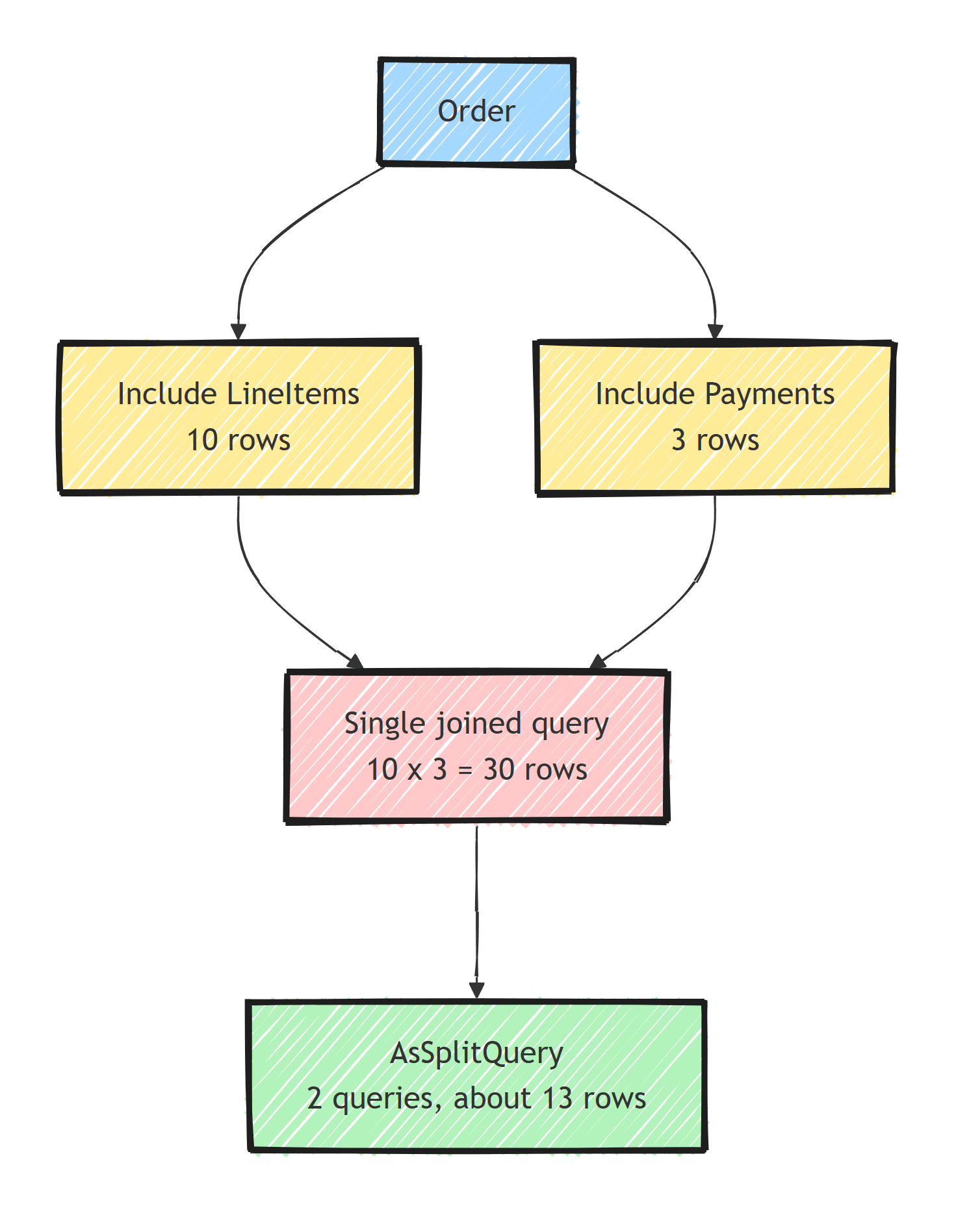
Fix: Use split queries or separate loads:
// ✓ Split query - separate SQL per Include
var order = await dbContext.Orders
    .Include(o => o.LineItems)
    .Include(o => o.Payments)
    .AsSplitQuery()
    .FirstOrDefaultAsync(o => o.Id == orderId);
EF Core 5+ also has a global setting:
optionsBuilder.UseNpgsql(connectionString, o =>
    o.UseQuerySplittingBehavior(QuerySplittingBehavior.SplitQuery));
Split queries aren't free: they trade one round trip for several, and the queries can observe different data unless wrapped in a serializable or snapshot transaction. The round-trip and duplication tradeoffs are covered in EF Core query splitting.
Mistake 8: Not Using Compiled Queries for Hot Paths
For queries that execute thousands of times per second:
private static readonly Func<AppDbContext, Guid, Task<Order?>> GetOrderByIdQuery =
    EF.CompileAsyncQuery(
        (AppDbContext db, Guid id) =>
            db.Orders.FirstOrDefault(o => o.Id == id));

// Usage
var order = await GetOrderByIdQuery(dbContext, orderId);
EF Core caches query translations either way, but compiled queries also skip the per-call work of matching the expression tree against that cache. That can matter on hot endpoints with cheap database work, but it should be measured as described in EF Core compiled queries.
Mistake 9: Querying Inside Loops
// ✗ One query per customer
foreach (var customerId in customerIds)
{
    var orders = await dbContext.Orders
        .Where(o => o.CustomerId == customerId)
        .ToListAsync();

    // Process orders
}
Fix: Batch the query:
// ✓ Single query for all customers, grouped in memory
var orders = await dbContext.Orders
    .Where(o => customerIds.Contains(o.CustomerId))
    .ToListAsync();

var ordersByCustomer = orders.ToLookup(o => o.CustomerId);
One round trip instead of N, and the in-memory ToLookup gives you the same per-customer grouping.
Quick Reference
- N+1 queries: use
Include()or, better, aSelect()projection - Loading full tables: filter with
Where()beforeToList() - Change tracking overhead: use
AsNoTracking()or projections - No pagination: add
Skip()+Take(), or cursor pagination - Missing indexes: add indexes for your WHERE/ORDER BY columns
- SQL injection: use
FromSqlInterpolated, never interpolate intoFromSqlRaw - Cartesian explosion: use
AsSplitQuery() - Hot path overhead: use
EF.CompileAsyncQuery() - Queries in loops: batch with
Contains()
Summary
Project only the columns the read model needs, support selective predicates with indexes, and paginate every potentially large collection. Watch the generated SQL and query count to catch N+1 loading and cartesian products. Optimize from a measured database plan before replacing EF Core or adding a lower-level data-access path.
Frequently Asked Questions
What is the N+1 query problem in EF Core?
It happens when you load a list of entities with one query and then access a navigation property on each item with lazy loading enabled, triggering one additional query per entity. Fix it with Include, or better, a Select projection that fetches everything in one query.
Are projections faster than Include in EF Core?
Usually yes. A Select projection fetches only the columns you need and skips change tracking entirely, while Include loads full entity graphs. Use projections for read-only queries and Include only when you need tracked entities to modify.
What is a cartesian explosion in EF Core?
When a single query Includes two or more sibling collections, the SQL join multiplies rows: 10 line items and 3 payments become 30 rows. AsSplitQuery avoids this by issuing one query per collection.
When should I use compiled queries in EF Core?
For hot paths that execute the same query shape thousands of times per second. EF Core already caches query translations, and EF.CompileAsyncQuery also skips the per-call work of matching the LINQ expression tree against that cache. For typical endpoints the gain is not worth the ceremony.
Is FromSqlRaw with string interpolation dangerous?
Yes, it concatenates user input straight into SQL, creating an injection vulnerability. Use FromSqlInterpolated (or FromSql in EF 7+), which converts interpolated values into SQL parameters.
