
Every .NET team eventually has this argument: EF Core or Dapper? Half the room wants change tracking, migrations, and LINQ. The other half wants to see exactly what SQL hits the database.
Both halves are right, just about different parts of the codebase. Here is how I decide which tool gets which job.
Two Philosophies
EF Core is a full-featured ORM. It manages your database schema, tracks entity changes, translates LINQ to SQL, and handles relationships. You work with C# objects and EF Core handles the SQL.
Dapper is a micro-ORM. You write SQL yourself, and Dapper maps the results to C# objects. It has no change tracking, migrations, or LINQ translation.
EF Core Strengths
LINQ and Type Safety
// EF Core - compile-time checked, refactoring-safe
var orders = await dbContext.Orders
    .Where(o => o.Status == OrderStatus.Active)
    .Include(o => o.Customer)
    .OrderByDescending(o => o.CreatedAt)
    .Take(10)
    .Select(o => new OrderSummary(o.Id, o.Customer.Name, o.TotalAmount))
    .ToListAsync();
If you rename TotalAmount to Amount, the compiler catches broken LINQ queries.
SQL strings require integration tests or execution to catch the mismatch.
Change Tracking
var order = await dbContext.Orders.FindAsync(orderId);
order.UpdateStatus(OrderStatus.Shipped); // Just modify the entity
await dbContext.SaveChangesAsync(); // EF Core generates the UPDATE
EF Core knows which properties changed and generates an UPDATE statement for only the modified columns.
Migrations
dotnet ef migrations add AddShippingAddress
dotnet ef database update
Schema changes are version-controlled and reproducible. With Dapper, you manage migrations separately.
Rich Domain Model Support
EF Core maps complex entity hierarchies, value objects, owned types, and inheritance strategies. Mapping a DDD aggregate to the database is straightforward with EF Core's configuration API.
Dapper Strengths
Performance
Dapper has less ORM overhead for straightforward reads because it skips change tracking and LINQ translation and uses a lean materialization pipeline. Whether that changes end-to-end latency depends on the query and database work.
Two caveats about that claim:
- The gap shrinks when you use EF Core well:
AsNoTracking(), projections, and compiled queries remove most of the overhead - The difference is measured in microseconds to low milliseconds per query, so it only matters at high request rates or large row counts
You won't find benchmark numbers here, and you shouldn't take anyone else's on faith either. Benchmark your own queries against your own schema; the results depend heavily on row size, column count, and mapping complexity.
Full SQL Control
var orders = await connection.QueryAsync<OrderSummary>(
    """
    SELECT o.id, c.name AS customer_name, o.total_amount
    FROM orders o
    INNER JOIN customers c ON o.customer_id = c.id
    WHERE o.status = @Status
      AND o.created_at > @CutoffDate
    ORDER BY o.created_at DESC
    LIMIT 10
    """,
    new { Status = "Active", CutoffDate = DateTime.UtcNow.AddDays(-30) });
You control the exact SQL. Useful for complex queries with CTEs, window functions, or database-specific features. For mapping joined results into object graphs, see mastering Dapper relationship mappings.
Transparent Data Access
Dapper runs exactly the SQL you write, so there are no hidden N+1 queries or unexpected JOINs.
When to Use EF Core
For write operations. Change tracking, unit of work, and transaction management make writes straightforward. You modify entities, call SaveChanges, and EF Core handles the rest.
For domain-rich applications. If you're doing DDD with aggregates, domain events, and complex entity hierarchies, you'll rely on EF Core's mapping capabilities.
For most of your application. EF Core is the default choice for .NET applications. Start here unless you have a specific reason not to.
For teams that prefer LINQ. LINQ queries are compiler-checked and refactoring-safe, and there are no raw SQL strings to maintain.
When to Use Dapper
For measured read hot paths. If profiling shows material EF Core translation or materialization overhead, Dapper gives you a lower-level path for that query.
For complex SQL. CTEs, recursive queries, window functions, full-text search, and database-specific features are easier to express in SQL than LINQ.
For reporting queries. Complex aggregations across many tables are often clearer as SQL.
For legacy database access. When you can't map a clean domain model to an existing schema, Dapper lets you query whatever you need without fighting the ORM.
Using Both Together (CQRS)
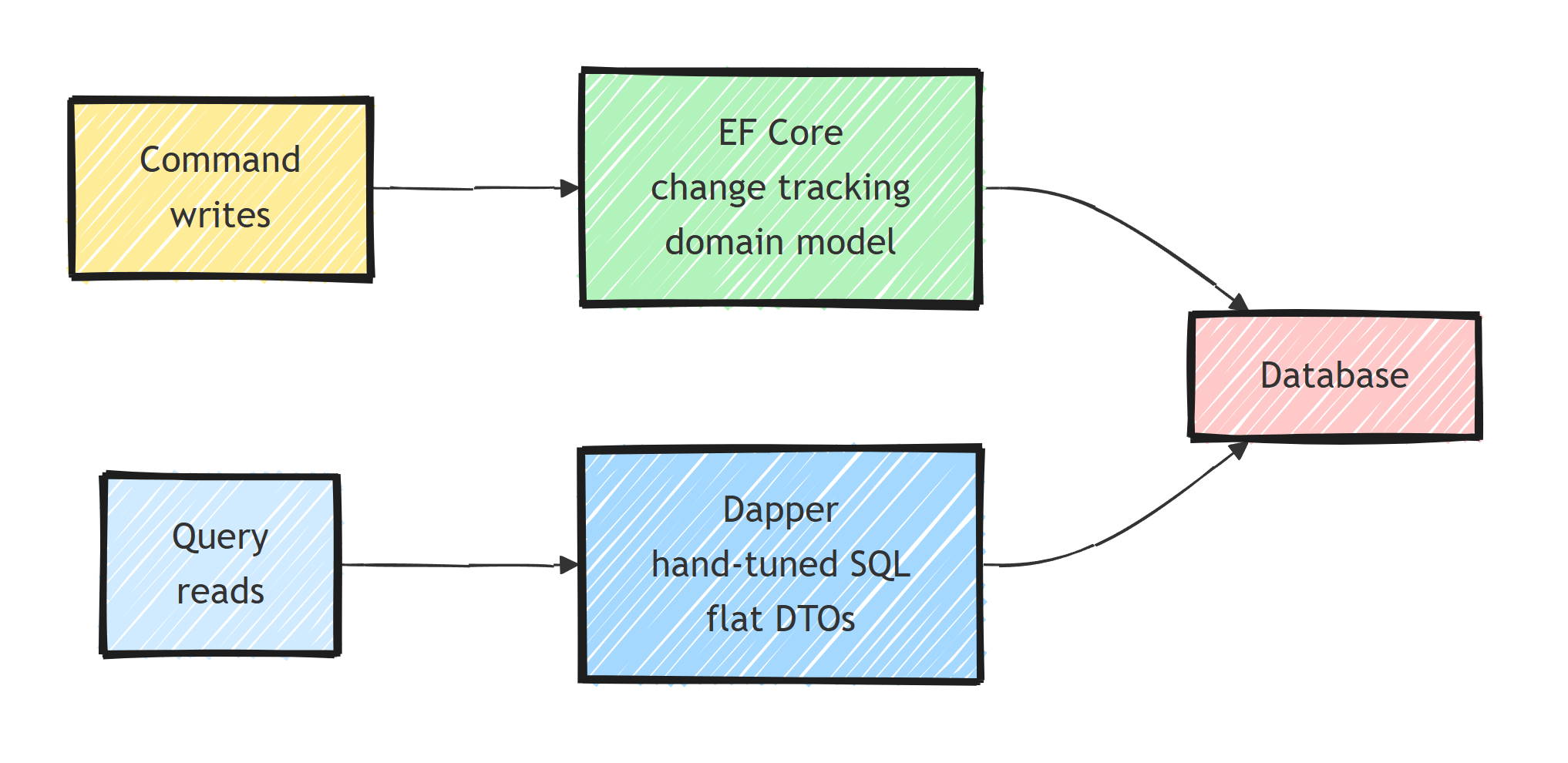
Use both. CQRS makes the split natural:
- Commands (writes): Use EF Core for change tracking, unit of work, and the domain model
- Queries (reads): Use Dapper for raw performance, custom SQL, and flat DTOs
// Command handler - EF Core for writes
public class PlaceOrderCommandHandler
{
    private readonly AppDbContext _dbContext;

    public async Task<Result<Guid>> Handle(PlaceOrderCommand command, ...)
    {
        var order = Order.Create(command.CustomerId, command.Items);
        _dbContext.Orders.Add(order);
        await _dbContext.SaveChangesAsync(cancellationToken);
        return order.Id;
    }
}

// Query handler - Dapper for reads
public class GetOrderByIdQueryHandler
{
    private readonly IDbConnection _connection;

    public async Task<Result<OrderResponse>> Handle(GetOrderByIdQuery query, ...)
    {
        var order = await _connection.QueryFirstOrDefaultAsync<OrderResponse>(
            """
            SELECT o.id, c.name AS customer_name, o.total_amount, o.status
            FROM orders o
            JOIN customers c ON o.customer_id = c.id
            WHERE o.id = @OrderId
            """,
            new { query.OrderId });

        return order is not null
            ? Result.Success(order)
            : Result.Failure<OrderResponse>(OrderErrors.NotFound);
    }
}
Side-by-Side Comparison
How the two stack up, point by point:
- Type: EF Core is a full ORM; Dapper is a micro-ORM
- Query language: LINQ vs. raw SQL
- Change tracking: built into EF Core; Dapper has none
- Migrations: EF Core has them built in; with Dapper you bring your own tool
- Read performance: EF Core is good; Dapper is excellent
- Write ergonomics: EF Core handles updates for you; Dapper writes are fully manual
- Learning curve: EF Core is bigger to learn; Dapper is a handful of extension methods
- Complex SQL: limited in LINQ; unrestricted in Dapper
- DDD support: excellent in EF Core; limited in Dapper
- Unit of Work: built into EF Core; manual transaction management with Dapper
Use Each Tool Where It Fits
EF Core is a strong default for aggregate writes, change tracking, migrations, and composable LINQ queries. Dapper is useful when explicit SQL makes a complex read clearer or measured materialization overhead matters. Both can share a connection and transaction, so the choice can be made per use case instead of per application.
Frequently Asked Questions
Is Dapper faster than EF Core?
For reads, yes, because Dapper skips change tracking and LINQ translation. The gap has narrowed with modern EF Core, especially when you use AsNoTracking and projections. For typical applications the difference rarely matters; for hot read paths it can.
Can I use EF Core and Dapper in the same project?
Yes, and it is a common CQRS setup: EF Core for commands where change tracking and the domain model help, Dapper for queries where you want hand-tuned SQL. They can even share the same database connection.
Does Dapper support migrations?
No. Dapper only executes SQL and maps results. You need a separate tool for schema management, such as EF Core migrations, FluentMigrator, or plain SQL scripts.
When should I choose Dapper over EF Core?
When you need full control over SQL (CTEs, window functions, database-specific features), when profiling shows EF Core is the bottleneck on a read-heavy path, or when working against a legacy schema that fights ORM mapping.
Is EF Core good enough for high-performance applications?
Usually yes. With projections, AsNoTracking, compiled queries, and pooling, EF Core performs well under heavy load. Most performance problems come from the queries developers write, not from EF Core itself.


