
EF Core gives you three ways to load related data, and they differ in when the query runs.
Eager loading fetches related data upfront in the same query with Include.
Explicit loading waits until the parent entity is in memory, then issues one query per LoadAsync call.
Lazy loading fires a query the first time you touch a navigation property, which is where the N+1 problem comes from.
Eager loading is the best default for most scenarios. Use explicit loading for conditional paths, and avoid lazy loading in production.
The Related Data Problem
When you query an Order, you decide whether EF Core also loads its OrderLineItems and Customer.
Loading everything upfront is wasteful, and loading nothing means extra round trips later.
EF Core provides three strategies: eager loading, explicit loading, and lazy loading. The one you pick decides how many queries reach the database, which makes it a performance decision.
Eager Loading With Include
Eager loading fetches related data in the same query using Include and ThenInclude:
var order = await context.Orders
    .Include(o => o.LineItems)
    .Include(o => o.Customer)
    .FirstOrDefaultAsync(o => o.Id == orderId);
EF Core generates a single query with JOINs:
SELECT s.*, li.*
FROM (
    SELECT o."Id", o."CustomerId", o."Status", c."Id" AS "Id0", c."Name"
    FROM "Orders" AS o
    INNER JOIN "Customers" AS c ON o."CustomerId" = c."Id"
    WHERE o."Id" = @orderId
    LIMIT 1
) AS s
LEFT JOIN "OrderLineItems" AS li ON s."Id" = li."OrderId"
ORDER BY s."Id", s."Id0";
For nested relationships, use ThenInclude:
var order = await context.Orders
    .Include(o => o.LineItems)
        .ThenInclude(li => li.Product)
    .FirstOrDefaultAsync(o => o.Id == orderId);
Filtered Includes
Since EF Core 5, you can filter what gets included:
var order = await context.Orders
    .Include(o => o.LineItems
        .Where(li => li.Quantity > 0)
        .OrderBy(li => li.Price))
    .FirstOrDefaultAsync(o => o.Id == orderId);
This is useful when you need only a subset of the related entities.
When to Use Eager Loading
Eager loading is the best default for most scenarios. You know exactly which relationships you need upfront, and EF Core fetches them in a single round trip. The downside is that large Include chains can produce massive SQL queries with many JOINs.
When you include multiple sibling collections, the joined result set multiplies (a cartesian explosion).
Use AsSplitQuery() in those cases, and measure the round-trip versus duplication tradeoff described in EF Core query splitting.
Explicit Loading
Explicit loading lets you load related data on demand after the parent entity is already in memory:
var order = await context.Orders
    .FirstOrDefaultAsync(o => o.Id == orderId);

// Load line items explicitly
await context.Entry(order)
    .Collection(o => o.LineItems)
    .LoadAsync();

// Load a single reference
await context.Entry(order)
    .Reference(o => o.Customer)
    .LoadAsync();
Each LoadAsync call issues a separate SELECT query. This gives you fine-grained control over when data is fetched.
Querying Before Loading
You can also apply filters or projections before loading:
var expensiveItems = await context.Entry(order)
    .Collection(o => o.LineItems)
    .Query()
    .Where(li => li.Price > 100)
    .ToListAsync();
The Query() method returns an IQueryable that you can chain with any LINQ operator. This avoids loading the entire collection when you only need a subset.
When to Use Explicit Loading
Explicit loading works well when:
- You conditionally need related data based on runtime logic
- You want to avoid massive
JOINqueries - You've loaded an entity from the change tracker and need its relationships later
Lazy Loading
Lazy loading automatically fetches related data the first time you access a navigation property. EF Core intercepts the property access and issues a query behind the scenes.
Setting Up Lazy Loading
Install the Microsoft.EntityFrameworkCore.Proxies package and enable it:
builder.Services.AddDbContext<AppDbContext>(options =>
    options.UseNpgsql(connectionString)
           .UseLazyLoadingProxies());
Mark navigation properties as virtual so EF Core can create proxy classes:
public class Order
{
    public Guid Id { get; set; }
    public OrderStatus Status { get; set; }

    public Guid CustomerId { get; set; }
    public virtual Customer Customer { get; set; }

    public virtual ICollection<OrderLineItem> LineItems { get; set; }
}
Now accessing order.LineItems triggers a query automatically:
var order = await context.Orders
    .FirstOrDefaultAsync(o => o.Id == orderId);

// This triggers a SELECT query for line items
foreach (var item in order.LineItems)
{
    // This triggers ANOTHER query for each product
    Console.WriteLine(item.Product.Name);
}
The N+1 Problem
That last example has a serious performance problem. If the order has 50 line items, accessing item.Product in the loop fires 50 separate queries, one for each product. Combined with the initial order query and the line items query, that's 52 queries total.
This is the N+1 problem, and it's the biggest risk of lazy loading. The code looks correct, but every loop iteration sends another query to the database.
Lazy Loading Without Proxies
If you want lazy loading for a specific entity without proxying your whole model, EF Core supports injecting ILazyLoader:
public class Order
{
    private readonly ILazyLoader _lazyLoader;
    private List<OrderLineItem> _lineItems;

    public Order()
    {
    }

    private Order(ILazyLoader lazyLoader)
    {
        _lazyLoader = lazyLoader;
    }

    public List<OrderLineItem> LineItems
    {
        get => _lazyLoader.Load(this, ref _lineItems);
        set => _lineItems = value;
    }
}
EF Core injects ILazyLoader through the private constructor when it materializes the entity.
The Load extension method (from Microsoft.EntityFrameworkCore.Infrastructure) queries the collection on first access and is a no-op when the loader is null, so new Order() still works in tests.
It is more explicit than proxies, but it couples entities to an EF Core interface and rarely justifies that tradeoff.
Detecting N+1 Queries
You can log SQL queries to catch this in development:
builder.Services.AddDbContext<AppDbContext>(options =>
    options.UseNpgsql(connectionString)
           .LogTo(Console.WriteLine, LogLevel.Information)
           .EnableSensitiveDataLogging());
If you see a pattern of many similar SELECT statements inside a loop, you've found an N+1 problem.
Comparing the Three Strategies
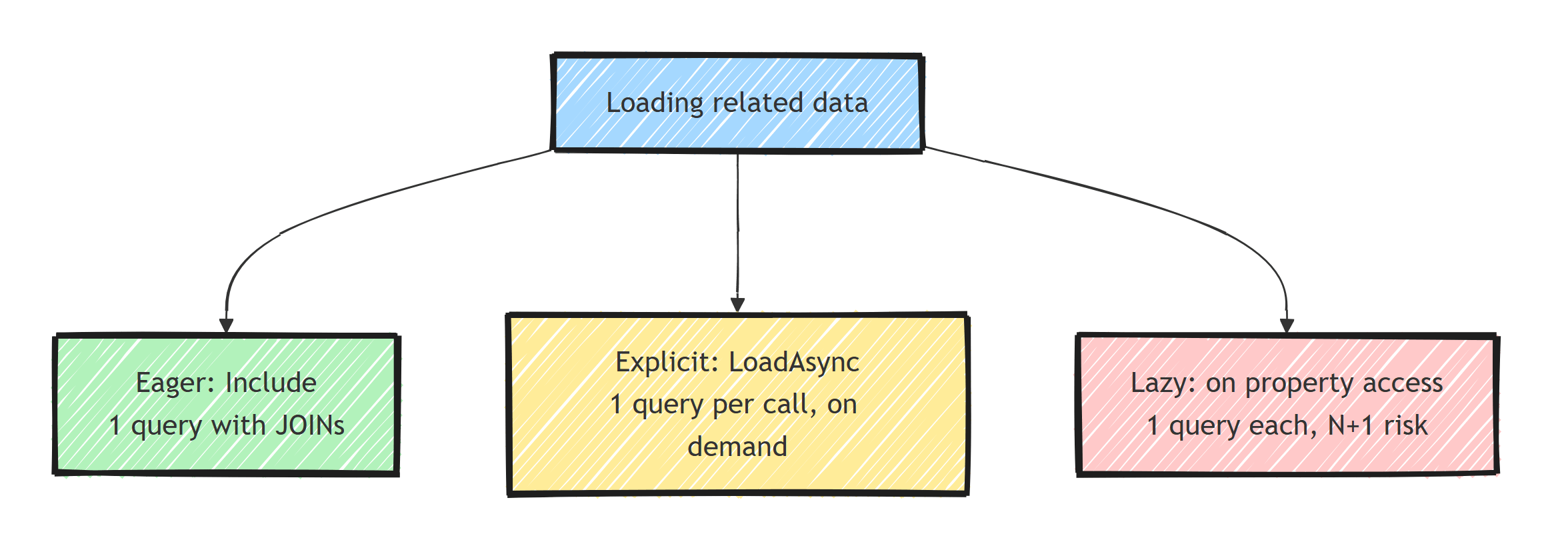
- Eager loading: one query with JOINs (or split queries), you decide upfront what to load, no N+1 risk. Best for relationships you always need.
- Explicit loading: one query per
LoadAsynccall, full on-demand control, low N+1 risk. Best for conditional loading. - Lazy loading: one query per navigation property access, fully automatic, high N+1 risk. Acceptable for prototyping, dangerous in production.
My Recommendations
A practical default is:
Use eager loading as the default. When you write a query, you almost always know what related data you need. Use Include to fetch it upfront.
Use explicit loading for conditional paths. If you only need line items when the order status is Confirmed, use explicit loading to avoid unnecessary data.
Avoid lazy loading in production. Lazy loading hides database queries behind property access. It makes performance problems invisible until they hit production. If you must use it, limit it to prototypes.
// ✅ Eager - clear intent, single round trip
var order = await context.Orders
    .Include(o => o.LineItems)
        .ThenInclude(li => li.Product)
    .Include(o => o.Customer)
    .FirstOrDefaultAsync(o => o.Id == orderId);

// ✅ Explicit - conditional loading
var order = await context.Orders
    .FirstOrDefaultAsync(o => o.Id == orderId);

if (order.Status == OrderStatus.Confirmed)
{
    await context.Entry(order)
        .Collection(o => o.LineItems)
        .LoadAsync();
}

// ❌ Lazy - hidden queries, N+1 risk
foreach (var item in order.LineItems) // hidden query
{
    Console.WriteLine(item.Product.Name); // hidden query per item
}
Summary
Use a projection or eager loading when you already know which related data the query needs. Use explicit loading when the decision depends on state discovered after the entity is loaded. Lazy loading hides network calls behind property access, so enable it only with query-count visibility and a deliberate reason.
Frequently Asked Questions
What is the difference between lazy loading and eager loading in EF Core?
Eager loading fetches related data upfront in the same query using Include. Lazy loading defers the query until the navigation property is first accessed, issuing a separate query at that moment.
Why is lazy loading considered bad practice in EF Core?
It hides database queries behind property access, which makes N+1 query problems easy to introduce and hard to spot. A loop touching a navigation property can fire hundreds of queries.
When should I use explicit loading in EF Core?
When you only need related data conditionally, based on runtime logic. You load the parent first, then call LoadAsync on specific collections or references only when needed.
How do I enable lazy loading in EF Core?
Install Microsoft.EntityFrameworkCore.Proxies, call UseLazyLoadingProxies in your DbContext options, and make navigation properties virtual. Alternatively, inject ILazyLoader into entities for proxy-free lazy loading.
Do filtered includes reduce the amount of data loaded?
Yes. Since EF Core 5, you can apply Where, OrderBy, Skip, and Take inside Include, so only the matching related entities are fetched instead of the entire collection.
