
PendingModelChangesWarning means the model your code builds no longer matches the model snapshot recorded by your last migration, and EF Core 9 raises it as an error when migrations run.
If you really did change the model, the fix is the migration you forgot.
If the error survives an empty migration, the cause is usually dynamic values in HasData seed data, which produce a different model on every build.
You upgrade a project to EF Core 9, run it, and MigrateAsync throws:
"The model for context 'AppDbContext' has pending changes. Add a new migration before updating the database."
You run dotnet ef migrations add Whatever, and the generated migration is empty, or contains nothing but updated seed rows.
You apply it, and next week the error is back.
Welcome to one of the most-reported EF Core 9 upgrade issues. The check itself is a good idea: it catches real missing migrations before they become production schema drift. But its most common trigger is not a forgotten migration. It is seed data that changes every time the model is built.
What Does EF Core 9 Actually Check?
Every migration you add updates the model snapshot (AppDbContextModelSnapshot.cs), a C# record of the model as of that migration.
When migrations run, EF Core 9 compares the model your code builds right now against that snapshot.
Any difference means the last migration does not describe your current model.
Before EF 9 this drift went unreported, and Migrate() brought the database up to the last migration even though your model no longer matched it.
EF 9 promotes the mismatch from silent to fatal (when applying migrations at runtime) via PendingModelChangesWarning.
So the error usually comes from one of two families of causes:
- Real pending changes. You edited an entity or configuration and forgot to add a migration.
- A model that never stabilizes. Something in model building produces a different model on every run, so no migration can ever catch up.
First, Diagnose Honestly
Add a migration and read it:
dotnet ef migrations add Probe
- The migration has real operations (columns, indexes, tables): you had genuine drift. Rename it properly or keep it, apply it, done.
- The migration is empty or touches only
UpdateDataon seed rows with new timestamps or GUIDs: you have the dynamic-seed problem. Remove the probe (dotnet ef migrations remove) and read on.
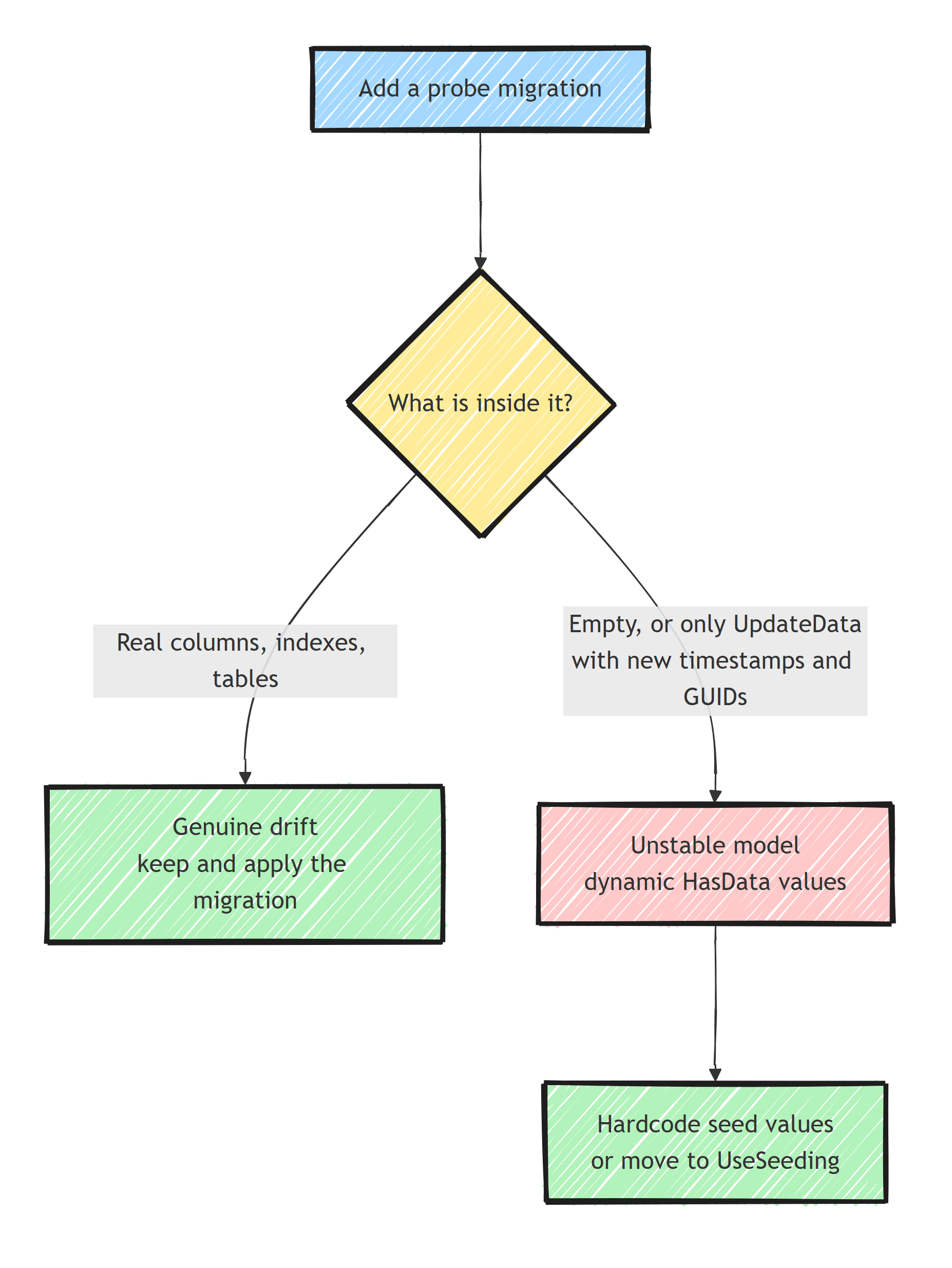
The UpdateData calls are the tell.
Look at what changed in them: a CreatedAt becoming a slightly later CreatedAt, or a key GUID becoming a different GUID.
That value is computed at model build time.
The Sneaky Trigger: Dynamic Values in HasData
HasData seed data is part of the model.
This compiles and works in EF 8, and it triggers the error in EF 9:
modelBuilder.Entity<Role>().HasData(
    new Role
    {
        Id = Guid.NewGuid(),                // new value every model build
        Name = "Admin",
        CreatedAtUtc = DateTime.UtcNow      // new value every model build
    });
Every time EF Core builds the model, Guid.NewGuid() and DateTime.UtcNow produce fresh values.
The snapshot recorded yesterday's values.
The comparison can never succeed, so the pending-changes error is permanent, and every migration you add "fixes" it only until the next model build.
The same bug shows up in less obvious forms:
Environment.MachineName,Random, or config-dependent values in seed rows.- Value converters or default values computed with non-deterministic expressions.
- Seed entities whose constructor sets
CreatedAt = DateTime.UtcNowinternally, so the literal inHasDatalooks innocent.
Fix 1: Make Seed Values Constant
HasData was always designed for static, hardcoded data with explicit keys.
Give it exactly that:
modelBuilder.Entity<Role>().HasData(
    new Role
    {
        Id = Guid.Parse("8f3a2c1e-5b74-4d20-9c6f-1a2b3c4d5e6f"),
        Name = "Admin",
        CreatedAtUtc = new DateTime(2026, 1, 1, 0, 0, 0, DateTimeKind.Utc)
    });
With constant values, every model build produces the same model, and it matches the snapshot.
If typing GUIDs offends you, generate them once and paste them; the point is that they never change again.
This constraint is also why HasData should stay small: reference data like roles, statuses, and countries, not test fixtures.
Fix 2: Move Seeding Out of the Model (EF 9's UseSeeding)
EF Core 9 added the better tool for anything dynamic: seeding callbacks that run as part of EnsureCreated/Migrate flows but are not part of the model, so nothing about them affects the snapshot:
builder.Services.AddDbContext<AppDbContext>(options =>
    options
        .UseNpgsql(connectionString)
        .UseAsyncSeeding(async (context, _, ct) =>
        {
            var adminExists = await context.Set<Role>()
                .AnyAsync(r => r.Name == "Admin", ct);

            if (!adminExists)
            {
                context.Set<Role>().Add(new Role
                {
                    Id = Guid.NewGuid(),          // fine here
                    Name = "Admin",
                    CreatedAtUtc = DateTime.UtcNow // also fine
                });

                await context.SaveChangesAsync(ct);
            }
        })
        .UseSeeding((context, _) =>
        {
            // synchronous twin, used by EnsureCreated and design-time tooling
        }));
Because the callback is ordinary code against the context, dynamic values, lookups, and conditional logic are all legal. The tradeoff is that it runs where migrations run; if you apply migrations from a pipeline instead of the app (which you should, see migration bundles), run your seeder as an explicit step in that pipeline or at app startup as idempotent code.
I compared all the seeding options, HasData, seeding callbacks, and hand-rolled startup seeders, in seeding data in EF Core.
Fix 3 (Last Resort): Suppress the Warning
If you are mid-upgrade and need the app running today:
options.ConfigureWarnings(w =>
    w.Ignore(RelationalEventId.PendingModelChangesWarning));
This turns the drift detector back off, EF 8 style. The missing-migration bug it exists to catch (someone edits an entity and ships without a migration) goes unreported again. Suppress it as a bridge, fix the seed data, then remove the suppression.
A better long-term guard is failing CI when the model drifts.
One option is running dotnet ef migrations has-pending-model-changes in the pipeline:
dotnet ef migrations has-pending-model-changes
The command exits non-zero when pending changes exist, so it fails the pipeline step on its own.
Or assert the same in a test through context.Database.HasPendingModelChanges().
That turns the whole class of problem into a red pull request, where a schema mistake is cheapest to fix.
See EF Core migrations best practices for the rest of the migration workflow.
Other Legitimate Causes Worth Ruling Out
If your seeds are static and the error persists, check for:
- Provider or version switches. Building the model with a different provider (SQL Server locally, PostgreSQL in CI) produces provider-specific model differences against a snapshot generated with the other one. One provider per snapshot lineage.
- Conditional model building.
ifstatements inOnModelCreatingkeyed on environment or config make the model non-deterministic across machines. Push that variability out of the model. - Manually edited snapshots. A merge conflict resolved by hand-editing
ModelSnapshot.cscan leave it describing a model no code produces. Regenerate by removing and re-adding the latest migration in a clean state, per how to roll back an EF Core migration.
Summary
PendingModelChangesWarning is EF Core 9 refusing to migrate a database from a model that has drifted past its last migration.
When the drift is real, the fix is the migration you forgot.
When the error keeps coming back and every probe migration only rewrites seed timestamps and GUIDs, the model itself is unstable, and dynamic values in HasData are the usual culprit.
Hardcode seed values, or better, move dynamic seeding into EF 9's UseSeeding/UseAsyncSeeding callbacks where it belongs.
Save the warning suppression for upgrade bridges, and let CI catch pending model changes.
Frequently Asked Questions
What does PendingModelChangesWarning mean in EF Core 9?
It means the current model built from your code differs from the model snapshot recorded by your last migration. EF Core 9 raises it as an error during Migrate to stop you from running an app whose model has drifted from the migrated schema.
Why does HasData with DateTime.UtcNow or Guid.NewGuid cause this error?
Seed data defined with HasData is part of the model. If a seed value is computed at model build time, like DateTime.UtcNow, it changes on every run, so the model never matches the snapshot and EF Core permanently reports pending changes.
How do I fix pending model changes?
If you changed the model, add a migration. If the culprit is dynamic seed values, replace them with hardcoded constants or move seeding to the UseSeeding and UseAsyncSeeding callbacks introduced in EF Core 9, which run outside the model.
Can I suppress PendingModelChangesWarning?
Yes, with ConfigureWarnings in your DbContext options, but treat it as a last resort. The warning exists to catch schema drift; suppressing it globally hides real missing migrations.
Does this error happen if I do not use migrations?
It is raised when applying migrations. If you create the schema with EnsureCreated or manage it outside EF Core migrations entirely, you will not hit this specific error, though model drift remains your responsibility.


