
The change tracker keeps a snapshot of every entity the DbContext loads or adds, compares the current values against that snapshot when you call SaveChanges, and generates the INSERT, UPDATE, or DELETE statements, with each UPDATE setting only the changed columns.
It also maintains entity state, identity resolution, and relationship fixup for every tracked object.
SaveChanges looks simple because the change tracker is doing the difficult work behind it.
Knowing how it works makes tracking bugs and unnecessary memory use easier to diagnose.
How Does the Change Tracker Work?
When you query data through a DbContext, EF Core returns the objects and tracks them.
Every entity loaded from the database goes into the change tracker with its original property values stored as a snapshot.
When you call SaveChangesAsync, EF Core compares the current values to the original snapshot. If anything changed, it generates an UPDATE statement with only the modified columns.
Entity States
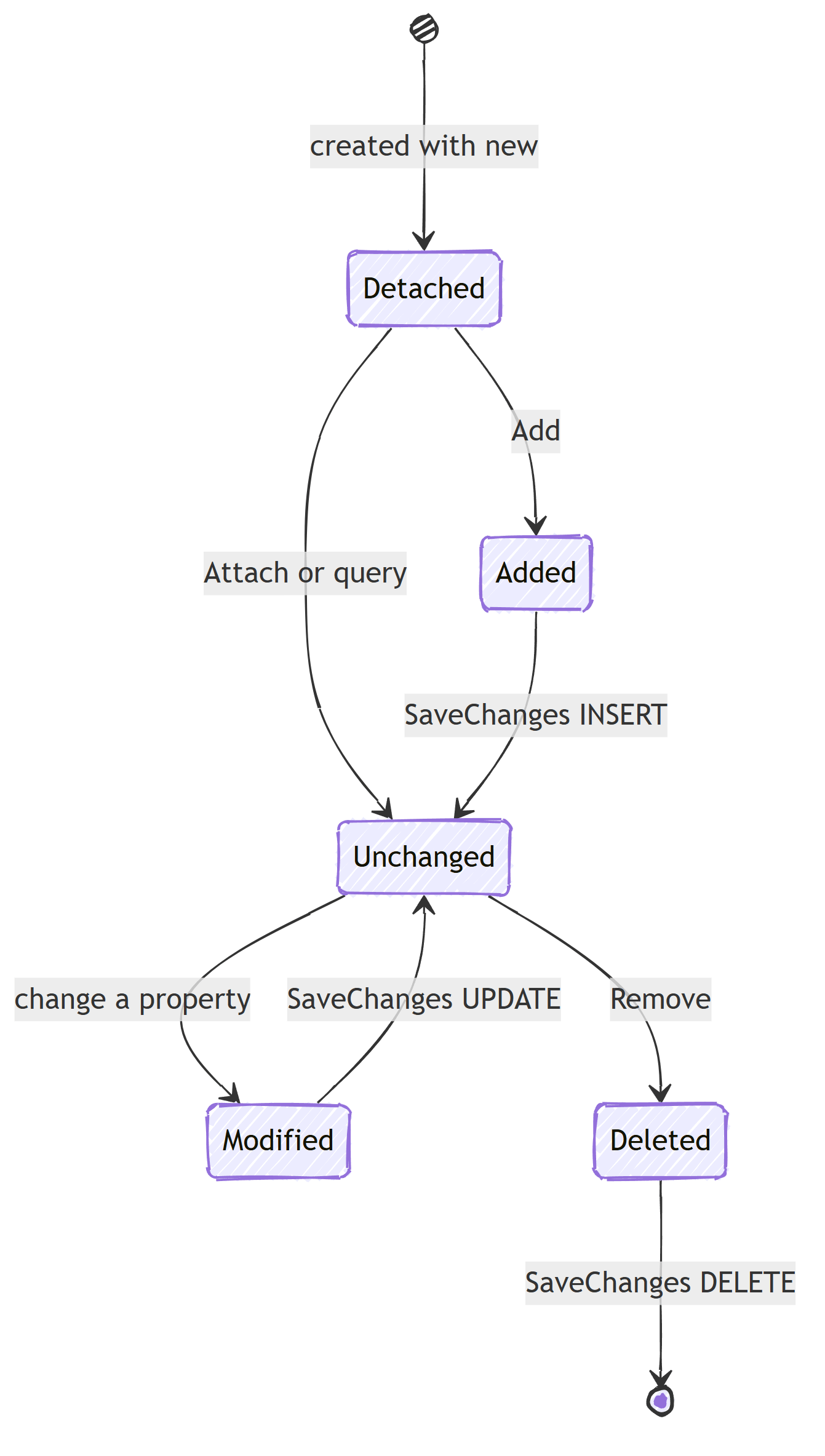
Every entity is in one of five states:
var entry = context.Entry(order);
Console.WriteLine(entry.State);
Detached: not tracked by the context;SaveChangesdoes nothingUnchanged: loaded but not modified;SaveChangesdoes nothingAdded: new entity, not yet in the database; produces anINSERTModified: loaded and changed; produces anUPDATEDeleted: marked for deletion; produces aDELETE
Tracking in Action
// 1. Entity is loaded → state: Unchanged
var order = await context.Orders.FirstAsync(o => o.Id == orderId);

// 2. Modify a property → state: Modified
order.Status = OrderStatus.Confirmed;

// 3. SaveChanges → generates UPDATE for Status column only
await context.SaveChangesAsync();
EF Core knows exactly which columns changed. If you loaded an Order with 15 columns but changed only Status, the generated SQL is:
UPDATE "Orders" SET "Status" = @p0 WHERE "Id" = @p1;
Adding Entities
// Option 1: DbSet.Add
context.Orders.Add(new Order { Id = Guid.NewGuid(), Status = OrderStatus.Draft });

// Option 2: context.Add
context.Add(newOrder);

// Option 3: Add parent, children are tracked automatically
var order = new Order();
order.AddLineItem(productId, quantity, price);

context.Orders.Add(order); // Order AND its LineItems marked as Added
await context.SaveChangesAsync(); // Inserts Order AND LineItems
No-Tracking Queries
If you only need to read data (no updates), skip tracking:
// Single query
var orders = await context.Orders
    .AsNoTracking()
    .Where(o => o.Status == OrderStatus.Confirmed)
    .ToListAsync();

// All queries in a context
context.ChangeTracker.QueryTrackingBehavior =
    QueryTrackingBehavior.NoTracking;

// Or configure at registration
services.AddDbContext<AppDbContext>(options =>
    options.UseNpgsql(connectionString)
           .UseQueryTrackingBehavior(QueryTrackingBehavior.NoTracking));
No-tracking queries are faster because EF Core skips snapshot creation and identity resolution. Skipping tracking on read-only queries is one of the easiest wins among EF Core query performance mistakes.
A middle option is AsNoTrackingWithIdentityResolution().
It skips snapshots but still deduplicates entities by primary key, so a query with joins doesn't materialize the same Customer five times.
Inspecting the Change Tracker
See what the change tracker knows:
// All tracked entities
foreach (var entry in context.ChangeTracker.Entries())
{
    Console.WriteLine($"{entry.Entity.GetType().Name}: {entry.State}");
}

// Only modified entities
var modified = context.ChangeTracker.Entries()
    .Where(e => e.State == EntityState.Modified);

// Modified properties on a specific entity
var orderEntry = context.Entry(order);
foreach (var prop in orderEntry.Properties)
{
    if (prop.IsModified)
    {
        Console.WriteLine(
            $"{prop.Metadata.Name}: " +
            $"{prop.OriginalValue} → {prop.CurrentValue}");
    }
}
Intercepting Changes (Audit Trails)
Use the change tracker to automatically set audit fields. For a full audit trail with old and new values, see audit logging with EF Core interceptors.
public override async Task<int> SaveChangesAsync(
    CancellationToken ct = default)
{
    var now = DateTime.UtcNow;

    foreach (var entry in ChangeTracker.Entries<IAuditable>())
    {
        switch (entry.State)
        {
            case EntityState.Added:
                entry.Entity.CreatedAt = now;
                entry.Entity.UpdatedAt = now;
                break;

            case EntityState.Modified:
                entry.Entity.UpdatedAt = now;
                break;
        }
    }

    return await base.SaveChangesAsync(ct);
}
Soft delete is another common pattern:
var now = DateTime.UtcNow;

foreach (var entry in ChangeTracker.Entries<ISoftDeletable>())
{
    if (entry.State == EntityState.Deleted)
    {
        entry.State = EntityState.Modified;
        entry.Entity.IsDeleted = true;
        entry.Entity.DeletedAt = now;
    }
}
Identity Resolution
The change tracker ensures only one instance of an entity exists per primary key:
var order1 = await context.Orders.FindAsync(orderId);
var order2 = await context.Orders.FindAsync(orderId);

// Same object reference
Console.WriteLine(ReferenceEquals(order1, order2)); // True
The second call returns the tracked instance without hitting the database. This is called identity resolution and prevents conflicting changes.
DetectChanges
EF Core calls DetectChanges automatically before SaveChangesAsync. It compares current property values to the stored snapshots:
// Automatic detection (default)
order.Status = OrderStatus.Shipped;
await context.SaveChangesAsync(); // DetectChanges called internally

// Manual detection
context.ChangeTracker.DetectChanges();
For performance-critical scenarios with many tracked entities, you can disable automatic detection:
context.ChangeTracker.AutoDetectChangesEnabled = false;

// Manually detect when needed
context.ChangeTracker.DetectChanges();
await context.SaveChangesAsync();
Performance Implications
The change tracker has a cost. The more entities you track, the more snapshots EF Core maintains in memory.
Batch Operations
For bulk updates, skip the change tracker:
// ❌ Slow - loads all entities into memory, tracks each one
var orders = await context.Orders
    .Where(o => o.Status == OrderStatus.Draft &&
                o.CreatedAt < cutoffDate)
    .ToListAsync();

foreach (var order in orders)
    order.Status = OrderStatus.Expired;

await context.SaveChangesAsync(); // N UPDATE statements

// ✅ Fast - single SQL statement, no tracking
await context.Orders
    .Where(o => o.Status == OrderStatus.Draft &&
                o.CreatedAt < cutoffDate)
    .ExecuteUpdateAsync(s =>
        s.SetProperty(o => o.Status, OrderStatus.Expired));
ExecuteUpdateAsync (EF Core 7+) generates a single SQL statement. No entities are loaded or tracked.
There are caveats around tracked entities going stale, which I cover in EF Core bulk updates.
Clear the Tracker
For long-running operations:
context.ChangeTracker.Clear();
This detaches all entities. Useful in background jobs that process many records.
Common Pitfalls
Detached entities: Entities from a different DbContext instance aren't tracked:
// Entity loaded in one scope
var order = await GetOrderFromAnotherMethod();

// Trying to update in a new scope
context.Orders.Update(order); // Marks ALL properties as modified
Use Attach + set specific properties instead:
context.Orders.Attach(order);
context.Entry(order).Property(o => o.Status).IsModified = true;
Update vs Attach: Update marks everything as modified. Attach marks nothing as modified:
context.Update(order);  // State: Modified (all columns in UPDATE)
context.Attach(order);  // State: Unchanged (you set modifications manually)
Sharing a DbContext across threads: the change tracker is not thread-safe. Running parallel queries against the same context corrupts its internal state. See DbContext is not thread-safe for the right way to parallelize EF Core queries.
Summary
Tracking is valuable when a unit of work will modify an entity and call SaveChanges.
Read models should usually use projections or AsNoTracking, while set-based updates belong in ExecuteUpdateAsync or ExecuteDeleteAsync.
In long-running jobs, call ChangeTracker.Clear() to keep the tracked graph small.
Frequently Asked Questions
What does the EF Core change tracker do?
It keeps a snapshot of every entity loaded through the DbContext and compares current values against that snapshot when you call SaveChanges. Based on the differences, it generates INSERT, UPDATE, or DELETE statements, and each UPDATE sets only the changed columns.
When should I use AsNoTracking in EF Core?
Use AsNoTracking for any read-only query where you will not modify and save the returned entities. It skips snapshot creation and identity resolution, which reduces memory usage and speeds up large queries.
What is the difference between Attach and Update in EF Core?
Attach starts tracking an entity in the Unchanged state, so nothing is saved unless you mark specific properties as modified. Update starts tracking it in the Modified state, so every column is included in the UPDATE statement.
What are the possible entity states in EF Core?
Detached, Unchanged, Added, Modified, and Deleted. Only Added, Modified, and Deleted produce SQL on SaveChanges: an INSERT, UPDATE, or DELETE respectively.
Does ExecuteUpdateAsync use the change tracker?
No. ExecuteUpdateAsync and ExecuteDeleteAsync translate directly to SQL and bypass the change tracker completely. Entities already tracked by the context are not updated to reflect those changes.
