
To deploy a .NET app to a VPS with Dokploy, install Dokploy on a Linux server, keep its panel private, define the API and Postgres in a Compose file, and add a domain on the service's Domains tab. Dokploy then builds the app, configures Traefik routing, and requests a Let's Encrypt certificate.
I use Dokploy for the servers behind Katabench. For a small application, start with one server, a private panel, and a Compose file checked into Git. You still own server updates, capacity, backups, and recovery, and you should accept that tradeoff before you run the install command.
The complete sample contains a .NET 10 API, Postgres 18, a Dockerfile, and a verification script you can run locally before renting anything.
Step 1: Create the Server and Its Firewall
Dokploy's requirements are at least 2 GB of RAM and 30 GB of disk on a supported Linux distribution such as Ubuntu 24.04. A 2-core, 4 GB server at Hetzner costs around $6 per month, and that's a reasonable size for the panel, an API, and a database. Check current prices and measure your workload before assuming how many applications it can carry.
Create the firewall at the provider before you create the server.
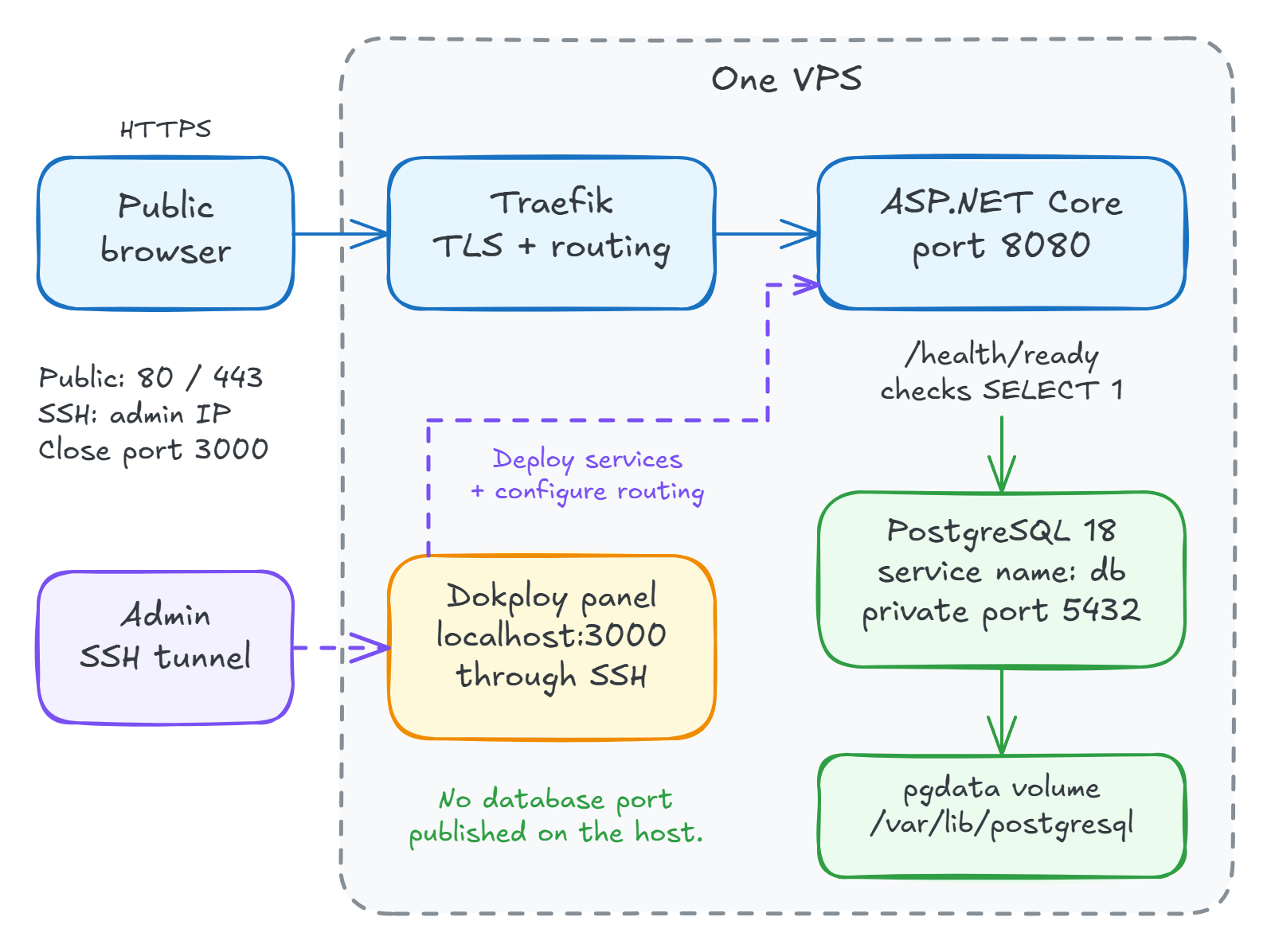
Allow public ports 80 and 443, restrict SSH to your IP address, and leave everything else closed.
This has to be the provider's firewall, because Docker can route published ports around UFW.
Use SSH keys, add a sudo-capable deploy user, and disable password login after testing the new login in a second terminal.
The VPS deployment checklist shows how to confirm what SSH actually applies.
Step 2: Install Dokploy and Keep the Panel Private
Run the documented installer from a root shell:
curl -sSL https://dokploy.com/install.sh | sh
It needs ports 80, 443, and 3000 free on the server, and it installs Docker if it's missing.
Keep 3000 blocked at the provider firewall and reach the panel through a tunnel:
ssh -N -L 3000:localhost:3000 deploy@your-server-ip
Open http://localhost:3000, create the administrator, and enable two-factor authentication.
A Tailscale network is another way to keep management private, and Katabench runs the same idea on Headscale.
The panel controls your secrets and can run commands on the host, so treat access to it like access to the server. Dokploy published dozens of critical advisories in 2026, including a pre-auth admin takeover in some older versions. Install the current release, and schedule updates like you do for the operating system.
Step 3: Define the App in Compose
The sample's API has a tiny notes table and separate liveness and readiness endpoints.
The readiness check is the part worth copying into Program.cs:
builder.Services.AddSingleton(_ => NpgsqlDataSource.Create(
    builder.Configuration.GetConnectionString("Database")!));

builder.Services
    .AddHealthChecks()
    .AddCheck<DatabaseCheck>("database", tags: ["ready"]);

var app = builder.Build();

// Liveness runs no checks: it only proves the process can respond.
app.MapHealthChecks("/health/live", new HealthCheckOptions
{
    Predicate = _ => false
});

// Readiness runs the database check.
app.MapHealthChecks("/health/ready", new HealthCheckOptions
{
    Predicate = check => check.Tags.Contains("ready")
});
DatabaseCheck runs SELECT 1 and returns Unhealthy if that fails.
The Dockerfile is a normal multi-stage build.
It also installs curl, because the Compose healthcheck uses it:
FROM mcr.microsoft.com/dotnet/sdk:10.0 AS build
WORKDIR /src
COPY DemoApi.csproj .
RUN dotnet restore
COPY Program.cs .
RUN dotnet publish -c Release --no-restore -o /out
FROM mcr.microsoft.com/dotnet/aspnet:10.0
RUN apt-get update && apt-get install -y --no-install-recommends curl && rm -rf /var/lib/apt/lists/*
WORKDIR /app
COPY /out .
USER $APP_UID
ENTRYPOINT ["dotnet", "DemoApi.dll"]
Put compose.yml next to it.
This file publishes no application or database ports:
services:
  api:
    build: .
    restart: unless-stopped
    environment:
      ConnectionStrings__Database: Host=db;Username=postgres;Password=${POSTGRES_PASSWORD:?Set POSTGRES_PASSWORD};Database=postgres;Timeout=2;Command Timeout=2
    expose: ['8080']
    healthcheck:
      test: ['CMD', 'curl', '-fsS', 'http://localhost:8080/health/live']
      interval: 10s
      timeout: 3s
      retries: 3
    depends_on:
      db:
        condition: service_healthy
  db:
    image: postgres:18
    restart: unless-stopped
    environment:
      POSTGRES_PASSWORD: ${POSTGRES_PASSWORD:?Set POSTGRES_PASSWORD}
    volumes:
      - pgdata:/var/lib/postgresql
    healthcheck:
      test: ['CMD-SHELL', 'pg_isready -U postgres']
      interval: 2s
      timeout: 2s
      retries: 20
volumes:
  pgdata:
Host=db uses the Compose service name, not the server's public IP.
depends_on waits for the database healthcheck during startup, and it doesn't stop the API if Postgres goes down later.
The Postgres 18 image stores version-specific data under /var/lib/postgresql.
Don't copy the old /var/lib/postgresql/data mount from a Postgres 17 Compose file.
Before you touch the server, run the whole thing locally:
node verify.mjs
The script builds the images, stops and restarts the database, recreates the stack, and removes everything it created when it finishes.
Step 4: Add the Domain and Deploy
Create a project and a Compose service pointing at your repository, then set its Compose path.
Add POSTGRES_PASSWORD in the panel's environment settings, using a generated value:
openssl rand -hex 32
Point a DNS A record at the server.
On the service's Domains tab, select api, port 8080, your hostname, HTTPS, and Let's Encrypt.
Dokploy adds the routing labels and the dokploy-network connection during deployment, so changing a domain requires a redeploy.
Preview Compose shows you the file it will actually run, so check it first if routing misbehaves.
Now deploy, and request the readiness endpoint through the public domain:
curl -i https://app.example.com/health/ready
Look for 200 and Healthy.
That one request checks the certificate, the proxy route, the API, and the database connection together.
If you get a 503 with Unhealthy, read the database connection error in Dokploy's logs.
The other failures come from Traefik, and each code points somewhere different: a 404 means no router matched or the container is unhealthy, a 502 means the wrong port, and a 504 means no shared network.
This table has what to check for each one.
Step 5: Check More Than the Process
Here's the output from verify.mjs, which uses a local Compose override and the same application:
database stopped
GET /health/live -> 200
GET /health/ready -> 503
database restarted
GET /health/ready -> 200
container recreation: saved row survived
While the database was stopped, Docker still reported the API container as healthy with zero restarts.
That's because the Compose healthcheck calls the liveness endpoint, and a restart wouldn't have helped anyway.
Keep it that way.
Traefik removes unhealthy containers from routing, so a healthcheck on readiness would turn this 503 into a 404 during a database outage.
Point your uptime monitor at /health/ready instead, from outside the server.
Why Use Dokploy Instead of Plain Docker Compose?
The Compose file above works without Dokploy. You would then write the Traefik configuration, certificate resolver, and deployment scripting yourself.
Dokploy gives you the Azure App Service experience on your own machine: push code, get a deployment, and routing is handled for you. The cost is a privileged control plane on your server that you have to keep updated and private. If you're comparing options, Dokploy vs Coolify goes through the differences.
For repeatable releases, have CI build the image and tag it with the commit SHA, then have Dokploy deploy that exact image through its webhook or API. That gives you a previous image to return to, which a rebuild from Git doesn't.
What Does This Setup Not Cover?
A persistent volume survives a container replacement, but it's still on this server. Configure off-site database backups, then practice restoring a stored dump before you put useful data here. Back up Dokploy's own configuration as well, because the web server backup is separate from your database backups.
One server means one hardware fault can take the application down. Write down how you would recover, and choose this setup only if that recovery time fits the application.
The sample creates its schema on startup and connects with the database's admin role to stay small. Before adapting it for real data, use explicit migrations and a role with only the permissions the API needs. Operating .NET apps on Dokploy covers the next set of problems, including forwarded headers, resource limits, and recovery.
The local script doesn't provision a VPS or issue a public certificate.
Those steps follow Dokploy's documentation, so confirm them with the curl check above on your own server.
Summary
Keep the panel private, define your API and database in a Compose file that publishes no ports, and let Dokploy handle routing and certificates through the Domains tab.
Then check /health/ready through the public domain, because that's the one request that proves the whole path works.
Run the sample locally first, and go through the deployment checklist before you rely on the server. My self-hosting course builds on this setup with private administration over Tailscale, automated releases, and a restore exercise.
Thanks for reading.
And stay awesome!
Frequently Asked Questions
How do I deploy a .NET app to a VPS with Dokploy?
Install Dokploy on a Linux server, keep its panel private, and put your API and database in a Compose file in your repository. Create a Compose service in Dokploy, set your secrets, add a domain with HTTPS on the Domains tab, and deploy.
What does Dokploy manage on a VPS?
Dokploy deploys applications from Git or container images and configures routing and HTTPS through Traefik. You still operate the server, its capacity, updates, backups, and recovery.
How much memory does Dokploy need?
The Dokploy documentation asks for at least 2 GB of RAM and 30 GB of disk. A 2-core, 4 GB server is a comfortable starting point for the panel, a small API, and a database, but measure your own workload before adding more applications.
Should the Dokploy panel be publicly accessible?
Keep port 3000 private and reach the panel through an SSH tunnel or a VPN. The panel controls deployments and application secrets, so treat access to it like access to the server, enable two-factor authentication, and keep Dokploy updated.
Does a Docker healthcheck restart an unhealthy container?
Not on plain Docker or Compose. A healthcheck reports container health, and a restart policy acts when the process exits. A dependency failure can leave a running container unable to serve useful requests, so monitor application readiness separately.
Can I deploy a .NET app to a VPS without Dokploy?
Yes. You can run the same Compose file with a reverse proxy you configure yourself. Dokploy saves you from writing the proxy configuration, certificate setup, and deployment scripting by hand, at the cost of running a privileged panel on your server.
