
To test a Postgres backup, download a stored dump, restore it into an empty database on an isolated instance, and run the queries your application needs.
Listing the archive isn't enough: pg_restore --list still exited 0 when I cut a dump in half.
I run a nightly pg_dump job for Katabench and ship it to Cloudflare R2.
Getting the file off the server is useful, but it doesn't tell me whether the application could use it after a restore.
This drill starts with a file downloaded from the bucket and ends with a query against an isolated database. The complete runnable sample creates its own Postgres and object-storage fixtures, and it needs Docker and Node.js.
Start With the Stored Copy
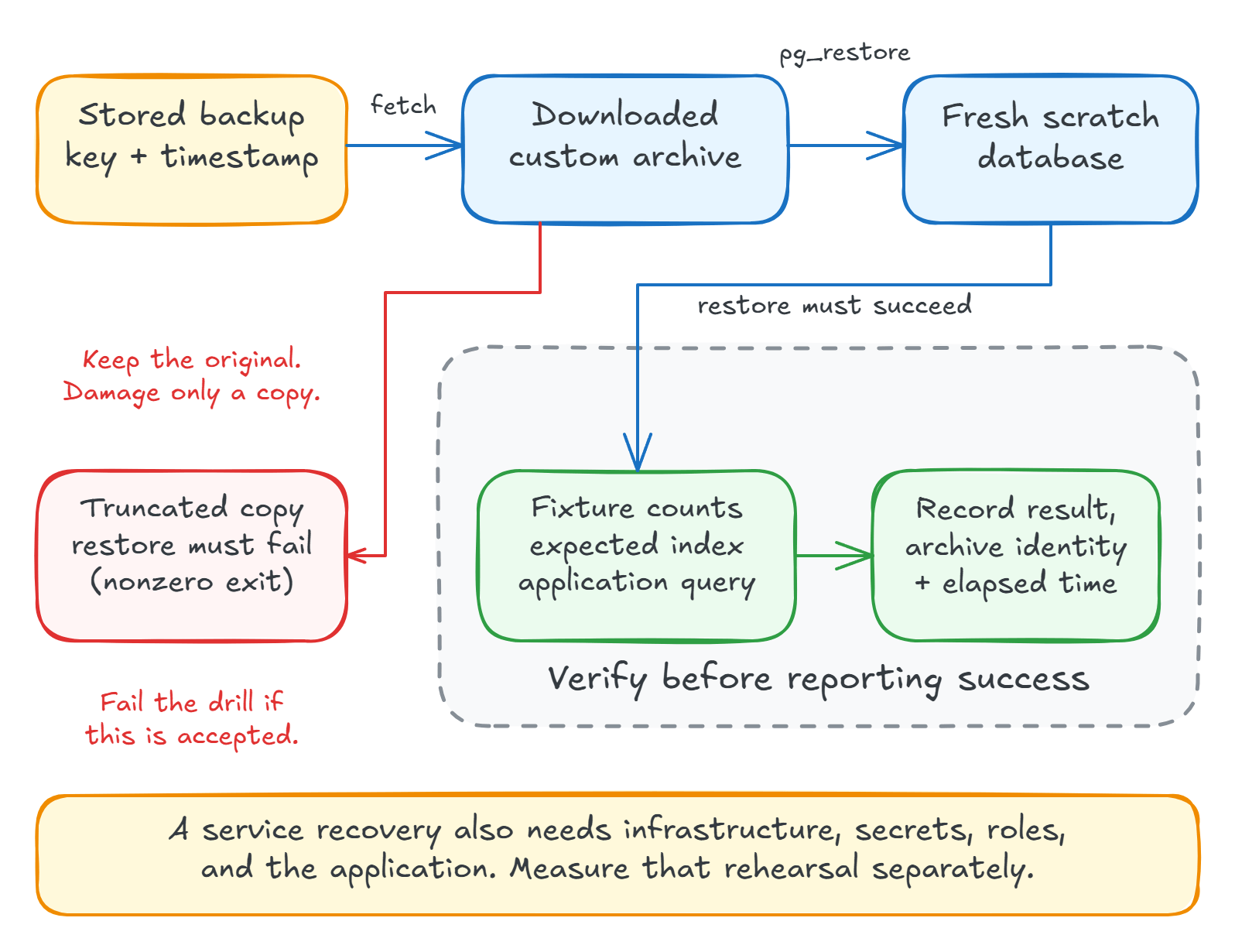
Download an existing backup using rclone:
rclone copyto r2:backups/prod/app.dump /tmp/restore.dump
Use the exact key from your backup listing. A new dump read directly from production would skip the upload, storage credentials, and download path you are trying to test.
Record the object's timestamp and size. Alert if no successful backup arrives within your expected window, and monitor failed jobs too. A scheduled job can fail while yesterday's valid file still exists.
The sample uses rclone's own S3-compatible server as a local fixture. It exercises the transfer, but it doesn't test your real bucket credentials or off-site recovery.
Restore Somewhere Disposable
Use an isolated Postgres instance with the required extensions available.
The sample starts a separate Postgres 18 container named for the run, without publishing a database port.
For an existing scratch container named restore-check, the equivalent commands are:
docker exec restore-check createdb -U postgres app_verify
docker cp /tmp/restore.dump restore-check:/tmp/restore.dump
if ! docker exec restore-check pg_restore \
  -U postgres -d app_verify \
  --no-owner --no-acl --exit-on-error /tmp/restore.dump; then
  echo "Restore failed" >&2
  exit 1
fi
--exit-on-error makes the first restore error fail the command.
--no-owner --no-acl skips the original ownership and grants, which is convenient for this isolated drill.
Test the application role separately before calling the full recovery procedure complete.
These commands expect a custom-format pg_dump -Fc archive.
If your backup tool adds an outer gzip layer, decompress that first.
A scratch database on the production server still competes for disk, memory, and I/O. Use another instance before you run this against a busy service.
Check Data You Can Account For
The fixture has 10,000 tasks and no concurrent writers. Its verification query is small:
SELECT count(*) AS tasks, max(id) AS max_id FROM tasks;
 tasks | max_id
-------+--------
 10000 |  10000
Those numbers match the source fixture.
Be careful when you adapt this to production: live counts taken before pg_dump don't necessarily describe its snapshot.
Writes between the count and the dump can produce a valid difference.
Use known application records, or collect exact verification counts with the same exported snapshot as the dump. The fixture avoids that coordination so you can practice the restore first.
Run a Query the Application Needs
Check that the expected indexes and constraints exist, then refresh planner statistics with ANALYZE and run a representative query:
ANALYZE tasks;

SELECT id FROM tasks
WHERE board_id = 42
ORDER BY created_at DESC
LIMIT 3;
  id
------
 9942
 9842
 9742
The sample verifies those rows and the expected index, then reports:
archive upload/download: byte-for-byte match
restore duration: 366 ms
restored: 10000 tasks, max id 10000
application query: 9942,9842,9742
index: tasks_board_created_idx
A sequential scan isn't proof of a broken restore, because the planner may correctly prefer one on a small table. Inspect the schema and the result before diagnosing a plan choice.
What Does pg_restore --list Actually Check?
Only the table of contents.
I cut a copy of the archive in half, the way a pg_dump killed partway through would leave it, and tried three things:
truncated archive, pg_restore --list: exit 0
truncated archive, pg_restore -f /dev/null: exit 1
complete archive, pg_restore -f /dev/null: exit 0
--list reads the table of contents at the start of the file, and that part survived the truncation.
A monitoring job built on --list would keep reporting success on a damaged backup.
pg_restore -f /dev/null reads every section of the archive without touching a database, and it fails on the truncated copy.
It doesn't replace a restore, but it's cheap enough to run on every new backup.
Make the Drill Fail Too
Check that your automation rejects a broken archive. The sample restores the truncated copy into another empty scratch database:
truncated archive, restore: rejected (exit 1)
  pg_restore: error: could not read from input file: end of file
  tables left behind in the scratch database: 1
The non-zero exit is what you want, and the last line is worth noticing. A failed restore can leave a partially restored database behind, so never reuse the target for a second attempt. Start from a new empty database every time, and only report success after the data and schema checks pass.
Remove the scratch instance after you've recorded the result, and make sure cleanup runs after failures too.
The drill itself fails if pg_restore accepts the truncated copy, which tests the error path before you rely on a scheduled success message.
How Long Would Recovery Actually Take?
The fixture restored in 366 ms, which tells you nothing about production. Record how long downloading, restoring, and verifying take on your actual data. That's only part of recovery time, since provisioning, secrets, application deployment, and reconnecting clients can take longer.
Keep the backup timestamp, archive size, restore duration, and verification result together. If a drill fails, keep the failure log and try the previous backup in a fresh target. That tells you whether you have one damaged file or a broken backup process.
With a successful nightly dump, your recovery point can be almost a day old. If that much lost work is unacceptable, use continuous WAL archiving and point-in-time recovery, whether you operate it yourself or buy it as a managed service.
Summary
Restore a stored file, into a new empty database, on an instance that can't hurt production, then run the queries your application depends on.
Add pg_restore -f /dev/null as a cheap check on every new backup, and stop trusting --list for that job.
Schedule the drill and keep the exact commands in your runbook, so that someone else can restore the file and report the recovery time without reconstructing your setup. It belongs on your VPS deployment checklist alongside the other recovery checks, and my self-hosting course practices a scratch-database restore from an off-site backup.
Thanks for reading.
And stay awesome!
Frequently Asked Questions
How do you test a Postgres backup?
Download a stored backup, restore it into an empty database on an isolated instance with pg_restore and --exit-on-error, then run data checks and a real application query against it. Record how long it took, and run the drill on a schedule.
Does pg_restore --list verify a backup?
No. It reads only the table of contents at the start of a custom-format archive, so it can exit successfully on a truncated file. To check the whole archive without a database, run pg_restore -f /dev/null, which reads every section and fails on truncation.
Where should you test a Postgres backup?
Restore into an isolated instance with enough disk and memory. A scratch database on the production server avoids overwriting production data but still competes for CPU, storage, and I/O.
Can you compare a restored database with live row counts?
Only if the counts describe the same snapshot. With concurrent writes, counts collected before pg_dump can legitimately differ. Use known records, a fixture for the drill, or verification data collected with the same exported snapshot as the dump.
Does a successful pg_restore prove an application can recover?
No. Check the expected data and schema, run an application query or smoke test, and verify roles and extensions. Whole-service recovery also includes infrastructure, secrets, deployment, and reconnecting the application.
What happens to the target database when pg_restore fails?
It can be left partially restored. In this drill, a failed restore with --exit-on-error still left a table behind, so always start each attempt from a new empty database and drop it afterwards.
