
A nightly off-site backup on a Docker VPS breaks when a failed pg_dump still uploads a file and an age-based prune then deletes the good copies.
Catch it by dumping to a local file, reading that file to the end, comparing the upload with it, and checking freshness from another machine.
I tested this on MinIO in a lab, for one database, not on a real provider.
The lab ran under WSL2, with MinIO as the storage and a database that dumps to about 92 MB.
Most runs used Docker 29.9 and PostgreSQL 18.6 on Ubuntu 24.04 in a privileged container.
Some smaller runs used Docker 29.6 directly on the host with Postgres 18.6 containers: set -e, tmpfs, and roles.
R2, B2, S3, and Dokploy never ran in that lab, so claims about them come from their docs or source, and I mark them.
What Has to Leave the Server, and What Does a Dump Not Cover?
On a Dokploy server I'd send two backups off the machine and bring one exact object back for a test. The picture draws this with R2, which my lab never touched:
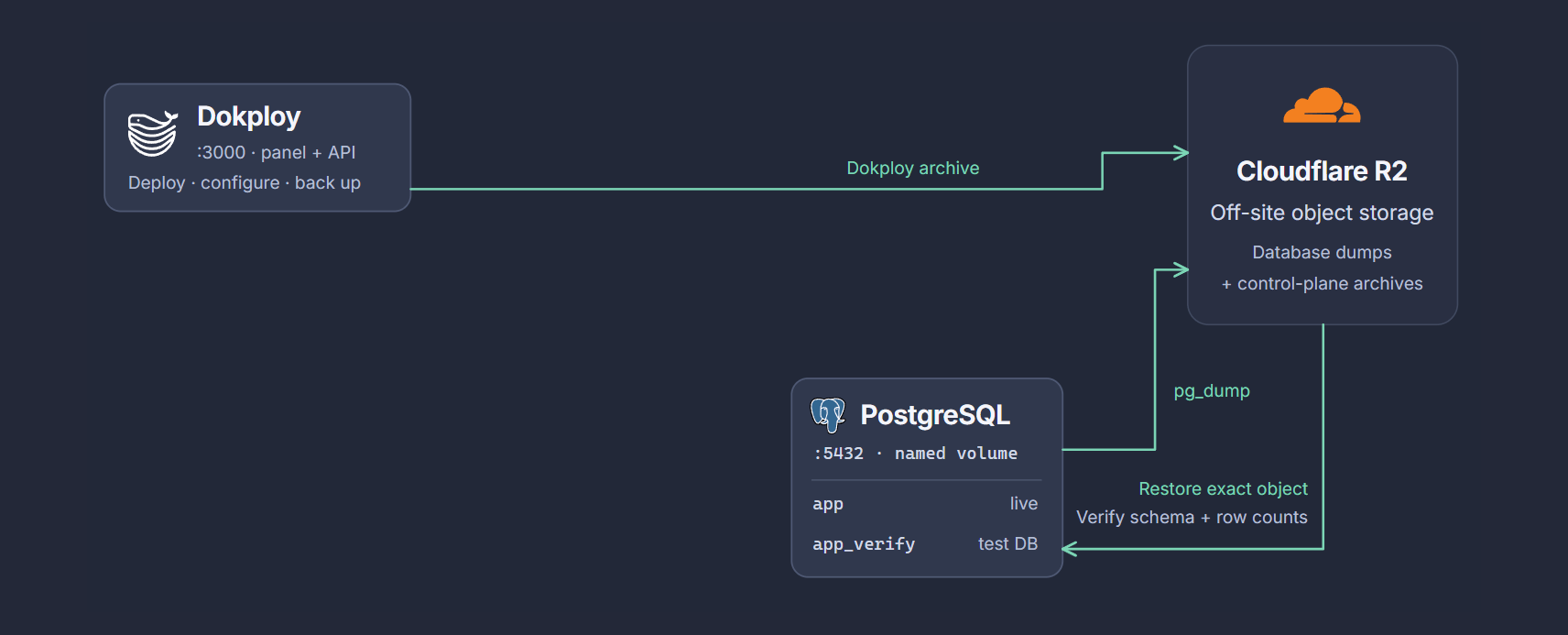
Per its docs, the Dokploy archive is its web server backup of its own database and /etc/dokploy.
I didn't test it.
A dump leaves out env files, Compose files, uploads, other volumes, other databases in the same Postgres, roles, and database-level grants and settings. I tested a backup of only two of those, a restic volume and the roles file below.
The dump does hold GRANT and OWNER TO lines for its tables, but no CREATE ROLE.
On a fresh container only the POSTGRES_USER role existed, so a restore without --no-owner stopped with role "app_owner" does not exist.
With --no-owner --no-acl it exited 0.
I then had to create the app role, and it got permission denied for table orders.
Loading a roles file through psql -d postgres first fixed both on one small database.
My ALTER DATABASE setting stayed lost, and I didn't test a full rebuild.
The file holds password hashes, so store it like a secret.
The backup script further down doesn't upload it, so run this command yourself, with your names in place of my lab's shop-postgres-1 and shop:
docker exec shop-postgres-1 pg_dumpall -U shop --globals-only > globals.sql
Provider server backups stay near the server, as VPS vs PaaS vs cloud covers. A Headscale control server needs its own backup too, and my Headscale backup guide covers it.
What Happens to a Short Backup Script When the Database Is Down?
The script exits 0 and uploads a bad file, and its prune then deletes the good ones.
I tested this short form, with my lab's names in it:
stamp=$(date -u +%Y%m%dT%H%M%SZ)

docker exec shop-postgres-1 pg_dump -Fc -U shop shop > "appdb-${stamp}.dump"
rclone copyto "appdb-${stamp}.dump" "frw:shop-rw/printed/appdb-${stamp}.dump"
rclone delete --min-age 30d frw:shop-rw/printed/
I stopped the database, killed it during a dump, then ran a prune test on a compressed schedule (trimmed):
##### P1 database stopped
exit 0
0 91556784
##### P2 docker kill at 30 MB
exit 0; script output lines 0
0 91556784 31264768
##### P3 age prune with failures, every 15 s, four good first, --min-age 40s
failing run 3 exit 0; full-size objects 0; total 3
The number rows are object sizes, so each fault added a bad object beside the good one.
docker exec returned non-zero, but the script's exit code comes from the prune.
Three failed runs removed every full-size backup while the bucket still held three objects.
With 30d and nightly runs that is the 31st failed night.
That number is arithmetic, because I compressed the ages and didn't use real cron.
Adding set -euo pipefail stops that upload.
Dump files still pile up locally.
A complete dump of an empty database still uploads and prunes.
Why Can a Failed pg_dump Still Upload a Normal-Looking Object?
A common form skips the local file and pipes pg_dump straight into rclone rcat.
That stream ends when its input ends, and the object stays.
set -o pipefail changes only the exit code, as this run with a killed database shows (trimmed):
  pipeline exit 137; stderr:
  listing:  40615936 2026-11-05 18:42:31.073982280 killdb-custom-pf.dump
  pg_restore --list exit 0; TABLE DATA 3
  pg_restore -f /dev/null exit 1; pg_restore: error: could not read from input file: end of file
I'd expect a real provider to finish a stream the same way, but I only ran MinIO.
So pg-backup, the script below, writes to a local file first.
On a one-disk VPS, that file shares the disk with Postgres.
I put the data directory and a temp dump on one 400 MB tmpfs.
A dump that filled it made 304 INSERTs fail with No space left on device, and the container stayed up once the dump was gone.
In one more run I filled the same size of tmpfs with dd, standing in for the dump, and ran small updates with default WAL settings.
Postgres crashed with could not write to file "pg_wal/xlogtemp.122": No space left on device, its recovery failed the same way, and the container exited with code 1.
That is why the script checks free space before it dumps. It checks only at the start, so nothing stops the disk filling during a run.
Before you install the script, run df -h /var/tmp /var/lib/docker.
I'd keep free space of at least twice the dump size to leave Postgres room.
Which Checks Does pg-backup Run on a Dump?
pg-backup runs three checks: a size floor, a full read with pg_restore -f /dev/null, and rclone check --download against the upload.
The full read rejected all 161,162 cuts I tried on custom-format archives up to 2.4 MB, while pg_restore --list accepted a large dump cut to 25% of its size.
My pg_dump check comparison shows what each check misses, including some docker exec -t dumps.
What Should the Storage Key Be Allowed to Do?
On MinIO, removing the delete right stopped deletion and left overwriting allowed, and R2 documents no token without delete rights. I have no tested pick among the providers, so I'd choose on key scope and lock behavior. Set the key up from my key and bucket lock guide, and read its warnings first, because per their docs compliance mode on AWS or B2 can't be shortened or removed, and an age-based lifecycle rule doesn't check for newer objects.
What Does the Full Backup Script Look Like?
I packaged pg-backup, check-backup-fresh, the six systemd units, and a local verify script into a runnable sample.
It needs Node.js 22+, Docker, and network access on its first run.
Run it on a development machine, not the server, because it mounts the Docker socket, compiles MinIO from source, and leaves base images and build cache behind.
Before you paste anything, set these up. My key and bucket lock guide covers the first row:
| Item | What to do |
|---|---|
| Provider console, not the server | Create the bucket, the lifecycle and lock rules, and a key scoped to that one bucket, never an admin key |
| Key and endpoint | I would keep a copy in a password manager, because a rebuild needs them when the server is gone |
| User and shell | Every command below runs as root on the server. The rclone commands assume export RCLONE_CONFIG=/etc/pg-backup/rclone.conf, so run that again in every new shell |
| Names | Replace shop, shop-postgres-1, shop-backups, and the 50000000 floor with yours |
| rclone | I used the .deb because the Ubuntu 24.04 repository offers 1.60.1, and I did not test the newer 1.76.0 |
| Other servers | On ARM use the linux-arm64 file, which I did not run. On an IPv6-only server drop -4 |
Install rclone and jq:
apt-get update && apt-get install -y jq
cd /tmp
curl -4 -fsSLO https://downloads.rclone.org/v1.75.2/rclone-v1.75.2-linux-amd64.deb
curl -4 -fsSL https://downloads.rclone.org/v1.75.2/SHA256SUMS | grep "linux-amd64.deb" | sha256sum -c - && dpkg -i rclone-v1.75.2-linux-amd64.deb
rm -f rclone-v1.75.2-linux-amd64.deb
This remote is the R2 form from Cloudflare's rclone page.
My lab ran the same layout with provider = Minio, never R2.
Paste the block with the placeholders as printed, then add the real values in the editor, because a heredoc with real values lands in root's shell history.
install -d -m 0700 /etc/pg-backup
cat > /etc/pg-backup/rclone.conf <<'EOF'
[offsite]
type = s3
provider = Cloudflare
access_key_id = <CHANGE>
secret_access_key = <CHANGE>
endpoint = https://<CHANGE-ACCOUNT-ID>.r2.cloudflarestorage.com
acl = private
no_check_bucket = true
EOF
chmod 600 /etc/pg-backup/rclone.conf
nano /etc/pg-backup/rclone.conf
List the remote to test the key:
export RCLONE_CONFIG=/etc/pg-backup/rclone.conf
rclone lsf offsite:shop-backups/postgres; echo "exit $?"
Find your container's labels and the size of a real dump, then set min_bytes to about half that size:
docker ps --format '{{.Names}}\t{{.Label "com.docker.compose.project"}}\t{{.Label "com.docker.compose.service"}}\t{{.Label "com.docker.swarm.service.name"}}'
docker exec shop-postgres-1 pg_dump -Fc -U shop -d shop | wc -c
These columns decide the pg_filters line near the top of the script below.
Plain Compose fills columns 2 and 3, so keep its default and put your project and service names in it.
A Swarm service fills column 4, so use pg_filters=(--filter label=com.docker.swarm.service.name=<CHANGE-APP-NAME>), which I tested only on a plain Swarm service.
Dokploy runs standalone databases that way, per its source, and my Dokploy backup guide covers the rest.
A container started with plain docker run fills only column 1, so use pg_filters=(--filter 'name=^shop-postgres$') with your exact name.
Save this as pg-backup:
#!/usr/bin/env bash
# /usr/local/bin/pg-backup
# Dump to a private temp file, prove the file reads to the end, upload it, compare the
# upload with the local file. Any failure exits non-zero before anything is pruned.
set -euo pipefail

# Change these.
pg_filters=(--filter label=com.docker.compose.project=shop --filter label=com.docker.compose.service=postgres)
pg_user=shop
pg_db=shop
remote=offsite:shop-backups/postgres
min_bytes=50000000 # about half the size of a real dump of this database
keep=              # empty when a bucket lifecycle rule expires objects, else 30d. Always give a unit.

export RCLONE_CONFIG=/etc/pg-backup/rclone.conf

mapfile -t ids < <(docker ps -q --filter status=running "${pg_filters[@]}")
if [ "${#ids[@]}" -ne 1 ]; then
  echo "expected one running database container, found ${#ids[@]}" >&2
  exit 1
fi
pg=${ids[0]}

# Stop before dumping when the storage is unreachable or the disk could fill.
# A dump that fills the disk Postgres writes to can crash Postgres.
biggest=$(rclone lsjson --files-only "$remote" | jq 'map(.Size) | max // 0')
need=$(( (biggest > min_bytes * 2 ? biggest : min_bytes * 2) * 2 ))
free=$(df --output=avail -B1 /var/tmp | tail -n 1)
if [ "$free" -lt "$need" ]; then
  echo "$free bytes free under /var/tmp, want $need" >&2
  exit 1
fi

name="$pg_db-$(date -u +%Y%m%dT%H%M%SZ).dump"
tmp=$(mktemp -d -p /var/tmp pg-backup.XXXXXX)
trap 'rm -rf "$tmp"' EXIT

# No -t on docker exec: a terminal turns every LF byte into CR LF and wrecks the archive.
docker exec "$pg" pg_dump -Fc -U "$pg_user" -d "$pg_db" > "$tmp/$name"

size=$(stat -c %s "$tmp/$name")
if [ "$size" -lt "$min_bytes" ]; then
  echo "dump is $size bytes, below the floor of $min_bytes" >&2
  exit 1
fi

# Reads and decompresses every data block. pg_restore --list would pass a truncated file.
docker exec -i "$pg" pg_restore -f /dev/null < "$tmp/$name"

rclone copyto "$tmp/$name" "$remote/$name"
rclone check --download "$tmp" "$remote" --one-way --include "$name"

if [ -n "$keep" ]; then
  rclone delete --min-age "$keep" --use-server-modtime --include '*.dump' "$remote"
fi

echo "backup ok: $name, $size bytes"
Install it and run it once by hand:
install -m 0755 pg-backup /usr/local/bin/pg-backup
pg-backup; echo "exit $?"
rclone lsl offsite:shop-backups/postgres
I ran this script against these faults, with a key that had no delete right on a locked bucket:
| Fault | Exit | Objects before and after |
|---|---|---|
| Database container stopped | 1 | 1 to 1 |
| docker kill during the dump | 137 | 1 to 1 |
| pg_terminate_backend during the dump | 1 | 1 to 1 |
| kill -9 of pg_dump | 137 | 1 to 1 |
| Complete dump of an empty database | 1 | 1 to 1 |
| Disk full, a 50 MiB tmpfs over /var/tmp, stopped at the free-space check | 1 | 1 to 1 |
| Same tmpfs with the check satisfied, so the dump filled it | 1 | 0 to 0 |
| Wrong storage secret, stopped at the free-space check | 5 | 1 to 1 |
| rclone killed during the upload | 137 | 1 to 1 |
| Storage unreachable, my harness stopped it at 300 s with rclone still running | 124 | 1 to 1 |
| Two containers match the filter | 1 | 2 to 2 |
| Injected: dump cut at 85%, tool reports success | 1 | 1 to 1 |
| Injected: half the file uploaded, tool reports success | 1 | 1 to 2 |
The disk-full rows used a separate tmpfs, which hides the shared-disk problem above.
The last row is the one bad object.
A failed rclone check exits 1 and leaves it, and a lock keeps it for the lock period.
I injected the last two rows through wrapper scripts, because no real tool reported success after a real failure.
The script has these limits:
| Case | What happened or what to do |
|---|---|
| Complete dump of the wrong database, above the floor | It passes |
| docker kill during the dump | Exits 137 with no message, so alert on the exit code |
| keep set with a key that cannot delete | The refused prune exits 1, and the systemd retries in my backup alerts guide add 4 objects in one night, so leave keep empty |
| --min-age 30 with no unit | Means seconds. In a dry run it selected 4 of 5 fresh objects, and 30d selected 0 |
| The prune | Matches *.dump at every depth under remote, so give it its own prefix |
| First good run after an outage | Removes everything older than keep, which left one backup in my test |
| pg_dump with no password | Works because the official image trusts local connections, so a hardened image needs its own setting |
How Do I Schedule pg-backup So a Failed Night Gets Noticed?
Use a systemd timer with an OnFailure unit, because cron dropped the output with No MTA installed, discarding output and recorded no exit code.
My backup alerts guide prints those units and the start timeout a hung run needs, and they are in the sample too.
As printed there, the alert only adds a line to a log file on the server, and I didn't test real delivery.
Keep migrations away from the dump window, because an ALTER queued behind a running dump stalled readers of that table in all 3 runs (my reader had a 2 s limit).
lock_timeout on the migration made it fail fast.
My pg_dump locking guide measures the full stall and what EF Core does.
What Does the Freshness Check Catch?
check-backup-fresh, a small script in the sample, reads the age and size of the newest object in the bucket.
It flagged an empty prefix and a stale or tiny newest object, and it passed one truncated at 75 percent, so it proves age and size, not content.
Run it from another machine, because a dead server can't report anything, and read the bucket rather than systemctl list-timers, which moved its LAST time even after a failing run.
Install it, and the units that run it from a second machine, from my backup alerts guide.
How Do I Restore Into a Throwaway Database?
Bring one exact object back, restore it into a throwaway container, and compare it with what you expect.
In my run the restore exited 0, and the restored and live counts matched: 1500000 orders and 3 indexes.
It needs room for the dump plus a second copy of the database, indexes included, and filling that disk can crash production Postgres.
A restore on the same server doesn't prove recovery onto a replacement server, and I didn't test a full rebuild.
The commands are in my restore drill guide.
What Does the Restored Copy Contain, and What Is Lost?
The restored copy holds the database as of the moment the dump started, which is earlier than the time the object reached the bucket. I ran three dumps with a live writer, and the orphan count (child rows with no parent row) was 0 in all three (trimmed):
newest restored row is 0.177 s after dump start; dump took 12.0 s; upload finished 12.5 s after dump start
newest restored row is 0.101 s after dump start; dump took 6.8 s; upload finished 7.1 s after dump start
So a restore from a 03:00 dump loses everything written after 03:00. With one dump a night, a crash just before the next run loses about 24 hours of writes, and more after a failed night.
My test used a small writer on one pair of tables. Point-in-time recovery would cover that gap, and I didn't test it. I also didn't test extensions missing from the restore image, or databases larger than my lab's, which was 637 MB on disk.
Does Dokploy's Backup Job Handle a Failed Dump?
Partly, going by its v0.31.0 source and shell rendered from its backup template in a simulation, and I didn't install Dokploy.
A failed run removes its partial object if the key can delete, and a key that can't leaves a cut object that pg_restore --list accepts.
My Dokploy backup guide shows how to check its .sql.gz objects.
What About Volumes and Encryption?
restic restored a test volume on MinIO, in a bucket with no lock.
With a key that can't delete, the backup still exited 0.
restic printed Access Denied and left its own lock files in the repository.
I didn't test it against a bucket lock.
When the dump failed, piping it into restic --stdin saved a partial snapshot with exit 0, and --stdin-from-command refused it.
Encrypting with age on the server needs only the public key, so a stolen server can't read the encrypted backups.
If you lose the private key, you can't decrypt them either.
I didn't wire it into pg-backup or test a lost key.
Summary
In my lab, dumping to a file, reading it with pg_restore -f /dev/null, checking a size floor, and running rclone check --download left no bad object under every real fault I tried.
The injected half upload stayed in the bucket with exit 1, so the alert has to reach you.
Use a key without delete rights where the provider offers one, expire objects with a provider rule, run the freshness check from somewhere else, and restore a specific object on a schedule. This covers one Postgres database, so env files, Compose files, uploads, and other volumes need their own backup. The tests ran against MinIO in a container, and the Dokploy part comes from its source. Run all of this on your real provider and server before you count on it.
This is one item on my VPS deployment checklist, and my self-hosting course sets up database backups to storage outside the server.
Thanks for reading.
And stay awesome!
Frequently Asked Questions
Can a failed pg_dump still upload a backup?
Yes. In my lab, a short script exited 0 with the database stopped or killed, uploaded an empty or cut-off object, and its age-based prune then removed the good backups. That ran on MinIO, not on a real provider.
Does set -o pipefail stop a failed pg_dump upload?
No. It changes the exit code of the pipeline, and the object rclone rcat wrote stays in the bucket. In my MinIO test, a killed database left a cut-off object that pg_restore --list accepted and a full read rejected.
What does rclone delete --min-age 30 mean?
It means 30 seconds, because rclone reads a bare number as seconds. In a dry run, --min-age 30 selected 4 of 5 fresh objects and --min-age 30d selected 0. Always give a unit.
How much data does a restored nightly dump lose?
Everything written after the dump started. In three runs with a live writer, the newest restored row was under 0.2 seconds after the dump start, while the upload finished 7 to 12.5 seconds after it. Point-in-time recovery would cover that gap, and I did not test it.
