
Connection refused from a Compose app to Postgres usually has one of three causes.
The app connected to localhost, which inside a container is the app itself, or it used the published host port instead of 5432, or Postgres had no TCP listener yet.
Connect to the service name on 5432, and gate startup on pg_isready -h 127.0.0.1.
I reproduced every error below on November 7, 2026, from app containers running psql 18.6 and a small Npgsql 10.0.3 client against Postgres 18.6 (postgres:18).
Everything ran on a WSL2 kernel, with Docker Desktop 29.6.1 and Compose 5.3.0, and with Docker 29.9.3 and Compose 5.7.0 inside an Ubuntu 24.04 container.
Nothing ran on a real VPS or behind a real .NET web host, and other labs shared the machine, so trust the counts and error text over the durations.
Which Error Are You Seeing?
Find your client's text in this table, and the first column gives you the cause.
As a control, db:5432 from the same network connected in both clients.
| Cause | Target | psql | Npgsql |
|---|---|---|---|
| localhost inside a container | localhost:5432 | connection to server at "localhost" (::1), port 5432 failed: Connection refused, then the same for (127.0.0.1) | Npgsql.NpgsqlException: Failed to connect to 127.0.0.1:5432 ---> System.Net.Sockets.SocketException: Connection refused |
| Published host port on the service name | db:15201 with 15201:5432 | connection to server at "db" (192.168.32.2), port 15201 failed: Connection refused | Npgsql.NpgsqlException: Failed to connect to 192.168.32.2:15201 ---> System.Net.Sockets.SocketException: Connection refused |
| Database in first-boot init, or not listening yet | db:5432 | connection to server at "db" (192.168.48.3), port 5432 failed: Connection refused | Npgsql.NpgsqlException: Failed to connect to 192.168.128.4:5432 ---> System.Net.Sockets.SocketException: Connection refused |
| Database opening, a brief window | db:5432 | connection to server at "db" (192.168.48.3), port 5432 failed: FATAL: the database system is starting up | Npgsql.PostgresException: 57P03: the database system is starting up |
| Wrong service name, app on another network, or database stopped | postgres:5432 or db:5432 | could not translate host name "db" to address: Name or service not known | Npgsql.NpgsqlException: Name or service not known ---> System.Net.Sockets.SocketException: Name or service not known |
| Another network by container IP, or a stopped database by its old IP | Container IP | connection to server at "192.168.48.3", port 5432 failed: timeout expired | Npgsql.NpgsqlException: Failed to connect to 192.168.48.3:5432 ---> System.TimeoutException: Timeout during connection attempt |
| Wrong password, so the server is reachable | db:5432 | FATAL: password authentication failed for user "shop" | Npgsql.PostgresException: 28P01: password authentication failed for user "shop" |
| host.docker.internal on plain Linux, no --add-host | Port 15203 | could not translate host name "host.docker.internal" to address: Name or service not known | Not run |
| Same network to a published port through the host, UFW on, Linux | Host-gateway alias or server IP | connection to server at "host.docker.internal" (172.17.0.1), port 15203 failed: timeout expired | Not run for the alias, TimeoutException for the bridge gateway |
The refused rows fail immediately, because something answered and nothing was listening on that port.
The timeout rows wait for your configured timeout.
With none set, psql printed Connection timed out after about 133 seconds, and Npgsql threw the same exception after about 15.
If your name error ends differently, match on could not translate host name, because the ending changed with the resolver and the DNS upstream.
A wrong password is a different problem with its own list of causes.
Why Does localhost Not Work Between Containers?
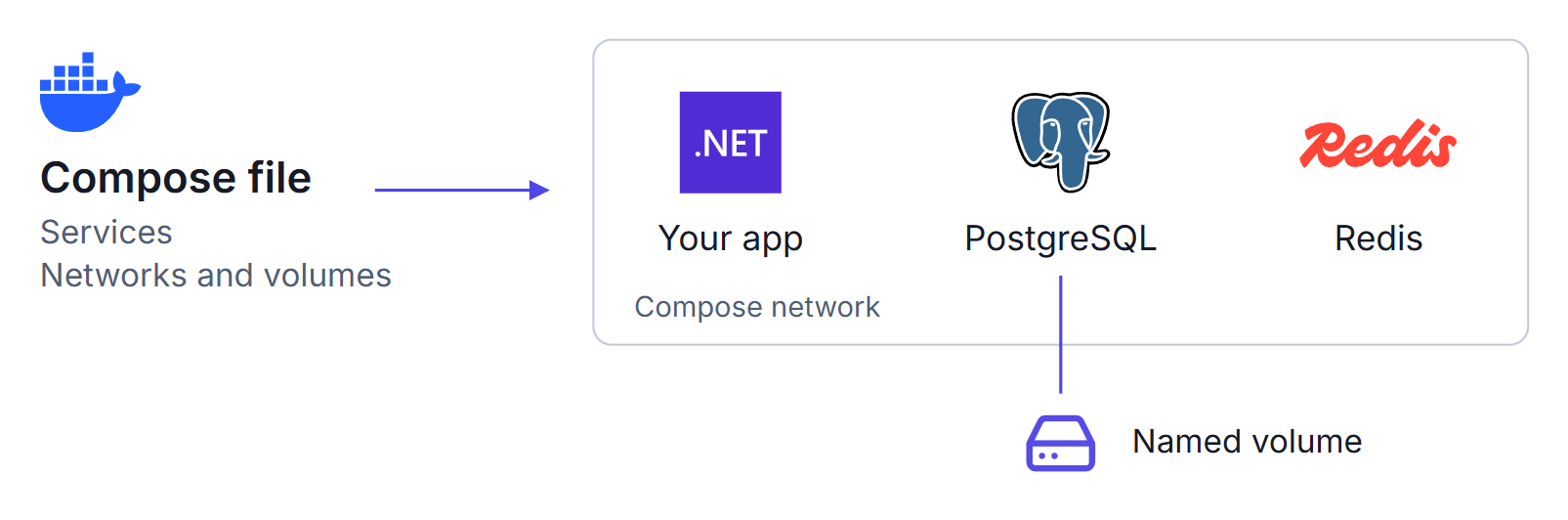
Each container has its own network stack, so localhost inside your app's container is that same container, and Postgres isn't listening there.
Docker Compose puts the services from one file on a shared network and resolves each service name to its container, so the service name is the address you want.
The published port is a related mix-up.
15201:5432 in ports maps port 15201 on the host to 5432 in the container, and that mapping exists only on the host side.
Inside the network the container listens on 5432 alone, so db:15201 is refused, and your app doesn't need a published port at all.
A one-off container on the network sees roughly what your app sees.
Compose names the network after the project folder, so a folder called shop gets shop_default.
These commands put the password in your shell history, so keep them to a test stack with a throwaway password:
docker run --rm --network shop_default postgres:18 psql 'postgresql://shop:change-me@db:5432/shop' -Atc 'select 1'
docker run --rm --network shop_default postgres:18 psql 'postgresql://shop:change-me@localhost:5432/shop' -Atc 'select 1'
docker run --rm --network bridge postgres:18 psql 'postgresql://shop:change-me@db:5432/shop' -Atc 'select 1'
The first printed 1, and the other two printed the localhost and name errors from the table.
Going out through the host behaved differently on Docker Desktop and on my Linux lab.
On Docker Desktop, host.docker.internal plus the published port connected.
On Linux with UFW active the same route timed out in 3 of 3 passes, and with UFW inactive it connected, also 3 of 3.
My reading of the rules, which I didn't prove, is that a packet from the same bridge skips Docker's DNAT and lands on the host's input path, where UFW applies.
Why Is It Refused Only on First Boot?
On an empty volume, the official image starts a temporary server to create the database and run your init scripts, and that server has no TCP listener.
Its entrypoint script adds -c listen_addresses='' after your arguments, so that value wins.
Setting listen_addresses=* in command didn't open TCP either.
I sampled pg_isready during a first boot with an init script that sleeps for 8 seconds, once over the Unix socket, a local connection that never touches the network, and once over TCP with -h 127.0.0.1.
0 means accepting, 1 rejecting, and 2 no response:
pg_isready    +  5.07s socket=0 tcp=2
pg_isready    + 13.45s socket=1 tcp=2
pg_isready    + 14.44s socket=2 tcp=2
pg_isready    + 14.90s socket=2 tcp=1
pg_isready    + 15.07s socket=0 tcp=0
For about 8 seconds the socket says accepting while TCP gets no response. The server log shows the two servers, and you can read it on your own stack (I removed PID 1's IPv6 and socket lines from the output):
docker compose logs db | grep -E 'listening on|ready to accept'
db-1  | 2026-11-07 11:00:14.159 UTC [139] LOG:  listening on Unix socket "/var/run/postgresql/.s.PGSQL.5432"
db-1  | 2026-11-07 11:00:14.315 UTC [139] LOG:  database system is ready to accept connections
db-1  | 2026-11-07 11:00:25.726 UTC [1] LOG:  listening on IPv4 address "0.0.0.0", port 5432
db-1  | 2026-11-07 11:00:25.824 UTC [1] LOG:  database system is ready to accept connections
PID 139 is the temporary server, which prints ready to accept connections with no TCP address open, and PID 1 is the real server.
On an existing volume the image skips all of this, and the first reading was already socket=0 tcp=0.
Plain depends_on failed the first connection 20 of 20 times on a fresh volume and 0 of 10 on an existing one after a clean shutdown, which is consistent with "it fails once, then works".
It is still a race, because with no depends_on the second boot failed 10 of 10, and I didn't measure crash recovery.
Which Healthcheck Should You Use?
Use pg_isready -h 127.0.0.1.
The usual pg_isready -U shop -d shop has no -h, so it connects over the socket, passes during init, and Docker starts your app against a server with no TCP listener.
With an 8 second init script, that check let the app start too early in every run: 20 of 20 with psql and Npgsql, and 5 of 5 with a separate raw TCP client.
Adding -h 127.0.0.1 made it 0 of 20 and 0 of 5.
The socket result depends on how long your script runs, and a schema-only DDL script failed only 1 of 5.
These counts are first-connection failures on a fresh volume, from a client that doesn't retry:
| Setup | No init script | DDL-only script | 1 s script | 8 s script |
|---|---|---|---|---|
| No depends_on | 20 of 20 | Not run | Not run | Not run |
| Plain depends_on | 20 of 20 | Not run | Not run | 20 of 20 |
| service_healthy, socket check, 5 s interval | 1 of 20 | 1 of 5 | 1 of 5 | 20 of 20, 5 of 5 |
| service_healthy, socket check, 1 s interval | 6 of 20 | Not run | 5 of 5 | 20 of 20 |
| service_healthy, -h 127.0.0.1, 1 s interval | 0 of 20 | Not run | 0 of 5 | 0 of 20 |
| service_healthy, -h 127.0.0.1, 5 s interval | Not run | Not run | Not run | 0 of 5 |
The temporary server answers on the socket for as long as init runs. That pass window is over 8 seconds with the 8 second script, and well under a second with no script or a DDL-only one. A window longer than the check interval is certain to be caught, which is why the 1 second script failed 5 of 5 at a 1 second interval. A short window is a race that machine load moves, so read those cells as intermittent and not as a rate.
up -d exited 0 in every one of these runs, so nothing warned me.
This is the file I ran, and the app connected on its first try in 5 of 5 first boots with the 8 second script:
services:
  db:
    image: postgres:18
    environment:
      POSTGRES_USER: shop
      POSTGRES_PASSWORD: change-me
      POSTGRES_DB: shop
    volumes:
      - pgdata:/var/lib/postgresql
      - ./init:/docker-entrypoint-initdb.d:ro
    healthcheck:
      test: ["CMD-SHELL", "pg_isready -h 127.0.0.1 -U $$POSTGRES_USER -d $$POSTGRES_DB"]
      interval: 5s
      timeout: 3s
      retries: 5
      start_period: 60s
      start_interval: 1s
  api:
    image: pgnet-npgsql
    entrypoint: ["dotnet", "/app/app.dll", "hold", "Host=db;Port=5432;Username=shop;Password=change-me;Database=shop;Timeout=5"]
    depends_on:
      db:
        condition: service_healthy
volumes:
  pgdata:
api is my small Npgsql client, so replace its image and entrypoint with your app, and change-me is a placeholder.
The $$ matters because Compose interpolates a single $ itself.
With one $ it warns that POSTGRES_USER is not set, blanks the value, and the check still passes, because pg_isready doesn't authenticate.
Keep a real -U anyway, since a wrong user writes a FATAL line to the server log on every probe.
start_period and start_interval stop a slow first boot from failing the check, and start_interval needs Docker Engine 25.0 and Compose 2.20.2 or later (Docker docs, read November 7, 2026).
With a 2 second interval, 3 retries, and neither setting, up exited 1 in 3 of 3 runs with dependency failed to start: container pgnet118h-db-1 is unhealthy, while the database was still booting.
With both settings it exited 0 in 3 of 3.
Raise start_period if your init script runs longer than a minute.
A port set with PGPORT in environment needs no -p, because pg_isready reads it, while postgres -p 5433 in command does.
A raw port check is weaker than pg_isready -h, because the port opened slightly before the server accepted connections, so it can pass during starting up.
Does depends_on Do Anything After Startup?
No, it orders startup and then does nothing by default. I stopped the database under a running app on a test stack, so don't run this on a server holding real data:
docker compose stop db
docker compose ps --format '{{.Service}} {{.Status}}'
docker compose logs --no-log-prefix --tail 2 api
api Up 25 seconds
11:00:50.018 ok
11:00:51.030 FAIL Npgsql.PostgresException: 57P01: terminating connection due to administrator command
The app stays Up with its database gone, and it reconnected later only because its own loop retries.
docker compose start db brings it back.
Compose has a restart option for this:
    depends_on:
      db:
        condition: service_healthy
        restart: true
It restarted the app after docker compose restart db, and after a changed database config followed by docker compose up -d.
On Compose 5.3.0 in my tests it did not restart the app after up -d --force-recreate db, stop then start, or a crash.
The Compose docs exclude a runtime restart of a dead container, which matches the crash result, and I can't explain the force-recreate result.
So your app needs its own reconnect logic.
A retry loop with a 0.25 second sleep connected in every run, even with no depends_on, after a median wait of 13.1 seconds on a fresh volume.
Summary
Connect to the service name on the container port, and use the error text to find which table row you hit.
The first-boot failure comes from the image's temporary server, which answers on the socket and not over TCP.
That lets the usual pg_isready healthcheck pass early, in every run with an 8 second init script and intermittently with a short one, and -h 127.0.0.1 removed the failure in every run I counted.
depends_on only covers startup, so the app has to handle a database that goes away later.
These results come from containers on a WSL2 kernel, so repeat the fresh-volume test on a throwaway copy of your stack.
My self-hosting course deploys a .NET API with PostgreSQL and Redis, then stops PostgreSQL to show the difference between liveness and readiness.
Thanks for reading.
And stay awesome!
Frequently Asked Questions
Why does localhost not work between Docker Compose containers?
Each container has its own network stack, so localhost inside the app container is the app container, and Postgres is not listening there. In testing, psql and Npgsql both got Connection refused at once. Connect to the Compose service name on port 5432 instead.
Should my app use the host port or the container port?
The container port. A mapping such as 15201:5432 exists on the host side, so another container on the same network that connected to db on port 15201 was refused, while db on port 5432 connected.
Why is Postgres refused only on the first boot?
On an empty volume the image runs a temporary server for initialization with TCP turned off, so network clients are refused until the final server starts. On an existing volume it skips that step, and TCP was already accepting at the first reading in testing.
What healthcheck should I use for Postgres in Docker Compose?
Use pg_isready with -h 127.0.0.1, so the check goes over TCP. Without -h it uses the Unix socket, which passes during first-boot initialization. With an 8 second init script the socket check let the app start too early in every run, and the TCP check never did. With a schema-only script the failure was intermittent, 1 of 5.
Does depends_on restart my app if Postgres goes down later?
No. After startup it does nothing by default, and the app stayed up when I stopped the database. Adding restart: true restarted the app after a Compose restart or a changed database config, but not after a stop and start, a force-recreate, or a crash, so the app still needs its own retry logic.
