
Docker bypasses UFW because it sends published ports through the NAT table and the forward path, while UFW's rules sit on the input path.
A ufw deny 8080 rule can appear in ufw status while the port stays open to the internet.
The fix is a provider firewall, or not publishing the port publicly.
I tested this on Ubuntu 24.04 with Docker 29.9, using a second container on the same network to play the internet.
Both ran as containers under WSL2 rather than on a rented VPS, so neither a provider's network nor Ubuntu's own kernel was part of the test.
I repeated the bypass, the DOCKER-USER rule, and the loopback bind on Ubuntu 26.04, and they behaved the same.
What Does the Bypass Look Like?
Start with a firewall that denies everything except SSH, then run two services.
The Python server on 9000 is a control, because it runs directly on the server.
The --directory option points it at an empty folder, since it would otherwise share whatever directory you start it from.
sudo ufw default deny incoming
sudo ufw allow 22/tcp
sudo ufw enable

docker run -d --name web -p 8080:80 nginx:alpine
python3 -m http.server 9000 --directory "$(mktemp -d)"
Scan the server from another machine:
nmap -Pn -p 22,8080,9000 your-server-ip
PORT     STATE    SERVICE
22/tcp   open     ssh
8080/tcp open     http-proxy
9000/tcp filtered cslistener
UFW works: the Python server is filtered. The container is open, even though no UFW rule allows it.
An explicit deny doesn't change the result:
sudo ufw deny 8080/tcp
sudo ufw status verbose | grep 8080
curl -s -o /dev/null -w '%{http_code}\n' http://your-server-ip:8080/
8080/tcp                   DENY IN     Anywhere
8080/tcp (v6)              DENY IN     Anywhere (v6)
200
ufw status shows the rule you expected, so nothing on the server warns you.
Why Does Docker Skip UFW Rules?
UFW keeps its rules on the INPUT chain, which handles packets addressed to the server itself.
Docker adds a DNAT rule that rewrites the destination to the container's address before the kernel makes its routing decision.
The packet is now headed somewhere else, so it goes to the FORWARD chain and never reaches INPUT.
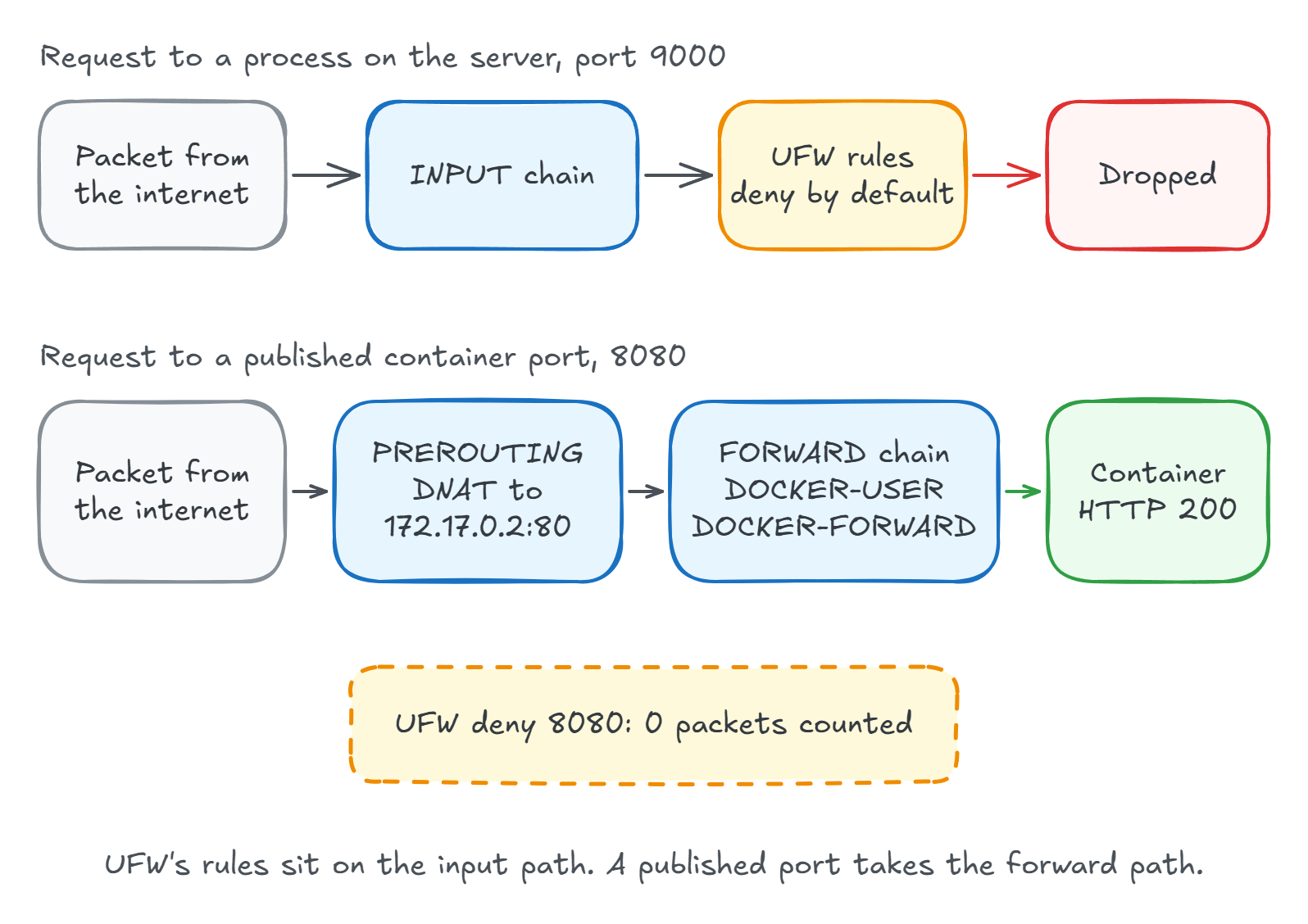
The packet counters show it directly. After the requests above, Docker's DNAT rule had matched and UFW's deny rule hadn't:
sudo iptables -t nat -L DOCKER -n -v | grep 8080
sudo iptables -L ufw-user-input -n -v | grep 8080
    2   120 DNAT       6    --  !docker0 *       0.0.0.0/0            0.0.0.0/0            tcp dpt:8080 to:172.17.0.2:80
    0     0 DROP       6    --  *      *       0.0.0.0/0            0.0.0.0/0            tcp dpt:8080
UFW does have chains on FORWARD, and ufw status verbose reports deny (routed).
That doesn't help either, because Docker's chains run first (trimmed to the chain names):
Chain FORWARD (policy DROP)
DOCKER-USER
DOCKER-FORWARD
ufw-before-logging-forward
ufw-before-forward
ufw-after-forward
Docker's firewall documentation describes the two as incompatible, so this is expected behavior rather than a bug you can wait out.
Which Fix Should You Use?
Use a provider firewall on every server, and don't publish anything that doesn't need to be public. The other two fixes are for cases those can't handle.
| Fix | Result from outside | Best for | Watch out for |
|---|---|---|---|
| Provider firewall | Not part of this test, it runs before the server | Every server | Check that it covers IPv6 and is really attached. Hetzner's does not filter private networks |
| Publish on 127.0.0.1 | Timed out, while the server itself got 200 | Ports only the server needs | Not available for Swarm services |
| Do not publish | Timed out, while another container on the network got 200 | Apps behind a reverse proxy | The proxy and the app need a shared Docker network |
| DOCKER-USER rule | Timed out | Swarm ports and source allow lists | A reboot removes it unless you persist it |
| UFW route rules | Timed out until a route rule allowed it | Keeping all rules in UFW | Rules match the container port, not the published port |
Fix 1: Block It Before It Reaches the Server
A provider firewall drops the packet before it reaches the server, so Docker's rules never see it. This is the fix I'd reach for first, and cloud firewall vs UFW covers the rules to use and how to prove they work.
Fix 2: Publish on Loopback, or Not at All
If only the server needs the port, bind it to loopback:
services:
  web:
    image: nginx:alpine
    ports:
      - '127.0.0.1:8080:80'
docker ps then shows 127.0.0.1:8080->80/tcp.
From outside the request timed out, and from the server it returned 200.
For an app behind a reverse proxy, don't publish it at all.
Put the proxy and the app on a shared Docker network and let the proxy publish 80 and 443.
expose doesn't publish anything: a container started with --expose 80 timed out from outside, and another container on the same network still got 200.
Fix 3: Add a Rule to DOCKER-USER
Docker jumps to DOCKER-USER before its own forwarding rules and leaves that chain's contents alone, so your rules go there.
Match the original port with conntrack:
sudo iptables -I DOCKER-USER -i eth0 -p tcp \
  -m conntrack --ctorigdstport 8080 --ctdir ORIGINAL -j DROP
Replace eth0 with your public interface, which ip route show default reports.
The obvious --dport rule is a trap, because DNAT has already rewritten the port by the time the packet reaches this chain:
| Rule in DOCKER-USER | Request to published port 8080 |
|---|---|
| --ctorigdstport 8080 | Timed out |
| --dport 8080 | HTTP 200, the rule never matches |
| --dport 80 | Timed out, but it matches every container listening on 80 |
To allow one address and block the rest, invert the source:
sudo iptables -I DOCKER-USER -i eth0 -p tcp ! -s 203.0.113.10 \
  -m conntrack --ctorigdstport 8080 --ctdir ORIGINAL -j DROP
The rule survived systemctl restart docker.
A reboot removed it, so persist it with a systemd unit that runs after Docker, or use the next fix.
Fix 4: Make UFW Route Rules Apply
You can keep managing everything in UFW by sending DOCKER-USER traffic through UFW's forward rules.
Append this to /etc/ufw/after.rules, with your public interface in place of eth0:
# BEGIN DOCKER
*filter
:ufw-user-forward - [0:0]
:DOCKER-USER - [0:0]
-A DOCKER-USER -m conntrack --ctstate RELATED,ESTABLISHED -j RETURN
-A DOCKER-USER -i eth0 -j ufw-user-forward
-A DOCKER-USER -i eth0 -m conntrack --ctstate NEW -j DROP
-A DOCKER-USER -j RETURN
COMMIT
# END DOCKER
Run sudo ufw reload.
Every published port now drops new connections until a route rule allows it, including your reverse proxy, so add its rules at the same time.
Route rules see the packet after DNAT, so they match the container's port:
# Does nothing for a container published as 8080:80
sudo ufw route allow proto tcp from any to any port 8080

# Works, and limits it to one source
sudo ufw route allow proto tcp from 203.0.113.10 to any port 80
That has a side effect.
My rule for port 80 also opened a second nginx container published on a different host port, because both listen on 80 inside.
Containers kept their outbound access, three reloads left the chain at four rules, and the setup survived a reboot.
This block has two costs.
The :DOCKER-USER line makes every ufw reload rebuild that chain, which removed a Fix 3 rule and a Fail2ban jail's jump in my tests.
A banned client got 200 again until I restarted Fail2ban.
Removing it takes one more step than you'd expect.
After I deleted the block and ran sudo ufw reload, the old rules stayed in the chain and published ports kept timing out.
sudo iptables -F DOCKER-USER cleared them.
The block above is a minimal version that I tested with IPv4. ufw-docker is a fuller, widely used implementation of the same idea.
What About Docker Swarm and Dokploy?
Swarm has the same problem, and loopback isn't an option because its publish syntax has no host IP field. I published one service through the ingress mesh and one in host mode. Both answered with no UFW rule:
docker service create -d --name sw-ingress --publish published=8082,target=80 nginx:alpine
docker service create -d --name sw-host --publish published=8083,target=80,mode=host nginx:alpine
swarm ingress 8082: 200
swarm host mode 8083: 200
The --ctorigdstport rule from Fix 3 blocked both.
This matters if you run Dokploy.
Its installer publishes the panel with published=3000,target=3000,mode=host, publishes Traefik on 80 and 443, and doesn't configure a firewall.
So the panel is reachable on 3000 until you block it upstream, whatever UFW says.
Does Docker Bypass UFW on IPv6?
It depends on whether the Docker network has IPv6 enabled.
| Setup | Request over IPv6 | What happened |
|---|---|---|
| Default bridge, no UFW rule | Timed out | docker-proxy listens on the host, so the packet takes the input path and UFW applies |
| Default bridge, ufw allow 8080 | HTTP 200 | Proves IPv6 reached the server in the row above |
| IPv6-enabled network, no UFW rule | HTTP 200 | Docker adds DNAT in ip6tables, so the bypass is back |
| IPv6-enabled network, DOCKER-USER rule in iptables | HTTP 200 | iptables only covers IPv4 |
| IPv6-enabled network, same rule in ip6tables | Timed out | Each address family needs its own rule |
If your server has a public IPv6 address, scan it separately with nmap -6.
Should You Turn Off Docker's iptables Rules?
No.
Setting "iptables": false looks like the clean fix, but Docker's documentation says it isn't appropriate for most users and is likely to break container networking.
You would also take on writing the replacement rules yourself.
How Do You Check Your Own Server?
List what Docker publishes, and treat anything on 0.0.0.0 or [::] as public until a firewall says otherwise:
docker ps --format '{{.Names}}\t{{.Ports}}'
web 0.0.0.0:8080->80/tcp, [::]:8080->80/tcp
On a Swarm node, also run docker service ls.
docker ps listed my ingress service only as 80/tcp, while docker service ls showed *:8082->80/tcp.
Then scan every port from outside the server, since that's the only view that counts:
nmap -Pn -p- your-server-ip
Only your reverse proxy ports and your admin path should show open.
Summary
Docker's published ports don't pass through UFW's rules, and ufw status won't tell you that.
A provider firewall is the simplest answer, because it filters before Docker's rules run.
On the server itself, bind internal services to loopback, keep apps unpublished behind a reverse proxy, and use DOCKER-USER with --ctorigdstport when you need a rule for a port you must publish.
This is one item on my Ubuntu server hardening checklist, and my self-hosting course configures a cloud firewall when it provisions the server.
Thanks for reading.
And stay awesome!
Frequently Asked Questions
Does Docker bypass UFW?
Yes, for published ports. Docker rewrites the destination of incoming packets to the container address, so they take the forward path and never reach the input chain where UFW keeps its rules. In testing, a container on port 8080 still returned HTTP 200 with an explicit ufw deny rule in place.
How do I stop Docker from bypassing UFW?
Block the port at your provider firewall, publish it on 127.0.0.1, or leave it unpublished behind a reverse proxy. If you need the rule on the server, add it to the DOCKER-USER chain or make UFW route rules apply to Docker through after.rules.
Does binding a container port to 127.0.0.1 fix the UFW problem?
Yes. A port published as 127.0.0.1:8080:80 timed out from outside the server and still answered from the server itself. Swarm services cannot do this, because their publish syntax has no host IP option.
Should I disable iptables in Docker to make UFW work?
No. Docker says this is not appropriate for most users and is likely to break container networking, including outbound access. Use a provider firewall or the DOCKER-USER chain instead.
Does Docker bypass UFW on IPv6?
It depends on the network. On the default bridge, IPv6 traffic went through the input path and UFW blocked it. On a Docker network with IPv6 enabled, the published port answered over IPv6 with no UFW rule, and a DOCKER-USER rule added with iptables did not cover it. It needed a matching ip6tables rule.
Does a Dokploy server have this problem?
Yes. The Dokploy installer publishes its panel on port 3000 in Swarm host mode and does not configure a firewall. In testing, a port published that way answered from outside with no UFW rule. Block port 3000 at your provider firewall and reach the panel through a tunnel or VPN.
