
Headscale lets you run Tailscale's control server on your own VPS with the official clients, and Headplane adds a web UI. In my tests, running machines kept their tunnels on Tailscale's default relays when Headscale went down, and new machines couldn't join. A machine that restarted dropped off the tailnet unless I granted a cache that Tailscale still labels a trial.
I tested Headscale 0.29.7, Caddy 2.11.8 and Tailscale 1.104 clients with the VPS and four machines (app, db, worker and laptop) running as containers on separate Docker networks.
Certificates came from Caddy's internal CA and names from /etc/hosts, so real DNS, Let's Encrypt and real NAT traversal were not part of the test.
I also didn't run a provider reboot or any macOS, Windows or mobile client.
What Happens When Headscale Goes Down?
In the system design behind my new SaaS I wrote that Katabench runs on Headscale with Headplane, and that "If Headscale goes down, existing tunnels keep working, but new machines can't join". It holds while machines stay up, and a restart during an outage is the part it leaves out.
Five cases with the control server stopped:
| During the outage | What happened | How it was tested |
|---|---|---|
| Machines stay up, default Tailscale relays | Direct and relayed pairs kept working, along with policy, MagicDNS and two held sessions | One 15 minute outage, probes at 1, 5 and 15 minutes |
| Machines stay up, embedded relay only | Direct pairs kept working. The relayed pair was dead at the first probe, and a held SSH session stalled until Headscale returned | One outage, probes at 1 and 5 minutes |
| A machine restarts, no cache granted | It lost its address and peers and stayed off the tailnet until the server returned | 3 runs, one a full systemd container restart, still off after 95 to 98 s |
| A machine restarts, cache-network-maps granted | It kept its address, its peers and the policy | 3 runs, each outage under 3 minutes |
| A brand new machine joins | It failed at fetch control key, before the key was checked | During the same outage, after the 15 minute probe |
With the server up, the same restarts (systemctl restart tailscaled on app, a container restart on worker) came back within seconds, so the outage is the cause.
During the outage, tailscale status on a restarted machine prints You are logged out, with or without the cache below, but no machine needed a new key afterwards.
If SSH to a server is reachable only over the tailnet, I'd expect a reboot during an outage to take SSH with it, because a restarted client lost its address and peers. So keep public SSH or your provider's console working.
Tailscale's page on coordination server outages says keys can't be refreshed, so devices gradually lose access to each other. I didn't run anything longer than 15 minutes. When Headscale came back, all four nodes showed online within 6 to 43 s.
How Do You Keep a Restarted Machine on the Tailnet?
Grant cache-network-maps in the policy, as the setup below does.
With the VPS stopped, I restarted app, worker and laptop, and in 3 of 3 runs they kept working (trimmed):
[17:01:56] restart app, worker, laptop
laptop -> 100.64.0.1:22 ok after 0 s
app Running 100.64.0.1 online= False cap= True peers= 3
Running is the backend state from tailscale status --json, while the plain tailscale status still prints the logged out message.
Tailscale's docs, as of November 6, 2026, describe this as opt-in during a trial for clients 1.104 and later, and as "not intended for long-term operation". Tailscale doesn't guarantee communication from cached state or support mobile clients and ephemeral nodes. Peers that joined after the cache was written stay unreachable until it updates. An expired node key still blocks everything.
Tailscale's page doesn't mention Headscale, and Headscale's policy docs for 0.29.7 don't name this attribute. So my runs are the only evidence I have that the two work together, and my longest run here was under 3 minutes.
I'd grant it, and I'd also keep public SSH or a provider console, because this is a trial.
Should You Run Headscale Instead of Tailscale?
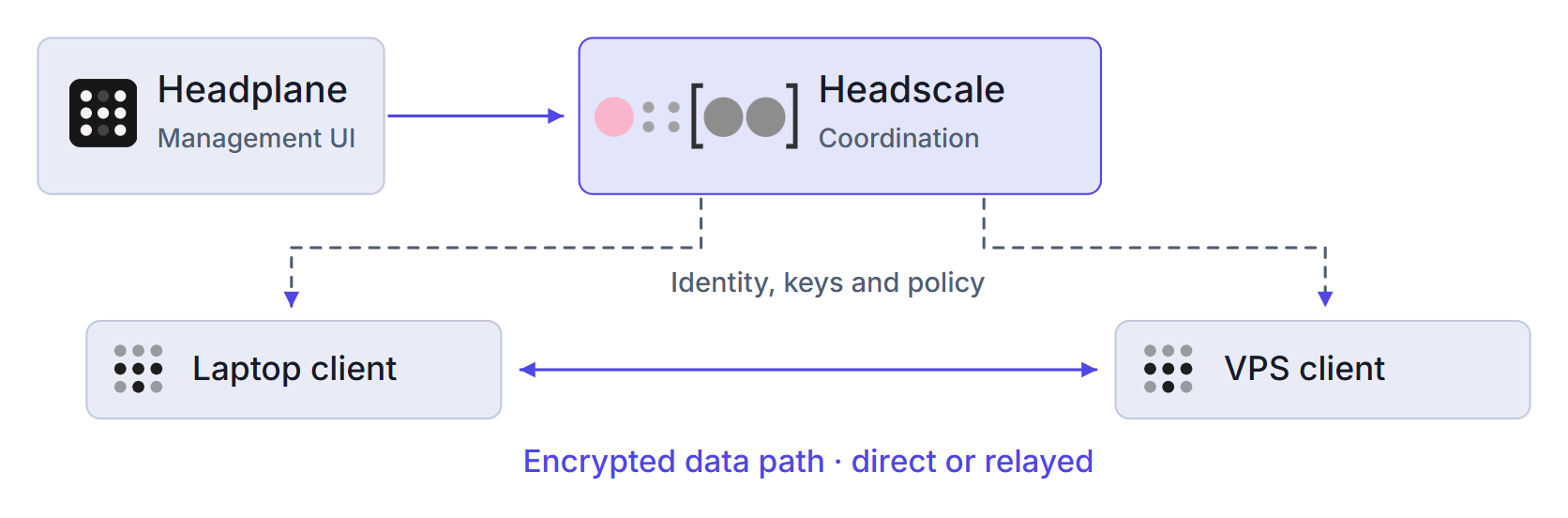
Headscale replaces one piece of Tailscale, the coordination server, and your application traffic doesn't pass through it:
The alternative is Tailscale's hosted service. On November 6, 2026, Tailscale's pricing page listed the free Personal plan at up to 6 users, unlimited user devices, 50 tagged resources, 3 ACL groups and 1,000 ephemeral minutes a month, for non-commercial use only.
If your setup is personal or non-commercial and fits those limits, you have no license or cost reason to run Headscale, and the hosted route is less work. For a small commercial team, compare the Standard plan at $8 per user per month with the VPS and the failure handling in this guide. Read Tailscale's terms too, because commercial use is their call.
You also give up some features. Headscale's feature list for 0.29.7 marks Funnel, Serve, network flow logs and OIDC groups in ACLs as unsupported.
How Do You Set Up Headscale With Docker Compose?
Run this on the VPS as root, with Docker and the Compose plugin installed.
First create an A record to the VPS for <HEADSCALE_HOST>, such as headscale.example.com.
Open 80 and 443 in your provider's firewall and not in UFW, because published Docker ports go around UFW.
I put this guide's Compose file, policy and Caddyfile, plus the Headplane override and config template and the backup script from the guides linked below, in a runnable sample.
Its verify.mjs reruns the policy and outage tests and needs Node.js 22+, Docker with NET_ADMIN, NET_RAW and /dev/net/tun, and outbound HTTPS.
If you copy the sample to a server, leave out compose.override.yaml and headplane/ unless you follow the Headplane guide.
Check the ports first.
3000 and the headplane name below are for the optional Headplane UI.
Nothing should print:
ss -ltnH '( sport = :80 or sport = :443 or sport = :3000 )'
The stack also fixes its container names and its Docker network, so check those too. Again, nothing should print:
docker ps -a --format '{{.Names}}' | grep -E '^(headscale|caddy|headplane)$'
docker network inspect $(docker network ls -q) --format '{{.Name}} {{range .IPAM.Config}}{{.Subnet}} {{end}}' | grep ' 172\.30\.'
ip route | grep '^172\.30\.'
The last two commands catch overlapping ranges.
An overlapping Docker network stopped docker compose up with an error.
A dummy interface standing in for a private network on 172.30.0.0/16 gave no error, and the route to 172.30.0.50 moved to the Compose bridge.
If the range is taken, change it in compose.yaml and in the trusted_proxies edit below.
This stack can't run beside Dokploy as printed, because Dokploy's docs need 80, 443 and 3000 free at install.
This stack publishes 80 and 443, and only Headplane adds 3000.
I didn't test it beside Dokploy or behind Traefik.
A separate small VPS avoids the conflict.
Download and edit the example config:
mkdir -p /opt/headscale/config /opt/headscale/data /opt/headscale/caddy
chmod 700 /opt/headscale
cd /opt/headscale

curl -fsSL -o config/config.yaml \
  https://raw.githubusercontent.com/juanfont/headscale/v0.29.7/config-example.yaml

sed -i \
  -e "s|^server_url: .*|server_url: https://<HEADSCALE_HOST>|" \
  -e "s|^listen_addr: .*|listen_addr: 0.0.0.0:8080|" \
  -e "s|^trusted_proxies: .*|trusted_proxies:\n  - 172.30.0.0/24|" \
  -e "s|^  base_domain: .*|  base_domain: <TAILNET_DOMAIN>|" \
  -e 's|^  path: ""|  path: /etc/headscale/policy.hujson|' \
  config/config.yaml
The chmod is there because Headscale created db.sqlite with mode 644.
<TAILNET_DOMAIN> is the MagicDNS suffix, such as ts.example.com.
Leaving the example's example.com gave server_url cannot be part of base_domain.
compose.yaml:
services:
  headscale:
    image: docker.io/headscale/headscale:0.29.7
    container_name: headscale
    restart: always
    read_only: true
    tmpfs:
      - /var/run/headscale
    volumes:
      - ./config:/etc/headscale:ro
      - ./data:/var/lib/headscale
    command: serve
    healthcheck:
      test: ["CMD", "headscale", "health"]

  caddy:
    image: caddy:2.11.8
    container_name: caddy
    restart: unless-stopped
    ports:
      - "80:80"
      - "443:443"
    volumes:
      - ./caddy/Caddyfile:/etc/caddy/Caddyfile:ro
      - caddy_data:/data
      - caddy_config:/config

volumes:
  caddy_data:
  caddy_config:

networks:
  default:
    ipam:
      config:
        - subnet: 172.30.0.0/24
caddy/Caddyfile:
<HEADSCALE_HOST> {
	reverse_proxy headscale:8080
}
My test added tls internal here, and a real server leaves that out.
config/policy.hujson:
{
  "groups": {
    "group:admins": ["admin@"]
  },
  "tagOwners": {
    "tag:app": ["group:admins"],
    "tag:db": ["group:admins"],
    "tag:worker": ["group:admins"]
  },
  "nodeAttrs": [
    { "target": ["autogroup:member", "autogroup:tagged"], "attr": ["cache-network-maps"] }
  ],
  "grants": [
    { "src": ["group:admins"], "dst": ["tag:app", "tag:db", "tag:worker"], "ip": ["tcp:22"] },
    { "src": ["tag:app"], "dst": ["tag:db"], "ip": ["tcp:5432"] },
    { "src": ["tag:worker"], "dst": ["tag:app"], "ip": ["tcp:4222"] }
  ]
}
This lets admins SSH to every tagged machine, app reach db on 5432, and worker reach app on 4222.
With no policy loaded, every machine can reach every port on every other machine, and with this policy the worker couldn't see the database at all.
My access policy guide has the probes, policy tests, and how a failing test is rejected on reload but applied on restart.
Start it, create the user, and load the policy:
docker compose up -d
docker compose ps
docker exec headscale headscale users create admin
docker exec headscale headscale users list
docker exec headscale headscale policy check --file /etc/headscale/policy.hujson
PID=$(docker inspect --format '{{.State.Pid}}' headscale); [ "$PID" -gt 0 ] && kill -HUP "$PID" || echo "Headscale is not running, nothing reloaded"
curl -fsS https://<HEADSCALE_HOST>/health
The last line should print {"status":"pass"}.
On a real server this is the first request that needs a public certificate, which I didn't test.
If it fails, wait a minute and read docker logs caddy.
Reload with kill -HUP on the PID, because Docker counts any docker kill as a manual stop.
After docker kill -s HUP headscale, a stop and start of the VPS container left Headscale down under restart: unless-stopped.
That wasn't a provider reboot.
Docker's engine makes that decision, though, so a real host should behave the same.
The check in the reload line matters, because a stopped container reports PID 0, and kill -HUP 0 ended my shell.
The Compose file also sets restart: always as a second guard.
The cost: a deliberate docker compose stop doesn't survive a reboot.
/version tells anyone on 443 your exact release, so patch promptly.
To upgrade, read the release notes, stop Headscale, run the backup script, change the image tag, compare the config, and start it.
Headscale's upgrade page requires each minor version in turn.
I didn't test an upgrade.
Back up the database with SQLite's .backup and the noise key, data/noise_private.key, which Headscale uses in the Noise handshake with each client.
With Headscale running, a cp of db.sqlite alone missed a row still in the write-ahead log.
My backup and restore guide has the script, and its one restore at a new address brought all 4 nodes back with no client touched.
Headplane doesn't need the Docker socket, and through a read-only mount a container still wrote a root-owned file on the host. My Headplane guide runs it in limited mode (agent and Docker integration off) through an SSH tunnel, which is my judgment, because Headplane's docs call limited mode not recommended for production.
Why Does tailscale up Time Out With Headscale?
I forced two failures, and both printed the same message on the client.
The reason was in the tailscaled log.
On Ubuntu, journalctl -u tailscaled --since "-200s" --no-pager shows it.
A client that doesn't trust the certificate (trimmed):
timeout waiting for Tailscale service to enter a Running state; check health with "tailscale status"
2026/11/05 14:38:55 Received error: fetch control key: Get "https://headscale.lab.test/key?v=148": x509: certificate signed by unknown authority
An nginx proxy with a plain proxy_pass drops the upgrade headers.
The client's log showed register request failing with 500 Internal Server Error, while these checks passed (trimmed):
GET /health -> HTTP 200
GET /key?v=148 -> HTTP 200
/health and /key succeed behind that proxy, so they don't prove it works.
This request does:
curl -sS -i -m 6 --http1.1 -X POST -H 'Connection: upgrade' -H 'Upgrade: tailscale-control-protocol' https://<HEADSCALE_HOST>/ts2021
It returned 400 when the upgrade reached Headscale and 500 when it didn't.
Caddy with no special config and nginx with the config from Headscale's docs both worked.
Headscale's reverse proxy page says Cloudflare's proxy and tunnel won't work in front of it. That implies a DNS-only record, and I didn't test that.
How Do You Join Machines and Stop Them Expiring?
Create one single-use key per machine on the VPS, each lasting 1 hour here:
docker exec headscale headscale preauthkeys create --tags tag:app --expiration 1h
docker exec headscale headscale preauthkeys create --tags tag:db --expiration 1h
docker exec headscale headscale preauthkeys create --tags tag:worker --expiration 1h
docker exec headscale headscale preauthkeys create --user <HEADSCALE_USER_ID> --expiration 1h
<HEADSCALE_USER_ID> is the number from headscale users list.
Then, on each machine:
curl -fsSL https://tailscale.com/install.sh | sh
sudo tailscale up --login-server=https://<HEADSCALE_HOST> --authkey=<AUTHKEY> --hostname=app
Repeat with --hostname=db, --hostname=worker and, with the user key, --hostname=laptop.
Use each key soon, because it stays in your shell history and works until it expires or is spent.
I ran the install script on app only.
The tag comes from the key, because Headscale refuses --advertise-tags with a user key.
For a Windows or macOS laptop, Headscale serves setup pages at https://<HEADSCALE_HOST>/windows and /apple, which I didn't follow.
A machine already on another control server refuses this with an error.
Run sudo tailscale logout on it first, from public SSH or your provider's console, because logout cuts any session over the tailnet.
I ran that only against a Headscale server at the same name with an empty database.
Addresses there follow join order, so the machine can get a different one.
Joining also takes over the machine's DNS, because the shipped config sets override_local_dns: true with 1.1.1.1 and 1.0.0.1.
If a server depends on private names, check resolution after it joins.
I didn't test that.
sudo tailscale set --accept-dns=false gave my lab node its own DNS back, and MagicDNS names then stopped resolving on it.
Check the result and the cache attribute:
# On the VPS
docker exec headscale headscale nodes list
# On a joined machine, with jq installed
tailscale status
tailscale ping app
tailscale status --json | jq '.Self.CapMap|has("cache-network-maps")'
Nothing expires a node by default, because node.expiry is 0.
With an expiry set, tagged nodes stayed exempt in my 2 minute test and personal nodes didn't, so tag your servers.
docker exec headscale headscale nodes expire -i <NODE_ID> --disable exempts a personal node, with <NODE_ID> from headscale nodes list.
The client's clock decides expiry, and an expired node logs itself out. So a personal node on a server can lock you out during an outage. A new key brought back the same record and IP.
Should You Turn On the Embedded DERP Relay?
I'd leave it off on one VPS, because the relay then dies with Headscale.
A default install relays through Tailscale's servers: the embedded relay is enabled: false, and my client received 28 Tailscale regions.
Traffic goes direct when it can and through a relay when it can't:
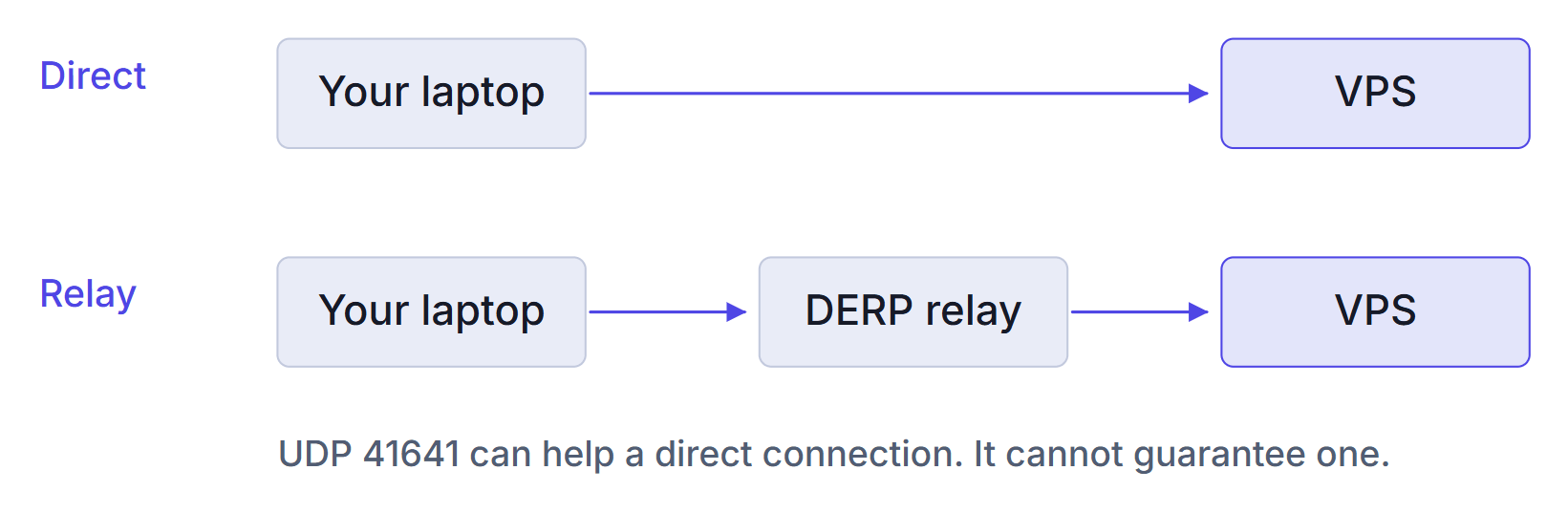
My containers sat behind Docker NAT, so laptop -> worker relayed through DERP(fra).
This test can't show how often a real VPS goes direct.
Tailscale's DERP page says a relay forwards already-encrypted traffic and can't decrypt it.
The shipped config also needs Tailscale's relay map at startup.
With controlplane.tailscale.com blocked, a running server carried on, and a restart crash-looped with getting DERPMap: Get "https://controlplane.tailscale.com/derpmap/default".
The embedded relay alone didn't fix that.
Emptying derp.urls leaves nothing to fetch, though I didn't run that case blocked.
I didn't test a relay on a second box.
If you enable it, it needs 3478/udp.
The example's placeholder ipv4 and ipv6 values send clients to documentation addresses, and tailscale debug derp headscale shows them.
Summary
A stopped Headscale left running machines working on Tailscale's default relays for the 15 minutes I watched.
A machine that restarted lost the tailnet until I granted cache-network-maps, which Tailscale calls a trial.
So keep public SSH or a provider console, and tag your servers.
On one VPS, I'd leave the embedded relay off, because the relay then dies with Headscale.
Reload with kill -HUP on the PID, and keep restart: always.
My guides to the access policy, Headplane and backups cover the rest.
The checks around this are in my VPS deployment checklist and Ubuntu server hardening checklist, and my self-hosting course sets up private administration over Tailscale on a real server.
Thanks for reading.
And stay awesome!
Frequently Asked Questions
What happens when Headscale goes down?
With the default Tailscale relays, machines that stay up keep their tunnels, and new machines cannot join. Direct and relayed pairs still worked after 15 minutes in my test. With only the embedded relay, relayed pairs died with it. A machine that restarts during the outage drops off the tailnet until Headscale returns, unless you grant a network map cache that Tailscale labels a trial.
Can I put Headscale behind Cloudflare?
The Headscale docs say the Cloudflare proxy and tunnel will not work in front of it, which implies a DNS-only record. I did not test this. A plain nginx proxy that dropped the upgrade headers failed with a timeout in my test.
Does Headscale use Tailscale DERP relays by default?
Yes. The embedded relay is off in the shipped config, and my client received 28 Tailscale regions. With that config, Headscale also refuses to start if it cannot fetch the relay map from Tailscale.
Why does tailscale up time out with Headscale?
The client prints the same timeout for different failures, so read the tailscaled log. In my tests an untrusted certificate showed an x509 error there, and an nginx proxy that dropped the upgrade headers showed a register request failing with 500.
Do Headscale nodes expire by default?
No, because node.expiry is 0. With an expiry set, tagged nodes stayed exempt in my 2 minute test and personal nodes did not, so tag your servers.
