
You can run Claude Code unattended on a VPS by putting it in a Docker dev container with a default-deny firewall, where it works without permission prompts. It only sees the repo you mount into it, and its web traffic only reaches the hosts you allow. Remote Control lets you send it tasks from your phone.
Where do you run Claude Code today? For most of us, it's the laptop that also holds our SSH keys, cloud credentials, and every repo we can push to. I think that's the wrong place for an agent, especially on commercial work.
I also want to give Claude a task, close my laptop, and check on it from my phone. So I gave it its own VPS.
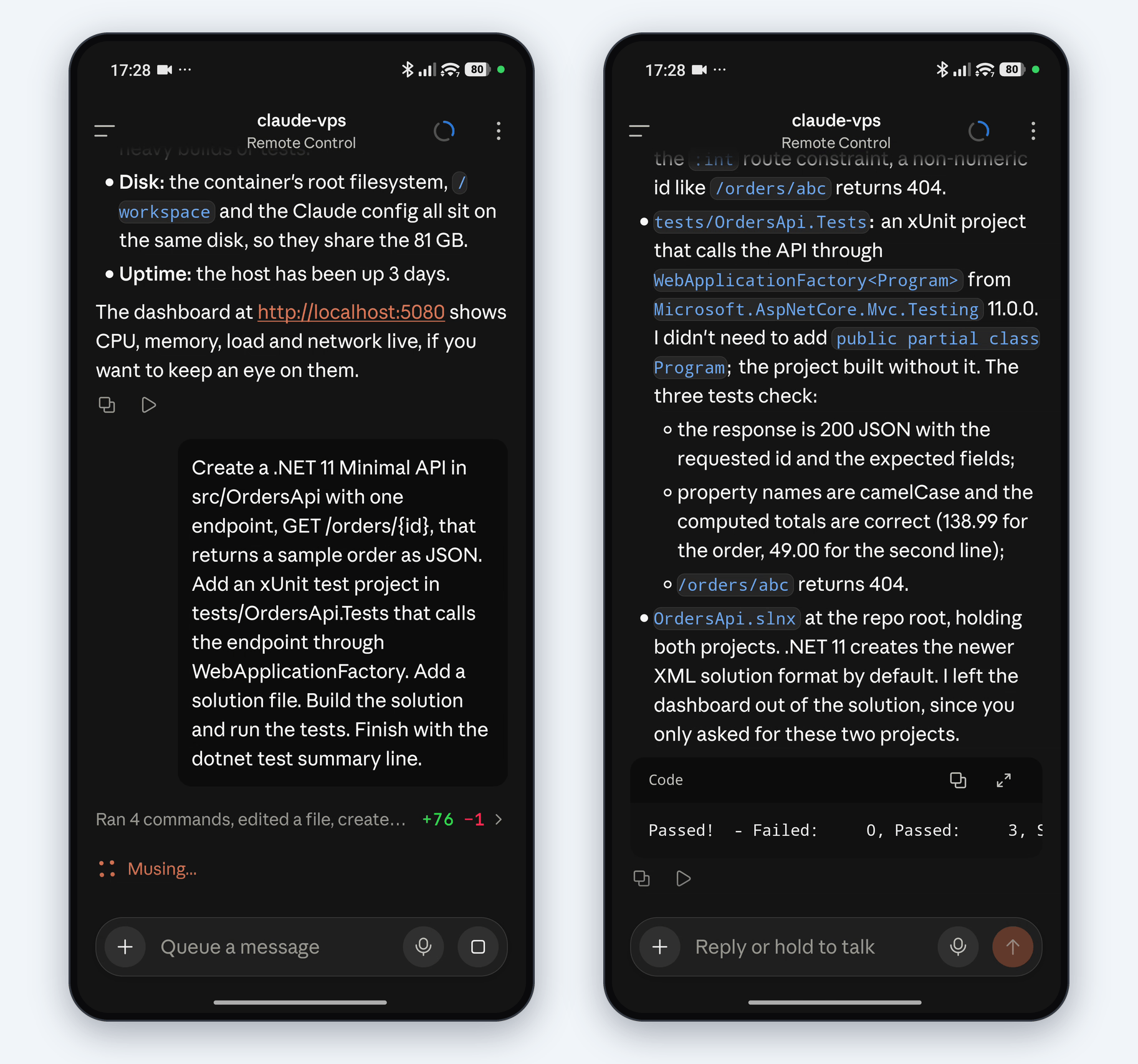
From my phone, I asked it to build a live dashboard of that server. In under three minutes, the dashboard was running.
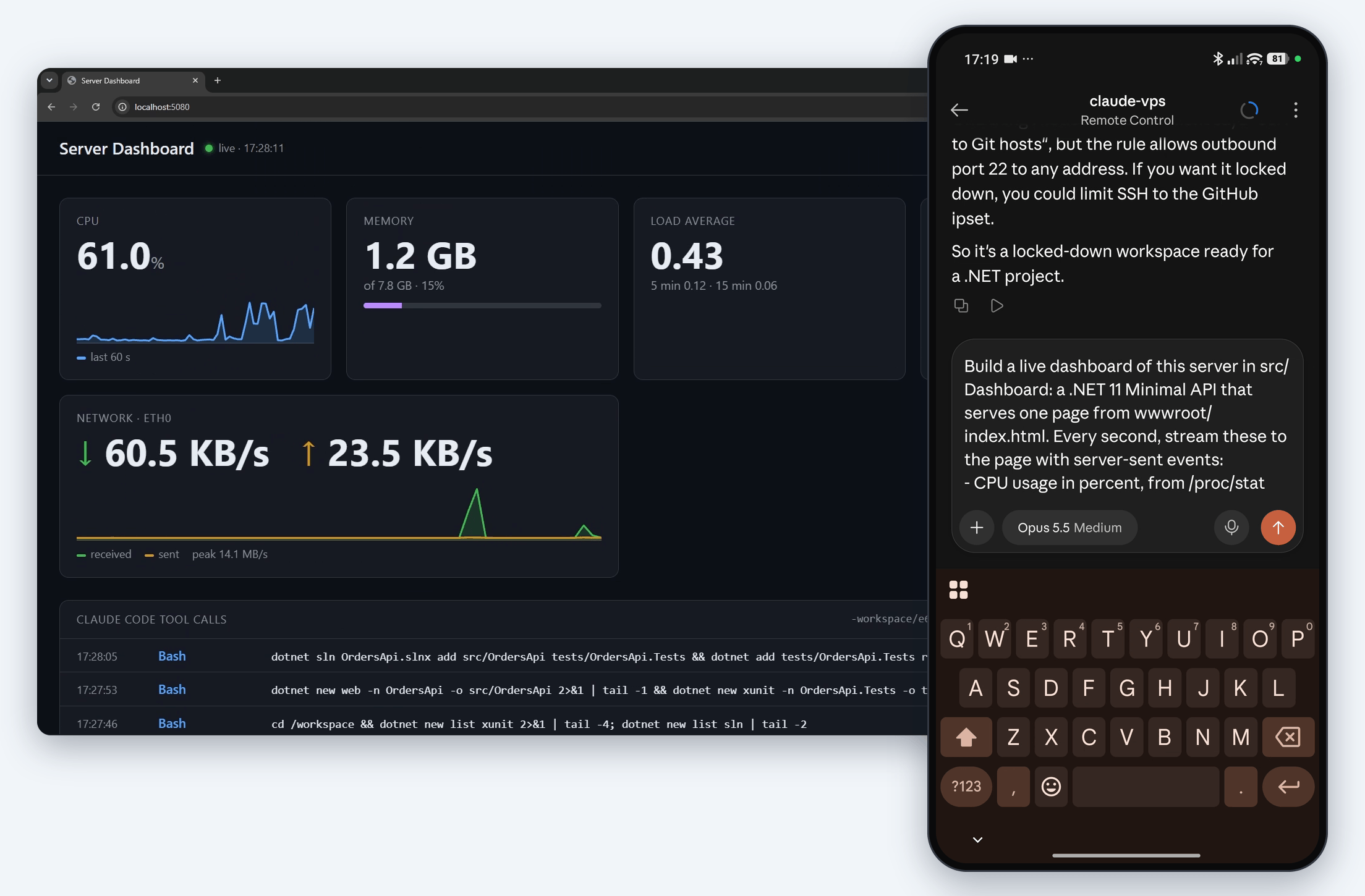
Claude never stopped to ask for permission, because I turned the prompts off. I only do that because it runs in a locked-down Docker container.
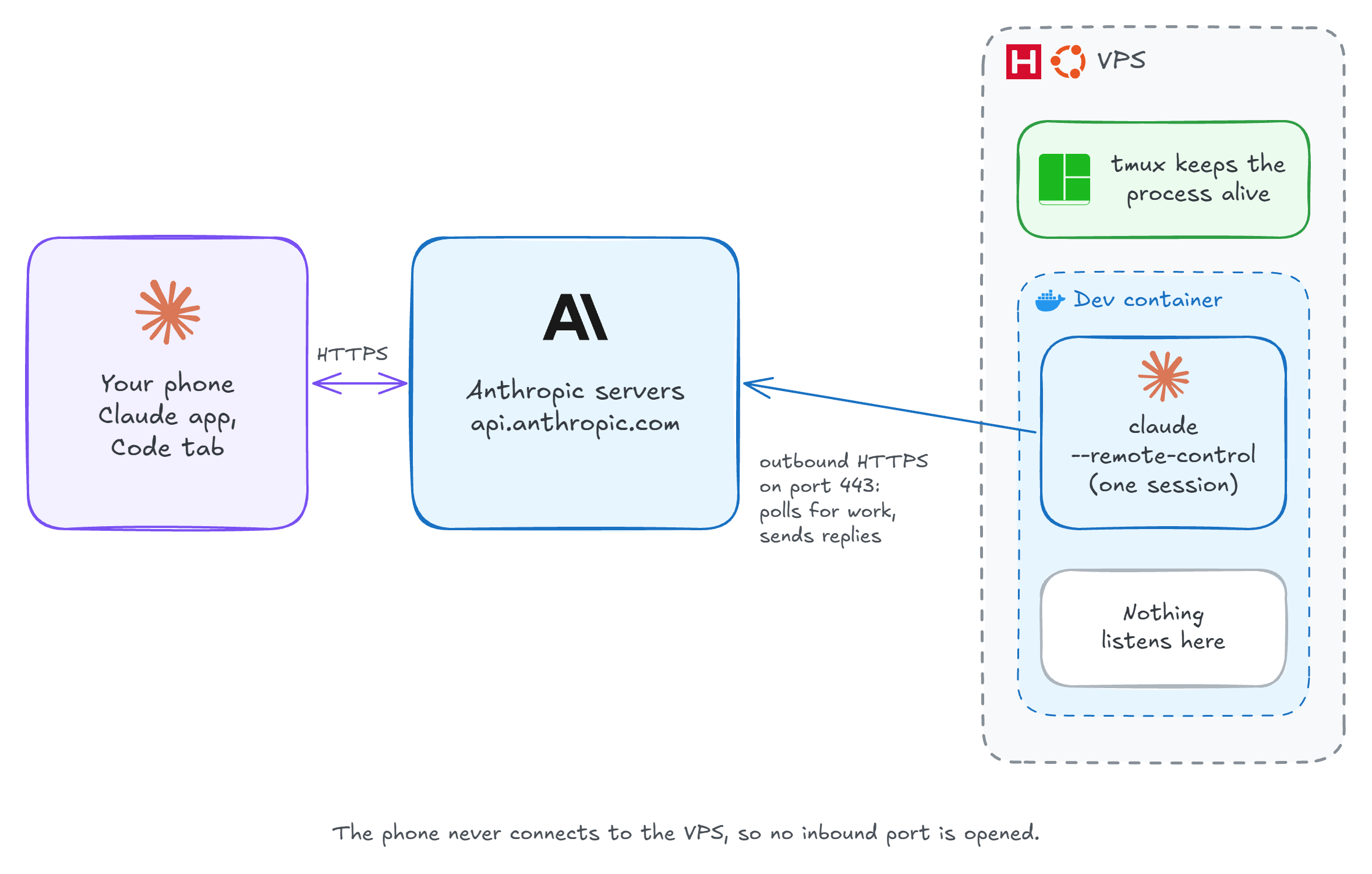
My phone doesn't connect to the server. Both of them talk to Anthropic's servers:
If you'd rather watch, I walk through the setup in Stop Running Claude Code on Your Laptop.
Step 1: Prepare the Server
You need an Ubuntu VPS and a non-root user that logs in with an SSH key. I use Hetzner with Ubuntu 24.04, and my Ubuntu hardening guide covers the user setup.
Claude Code's system requirements ask for at least 4 GB of RAM, but that's for Claude Code alone.
The app it builds runs on the same server, and dotnet build, the tests, and a database all compete for memory and CPU, so give it more if you can.
Install Docker with Docker's apt steps.
Then add your user to the docker group and install the Dev Containers CLI, which runs dev containers without VS Code:
sudo usermod -aG docker $USER

# The CLI requires Node 20 or later, and Ubuntu 24.04's package is Node 18
curl -fsSL https://deb.nodesource.com/setup_26.x | sudo bash -
sudo apt-get install -y nodejs
sudo npm install -g @devcontainers/cli
Log out and back in, so your shell picks up the docker group.
Anyone in that group can get root on the host, so keep this user to yourself.
Step 2: Add the Dev Container
A dev container is a Docker container you develop in, described by a .devcontainer folder in your repo.
Mine has three files, based on Anthropic's reference container and changed for .NET 11.
You can download all three.
The settings that matter are in devcontainer.json:
{
  "name": "claude-sandbox",
  "build": { "dockerfile": "Dockerfile" },
  "runArgs": ["--cap-add=NET_ADMIN", "--cap-add=NET_RAW"],
  "remoteUser": "claude",
  "mounts": [
    "source=claude-config-${devcontainerId},target=/home/claude/.claude,type=volume",
    "source=${localWorkspaceFolder}/.devcontainer,target=/workspace/.devcontainer,type=bind,readonly"
  ],
  "containerEnv": {
    "CLAUDE_CONFIG_DIR": "/home/claude/.claude",
    "DISABLE_AUTOUPDATER": "1"
  },
  "workspaceMount": "source=${localWorkspaceFolder},target=/workspace,type=bind",
  "workspaceFolder": "/workspace",
  "postStartCommand": "sudo /usr/local/bin/init-firewall.sh",
  "waitFor": "postStartCommand"
}
Claude runs as a non-root claude user, because it refuses to skip permissions as root.
The two --cap-add flags let the container set up its own firewall, and postStartCommand runs the firewall script on every start.
The volume keeps your Claude login across rebuilds, and the read-only mount stops the agent from editing its own sandbox.
The Dockerfile installs Claude Code in the image, so the only Claude on the VPS is the one in the container.
Clone your repo on the server, copy the .devcontainer folder into its root, and start the container:
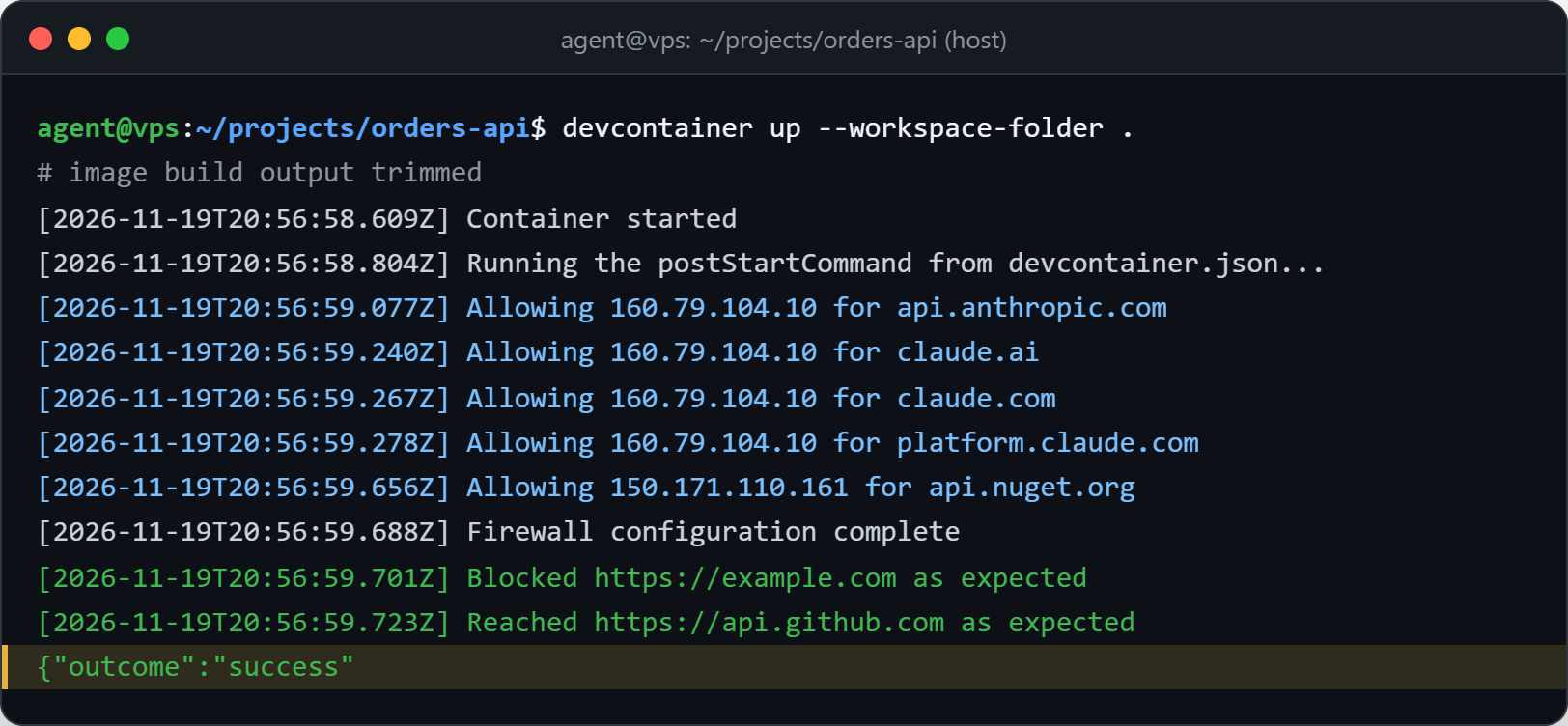
devcontainer up --workspace-folder .
The firewall blocks outbound web traffic except a short list of hosts.
Then it checks that example.com fails and GitHub works.
Step 3: Log In Once
Start Claude inside the container and pick Claude account with subscription:
devcontainer exec --workspace-folder . claude
There's no browser on the server, so Claude prints a login URL. Open it on your laptop, click Authorize, and paste the code it gives you back into the terminal:
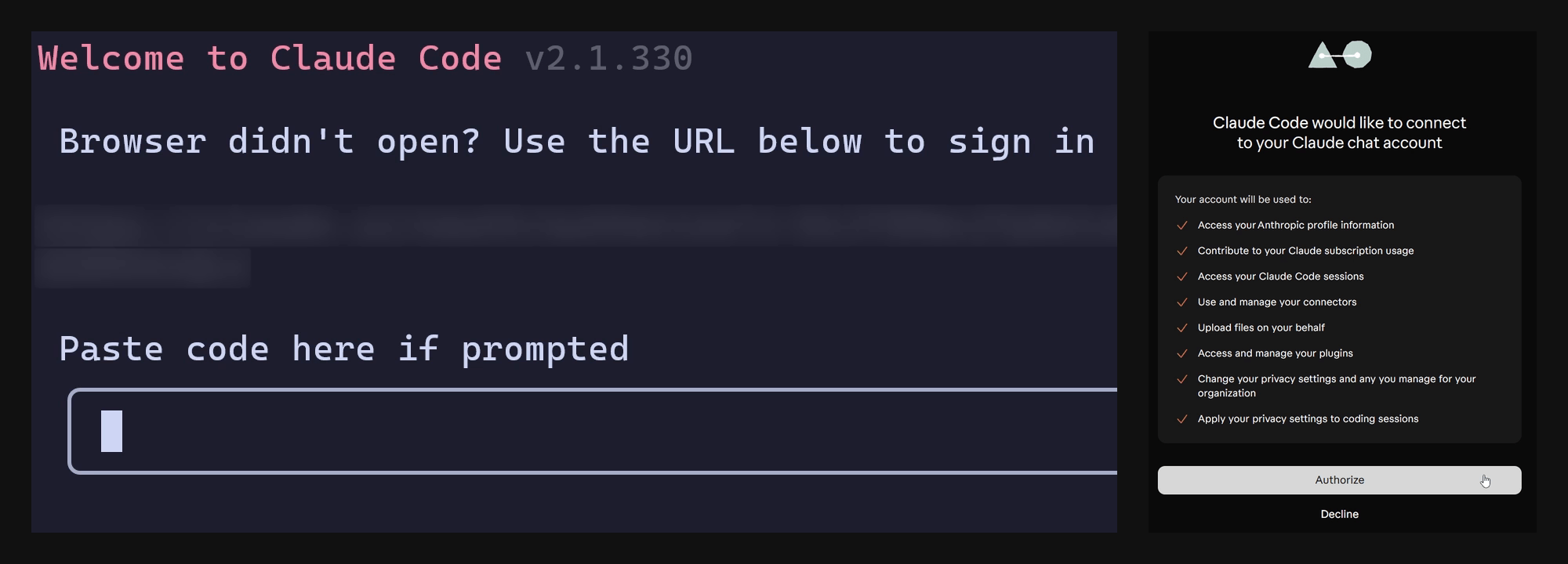
Claude saves the login in the volume, so you only do this once.
Type /exit once Claude starts, because a session started this way ends when you close SSH.
Step 4: Start Remote Control in tmux
Remote Control connects a Claude Code session on your server to the Claude app on your phone. It needs the subscription login from Step 3, not an API key.
Someone told me this gets your account banned. I found no rule against it, and the Remote Control docs cover exactly this setup. Use the unmodified Claude Code with your own account.
Start the session inside tmux, so it keeps running after you close SSH:
tmux new -s claude 'devcontainer exec --workspace-folder . \
  claude --remote-control claude-vps --permission-mode bypassPermissions'
Accept Remote Control and the bypass mode warning if it asks:
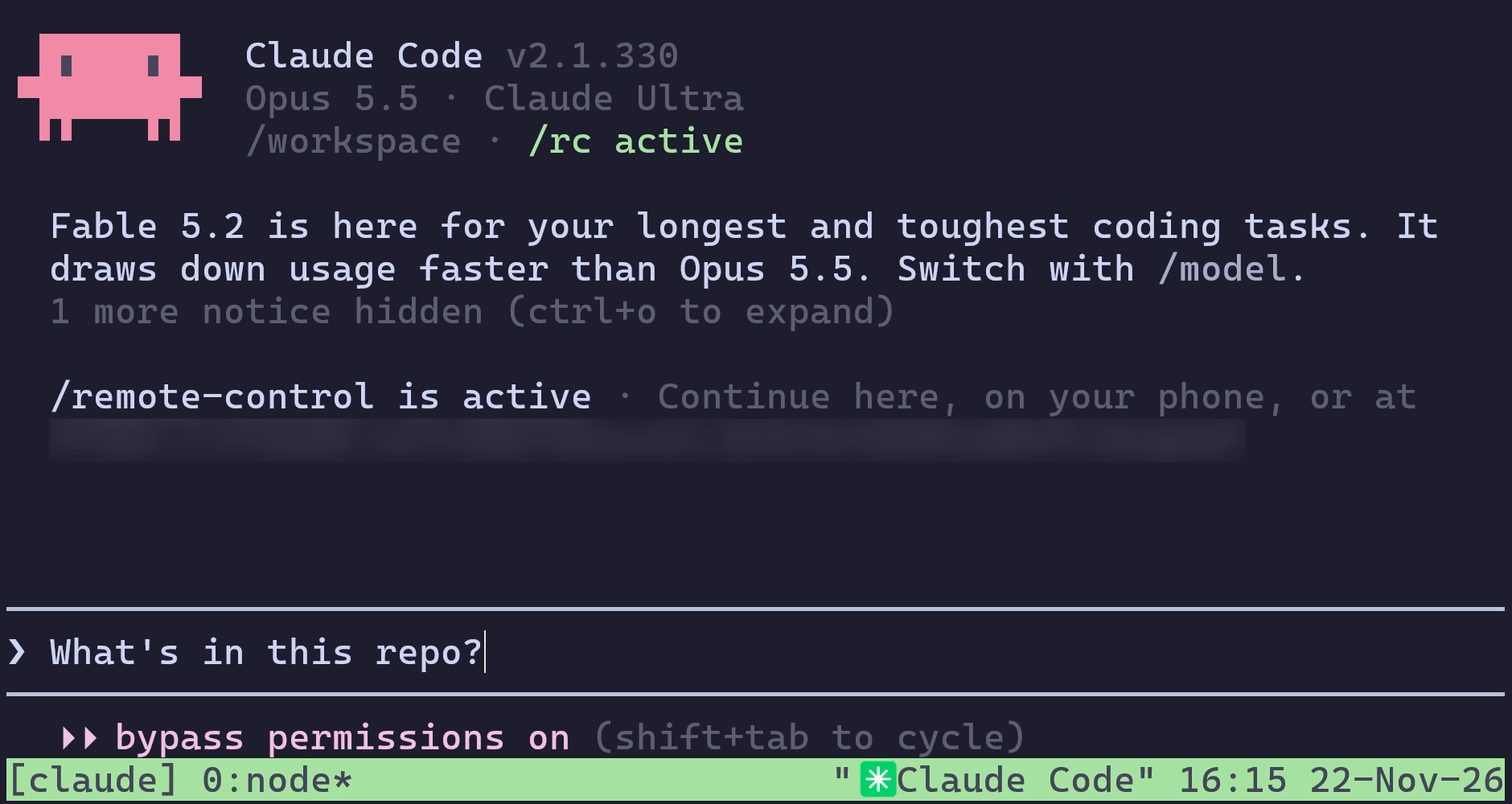
I opened the Claude app, and claude-vps was in the Code tab with the same conversation:
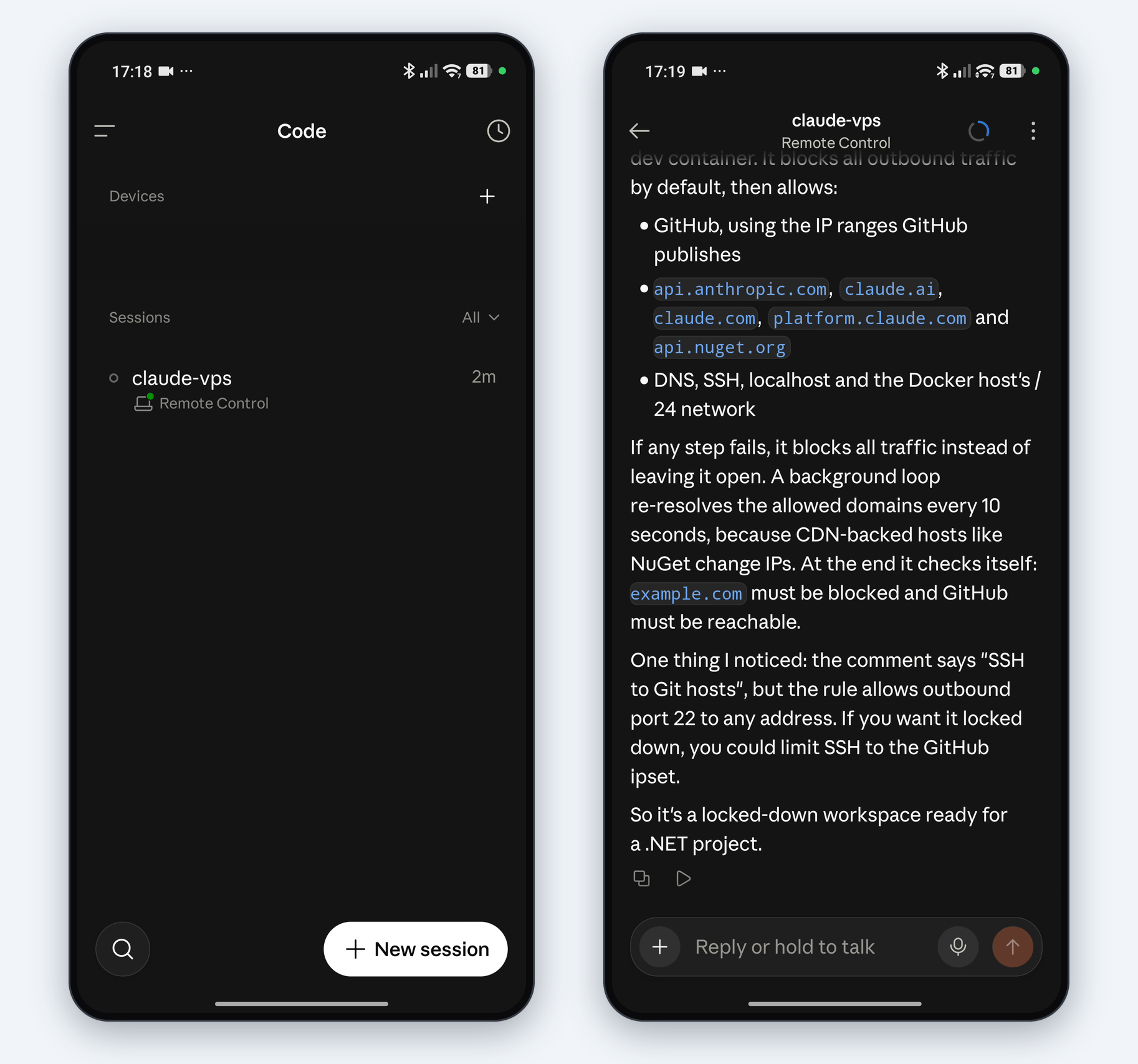
Press Ctrl+b, then d, to detach, and close SSH.
The session keeps running, and tmux attach -t claude brings you back to it.
Step 5: Give It Work From Your Phone
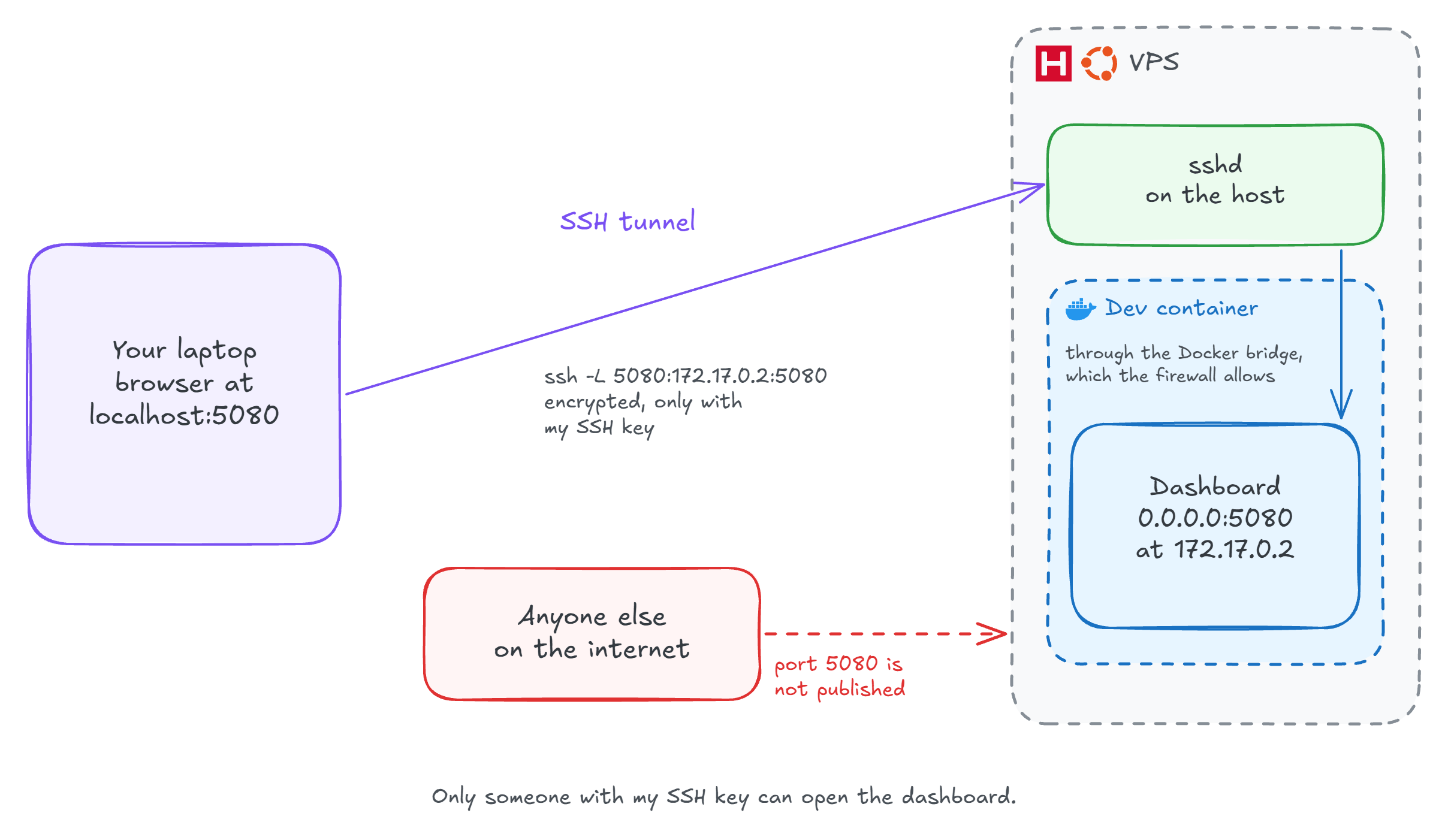
My first task was the dashboard from the start of this issue, a .NET 11 app that shows the server's CPU, memory, and the commands Claude runs. It listens on port 5080 inside the container, and that port isn't published, so I opened it through an SSH tunnel to the container's IP address:
# On the VPS
docker inspect -f '{{range .NetworkSettings.Networks}}{{.IPAddress}}{{end}}' <container>

# On your laptop
ssh -N -L 5080:172.17.0.2:5080 agent@your-vps
Nobody else on the internet can reach the dashboard.
Then I sent a second task, a .NET 11 Minimal API with a test project. About a minute later, three tests passed.
How Much of the Internet Should It Get?
My firewall allows Anthropic, GitHub, and NuGet. But Claude also needs the web now and then, for example to read the docs of a library that changed after its training data.
Claude Code has two web tools, and the firewall treats them differently:
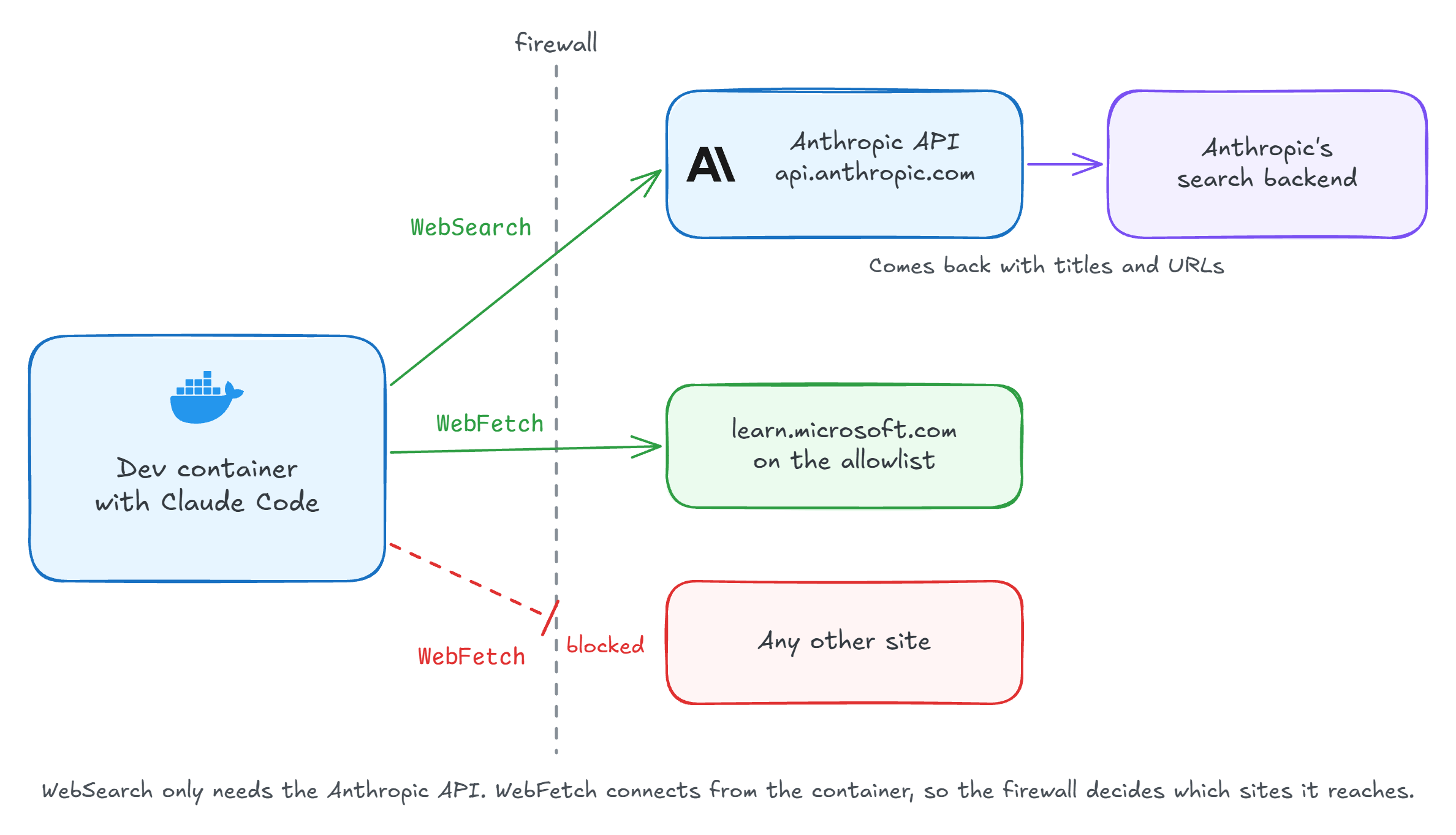
WebSearch runs on Anthropic's search backend and returns titles and URLs. The container only talks to the Anthropic API, so search works behind this firewall as it is.
WebFetch reads the page itself, and that request goes out from the container. The firewall rejects it for any host that isn't on the list.
So these are my defaults:
- Allow what the work needs: Anthropic, your git host, and your package registry.
- Leave WebSearch on, since it finds pages without a firewall change.
- Add a documentation site when Claude needs to read it, one at a time.
For .NET, that's usually learn.microsoft.com.
Add it to the DOMAINS list in init-firewall.sh (GitHub isn't there, because the script loads GitHub's address ranges from its API):
DOMAINS=("api.anthropic.com" "claude.ai" "claude.com" "platform.claude.com" "api.nuget.org" "learn.microsoft.com")
The script looks each name up again every 10 seconds, because sites behind a CDN change addresses. It's copied into the image, so rebuild the container and start the tmux session from Step 4 again:
devcontainer up --workspace-folder . --remove-existing-container
Opening the whole web would save you that step, but I keep the list short. With bypass permissions on, nothing asks before a request goes out. Data from the container can reach any host on the list, and this firewall also leaves SSH and DNS open. Anthropic recommends this mode only in isolated environments without internet access, so I only point it at repos I trust.
Summary
Set up the dev container and the firewall before you give Claude any work. Then start Remote Control inside tmux, so you can hand it a task from your phone and close the laptop.
The complete dev container has the Dockerfile and the full firewall script, which also switches the default policy to drop if any step of the setup fails.
If you want to run more of your own infrastructure on a VPS, I cover the server side in Pragmatic Self-Hosting.
Thanks for reading.
And stay awesome!
Frequently Asked Questions
Can I run Claude Code on a VPS?
Yes. Claude Code's system requirements list Ubuntu 20.04 or later and at least 4 GB of RAM. Give the server more if Claude builds and tests your app on it. For unattended work, run Claude Code inside a Docker dev container as a non-root user, with a firewall that only allows the hosts it needs.
Why run Claude Code in a dev container instead of directly on the VPS?
So it can work without permission prompts in a box you control. Claude Code is installed only in the container image, runs as a non-root user, sees only the mounted repo, and reaches only the hosts on the firewall allowlist. The Claude Code docs recommend bypass permissions mode only in isolated environments like containers and VMs.
How do I control Claude Code on a server from my phone?
Start claude --remote-control inside tmux on the server, then open the session in the Code tab of the Claude mobile app or at claude.ai/code. The server only makes outbound HTTPS calls to the Anthropic API, so no inbound port is needed.
Can Claude Code search the web from inside a firewalled container?
Yes. WebSearch runs on Anthropic's search backend, so the container only talks to the Anthropic API, and you get back titles and URLs. WebFetch is different. It requests the page from the container, so the firewall blocks it for any host that isn't on the allowlist.
Can running Claude Code on a VPS get your account banned?
I found no rule against it. Anthropic's legal page doesn't prevent you from signing in to the unmodified Claude Code binary with your own subscription, and the Remote Control docs cover running claude on a remote machine in tmux. Anthropic's terms and usage policy do prohibit sharing your account, reselling or proxying access, and using Claude's outputs to train other AI models. Anthropic doesn't publish how it detects abuse, so I can't promise an account won't be flagged.
