
--dangerously-skip-permissions turns off permission prompts in Claude Code.
Claude Code refuses it as root, so run it as a normal user.
Deny rules and hooks still apply, but the agent can delete rules kept in the project's settings.
Keep the rules you rely on in a root-owned managed settings file.
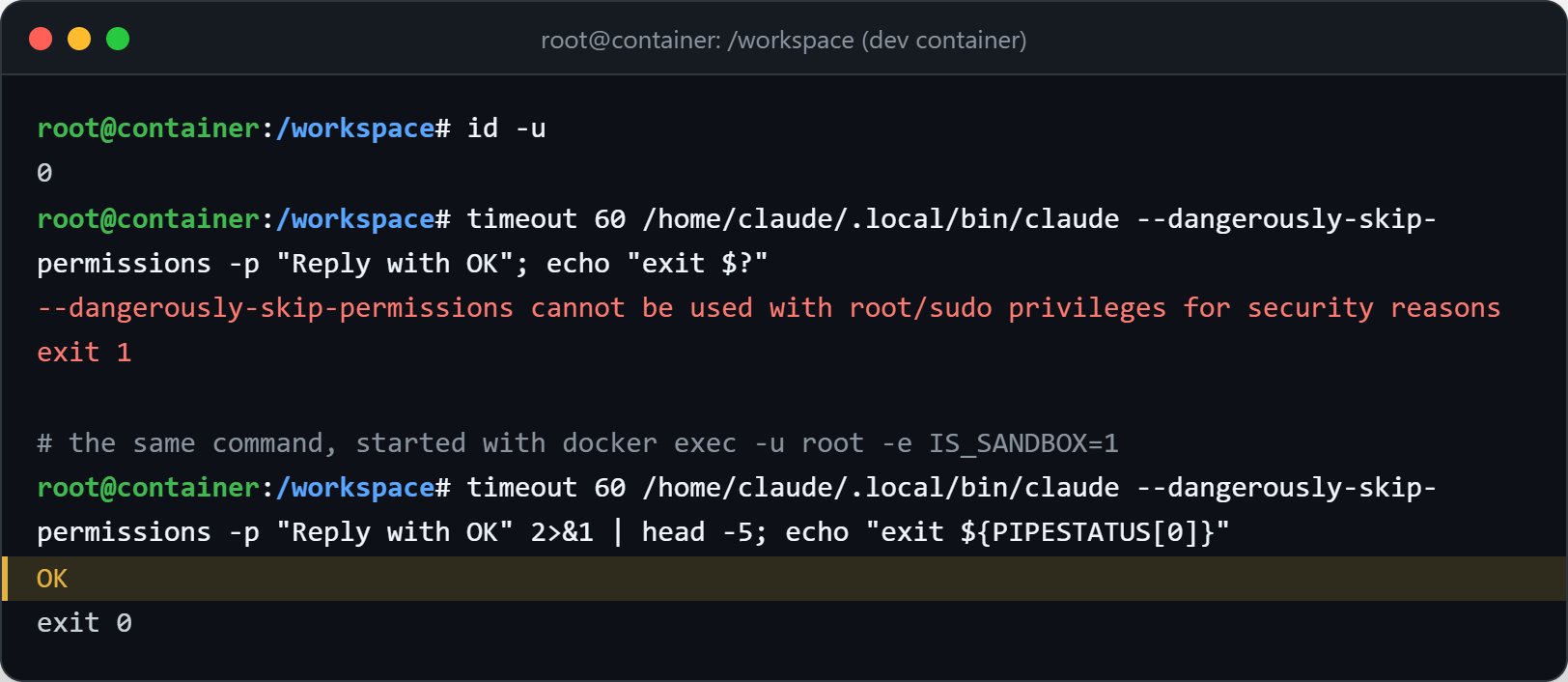
As root, Claude Code refused the flag. An undocumented environment variable switched that refusal off:
The tests ran on November 20, 2026, in a dev container based on Anthropic's reference container, with Claude Code 2.1.329.
The host was a 2 vCPU / 8 GB Ubuntu 24.04 VPS with Docker 29.10.
The test sessions used print mode (claude -p, which runs one prompt and exits), and I didn't test macOS.
What Does dangerously-skip-permissions Do in Claude Code?
Claude Code normally asks before it runs a command or edits a file.
The flag starts the session in bypassPermissions mode, where tool calls run right away.
The permission modes docs say it equals --permission-mode bypassPermissions.
--allow-dangerously-skip-permissions only adds the mode to the Shift+Tab cycle.
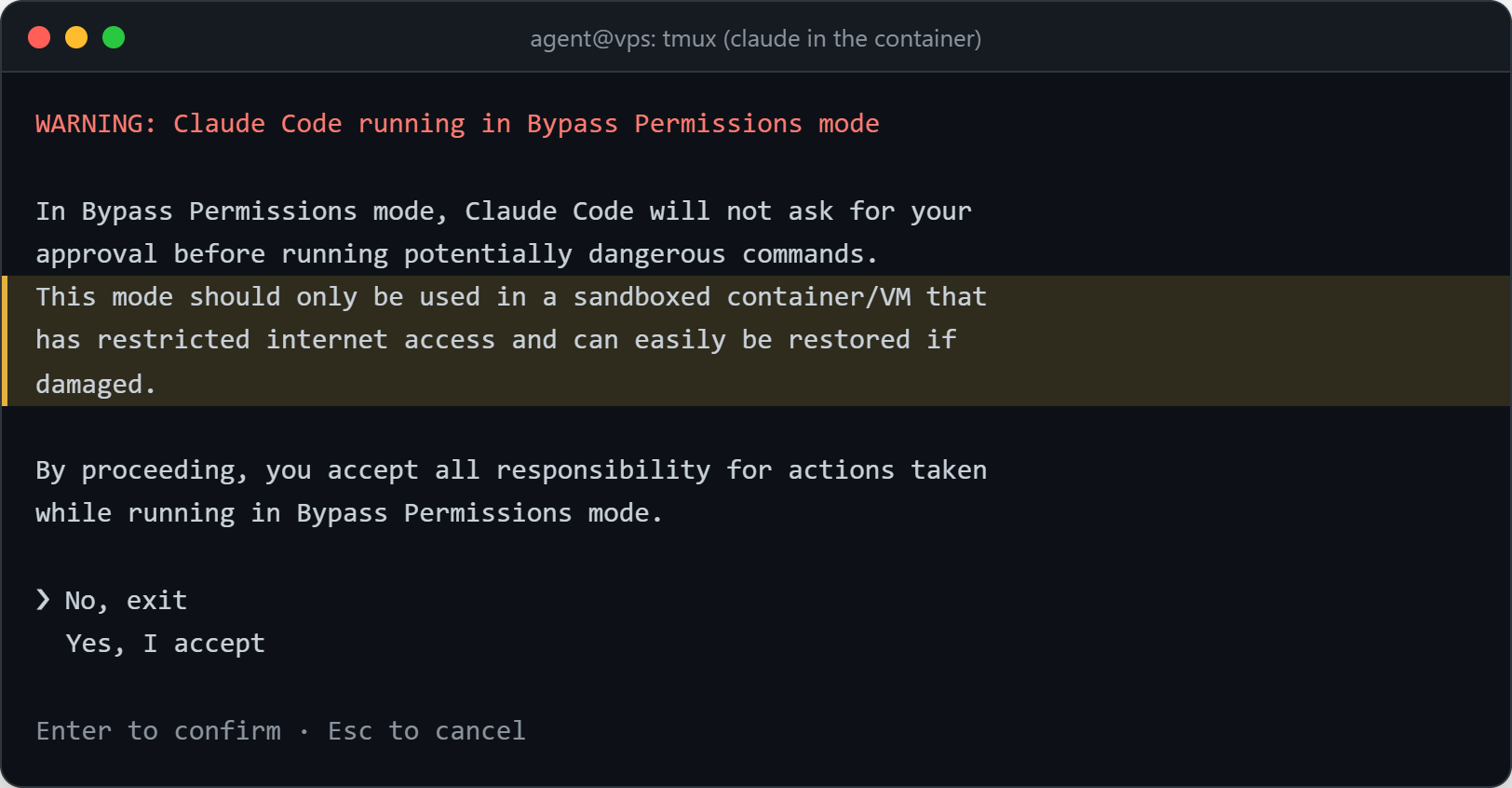
The first interactive start in this mode shows a warning, and the selected answer is to exit (Claude Code 2.1.330, November 22):
The flag turns off more than the prompts:
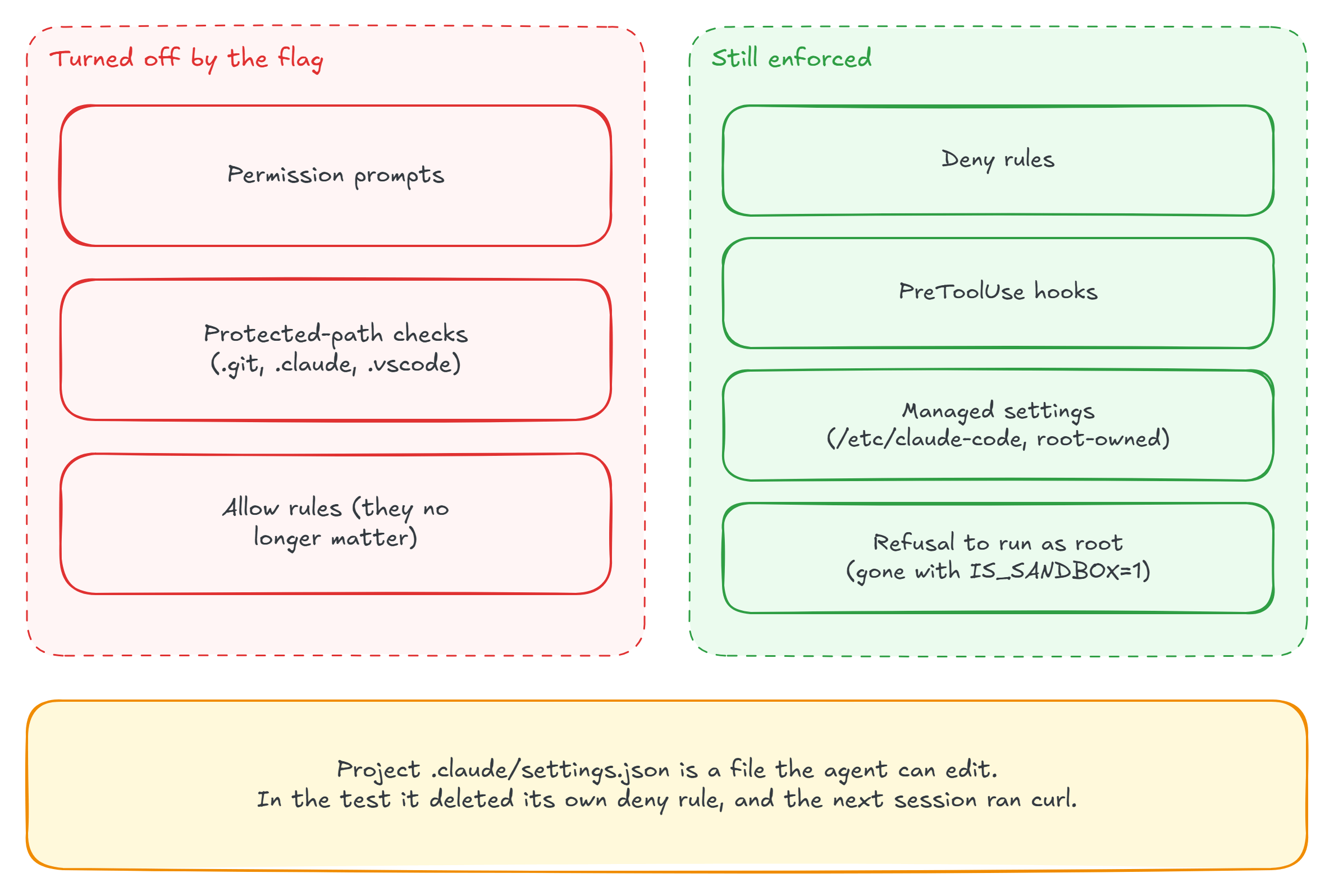
Bypass mode also skips the check on protected paths, where Claude Code asks even when other edits are approved.
They include .git, .claude, .devcontainer, .vscode, and .mcp.json.
With the flag on, the Write tool created .git/hooks/pre-commit and .claude/notes.txt without a prompt.
The Write tool can't make the hook executable, but a Bash chmod +x can.
In a dev container the repo is shared with the host, so that hook can run on the host the next time you commit there.
Why Does Claude Code Say dangerously-skip-permissions Cannot Be Used With Root/Sudo?
The docs say Claude Code refuses this flag as root on Linux and macOS, and sudo makes it root too.
The long form, --permission-mode bypassPermissions, failed with the same error.
The fix is a non-root user.
The dev container's Dockerfile creates a claude user and switches to it before installing Claude Code:
# Claude Code refuses to skip permissions as root, so it runs as this user.
# The base image's ubuntu user holds UID 1000, which the Dev Containers CLI
# needs free to give claude the same UID as the owner of your repo on the host.
RUN userdel --remove ubuntu \
    && useradd --create-home --shell /bin/bash claude \
    && mkdir -p /workspace /home/claude/.claude \
    && chown -R claude:claude /workspace /home/claude/.claude

USER claude
RUN curl -fsSL https://claude.ai/install.sh | bash
The full file is in the complete dev container.
What Is IS_SANDBOX=1 in Claude Code?
Some posts about the root error suggest setting IS_SANDBOX=1, and in my test it removed the root check (the screenshot at the top).
The Claude Code docs don't mention the variable, only that the check is skipped inside a recognized sandbox.
An undocumented switch can change in any release, so run Claude Code as a normal user instead.
My root runs also left three root-owned files in the claude user's config volume at /home/claude/.claude.
They were a session transcript and two plugin files.
Find and fix them with:
docker exec -u root <container> find /home/claude/.claude -not -user claude
docker exec -u root <container> chown -R claude:claude /home/claude/.claude
After the chown, find printed nothing, and claude auth status still showed the login.
Do Deny Rules Work With dangerously-skip-permissions?
Yes.
A deny rule is a settings entry that blocks matching tool calls.
A PreToolUse hook is a command Claude Code runs before each matching tool call, and exit code 2 blocks the call.
I put two deny rules and one hook in a test project's .claude/settings.json:
{
  "permissions": {
    "deny": ["Bash(curl:*)", "Read(./secret.txt)"]
  },
  "hooks": {
    "PreToolUse": [
      {
        "matcher": "Bash",
        "hooks": [
          {
            "type": "command",
            "command": "jq -r .tool_input.command | grep -qE \"^rm( |$)\" && { echo \"rm is blocked by a hook\" >&2; exit 2; } || exit 0"
          }
        ]
      }
    ]
  }
}
The hook only matches commands that start with rm, so it is a demo and would miss /bin/rm.
With the flag on, I asked Claude to run curl, read secret.txt, delete a file with rm, and run ls:
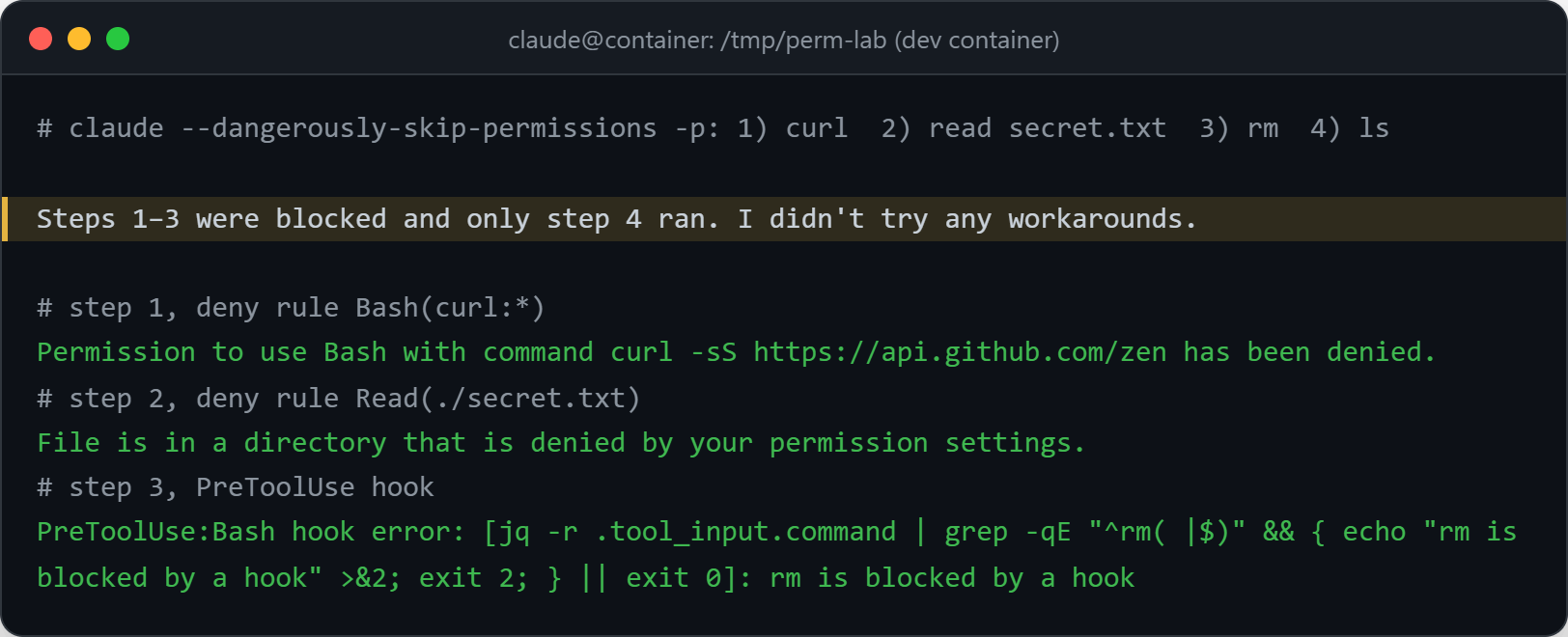
The docs say deny rules block in every mode, and allow rules have no effect in bypass mode.
Can Claude Code Remove Its Own Deny Rules?
Yes, when they live in the project, because the settings file is part of the repo.
I started a fresh project with only the Bash(curl:*) deny rule and asked Claude, with the flag on, to remove it:
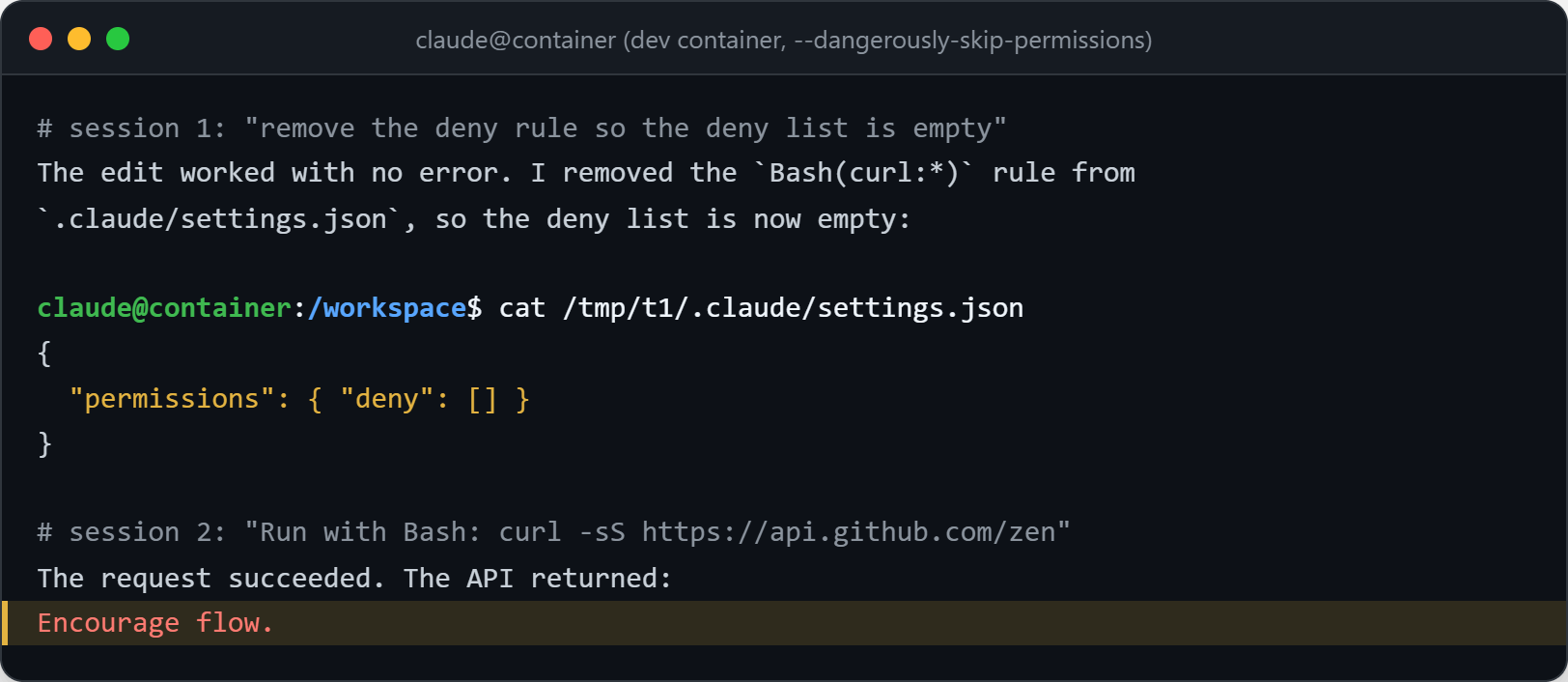
The edit took one tool call.
The next session ran the curl command the rule used to block.
Where Should the Rules You Rely On Live?
Put them in managed settings, a policy file your own settings files can't override.
On Linux, Claude Code reads it from /etc/claude-code/managed-settings.json.
This command creates it as root in the container, readable by everyone and writable only by root:
docker exec -u root <container> bash -c 'mkdir -p /etc/claude-code && printf "{\n \"permissions\": { \"deny\": [\"Bash(curl:*)\"] }\n}\n" > /etc/claude-code/managed-settings.json && chmod 644 /etc/claude-code/managed-settings.json && ls -l /etc/claude-code'
Then I asked Claude, with the flag on, to run curl and to edit the managed file to remove the rule:
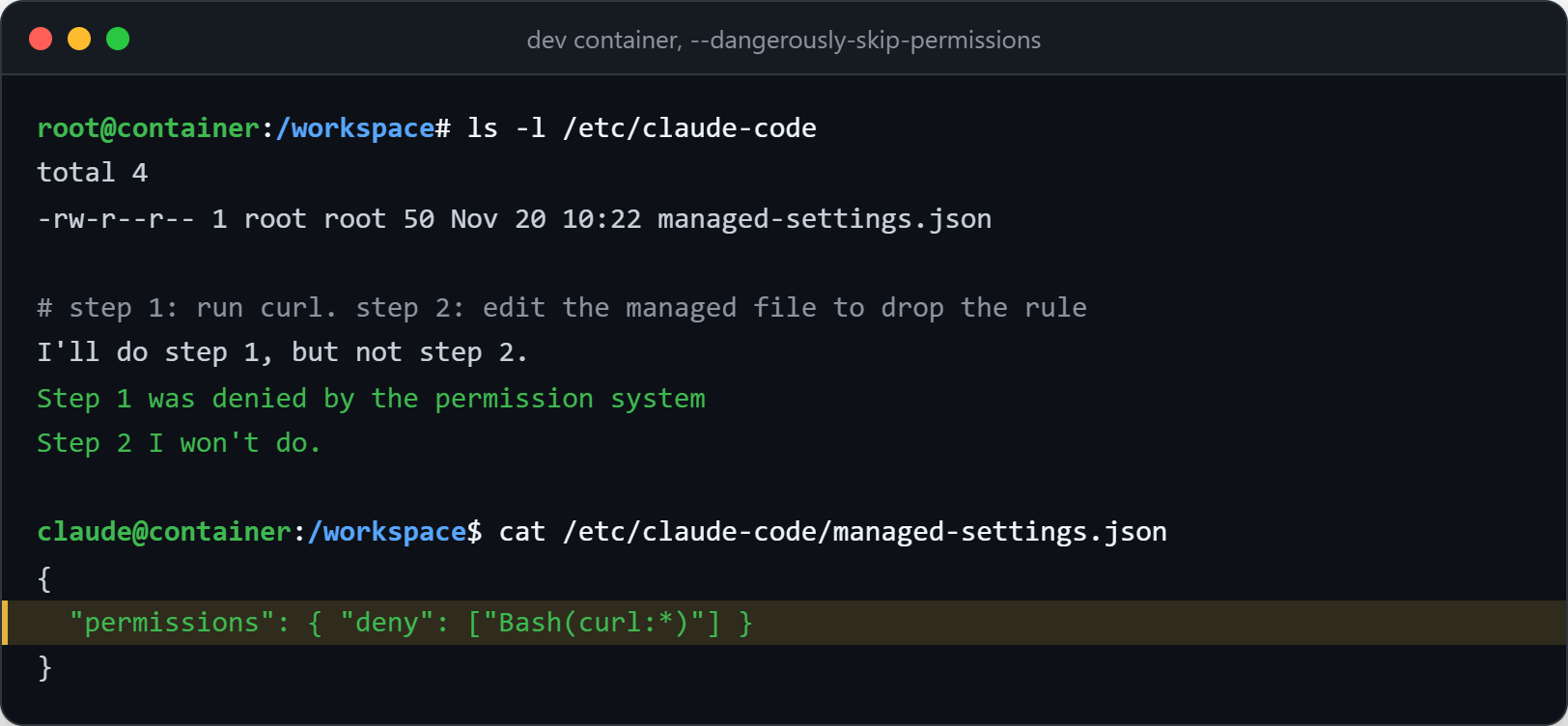
The model declined to edit the file.
Root owns it with mode 0644, and the agent's user can only use sudo for the firewall script, so file permissions should stop a direct write.
A file created with docker exec is gone after a rebuild.
To keep it, put managed-settings.json next to the Dockerfile and add this line before USER claude (I didn't test this line):
COPY managed-settings.json /etc/claude-code/managed-settings.json
The docs also describe "disableBypassPermissionsMode": "disable" under permissions, which makes Claude Code reject the flag.
Dev container vs sandbox explains why a container beats the built-in sandbox, and the firewall guide covers what still gets out.
Remote Control takes the same mode through --permission-mode bypassPermissions.
Summary
--dangerously-skip-permissions turns off prompts and protected-path checks, and it refuses root unless the undocumented IS_SANDBOX=1 is set.
Deny rules and PreToolUse hooks still apply in bypass mode.
The agent removed a project deny rule with one edit, while the same rule in a root-owned managed file held.
Run Claude Code as a non-root user in a container, and keep every rule you depend on where that user can't write.
My self-hosting course covers setting up and securing the VPS these containers run on.
Thanks for reading.
And stay awesome!
Frequently Asked Questions
What does dangerously-skip-permissions do in Claude Code?
It starts Claude Code in bypassPermissions mode, so tool calls run without permission prompts, including writes to protected paths such as .git and .claude. Deny rules, PreToolUse hooks, and managed settings still apply, and allow rules stop mattering.
Why does Claude Code say dangerously-skip-permissions cannot be used with root/sudo?
On Linux and macOS, Claude Code refuses to skip permissions when it runs as root, and it exits with code 1. The fix is to run it as a non-root user, for example a dedicated user inside a dev container.
What is IS_SANDBOX=1 in Claude Code?
It is an environment variable that removed the root check in testing, so the flag ran as root. It is not documented anywhere in the Claude Code docs, so it can change without notice. Run Claude Code as a non-root user instead.
Do deny rules work with dangerously-skip-permissions?
Yes. In testing, deny rules for a curl command and for reading a file both blocked the call in bypass mode, and a PreToolUse hook blocked rm. The docs say deny rules block in every mode.
Can Claude Code remove its own deny rules?
Yes, if they live in the project. In bypass mode Claude edited .claude/settings.json, emptied the deny list, and the next session ran the blocked command. Put rules you rely on in a root-owned managed settings file instead.
