
You can run a Claude Code dev container on a server with no screen or desktop, and you don't need VS Code.
Install Node 20 or later and the Dev Containers CLI, and put a .devcontainer folder in your repo.
Then devcontainer up builds and starts the container, and devcontainer exec ... claude starts Claude Code inside it.
I tested this on November 20, 2026, on a 2 vCPU / 8 GB Ubuntu 24.04 VPS with Docker 29.10, Dev Containers CLI 0.90.0, and Claude Code 2.1.329. The container uses the .NET 11 SDK image and is based on Anthropic's reference dev container. I didn't try VS Code, Codespaces, or other base images.
One step failed quietly.
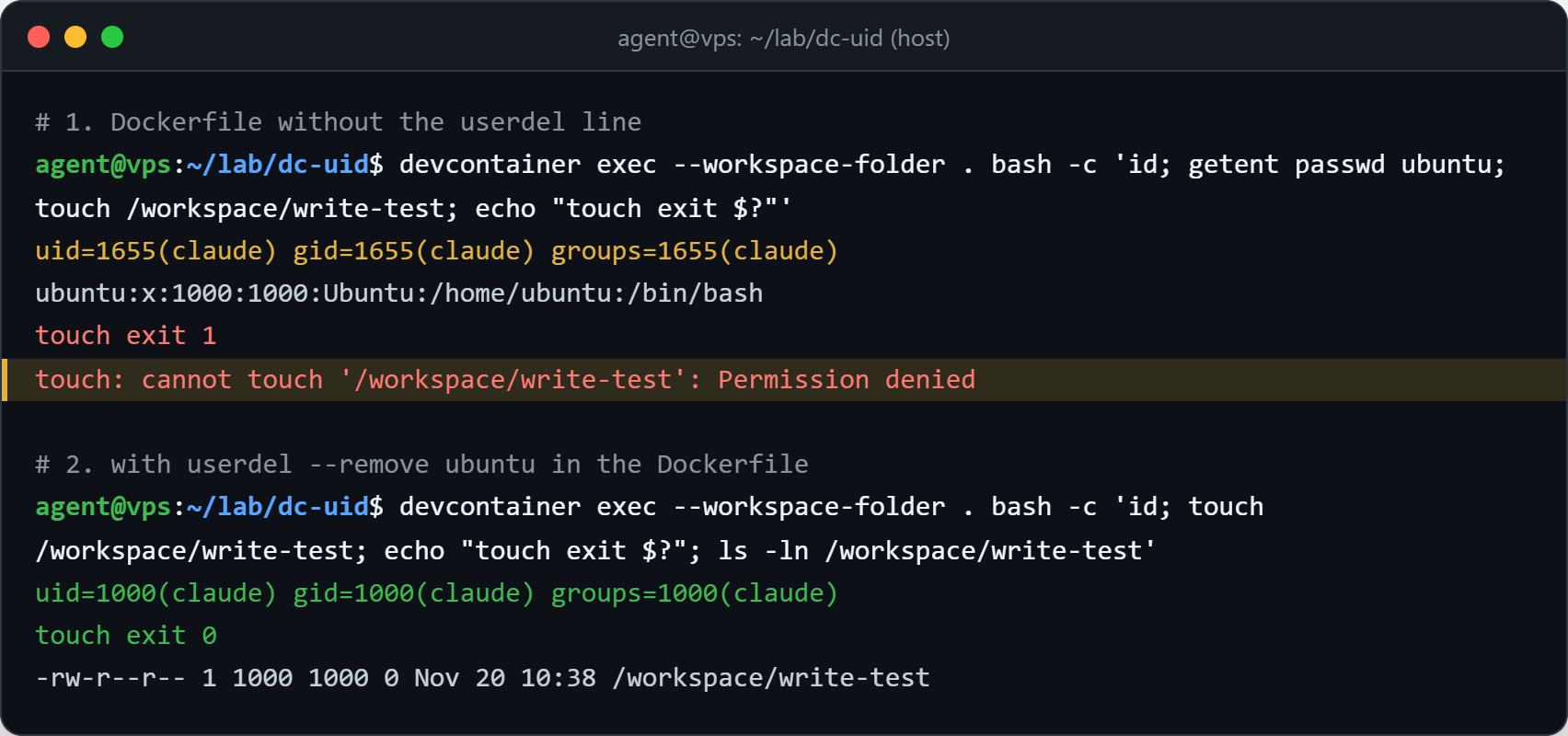
devcontainer up reported success, but the agent couldn't write a single file to the repo until I deleted one user from the image:
Can You Use Dev Containers Without VS Code?
Yes.
A dev container is a Docker container described by a .devcontainer folder in your repo.
The Claude Code dev container docs are written for editors, but the Dev Containers CLI reads the same devcontainer.json and drives Docker over plain SSH.
Your user needs to be in the docker group (sudo usermod -aG docker $USER, then log in again).
That group gives root-level access to the host, so keep that user for yourself.
My Ubuntu server hardening guide covers the user setup.
Which Node.js Version Does the Dev Containers CLI Need?
Node 20 or later, according to the engines field in the CLI's package.json ("node": ">=20.0.0").
Ubuntu 24.04's own nodejs package is older, so install Node from NodeSource, then the CLI:
curl -fsSL https://deb.nodesource.com/setup_26.x -o /tmp/nodesource_setup.sh
sudo bash /tmp/nodesource_setup.sh
sudo apt-get install -y nodejs
sudo npm install -g @devcontainers/cli
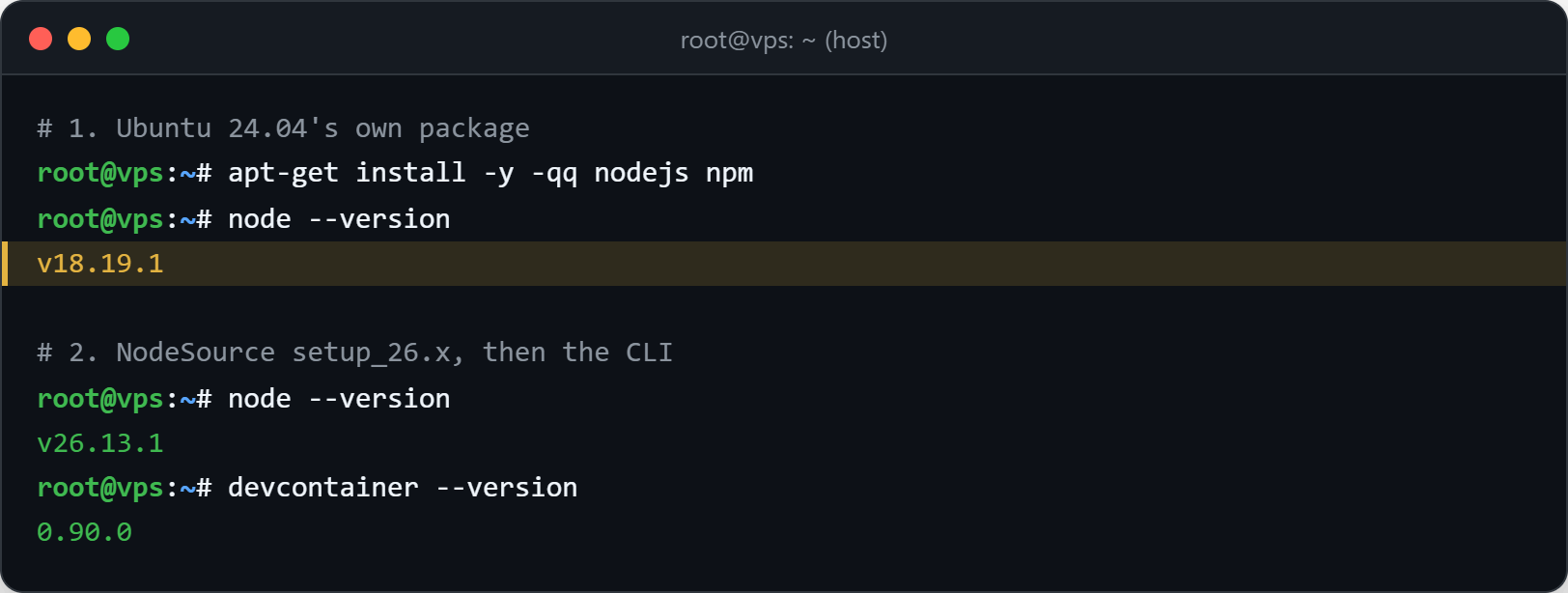
npm installed the CLI on Node 18 without complaint, but Node 18 is outside the range the CLI declares.
Node 22 from setup_22.x worked the same way as 26.
How Do You Set Up a Claude Code Dev Container on a Server?
The setup is three files in .devcontainer/: Dockerfile, devcontainer.json, and the firewall script init-firewall.sh.
Download the complete dev container and copy its .devcontainer folder into your repo.
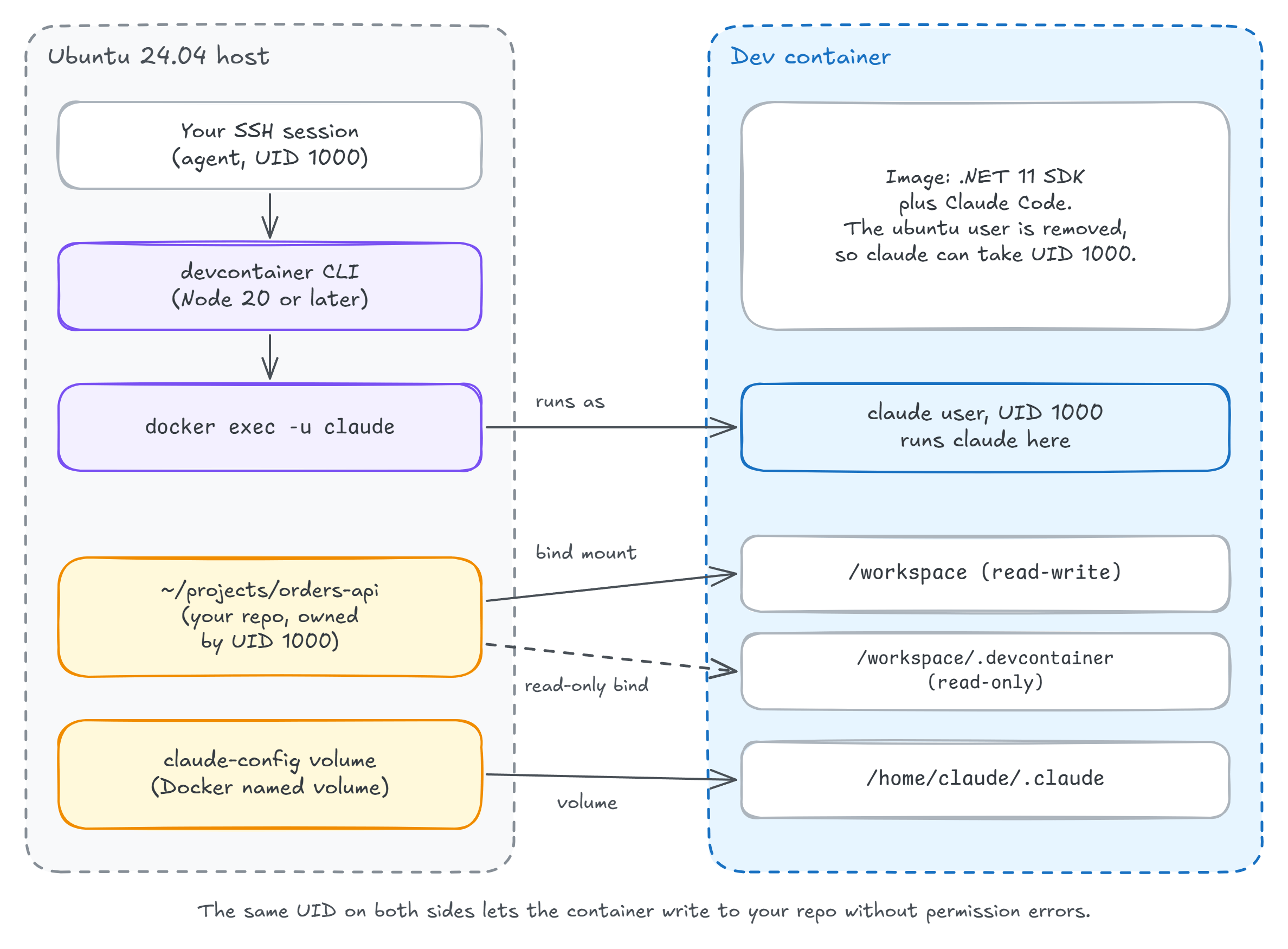
These are the devcontainer.json lines that matter on a server:
  "remoteUser": "claude",
  "mounts": [
    "source=claude-config-${devcontainerId},target=/home/claude/.claude,type=volume",
    "source=${localWorkspaceFolder}/.devcontainer,target=/workspace/.devcontainer,type=bind,readonly"
  ],
  "postStartCommand": "sudo /usr/local/bin/init-firewall.sh",
remoteUser is the user devcontainer exec runs as.
Claude Code refuses to skip permission prompts as root, so it has to be a normal user.
The first mount is a named volume (storage Docker keeps outside the container) at ~/.claude.
It keeps the Claude Code login across rebuilds, as the dev container login guide explains.
The second mount puts .devcontainer back over itself as read-only, so the agent can't edit its own container definition.
From inside the container, any change there failed with Read-only file system, including a new file and a delete.
The repo's .git folder has no such protection, and the git hooks escape guide shows what that allows.
postStartCommand runs the firewall script at every start.
It runs as claude, so it needs sudo, and the firewall guide covers what it allows.
What Do the Up and Exec Commands Do?
devcontainer up builds the image and starts the container.
It also builds a second image with a -uid suffix, which changes the container user's UID (the numeric user ID Linux uses for file ownership) to match the owner of your repo.
cd ~/projects/orders-api
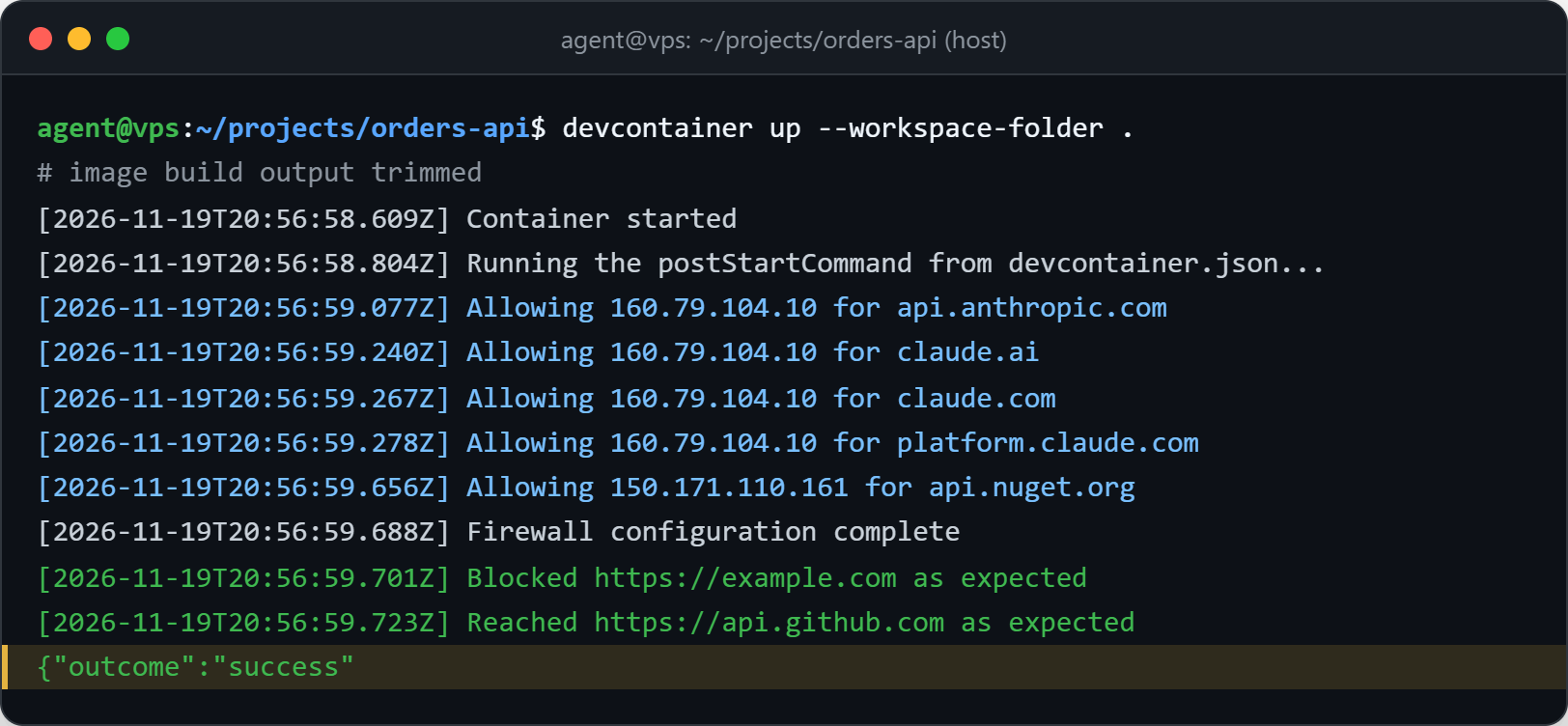
devcontainer up --workspace-folder .
The firewall output streams during up, and the success line comes last, because "waitFor": "postStartCommand" makes the CLI wait for the script:
Then start Claude Code:
devcontainer exec --workspace-folder . claude
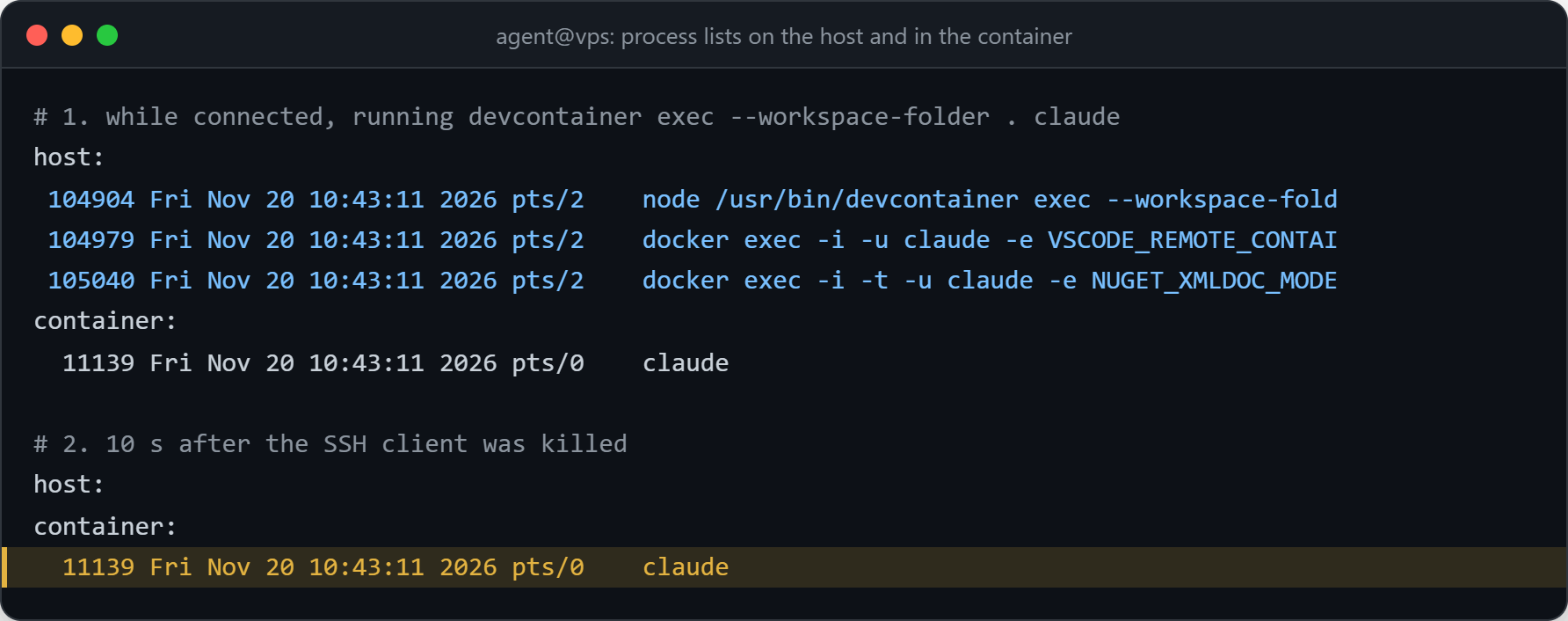
On the host, devcontainer exec is a Node process that runs docker exec as claude, and it belongs to your SSH session.
When I killed the SSH client, the host side was gone within 10 seconds.
claude kept running in the container with no terminal to return to:
Start it inside tmux instead, as the Claude Code tmux guide shows.
Why Do You Get Permission Denied in a Dev Container?
The CLI gives the container user the UID of the repo owner, which is 1000 for the first user on a typical Ubuntu server.
In the .NET SDK image, a user named ubuntu already holds UID 1000:
docker run --rm mcr.microsoft.com/dotnet/sdk:11.0 getent passwd 1000
So claude got UID 1655 and couldn't write to the repo, as the first screenshot shows.
The Dockerfile in the download deletes that user before it creates claude:
RUN userdel --remove ubuntu \
    && useradd --create-home --shell /bin/bash claude \
    && mkdir -p /workspace /home/claude/.claude \
    && chown -R claude:claude /workspace /home/claude/.claude
With it, claude got UID 1000, and the files it wrote belonged to my own user on the host.
Run the same getent check against any other base image before you use it.
If the UID changes after you've logged in, the login volume keeps the old owner, and the login guide shows the fix.
How Do You Open an App Running in the Dev Container?
Use an SSH tunnel to the container's IP address.
This devcontainer.json publishes no ports, so an app inside the container isn't reachable from the internet.
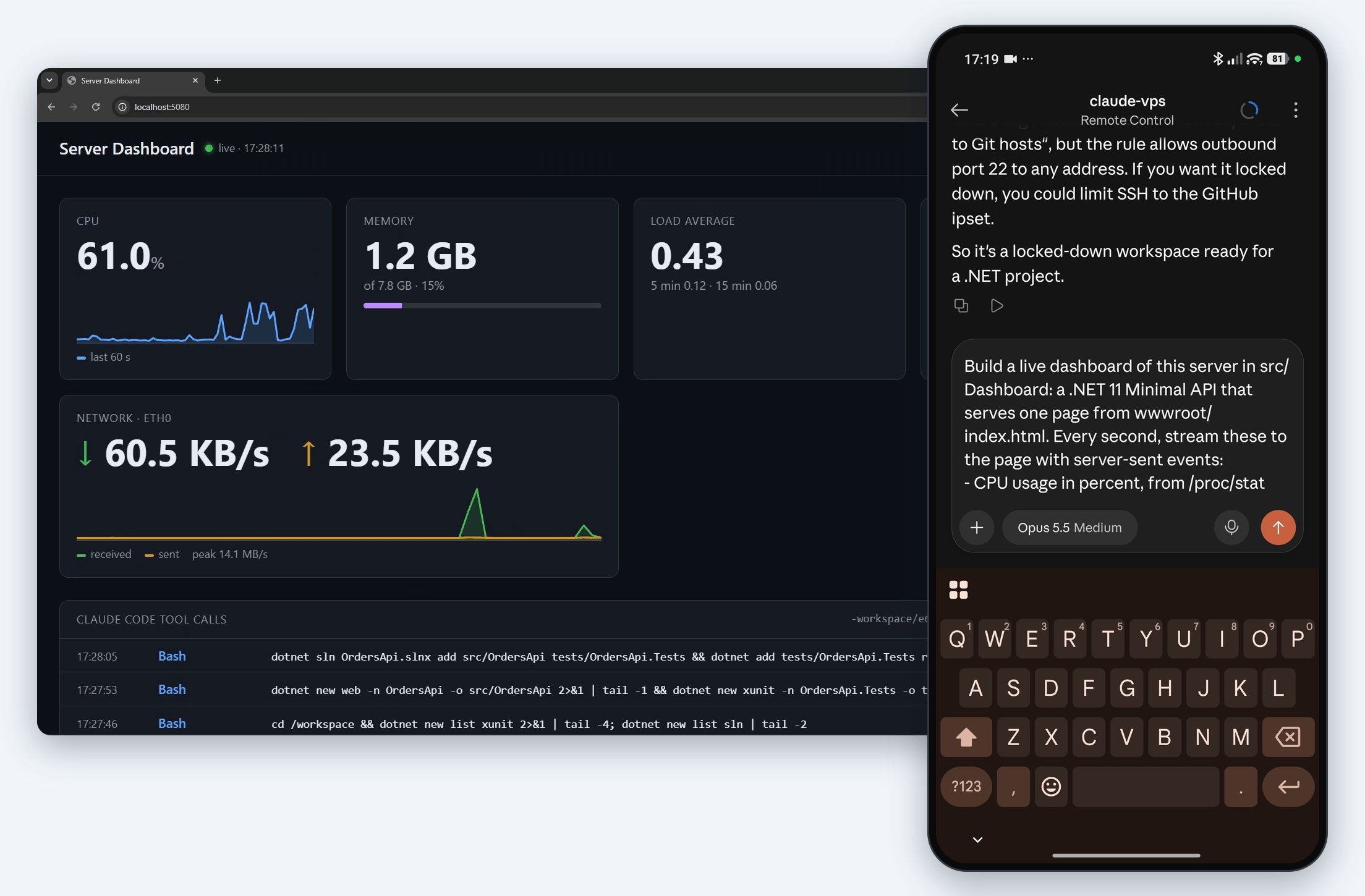
On November 22, Claude built a dashboard that listens on port 5080 in my container, and I opened it from my laptop:
# On the VPS: print the container's IP address (the name is in docker ps)
docker inspect -f '{{range .NetworkSettings.Networks}}{{.IPAddress}}{{end}}' <container>

# On your laptop: forward port 5080 to that address
ssh -N -L 5080:172.17.0.2:5080 agent@your-vps
The second command prints nothing while the tunnel is open.
http://localhost:5080 then shows the app:
The tunnel works because the firewall allows the Docker host network:
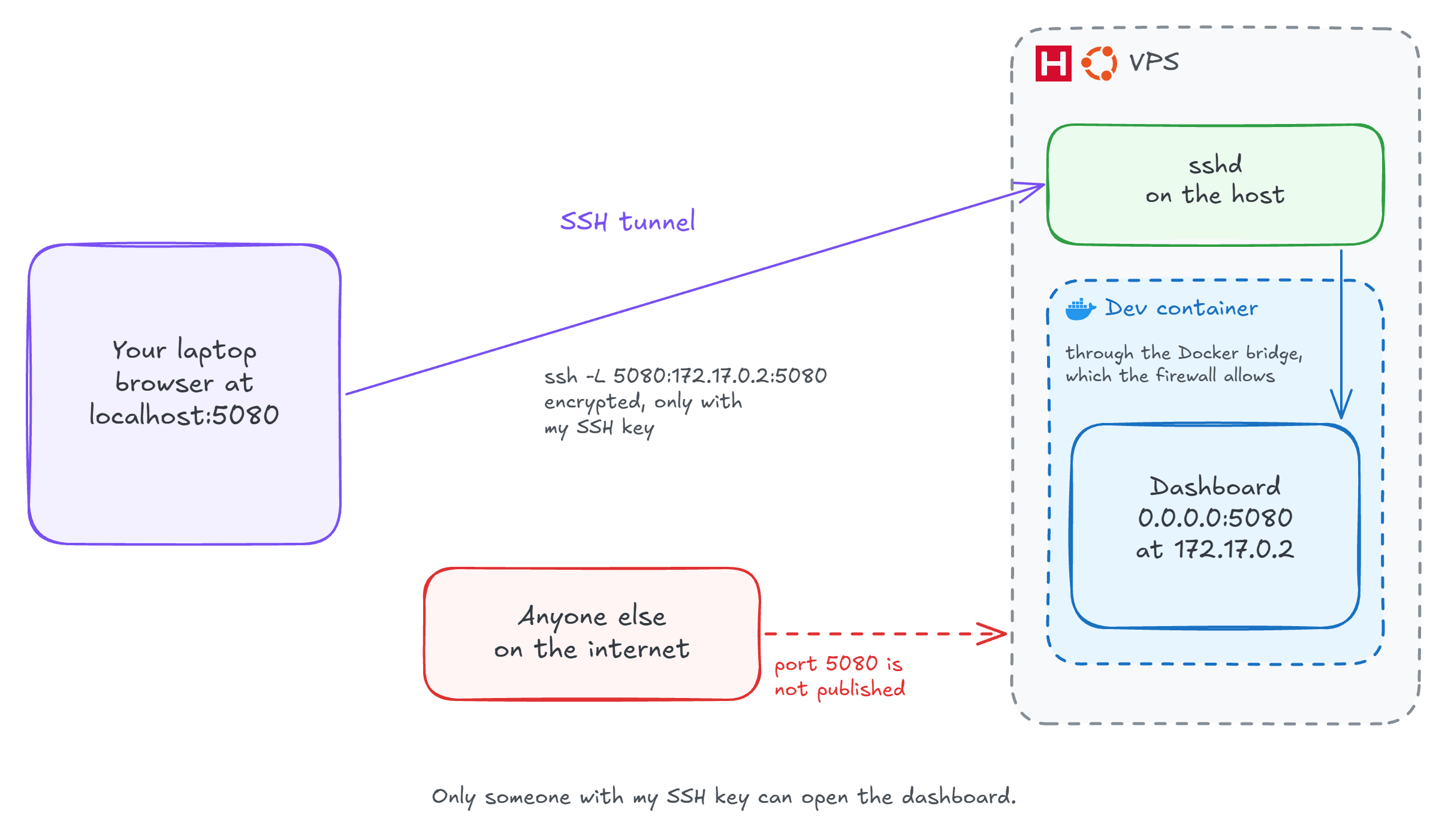
The app has to listen on 0.0.0.0, because 127.0.0.1 inside the container isn't reachable from the host.
How Do You Rebuild a Dev Container With the CLI?
Change the files on the host, since .devcontainer is read-only inside the container.
Then replace the container:
devcontainer up --workspace-folder . --remove-existing-container
Named volumes stay. On my server, the same login volume survived several rebuilds.
Summary
The Dev Containers CLI runs dev containers over plain SSH and needs Node 20 or later.
devcontainer up starts the container, and devcontainer exec runs Claude Code in it, preferably inside tmux.
If /workspace gives you Permission denied, check who holds UID 1000 in the base image first.
My self-hosting course covers setting up the Ubuntu server that runs these containers.
Thanks for reading.
And stay awesome!
Frequently Asked Questions
Can you use dev containers without VS Code?
Yes. The Dev Containers CLI reads the same devcontainer.json file and runs it with Docker. devcontainer up builds and starts the container, and devcontainer exec runs a command inside it, such as claude. It works over plain SSH on a headless server.
Which Node.js version does the Dev Containers CLI need?
Node 20 or later, according to the engines field in its package.json. Ubuntu 24.04 ships Node 18.19.1 in its own nodejs package, so install Node from NodeSource instead. A retest on Node 18.20.8 did not fail, but Node 18 is outside the range the CLI declares.
Why do you get Permission denied in a dev container?
The container user has a different UID than the owner of your repo on the host. In the .NET SDK image, the ubuntu user already holds UID 1000, so the container user got UID 1655 and could not write to the mounted repo. Removing the ubuntu user in the Dockerfile gave it UID 1000 and fixed the writes.
How do you rebuild a dev container with the CLI?
Run devcontainer up with the remove-existing-container option. It replaces the container with a new one built from your current files. Named volumes, such as the one that holds the Claude Code login, are not removed.
