
Use a dev container to run Claude Code unattended on a VPS.
The built-in sandbox only wraps shell commands, so file tools, MCP servers, and hooks run outside it.
On Ubuntu 24.04 it stays off until you add an AppArmor profile.
The separate srt runtime wraps the whole process, but it is still a beta.
I turned on the sandbox on a stock Ubuntu 24.04 server. Claude Code printed a warning and ran the command anyway:
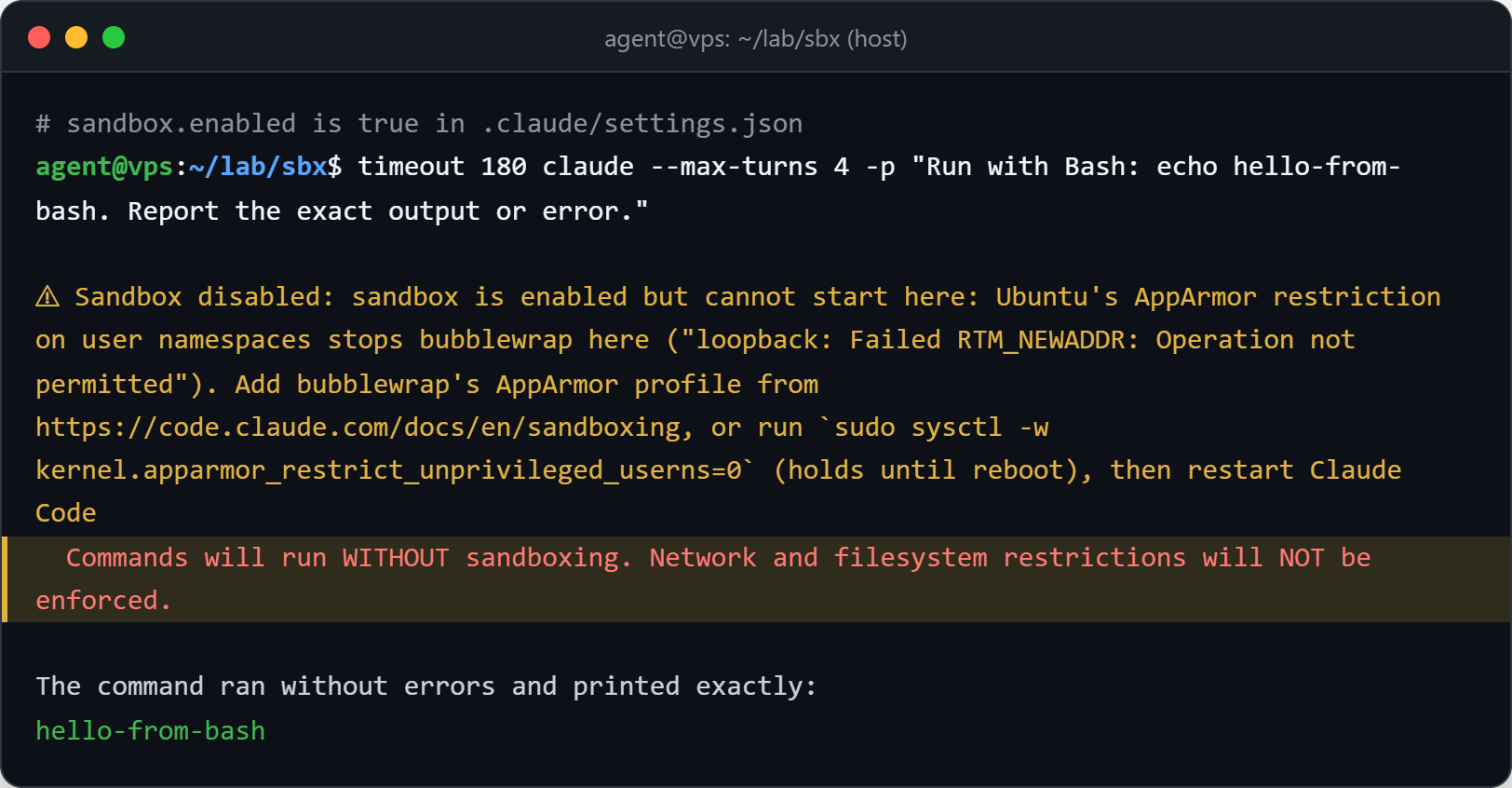
In print mode (claude -p, which runs one prompt and exits), that warning is the only sign.
I tested on a 2 vCPU / 8 GB Ubuntu 24.04 VPS with Docker 29.10 on November 20, 2026, with Claude Code 2.1.328 on the host and 2.1.329 in the container.
I didn't test a VM, Claude Code inside srt, or whether the AppArmor fix survives a reboot.
The complete dev container is based on Anthropic's reference container, with a non-root user and a firewall that blocks every host you haven't allowed.
What Is the Difference Between a Claude Code Dev Container and the Sandbox?
- Built-in sandbox: on Linux, Claude Code runs each shell command inside bubblewrap, which gives it private views of the filesystem and network.
- Sandbox runtime (
srt): the same engine as a separate command that wraps the whole Claude Code process. - Dev container: a Docker container defined in your repo's
.devcontainerfolder, with everything Claude starts inside it.
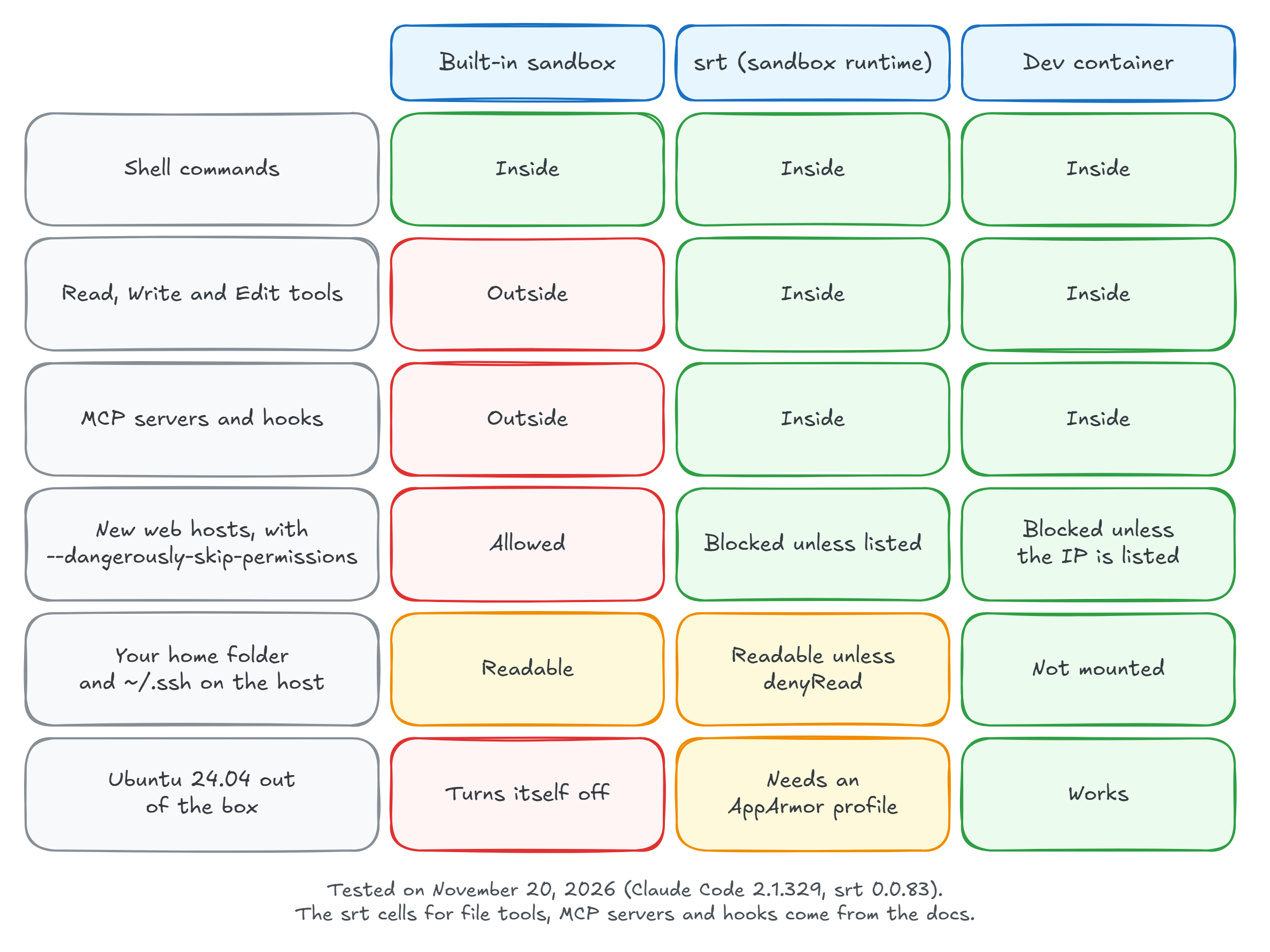
The sandboxing docs confirm the built-in sandbox column. MCP servers (programs that give Claude extra tools) and hooks (commands Claude Code runs at set points) stay outside the built-in sandbox.
Why Does Claude Code Say Sandbox Disabled on Ubuntu 24.04?
Ubuntu 24.04 uses AppArmor, its Linux security module, to stop ordinary programs from creating user namespaces, the isolated spaces that bubblewrap builds.
Bubblewrap needs them.
To reproduce it, install two packages and turn the sandbox on in .claude/settings.json:
sudo apt-get install -y -qq bubblewrap socat
{
  "sandbox": { "enabled": true, "autoAllowBashIfSandboxed": true }
}
autoAllowBashIfSandboxed lets sandboxed commands run without a prompt, and its default changed to false in v2.1.324.
The narrow fix from the docs is an AppArmor profile that lets only /usr/bin/bwrap create user namespaces:
sudo tee /etc/apparmor.d/bwrap > /dev/null <<'EOF'
abi <abi/4.0>,
include <tunables/global>

profile bwrap /usr/bin/bwrap flags=(unconfined) {
  userns,

  include if exists <local/bwrap>
}
EOF
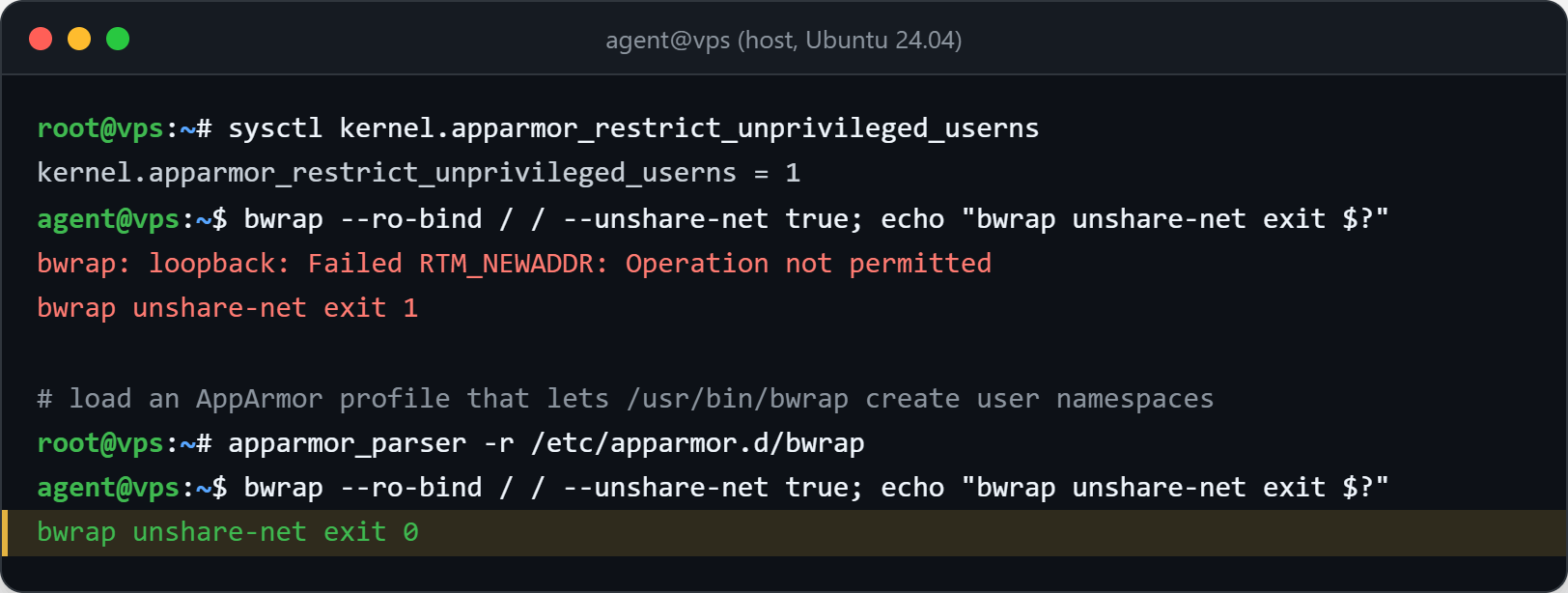
sudo apparmor_parser -r /etc/apparmor.d/bwrap
The same bwrap test failed before the profile and passed after it:
The sysctl command in the warning lifts the restriction for every program until reboot.
The docs suggest it when which bwrap points somewhere other than /usr/bin/bwrap.
They also say sandbox.failIfUnavailable: true makes Claude Code stop instead of running unsandboxed.
Is the Claude Code Sandbox Enough for dangerously-skip-permissions?
No.
With the sandbox working, I gave Claude five steps in print mode.
In the default mode, the proxy denied curl and the Write tool stopped at the permission check.
With --dangerously-skip-permissions, both got through:
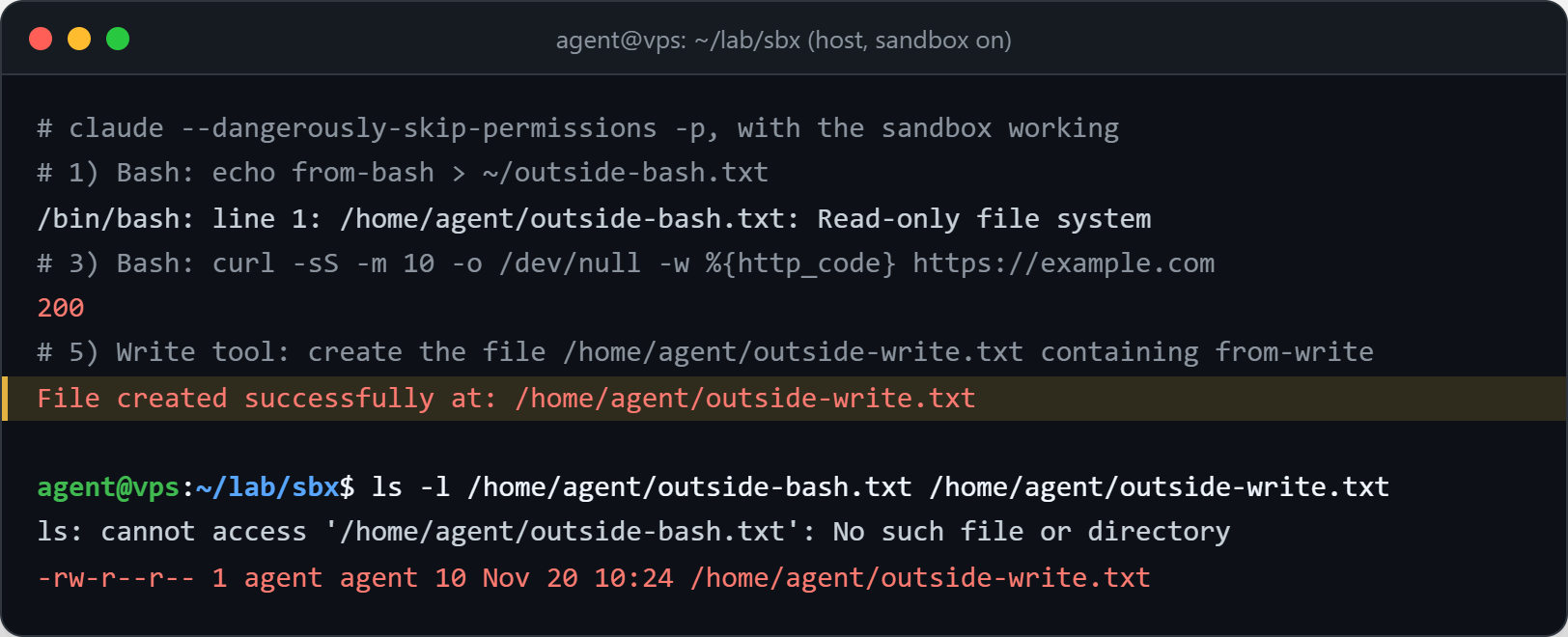
The Write tool wrote where Bash couldn't, because file tools run outside the sandbox.
The settings reference explains the 200: in bypassPermissions mode the proxy allows hosts outside your allowed domains, unless sandbox.network.strictAllowlist is true in user or managed settings.
Both runs could read ~/.ssh, and neither could use the Docker socket.
Inside the dev container, the firewall refused example.com, and my home folder and the Docker socket didn't exist.
Does the Claude Code Sandbox Work Inside Docker?
Not in the dev container I tested. Without bubblewrap, Claude Code warned and ran the command unsandboxed. With bubblewrap installed, it couldn't create a namespace under Docker's default seccomp (system call filter) and AppArmor profiles, and Claude Code refused to retry outside the sandbox. The container's firewall already covers every process in it, so the sandbox adds little.
What Is the Claude Code Sandbox Runtime?
srt is the open source engine behind the built-in sandbox, published as @anthropic-ai/sandbox-runtime.
The sandbox environments page lists the whole Claude Code process as inside it, including file tools, MCP servers, and hooks.
Anthropic calls it a beta research preview.
I ran version 0.0.83 on the host.
Without the AppArmor profile it exited with the same RTM_NEWADDR error instead of running the command.
With the profile, ~/.srt-settings.json allowed one domain and writes to the current folder, and hid ~/.ssh:
{
  "network": { "allowedDomains": ["example.com"], "deniedDomains": [] },
  "filesystem": { "denyRead": ["~/.ssh"], "allowWrite": ["."], "denyWrite": [] }
}
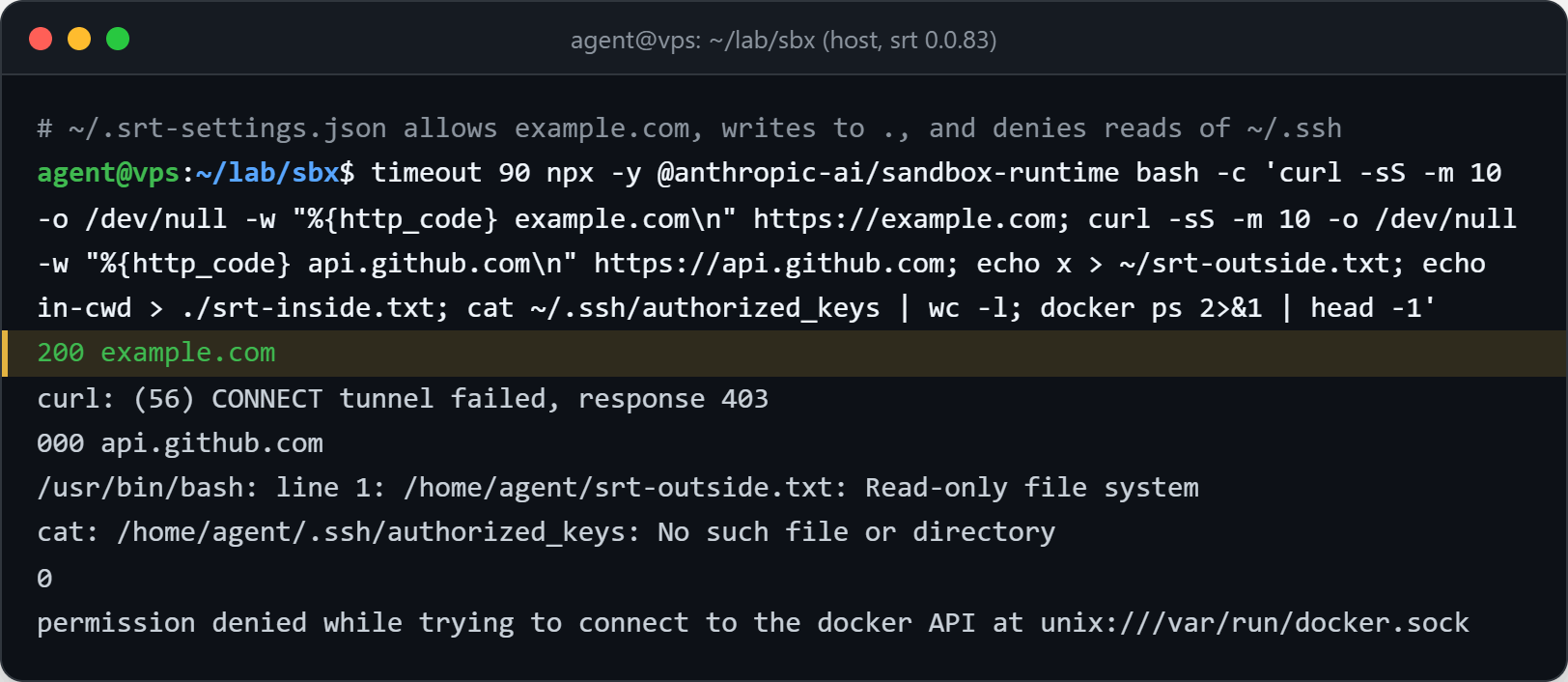
The write to the current folder worked.
Pass the command as separate words, as in bash -c '...', because one quoted string failed with No such file or directory.
To wrap Claude Code, the docs run srt claude with claude.ai and platform.claude.com on the allowlist for login.
Inside srt, the agent still runs as your user, with your server's tools.
Should I Use the Claude Code Sandbox or a Dev Container?
Use the dev container for unattended runs.
It has its own non-root user, which you need anyway, because --dangerously-skip-permissions refuses to run as root.
Your home folder, SSH keys, and the Docker socket stay outside unless you mount them.
The docs say to run sessions that skip permissions inside a container, a VM, or the sandbox runtime, and that a VM gives the strongest separation.
The container has gaps too. The agent can send its login token to any host the firewall allows. It can also write git hooks that run on the host when you commit there. The Dev Containers CLI guide covers the setup without VS Code.
Keep the built-in sandbox for interactive work, where you answer the prompts. To undo the host changes from this guide:
sudo apparmor_parser -R /etc/apparmor.d/bwrap
sudo rm -f /etc/apparmor.d/bwrap
sudo apt-get purge -y bubblewrap socat
rm -f ~/.srt-settings.json
Summary
The built-in sandbox wraps only shell commands, and on a stock Ubuntu 24.04 server it turned itself off.
With permissions skipped, the Write tool and curl both got past it.
srt followed its settings file, but it is still a beta and runs as your own user.
For unattended runs on a VPS, put Claude Code in a dev container with a non-root user and a firewall, and mount only the repo.
My self-hosting course covers setting up and securing the VPS these containers run on.
Thanks for reading.
And stay awesome!
Frequently Asked Questions
Should I use the Claude Code sandbox or a dev container?
For unattended runs on a VPS, use a dev container. The built-in sandbox only wraps shell commands, so file tools, MCP servers, and hooks run outside it. With permissions skipped, it also let a shell command reach a host that was on no allowlist.
Is the Claude Code sandbox enough for dangerously-skip-permissions?
No. In testing with the sandbox on and permissions skipped, curl reached example.com and the Write tool created a file in the home folder, outside the project. The Claude Code docs also say the sandboxed Bash tool on its own is not enough for unattended runs.
Why does Claude Code say Sandbox disabled on Ubuntu 24.04?
Ubuntu 24.04 restricts unprivileged user namespaces through AppArmor, and bubblewrap needs them. Claude Code prints a warning and runs commands without the sandbox. An AppArmor profile for /usr/bin/bwrap fixed it in testing.
Does the Claude Code sandbox work inside Docker?
Not in the dev container I tested. With bubblewrap installed, it could not create a new namespace under Docker default security settings. Without bubblewrap, Claude Code warned and ran commands without the sandbox.
What is the Claude Code sandbox runtime?
It is the open source engine behind the built-in sandbox, packaged as a command called srt. It wraps a whole process, including Claude Code file tools, MCP servers, and hooks. Anthropic calls it a beta research preview.
