
The Claude Code dev container firewall, init-firewall.sh, drops outbound traffic by default and allows GitHub's IP ranges plus a few host names.
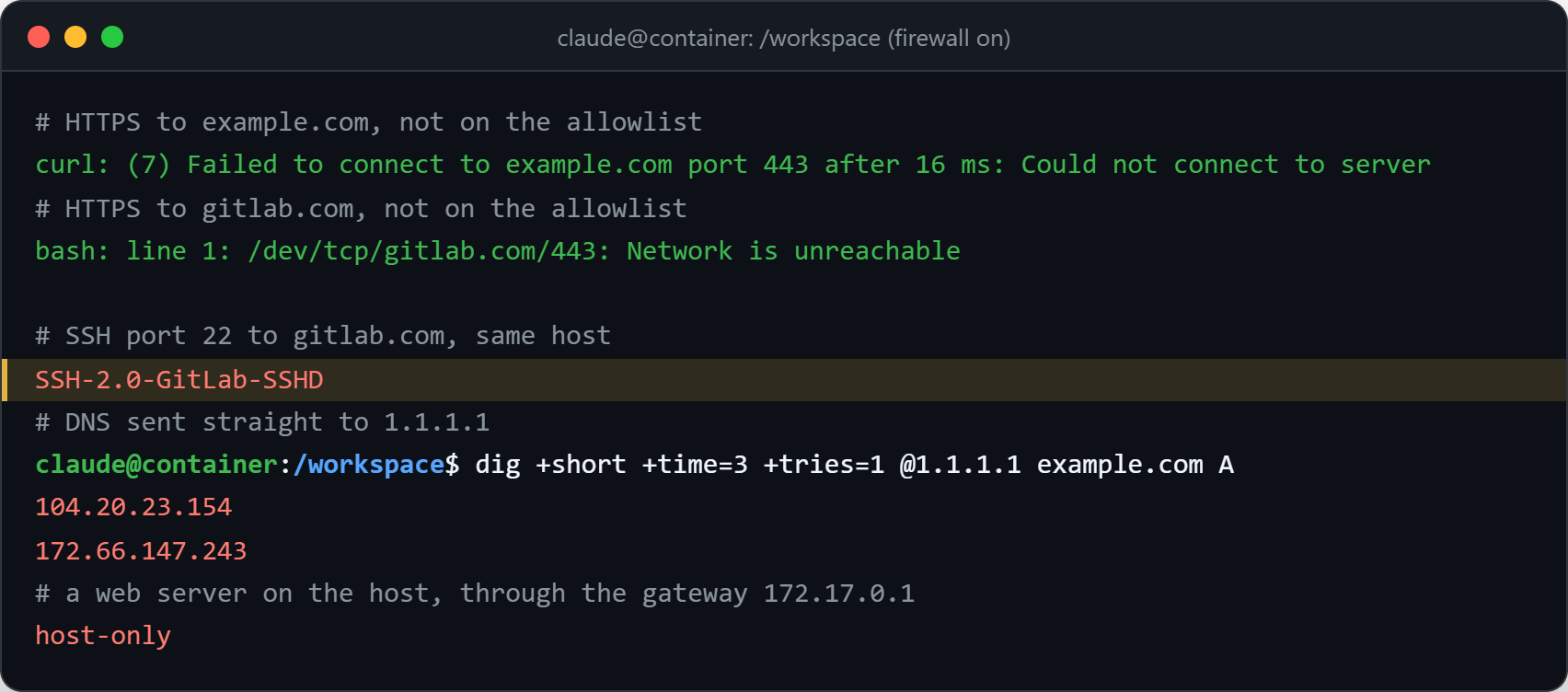
It blocks ordinary web traffic, but DNS, SSH on port 22, and the Docker host still get through.
Names behind a content delivery network (CDN), like api.nuget.org, need a fresh lookup every 10 seconds, or restores fail.
I tested on a 2 vCPU / 8 GB Ubuntu 24.04 VPS with Docker 29.10 and Claude Code 2.1.329, on November 20, 2026. The container is based on Anthropic's reference dev container, and you can download the complete dev container with my fixed script. I didn't test Docker networks with IPv6 or a host firewall such as UFW.
This is what the firewall let through inside the running container:
What Does init-firewall.sh Allow?
The script runs as root on every container start. It uses iptables, the Linux packet filter, and an ipset, a named list of addresses that one rule can match. The list holds GitHub's published IP ranges plus the addresses these names resolve to:
DOMAINS=("api.anthropic.com" "claude.ai" "claude.com" "platform.claude.com" "api.nuget.org")
Anthropic's script names only api.anthropic.com from that list.
Sign-in still works through it, because claude.ai, claude.com, platform.claude.com, and sso.claude.com all resolved to the same address, 160.79.104.10.
Name them anyway, since nothing promises they keep sharing it.
Add the registries your project needs too.
Logging in inside a dev container covers the sign-in flow.
Three rules skip the allowlist: DNS on UDP port 53 to any server, SSH on TCP port 22 to any host, and the Docker host network 172.17.0.0/24.
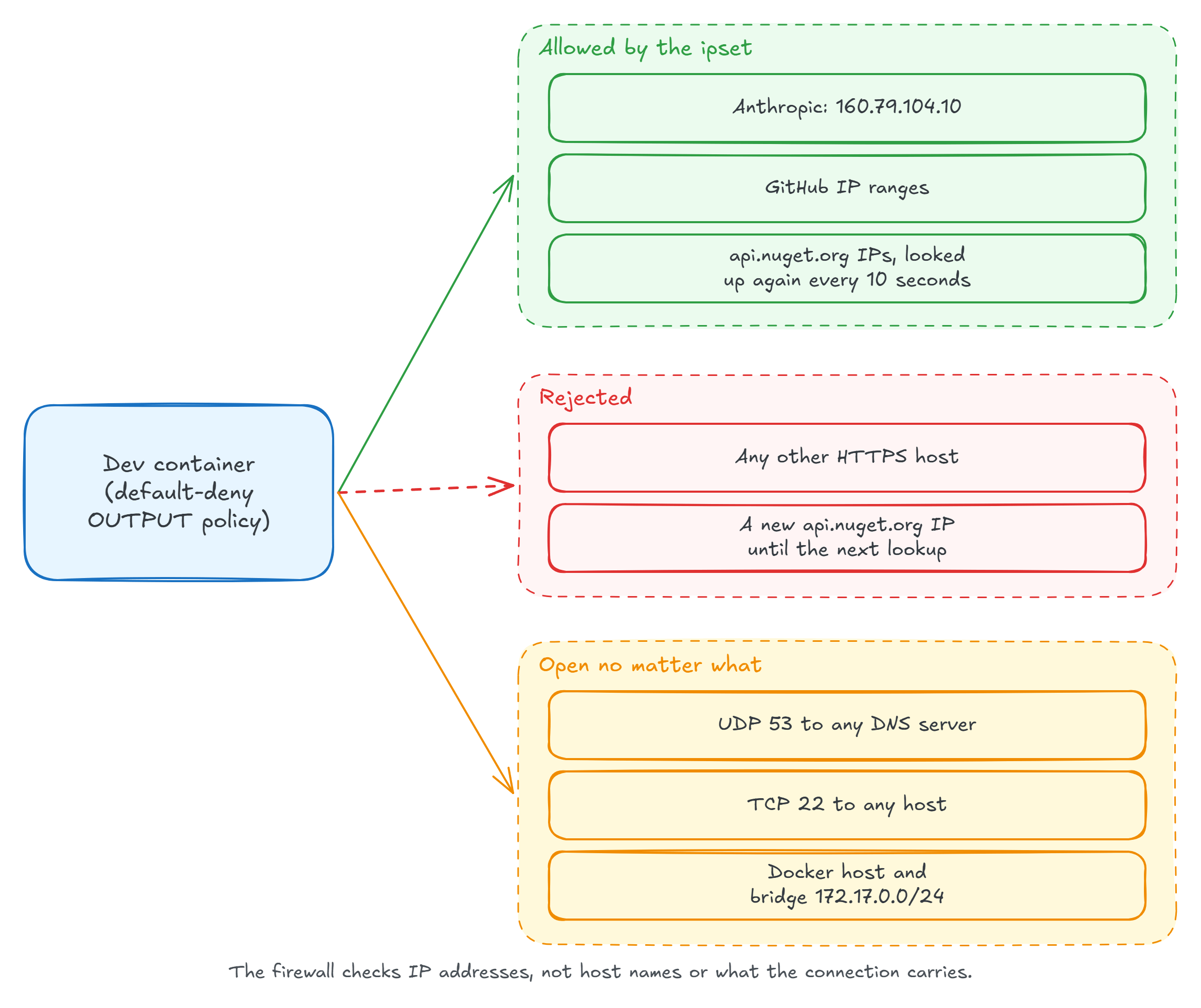
Each open path can carry data out, and GitHub is allowed as whole ranges, so any repo on GitHub is reachable. The Claude Code docs warn: "Any approach that allows network egress can still leak data the agent can read". Treat every service on the VPS as reachable from the container.
I asked Claude what was in the repo, and it found the SSH rule by itself:
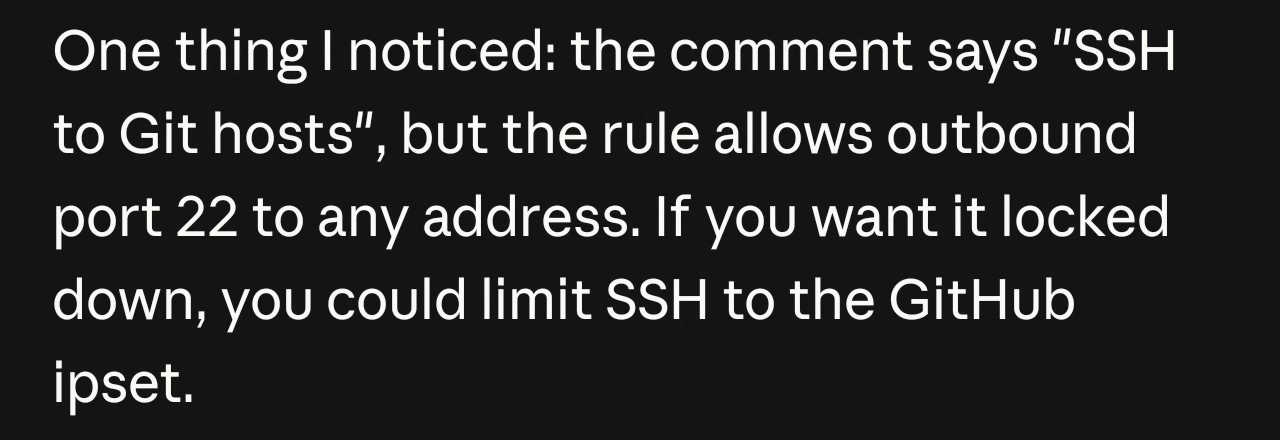
I fixed the comment in the download and left the rule alone. I haven't tested limiting SSH to the GitHub ranges.
Why Does dotnet restore Fail With Network Is Unreachable?
api.nuget.org sits behind a CDN.
Its final DNS record has a 10-second lifetime (TTL), and it switched between 150.171.109.53 and 150.171.110.161.
A script that looks the name up once allows only the address it saw at start.
I ran a small .NET program in the container. It opened a new connection to NuGet every 5 seconds and printed the DNS answer next to each result:
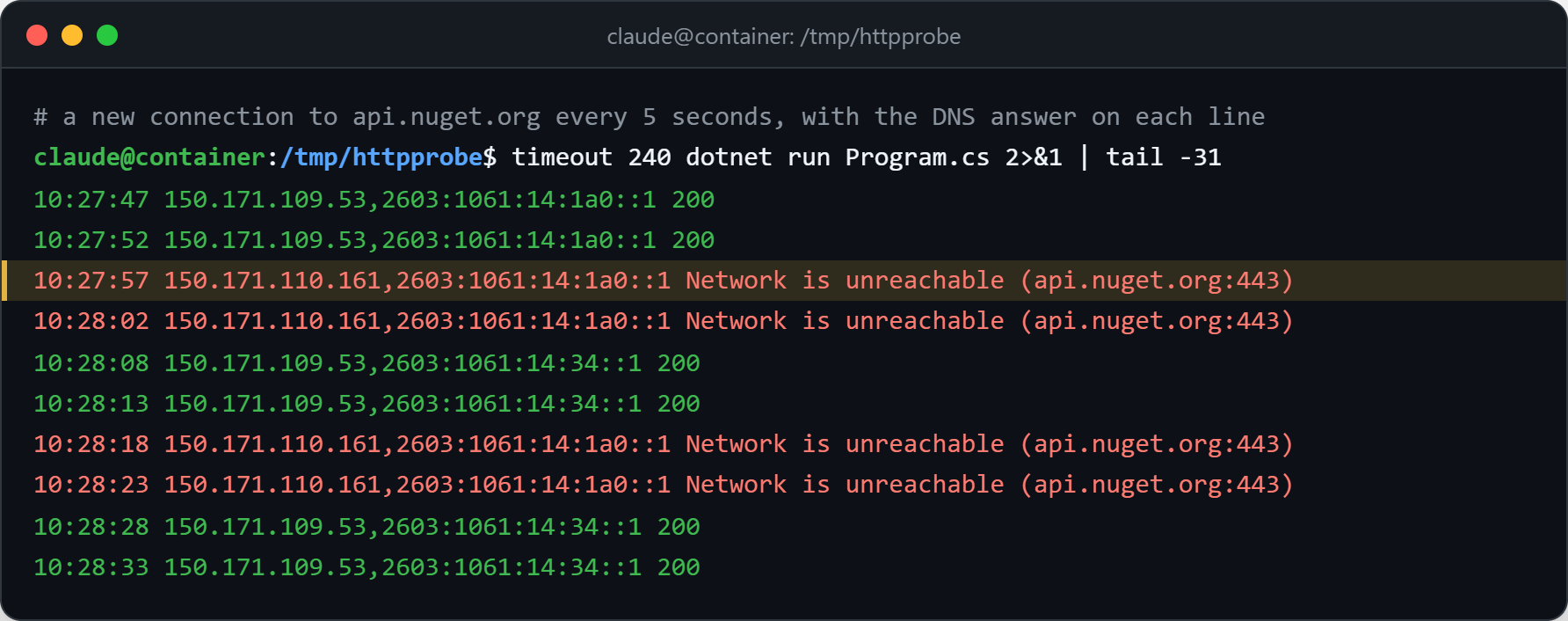
Every call that resolved to 150.171.110.161 failed, 10 of 30.
The message matches the one a dotnet add package restore printed in an earlier run.
How Do You Keep api.nuget.org on the Allowlist?
Look the names up again every 10 seconds, to match the TTL. The script starts this loop in the background:
(
    set +e
    while sleep 10; do
        for domain in "${DOMAINS[@]}"; do
            for ip in $(dig +short A "$domain" | grep -E '^[0-9.]+$'); do
                ipset add allowed-domains "$ip" -exist
            done
        done
    done
) >/dev/null 2>&1 &
echo $! > /run/allowlist-refresh.pid
The loop only adds addresses. On a re-run, the full script reads the PID file and stops the old loop first.
I compared a 30-second loop and a 10-second loop, with one NuGet call per second:
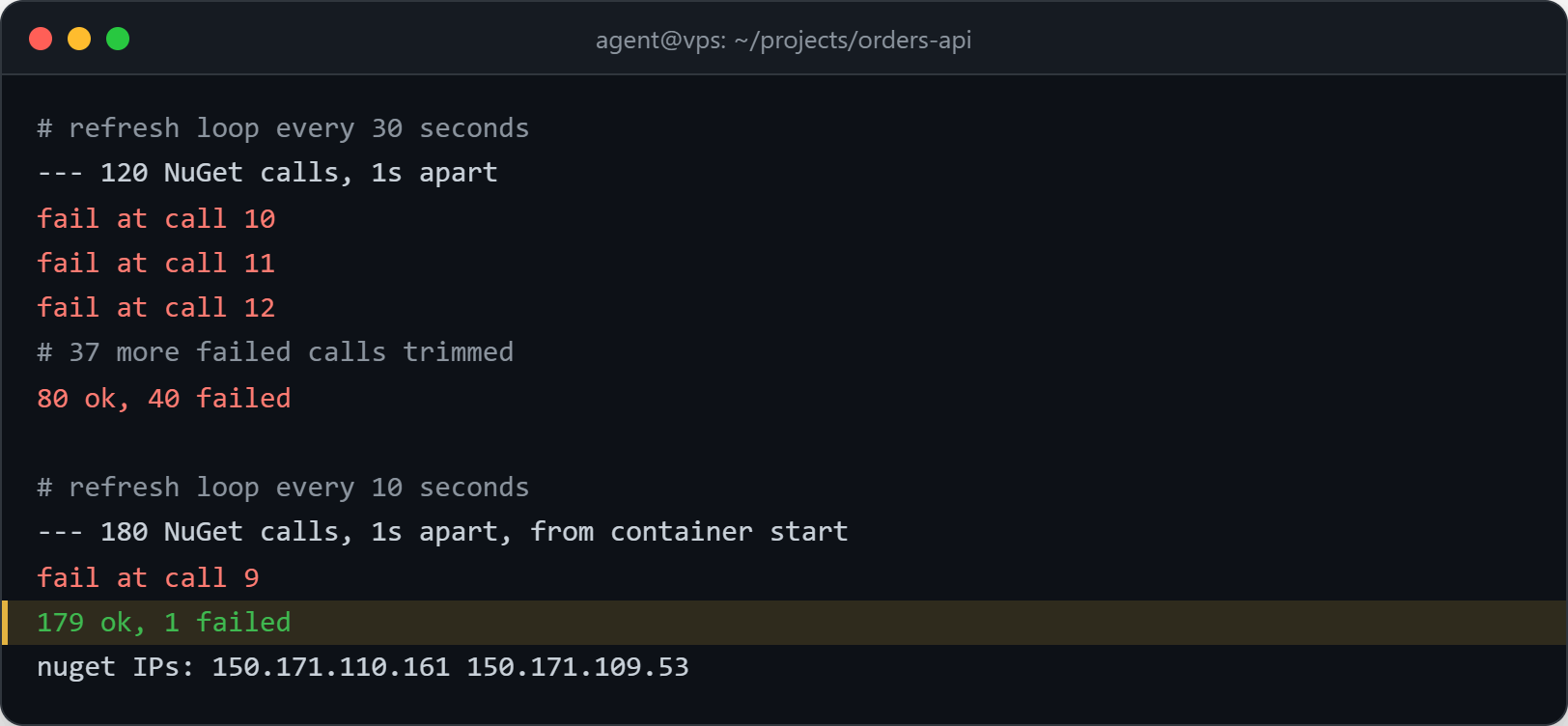
The one failure at 10 seconds was the first call after a new address appeared.
Claude Code's built-in sandbox sends traffic through a proxy that checks host names instead, and the sandbox vs dev container comparison covers when each fits.
Why Does init-firewall.sh Hang When You Run It a Second Time?
Anthropic's version hung on its second run in a throwaway container:
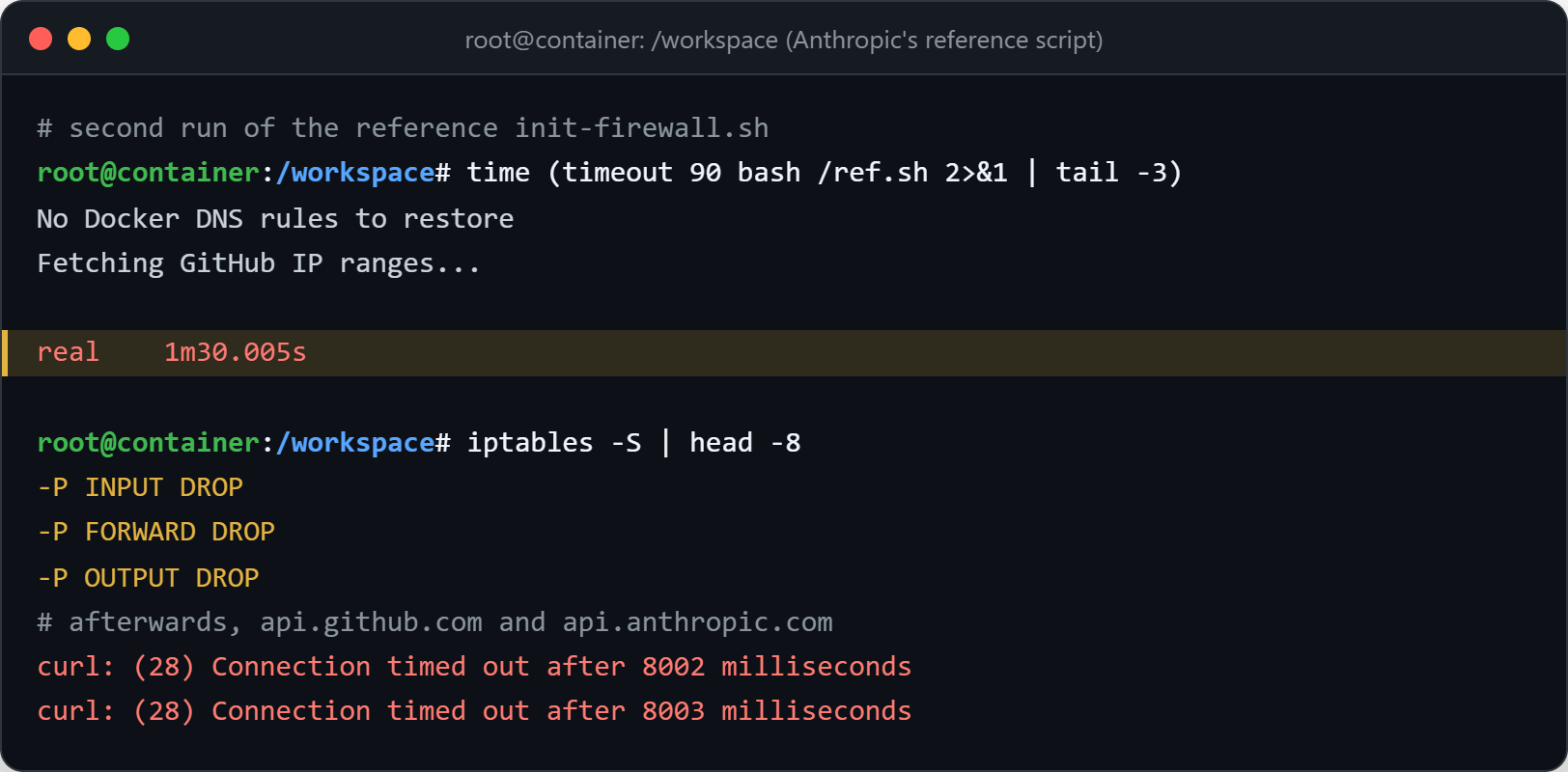
It deletes its rules, including the one that accepts replies, while the default policy is still DROP.
Then it calls curl with no time limit.
My version opens the policies before it deletes anything, and gives that curl call --max-time 15:
iptables -P INPUT ACCEPT
iptables -P FORWARD ACCEPT
iptables -P OUTPUT ACCEPT
iptables -F
If a container is already stuck, recreate it from the host with devcontainer up --workspace-folder . --remove-existing-container.
What Happens When a Re-Run Fails Partway?
Opening the policies first has a cost: until the last lines run, nothing is blocked. I broke DNS and ran the version without a trap a second time:
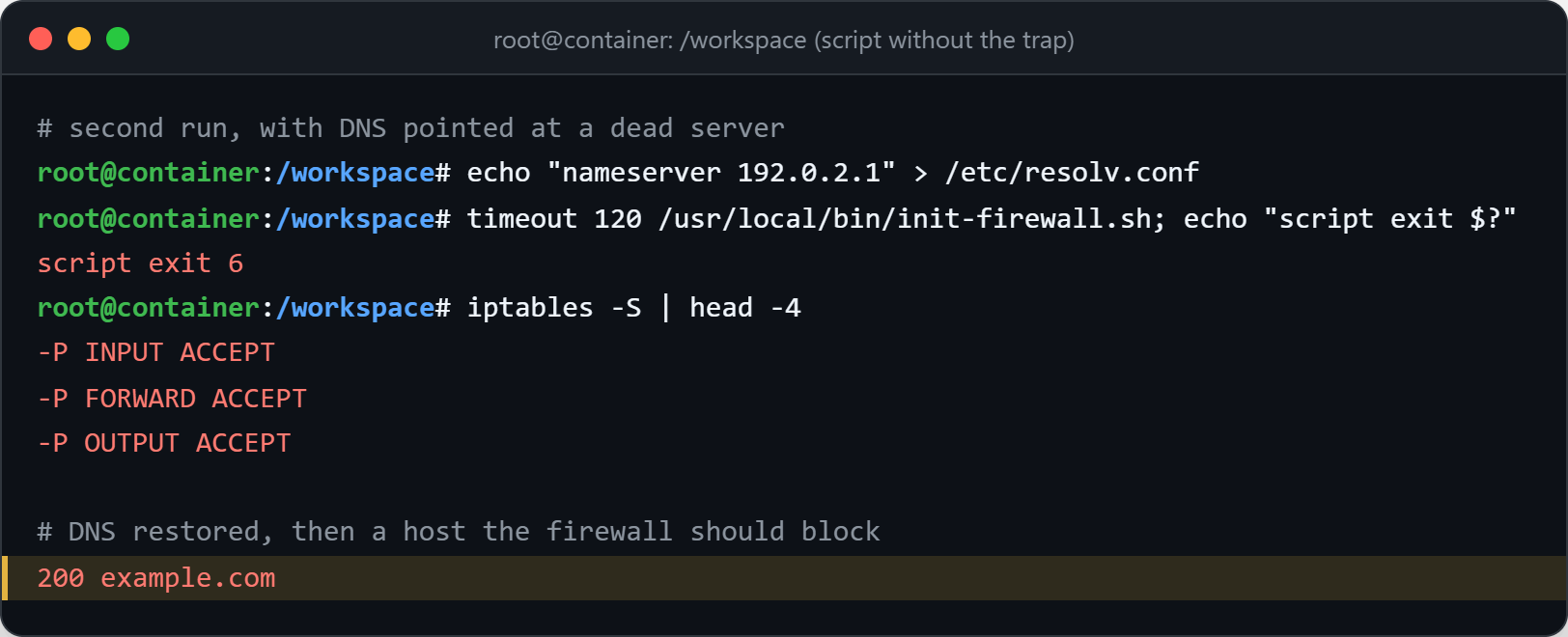
The script stopped at the GitHub download without printing anything, and the firewall stayed off.
The fix is a trap, a function bash runs when the script exits. Any non-zero exit blocks all traffic:
fail_closed() {
    local status=$?
    if [ "$status" -ne 0 ]; then
        iptables -P INPUT DROP
        iptables -P FORWARD DROP
        iptables -P OUTPUT DROP
        echo "ERROR: firewall setup failed, all traffic blocked" >&2
    fi
    exit "$status"
}
trap fail_closed EXIT
A name that didn't resolve and a failed GitHub download now both end on DROP, and a normal run restores access:
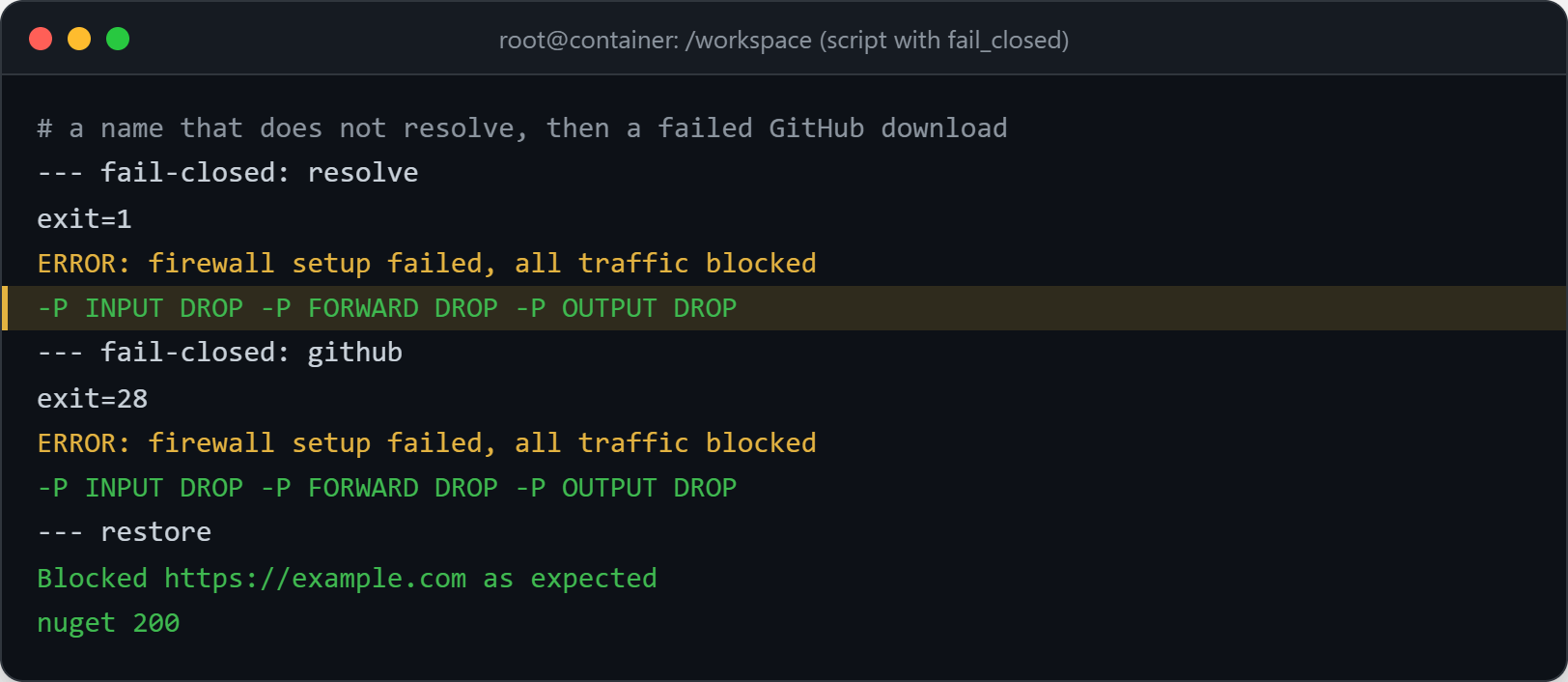
The trap must run on EXIT.
An ERR trap missed the script's own exit 1 and left every policy on ACCEPT.
After any re-run, check that example.com is still blocked.
Summary
The dev container firewall blocks ordinary web traffic, but DNS, port 22, the Docker host, and all of GitHub stay open.
A one-time lookup misses names behind a CDN, so look them up again every 10 seconds.
Make the script fail closed, so a broken re-run blocks everything.
What the container can write on the host is a separate risk, covered in git hooks planted in a dev container.
My self-hosting course covers the cloud firewall in front of the server itself.
Thanks for reading.
And stay awesome!
Frequently Asked Questions
What does init-firewall.sh do in the Claude Code dev container?
It sets the default policy for outbound traffic to drop, then allows DNS, SSH on port 22, the Docker host network, GitHub published IP ranges, and the IP addresses of a short list of host names, which it looks up at start and again every 10 seconds. Every other outbound connection is rejected.
Which hosts does Claude Code need through the firewall?
The Claude Code network docs list api.anthropic.com, claude.ai, claude.com, platform.claude.com, sso.claude.com, and downloads.claude.ai, plus your package registries. The reference script only names api.anthropic.com. Sign-in works anyway today because the other Anthropic names share its IP address, but that can change.
Does the Claude Code devcontainer firewall block DNS?
No. Outbound DNS on UDP port 53 is allowed to any server, so a lookup sent straight to 1.1.1.1 got an answer from inside the container. SSH on port 22 to any host and the Docker host network are open too.
Why does dotnet restore fail with Network is unreachable in the dev container?
api.nuget.org sits behind a CDN with a 10-second DNS lifetime, and in testing it switched between two IP addresses. A firewall that looks up the name once allows only the address it saw at start, so requests failed whenever DNS returned the other one. Looking the names up again every 10 seconds cut the failures to 1 call in 180.
Why does init-firewall.sh hang when you run it a second time?
The reference script deletes its rules while the default outbound policy from the first run is still drop, then calls curl with no time limit. The call cannot get out, so the script waits. Setting the policies to accept before deleting the rules fixed it in testing.
