
No, not on a public address.
ports: "5432:5432" accepted a real login from outside through UFW default deny, and Postgres never locked the account, while expose published nothing and 127.0.0.1:5432:5432 closed the port from outside.
Leave the port unpublished, keep the database off shared proxy networks, and connect over a private Compose network.
I tested this on November 7, 2026, on a systemd Ubuntu 24.04 container with Docker 29.9.3, Compose 5.7.0, and UFW 0.36.2 on default deny plus allow 22/tcp, using a second container to play the outside machine.
Postgres was 18.6, and Redis was 8.10.3 and 7.4.12.
It all ran on a WSL2 kernel, so no real VPS, provider firewall, Traefik, or Dokploy was part of the test, and I did not measure how often scanners find these ports.
Who Can Reach a Published Postgres Port?
I started the same database with four configs and tried to log in from every vantage point on the server and beside it. The first config has neither key, and the other three are below. Don't use the middle one on a server, because it opens a login to the internet through UFW:
    expose:
      - "5432"
    ports:
      - "5432:5432"
    ports:
      - "127.0.0.1:5432:5432"
Each cell is a real psql login with the correct password and a 3 second timeout.
Three passes agreed on all 120 probes, and a re-run with a raw socket and no password agreed on every cell it covered:
| Vantage and target | No ports | expose: "5432" | ports: "5432:5432" | ports: "127.0.0.1:5432:5432" |
|---|---|---|---|---|
| Same project, db:5432 | Connects | Connects | Connects | Connects |
| Other project, db:5432 | DNS failure | DNS failure | DNS failure | DNS failure |
| Other project, container IP | Timeout | Timeout | Timeout | Timeout |
| Other project, server IP:5432 | Timeout | Timeout | Connects | Timeout |
| Other project, its bridge gateway:5432 | Timeout | Timeout | Connects | Timeout |
| Host, 127.0.0.1:5432 | Refused | Refused | Connects | Connects |
| Host, server IP:5432 | Refused | Refused | Connects | Refused |
| Host, container IP | Connects | Connects | Connects | Connects |
| Outside, server IP:5432 | Timeout | Timeout | Connects | Timeout |
| Outside with a route to the bridge subnet, container IP | Timeout | Timeout | Timeout | Timeout |
The ports column is the problem.
UFW's default deny didn't stop the outside login, because Docker sends published ports around UFW's rules.
A provider firewall filters before the server, and this lab didn't have one.
Other projects got in the same way, through the server IP or their own bridge gateway, even though they couldn't resolve db or route to the container.
Through the server IP, Postgres saw that client as the database bridge's gateway, so its logs can't tell you which project connected.
If your provider delivers the public IP through 1:1 NAT, the server-IP route leaves the server and meets the provider's firewall, which I didn't test, and the gateway route doesn't depend on it.
These results are for Linux, because Docker Desktop differs: a container on another network connected to a published container by IP there, 3 of 3.
What Is the Difference Between expose and ports?
ports publishes a port on the host, and expose changed nothing compared with neither key.
Compose's expose and the image's own EXPOSE 5432 only declare a port, and containers on one network can already reach each other.
With UFW off, the unpublished timeouts on the server IP became Connection refused, so that isolation doesn't depend on UFW either.
The loopback bind is the form to use when the server itself needs the port, for example behind an SSH tunnel.
Does Postgres Lock an Account After Failed Logins?
No.
I ran a guessing script against a published port through UFW for 15 seconds at a time, and then the correct password logged in straight away after 128,593 failures.
Nothing locked, and each guess added about 251 bytes to the log, a password authentication failed line and its DETAIL line, or 32 MB over the run.
One worker managed about 240 failed logins per second, and 8 or 32 workers managed over 1,000 per second (1,060 to 1,563 across six runs). That is one 32-CPU machine with no network latency, so a real server across a real network will be slower, and it isn't a VPS number.
Should You Publish Redis in Docker?
No, and Redis is worse than Postgres here because it never asks for a password.
I published redis:8 with -p 6379:6379 on a throwaway test server and removed it straight away, because anyone who can reach that port can read and delete the data.
FLUSHALL below deletes every key in every database with no prompt, so this output is a demonstration and not a check to run:
outside$ redis-cli -h 10.252.0.10 INFO server | grep redis_version
redis_version:8.10.3

outside$ redis-cli -h 10.252.0.10 SET orders:1 42
OK

outside$ redis-cli -h 10.252.0.10 FLUSHALL
OK

outside$ redis-cli -h 10.252.0.10 CONFIG GET protected-mode
protected-mode
no
To check your own server, and only your own, use these two, which only read:
redis-cli -h your-server-ip INFO server
redis-cli -h your-server-ip CONFIG GET protected-mode
Redis has a protected mode for exactly this, and the official image turns it off.
The image's Dockerfile patches the default in src/config.c during the build, on the reasoning that ports aren't exposed unless you publish them, and its docs say so (read November 7, 2026).
I saw the same on 8.10.3 and 7.4.12, and defaults depend on tag and date, so check yours.
Turning protected mode on isn't the fix, because it answers DENIED Redis is running in protected mode to the server's own redis-cli through the published port as well.
Use a password and no published port.
With --requirepass the same port answered NOAUTH Authentication required. from outside, and a loopback bind scanned as 6379/tcp filtered redis.
Can You Attach the Database to a Shared Proxy Network?
Don't. A reverse proxy shares a Docker network with every app it routes to, and adding the database to that network looks like a quick way to let something else reach it. This is the form to avoid:
  db:
    image: postgres:18
    environment:
      POSTGRES_USER: billing
      POSTGRES_PASSWORD: change-me-3
      POSTGRES_DB: billing
    volumes:
      - pgdata:/var/lib/postgresql
    networks:
      - default
      - proxy
Before the change, shop's app reached billing's app over proxy by name, and billing's database failed by name and timed out by IP.
After it, shop's app logged in to billing's database with its credentials in 40 of 40 tries, and a wrong password got a real FATAL, so that database is now open to guessing from every app on the network.
The less obvious result is what happens to the name db.
When billing started with its db on proxy, shop's app, which also sits on proxy, began reaching billing's database through its own plain db.
Nobody touched or restarted shop, and both databases used the same user and password in this run:
=== shop, before billing starts:
    getent: 172.19.0.2
        20 shop-db
 Container billing-db-1 Started
=== shop, after billing starts with its db on proxy (no operator action on shop, no restart):
    getent: 172.18.0.3
        20 billing-db
CREATE TABLE
INSERT 0 1
wrote on billing-db
  shop-db-1 orders: none
  billing-db-1 orders: orders
The app wrote its order to the wrong database with no error. With different passwords it fails loudly, as a password authentication failure from a server that isn't yours. I tested new logins and one write per method, not a connection pool that already holds open connections.
Which db Answers When Two Projects Share a Network?
Docker's embedded DNS walks the container's networks in a fixed order and answers from the first one that has the name.
In the Docker 29 source, that order is gw-priority, then the gateway network, then non-internal before internal, then networks with a gateway, then the network name, and my tests confirmed the gw-priority, internal, and name steps.
So the answer flips when the shared network's name sorts ahead of the project's own, and always when the project's own network is internal:
| Project's own network | Shared network | Plain db after billing's db joins |
|---|---|---|
| alpha_default | proxy | Own |
| shop_default | proxy | Billing's |
| alpha_default | aaa-shared | Billing's, the rename flips it |
| shop_default | zzz-shared | Own, the rename flips it back |
| shop_default | dokploy-network | Billing's |
| alpha_data, internal | proxy | Billing's, though the name sorts first |
| alpha_data, not internal | proxy | Own |
| zulu_default, gw-priority=1 on it | proxy | Own, though the name sorts last |
Attach order made no difference, and dokploy-network here is only a name, since I didn't run Dokploy.
The gw-priority row came from docker run, and it also moves the container's default route.
When both databases joined the shared network with the alias db, shop's app split between them, 12 logins to billing-db and 8 to shop-db.
I found no Docker doc for this order in the pages I checked, so treat it as implementation that can change, and don't design around network names.
How Should You Lay Out the Compose File?
Put the database and cache on an internal network, give them project-specific aliases, and let only the app join the proxy network.
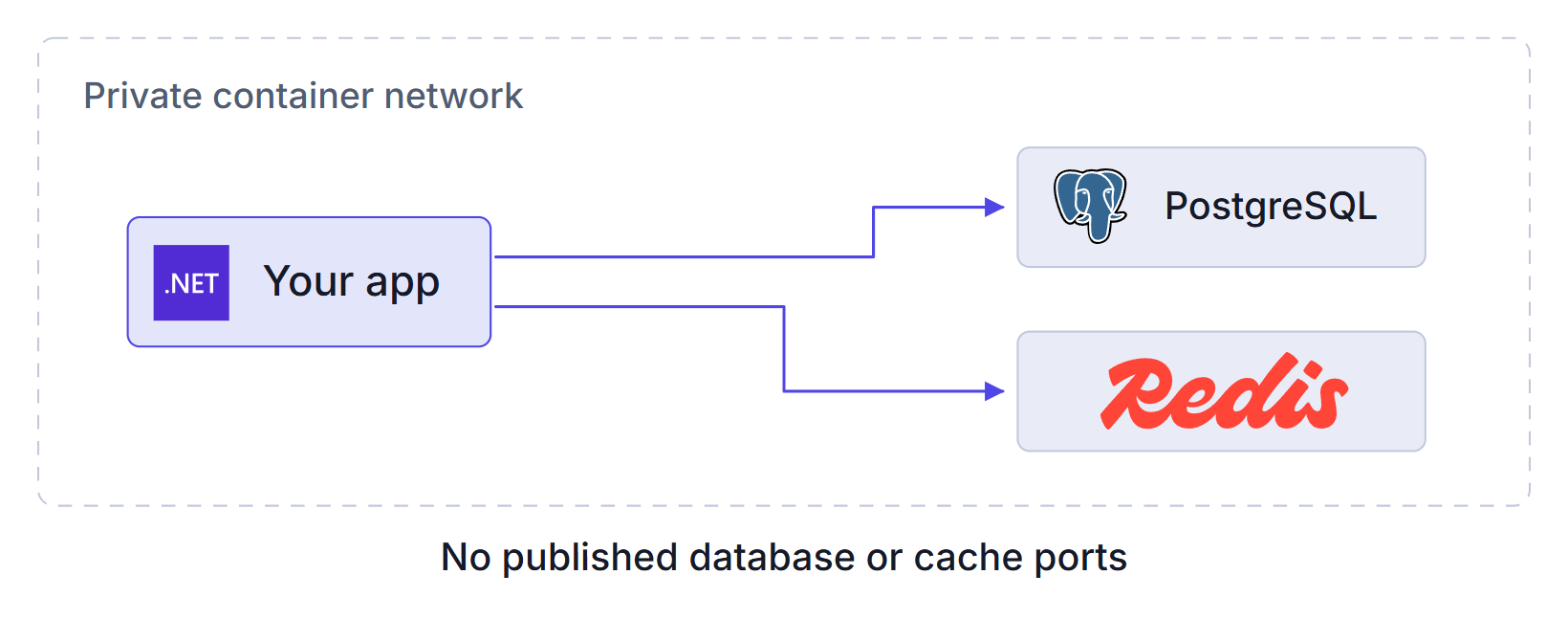
This is the layout I ran, where pgnet-client stands in for your app and change-me values are placeholders:
services:
  app:
    image: pgnet-client
    networks:
      - data
      - proxy
    depends_on:
      db:
        condition: service_healthy
  db:
    image: postgres:18
    environment:
      POSTGRES_USER: shop
      POSTGRES_PASSWORD: change-me
      POSTGRES_DB: shop
    volumes:
      - pgdata:/var/lib/postgresql
    healthcheck:
      test: ["CMD-SHELL", "pg_isready -h 127.0.0.1 -U shop -d shop"]
      interval: 5s
      timeout: 3s
      retries: 5
      start_period: 60s
      start_interval: 1s
    networks:
      data:
        aliases:
          - shop-db
  redis:
    image: redis:8
    command: ["redis-server", "--requirepass", "change-me-too"]
    networks:
      data:
        aliases:
          - shop-redis
volumes:
  pgdata:
networks:
  proxy:
    external: true
  data:
    internal: true
I created proxy first with docker network create proxy, and on your server use your reverse proxy's network instead.
The app must connect to shop-db and shop-redis.
data is internal, so it sorts last for this app, and plain db reaches any db on proxy.
pgnet-client is built on postgres:18, so it has psql, and a password on the command line only suits a test stack.
With billing's database still on proxy, the two names landed in different places (first line of each getent):
vps$ docker compose exec app getent ahostsv4 db
172.18.0.3      STREAM db

vps$ docker compose exec app getent ahostsv4 shop-db
172.19.0.3      STREAM shop-db

vps$ docker compose exec -e PGPASSWORD=change-me app psql -h db -U shop -d shop -Atc 'select current_database()'
psql: error: connection to server at "db" (172.18.0.3), port 5432 failed: FATAL:  password authentication failed for user "shop"

vps$ docker compose exec -e PGPASSWORD=change-me app psql -h shop-db -U shop -d shop -Atc 'select current_database()'
shop
One earlier run of this layout gave plain db 17 logins to the other database, 2 to its own, and 1 refused, which I can't explain and didn't see again in 90 later samples.
The alias reached its own database in all 20 logins of that run.
internal: true also takes away the database's outbound access (Network is unreachable), while the app keeps both the database and its own outbound access, because it also joins proxy.
A backup job on that network would lose its off-site route too, which I didn't test.
How Do You Check What Your Server Exposes?
Run these on the server, and the first shows what Docker publishes:
docker ps --format '{{.Names}}\t{{.Ports}}'
ss -ltn | grep -E ':(5432|6379) ' || echo none
docker network inspect proxy --format '{{range .Containers}}{{.Name}} {{end}}'
A database line showing 0.0.0.0:5432->5432/tcp is published to everyone, while 5432/tcp alone is not.
On the recommended layout ss printed none.
Use your proxy network's name in the last command, and any database in its list is open to every app on that network.
Then scan from another machine, pointed at your own server only:
nmap -Pn -sV -p 5432,6379 your-server-ip
nmap named both services through UFW when they were published:
PORT     STATE    SERVICE    VERSION
5432/tcp open     postgresql PostgreSQL DB 9.6.0 or later
6379/tcp open     redis      Redis key-value store 8.10.3
On the recommended layout it showed 5432/tcp filtered postgresql and 6379/tcp filtered redis.
Summary
A published Postgres port is reachable from outside and from every other project on the server, UFW doesn't stop it, and Postgres has no lockout for the guesses that follow.
The official Redis image is more exposed still, because it accepted reads, writes, and FLUSHALL with no password at all.
expose changes nothing, so the choice is between no published port and a loopback bind.
A database attached to a shared proxy network is open to every app on that network, and it can also take over the name db in another project.
Keep databases on a project network and connect through a project-specific alias.
These results come from containers on a WSL2 kernel, so scan your own server from outside before you rely on them.
My self-hosting course deploys an app behind Traefik with automatic HTTPS while the database and cache stay private.
Thanks for reading.
And stay awesome!
Frequently Asked Questions
Is it safe to publish Postgres port 5432 in Docker?
No. A port published as 5432:5432 accepted a real login from another machine through a UFW default deny policy, and other projects on the server reached it too. Leave the port unpublished, or bind it to 127.0.0.1 if the server itself needs it.
What is the difference between expose and ports in Docker Compose?
The ports key publishes a port on the host. The expose key does not. In testing, a database with expose behaved exactly like one with neither key across all ten targets I probed, because containers on the same network can already reach each other.
Does Postgres lock an account after failed logins?
Not by default. After 128,593 failed logins through a published port, the correct password logged in straight away. A test client managed over 1,000 guesses per second at 8 or more workers on my machine, with no network latency, so a real server across a real network will be slower.
Does the official Redis image need a password when published?
It does not ask for one. The image build turns protected mode off, so a published port accepted reads, writes, and FLUSHALL from outside with no password on versions 8.10.3 and 7.4.12. Set a password and do not publish the port.
Why did my app start connecting to another project database?
If another project attaches its service named db to a shared network, Docker DNS can answer your app with that database, because it answers from the first network in its own order that has the name. In testing this happened as soon as the other project started, with no change on the affected project. A project-specific alias prevents it.
