
Run ssh -N -L 127.0.0.1:15432:172.18.0.2:5432 deploy@vps with your container's address, then point your client at 127.0.0.1:15432.
The container publishes no port, because the SSH server opens the last hop to it.
The address can move, mostly on reboots, and forwarding to a loopback publish survives that.
I ran this on November 7, 2026, with a systemd Ubuntu 24.04 container as the server and a second container as the laptop, on a WSL2 kernel, with Docker 29.9.3, OpenSSH 9.6, and Postgres 18.6.
I repeated the address moves, the forward, and the role test on the official Ubuntu 24.04 cloud image under QEMU, with Ubuntu's docker.io 29.1.3 and Postgres 17.11, so Ubuntu's kernel and systemd were part of that run.
Nothing ran on a real VPS or behind a provider firewall, and I tested no macOS client and no DBeaver.
How Do You Tunnel to a Container With No Published Port?
The SSH client listens on a port on your laptop and carries each connection to the server. The SSH server then opens the last hop, so the target address is read from the server's point of view. A Docker host routes to its own bridge networks, which lets the server reach the container's private address with nothing published.
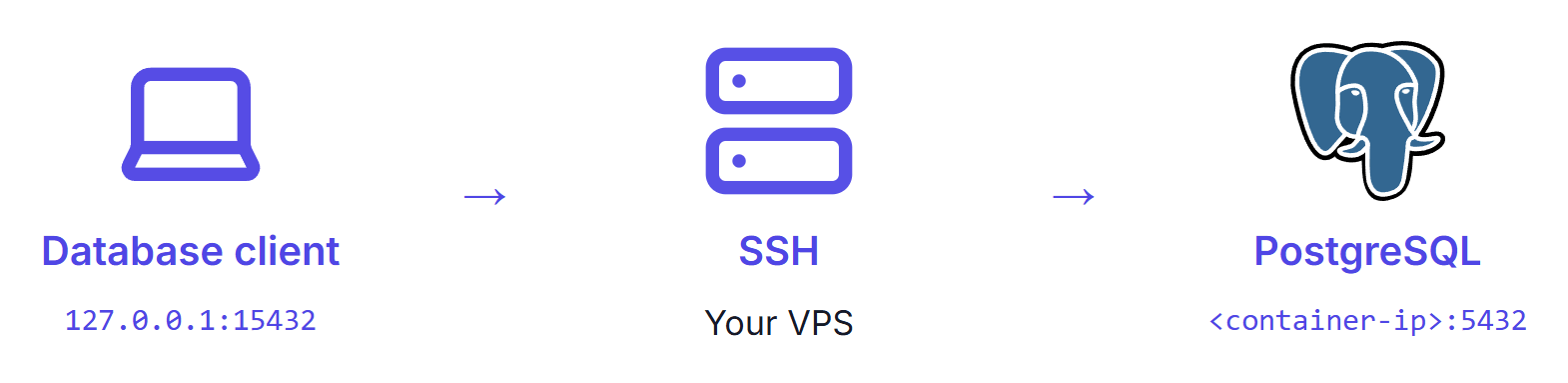
Find the address first, replacing vps, deploy, shop-db-1, and shop_default with your server, login, container, and Compose network:
ssh deploy@vps "docker ps --format '{{.Names}}\t{{.Ports}}'"
ssh deploy@vps "docker inspect -f '{{(index .NetworkSettings.Networks \"shop_default\").IPAddress}}' shop-db-1"
shop-db-1	5432/tcp
172.18.0.2
5432/tcp with no arrow means the port isn't published.
Use the index form, because a range template printed 172.18.0.2172.19.0.2 for a container on two networks.
Both commands need Docker access: the docker group, which my hardening checklist treats as root, or sudo in a shell on the server.
Open the tunnel and leave that terminal alone:
ssh -N -L 127.0.0.1:15432:172.18.0.2:5432 deploy@vps
-N runs no remote command, so a blank terminal is the working state.
It printed 0 bytes while a query passed through it, and a broken tunnel looks just as blank until something connects.
So prove the path from a second terminal, where psql asks for the role's password:
psql -h 127.0.0.1 -p 15432 -U app -d shop -c 'SELECT count(*) FROM orders'
psql -h 127.0.0.1 -p 15432 -U app -d shop -c 'SELECT inet_server_addr(), current_database()'
 count
-------
    42
(1 row)

 inet_server_addr | current_database
------------------+------------------
 172.18.0.2       | shop
(1 row)
Without the tunnel, the same query got Connection refused, and so did a direct attempt on the server's 5432, though a provider firewall changes what a real server shows.
With the tunnel open, the server had no 5432 or 15432 listener.
Keep the 127.0.0.1: in the forward.
Without a bind address, the forward still listened on loopback only, but -L 0.0.0.0:15432:... let a neighboring machine read the table, so never use that form.
The Dokploy panel tunnel uses the same flag with localhost as its target.
That fits a panel listening on the server itself, which this container doesn't do, though I didn't run it against a panel.
To run it in the background, add -f together with ExitOnForwardFailure:
ssh -f -N -o ExitOnForwardFailure=yes -L 127.0.0.1:15432:172.18.0.2:5432 deploy@vps
ss -ltnp 'sport = :15432'
pgrep -af 'ssh -f -N'
pkill -f 'ssh -f -N'
With the local port already held, plain ssh -f -N exited 0 and left a background process with no forward, while this form exited 255.
The option only covers the listener, so a refused database still leaves the tunnel running, and SSH tunnel errors has the rest of those failures.
pkill -f stops every background tunnel of yours that matches, not only this one, and I ran these four lines on Linux only.
What Can Change the Container's Address?
Compose's docs say a replaced container joins under a different address, and my results were narrower than that. Recreating only the database kept it every time, while a reboot with three services on the network usually moved it. These totals combine the container lab and the cloud image, except where a row says otherwise:
| What happened | On the network | Address moved |
|---|---|---|
| --force-recreate db | Three services | 0 of 10 |
| Reboot | Database alone | 0 of 8 |
| --force-recreate, whole stack | Three services | 1 of 13 |
| compose down, then up -d | Three services | 1 of 8, container lab only |
| systemctl restart docker | Three services | 10 of 14 |
| Reboot | Three services | 13 of 16, with 6 of 6 on the cloud image |
| Another container starts in the gap and stays | Database and others | 12 of 12, container lab only |
The moves look like a start-order race between containers on one network, but I didn't verify that cause, and samples this small aren't rates. I also didn't test a busy shared network, such as a deployment panel's.
Docker's networking docs don't describe an allocation order (read November 7, 2026, like Compose's). The Compose wording is stronger than I measured for a single recreate, but it is the documented behavior, so treat the address as unstable.
An open tunnel doesn't notice the move.
In 3 of 3 runs ssh stayed up, and every new query failed with server closed the connection unexpectedly while ssh printed this:
channel 1: open failed: connect failed: No route to host
A reboot ends the tunnel itself.
In one constructed run, I forced a second Postgres with the same role, password, and database name onto the old address, and the old tunnel logged in to it with no SSH error.
The only sign was relation "orders" does not exist, which is why the proof above queries a real table.
When that server had its own orders, both proof queries passed with a different count, so a restored copy won't trip them.
After a reboot or redeploy, look the address up again.
Which Option Should You Use?
For an occasional query, use one-shot docker exec.
For a GUI client you open often, publish on loopback, since it kept working through an open tunnel when the address moved.
| Option | Adds on the server | After a move | Cost |
|---|---|---|---|
| Forward to the container address | Nothing | Open tunnel failed, 3 of 3 | Docker access for each lookup |
| Rediscover script | Nothing | New tunnel worked, 3 of 3 | Docker access, and an open tunnel goes stale |
| Publish on 127.0.0.1:5432 | A loopback listener | Open tunnel worked, 3 of 3 | Any local user can reach it |
| One-shot docker exec | Nothing | No address involved | Docker access, and no GUI client |
| Fixed ipv4_address | Nothing | Stayed through 4 reboots | The stack stops once, and the subnet stays reserved |
Publish on Loopback
This is the one option that does bind 5432 on the server, on its loopback address and not a public one.
A direct attempt from the laptop failed, and who can reach a published port has the full table.
Add this to compose.override.yaml, using your service name for db, and apply it with docker compose up -d, which recreates the database container and ends its open connections:
services:
  db:
    ports:
      - "127.0.0.1:5432:5432"
ssh -N -L 127.0.0.1:15432:127.0.0.1:5432 deploy@vps
Through three real moves, one open tunnel kept returning rows, and inet_server_addr() followed the container.
Any local user on the server can reach this port, and the publish fails if something on the server already holds 5432.
To go back, remove those lines and run docker compose up -d.
Docker's docs say that before 28.0.0, hosts on the same layer 2 segment could also reach ports published to localhost (read November 7, 2026), so run docker version first, and on an older daemon forward to the container address instead of publishing.
I didn't test that from an adjacent host.
Rediscover the Address
Save this as a script and run it instead of a fixed forward. It worked three of three times after the address moved:
#!/bin/bash
ip=$(ssh deploy@vps "docker inspect -f '{{(index .NetworkSettings.Networks \"shop_default\").IPAddress}}' shop-db-1")
exec ssh -N -o ExitOnForwardFailure=yes -L "127.0.0.1:15432:${ip}:5432" deploy@vps
One-Shot docker exec
This leaves no listener anywhere, and the second form is interactive:
ssh deploy@vps "docker exec shop-db-1 psql -U app -d shop -c 'SELECT count(*) FROM orders'"
ssh -t deploy@vps docker exec -it shop-db-1 psql -U app -d shop
It asks for no password, for the reason in the password guide, and app is still a superuser here.
Fix the Address in Compose
Add this to compose.override.yaml and apply it with docker compose down then docker compose up -d:
services:
  db:
    networks:
      default:
        ipv4_address: 172.30.0.10

networks:
  default:
    ipam:
      config:
        - subnet: 172.30.0.0/24
ssh -N -L 127.0.0.1:15432:172.30.0.10:5432 deploy@vps
docker compose down stops the stack, so this needs a maintenance window, and it must never carry -v, which would delete the database volume.
Check docker inspect -f '{{range .Mounts}}{{.Name}} {{end}}' shop-db-1 first.
A long hash means an anonymous volume, and in my run down then up -d brought back an empty database.
Compose's down docs say the old volume stays on disk and a later up doesn't mount it (read November 7, 2026).
Check that the subnet is free with ip route first, and note that I didn't test this on a network a deployment panel owns.
To go back, remove those lines, then run the same two commands.
Which Postgres Role Should the Tunnel Use?
Not the POSTGRES_USER role, which is app in the commands above.
The image makes that role a superuser, and it wrote through the tunnel with UPDATE 1.
The built-in option is a role with pg_read_all_data, so replace the sample password here:
CREATE ROLE inspector LOGIN PASSWORD 'lab-only-inspector-password';
GRANT pg_read_all_data TO inspector;
Test it inside a transaction with a row that fits your table, so a mis-granted role can't leave a row behind on a real table:
psql -h 127.0.0.1 -p 15432 -U inspector -d shop -v VERBOSITY=verbose -c 'BEGIN' -c 'INSERT INTO orders VALUES (1000, 1, 1)' -c 'ROLLBACK'
BEGIN
ERROR:  42501: permission denied for table orders
LOCATION:  aclcheck_error, aclchk.c:2843
ROLLBACK
On Postgres 16, 17, and 18 it read pg_authid and pg_shadow, which gives it every role's password verifier, including the superuser's (printed here as prefix and length):
app|SCRAM-SHA-256$|133
inspector|SCRAM-SHA-256$|133
A verifier isn't the password, but it can be attacked offline, and I didn't test how hard that is. The predefined roles page doesn't mention this.
The role also read every table, including the password_hash column and tables created after the grant, in every database it could connect to.
It isn't strictly read-only either, since a SECURITY DEFINER function that PUBLIC could execute wrote for it, and default_transaction_read_only = on stopped that only until the role turned the setting off for itself.
When a person only needs certain tables, use explicit grants:
CREATE ROLE reader LOGIN PASSWORD 'lab-only-reader-password';
GRANT USAGE ON SCHEMA public TO reader;
GRANT SELECT ON orders TO reader;
GRANT SELECT (id, email) ON customers TO reader;
Run it while connected to the database it should cover, as the role that owns the tables.
reader got id and email, and 42501 for password_hash, pg_shadow, pg_authid, and invoices in a second database.
A table created later got 42501.
ALTER DEFAULT PRIVILEGES IN SCHEMA public GRANT SELECT ON TABLES TO reader; changes that, and it gives reader every future table in that schema, including one holding secrets.
How Do You Set This Up in DBeaver?
I didn't test this, so everything here comes from the DBeaver SSH docs (read November 7, 2026, page undated).
By default DBeaver picks a random local port and forwards it to the destination port on the Main tab, and the setup steps set the Main tab host to localhost.
The page doesn't mention containers.
localhost means the server in a forward, which worked in my OpenSSH tests with a loopback publish and was refused with no published port.
So that advice should fit the loopback option, and with no published port the Main tab host may need the container address, which you should check on your own desktop.
Summary
The tunnel takes one command, and the container address is the part that changes.
Recreating only the database kept it in 10 of 10 runs, while a reboot with three services moved it in 13 of 16, so look it up each time or forward to a loopback publish, which kept working through three real moves.
A loopback publish does bind 5432 on the server, so count local users among the people who can reach it.
Use a separate Postgres role for the tunnel.
pg_read_all_data stopped ordinary writes, read every role's password verifier, and let a SECURITY DEFINER function write for it, so explicit grants fit better when the role is for a person.
My self-hosting course practices reaching a private Postgres container through this kind of tunnel and proving the path with a real query.
Thanks for reading.
And stay awesome!
Frequently Asked Questions
How do I reach Postgres in Docker through SSH without publishing a port?
Find the container address on the server, then run ssh with a local forward from a loopback port on your laptop to that address on port 5432. The SSH server opens the last hop, so the container publishes nothing. Prove the path with a real query, because a blank terminal looks the same when the tunnel is broken.
Does the Postgres container address change?
It can. Recreating only the database kept the address in 10 of 10 runs, and a reboot with the database alone on its network kept it in 8 of 8. A reboot with three services on the network moved it in 13 of 16 runs. Compose documents that a replaced container can get a different address, so look it up each time.
Does publishing on 127.0.0.1 expose port 5432?
It binds 5432 on the server loopback, not on a public address. A direct attempt from another machine failed, while any local user on the server could reach the port. Docker documents that before version 28.0.0, hosts on the same layer 2 segment could also reach loopback-published ports.
Is pg_read_all_data a safe role for a tunnel?
It blocks ordinary writes, but it is broader than read-only suggests. On Postgres 16, 17, and 18 it read the password verifier of every role, including the superuser. It also reads every database it may connect to. Use explicit grants on the tables a person needs when that matters.
Does DBeaver work with a container that publishes no port?
I did not test it. The DBeaver docs say to set the Main tab host to localhost, which fits a loopback publish. With no published port, localhost was refused in my OpenSSH tests, so the Main tab host may need the container address. Check that on your own desktop.
