
A cloud firewall filters traffic before it reaches your server, and UFW filters it on the server. On a Docker host, only the cloud firewall covers published container ports, because Docker routes them around UFW. Use the cloud firewall as your main rule set, and keep UFW as a second layer for host processes.
The UFW and Docker results below come from a test on Ubuntu 24.04 and 26.04, running as containers under WSL2, with a second container scanning from outside. I didn't test a live provider firewall, so the provider details come from Hetzner's and DigitalOcean's documentation.
What Is the Difference Between a Cloud Firewall and UFW?
The main difference is where each one sits, and most of the other differences follow from that.
| Cloud firewall | UFW | |
|---|---|---|
| Where it filters | In the provider's network | On the server, on the input path |
| Published Docker ports | Filtered before they reach the server | Not filtered |
| SSH and other host processes | Filtered | Filtered |
| After a root compromise | An attacker also needs your provider account to change it | An attacker with root can turn it off |
| Cost | Free at Hetzner and DigitalOcean | Free, part of Ubuntu |
| Rule style | Allow rules only at Hetzner, deny rules also exist at DigitalOcean | Allow, deny, reject, and limit |
| Rule order | Does not matter at Hetzner | Matters, the first match wins |
| Private network traffic | Not filtered at Hetzner, can be filtered at DigitalOcean | Applies to every interface by default |
| Logs | Not available at DigitalOcean | Yes, as UFW log lines |
| Many servers | One firewall applied by label or tag | Configured on each server |
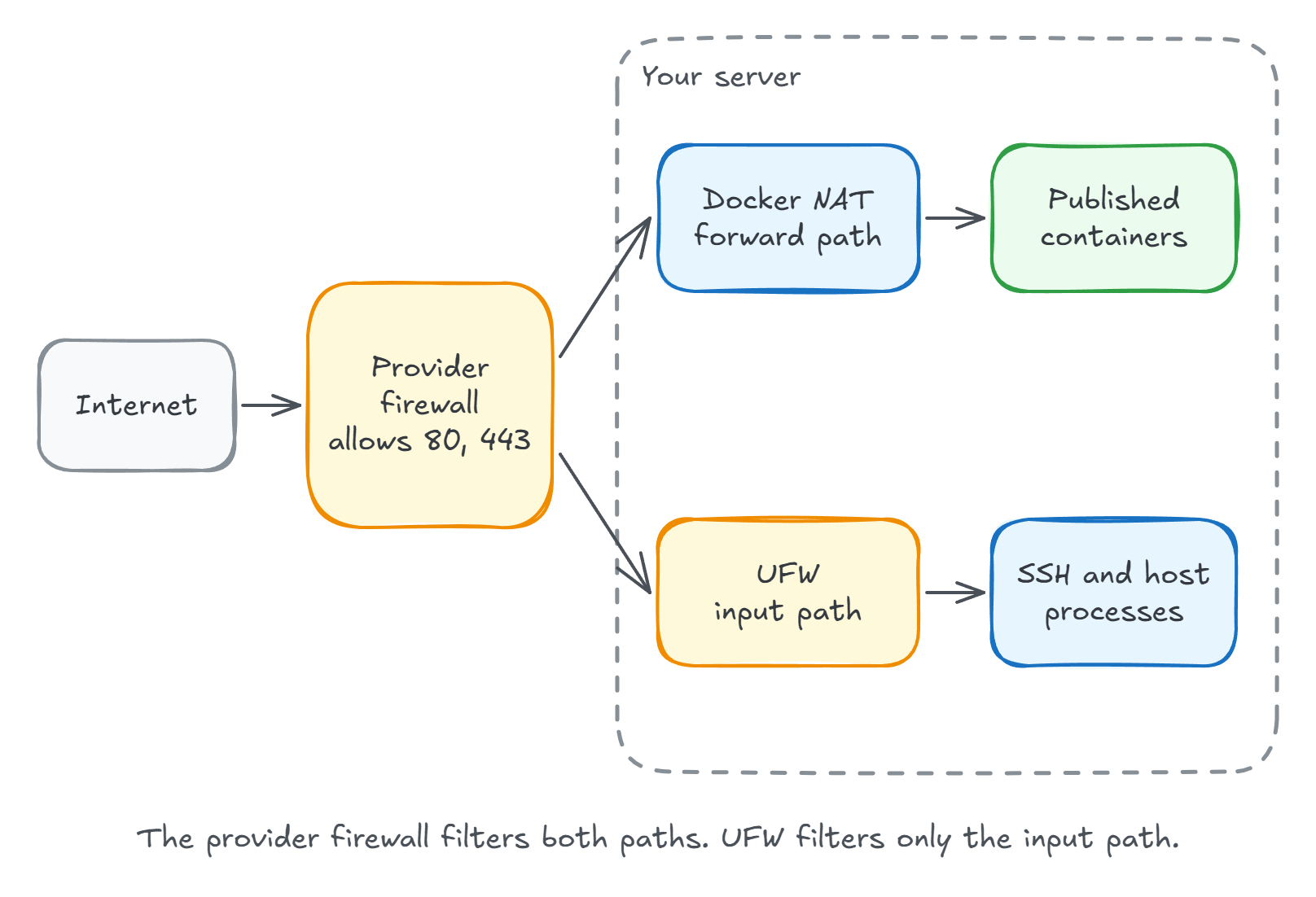
The Docker row decides it for most people.
With UFW denying everything except SSH, a container published on 8080 still returned 200 from outside, while a process listening directly on the server timed out.
Docker bypasses UFW explains why and walks through the server-side fixes.
Do You Need Both?
You need the cloud firewall, and UFW is a reasonable addition.
UFW adds two things. It protects host processes if the cloud firewall isn't applied, which can happen: Hetzner notes that a server selected by label may not receive the firewall under some conditions, so it tells you to verify the selection. It also filters host processes on private networks, which a Hetzner firewall doesn't cover.
It doesn't add protection for published containers.
If you run only UFW on a Docker host, you are less protected than ufw status suggests.
What Rules Should a Docker VPS Use?
Allow the minimum, and leave everything else unlisted. This is what I'd start from on a server running a reverse proxy in Docker:
| Port | Allow from | Why |
|---|---|---|
| 80/tcp | Anywhere | HTTP redirects and certificate issuance |
| 443/tcp | Anywhere | HTTPS |
| 443/udp | Anywhere, only if you serve HTTP/3 | Dokploy publishes this for Traefik |
| 22/tcp | Your IP address, or nobody if you use a VPN | Administration |
| 3000/tcp | Nobody | The Dokploy panel, reached through a tunnel or VPN |
| 5432/tcp | Nobody | Postgres should never be public |
A few provider details are easy to miss:
- Outbound rules change the default at Hetzner. With no outbound rules, all outbound traffic is allowed. Once you add one, other outbound traffic is dropped, which stops package updates and image pulls until you allow them.
- Existing connections stay open. Hetzner says changes apply only to new connections, and DigitalOcean says adding rules doesn't end existing ones. Your SSH session surviving a change proves nothing, so test from a second terminal.
- Don't block ping for security. Hetzner doesn't recommend blocking ICMP echo, because it complicates troubleshooting and adds little.
- A VPN can remove the SSH rule entirely. Tailscale dials outward, so your cloud firewall needs no inbound rule for it.
How Do You Prove the Firewall Works?
Scan from a machine outside your provider's network, such as your laptop on a home connection. A scan from the server itself or a neighbor on a private network tests the wrong path.
nmap -Pn -p 22,80,443,3000,5432 your-server-ip
Each state means something specific.
I measured these by changing only UFW, with a process listening on 9000 and nothing on 9001:
| Firewall state | Port 9000, listening | Port 9001, nothing listening |
|---|---|---|
| UFW off | open | closed |
| UFW on, default deny | filtered | filtered |
| UFW on, allow 9000 | open | filtered |
closed is the useful one.
It usually means your probe reached the server and nothing dropped it, so no firewall is covering that port.
The exception is a rule that rejects instead of drops: a ufw reject rule on a port with nothing listening also showed closed.
UFW can mask a provider firewall that isn't working, because both produce filtered.
To test the provider firewall alone, allow a throwaway port in UFW and start a listener:
sudo ufw allow 9000/tcp
python3 -m http.server 9000 --directory "$(mktemp -d)"
The --directory option matters here, because if the provider firewall isn't working, that port is public and the server shares the folder you started it from.
Scan 9000 from outside.
filtered means the provider firewall dropped it, and open means the provider firewall isn't covering that port.
Stop the listener and clean up afterwards:
sudo ufw delete allow 9000/tcp
If your server has a public IPv6 address, repeat the scan with nmap -6, since IPv4 results say nothing about it.
What Can't a Firewall Do?
A firewall only controls which packets reach the server.
Ports 80 and 443 stay open by design, so your application and the kernel's TCP code still face the internet.
CVE-2026-98432, a critical flaw in the Linux kernel's IPv4 TCP handling, is a current example. Closing unused ports reduces what is exposed, but only a patched kernel fixes it. So a firewall has to go alongside automatic security updates and a plan for reboots.
Summary
Put your rules in the cloud firewall, because it's the only one of the two that filters published Docker ports and an attacker on the server can't turn it off. Keep UFW on as a second layer for SSH and other host processes if you like, but don't read its status as a description of what the internet can reach. Run a scan from outside after every firewall or Compose change, because that shows what the internet can reach.
The full list of checks is in my Ubuntu server hardening checklist, and my self-hosting course configures a Hetzner cloud firewall when it provisions the server.
Thanks for reading.
And stay awesome!
Frequently Asked Questions
What is the difference between a cloud firewall and UFW?
A cloud firewall runs in your provider network and filters traffic before it reaches the server. UFW runs on the server and filters traffic addressed to the server itself. On a Docker host, only the cloud firewall covers published container ports.
Do I need UFW if I have a cloud firewall?
Not strictly. The cloud firewall does the main job on a Docker host. UFW is still a useful second layer for processes running directly on the server, such as SSH, and it covers traffic a provider firewall may not filter, such as private network traffic at Hetzner.
Does a Hetzner firewall block Docker ports?
It should, because it filters traffic before the server and before any Docker rule runs. Check this from outside with a port scan. Hetzner firewalls do not filter private Cloud Networks, so other servers on the same private network can still reach those ports.
Are cloud firewalls free?
Hetzner says it does not charge for Cloud Firewalls, and DigitalOcean provides them at no additional cost. Check your own provider, because this varies.
What does filtered mean in nmap?
It means nmap got no useful reply, usually because a firewall dropped the probe. Closed means the packet reached the server and nothing is listening, so no firewall dropped it. Open means a service answered.
Will changing a cloud firewall disconnect my SSH session?
Usually not. Hetzner says changes apply only to new connections, and DigitalOcean says adding rules does not end existing ones. So your open session proves nothing, and you should test new rules from a second terminal before closing the first one.
