
password authentication failed means the server you reached rejected what your client sent, and a POSTGRES_PASSWORD changed on an existing volume is one common reason.
Seven causes give the same client text.
Test the password over the Compose network, fix it with \password, and avoid docker compose down -v, which deletes your data.
I reproduced all seven in a WSL2 lab with Docker 29.6 on Docker Desktop, Compose 5.3, Postgres 18.6 (postgres:18), and Npgsql 10.0.3, on November 7, 2026.
A second container and a package Postgres inside Docker-in-Docker stood in for the other server in cause 5.
Nothing ran on a real VPS, and I did not test md5 passwords from old volumes or a native Postgres on Windows or macOS.
How Do You Test the Password for Real?
Run psql the way your app connects, from another container, over the Compose network, by service name:
docker compose run --rm --no-deps db psql -h db -U postgres -c "SELECT current_user"
This starts a one-off container that only runs psql, publishes no port, and leaves nothing behind.
Replace db with your service name and postgres with the role your app uses, then type the password your app sends at the prompt.
Add -d yourdb if the role has no database of the same name, or the right password prints database "..." does not exist.
A wrong password prints the error below, and the right one prints the role name:
Password for user postgres:
psql: error: connection to server at "db" (192.168.48.2), port 5432 failed: FATAL:  password authentication failed for user "postgres"
If this fails, the role on the volume doesn't have the password you typed, which points at causes 1, 2, 3, or 7 in the table below. If it passes and your app still fails, the app is sending different bytes or reaching a different server, which points at causes 3, 4, 5, or 6.
Why Does docker exec psql Connect Without a Password?
Because the image never asks it for one.
Its initdb step sets up trust for the local socket and the loopback addresses, and only the last rule checks a password:
docker compose exec db sh -c 'grep -vE "^(#|$)" "$PGDATA/pg_hba.conf"'
local   all             all                                     trust
host    all             all             127.0.0.1/32            trust
host    all             all             ::1/128                 trust
local   replication     all                                     trust
host    replication     all             127.0.0.1/32            trust
host    replication     all             ::1/128                 trust
host all all all scram-sha-256
So docker compose exec db psql -U postgres -c "SELECT current_user" succeeds whatever the password is.
Adding -h 127.0.0.1 or -h localhost doesn't change that.
I sent a wrong password to each address with log_connections=all on, and the server logged how it let the loopback attempts in:
LOG: connection authenticated: user="postgres" method=trust (/var/lib/postgresql/18/docker/pg_hba.conf:119)
The container's own IP and another container by service name both refused that wrong password, because they match the last rule.
A green healthcheck doesn't help either.
My container reported health=healthy while it rejected a wrong password.
Which of the Seven Causes Is It?
Every cause gives the same client text, from psql and from Npgsql:
psql: error: connection to server at "db" (192.168.112.2), port 5432 failed: FATAL:  password authentication failed for user "postgres"
npgsql FAIL: Npgsql.PostgresException: 28P01: password authentication failed for user "postgres"
  SqlState=28P01 Severity=FATAL Routine=auth_failed Detail=(null) Hint=(null)
28P01 is the Postgres code for a failed password login, and Detail is null, so your .NET logs never see a reason.
The server log adds little.
For a wrong password on an existing role it prints only the pg_hba.conf line it matched, so of these seven it names only cause 7.
That leaves the tells:
| # | Cause | Tell | Fix | Destroys data? |
|---|---|---|---|---|
| 1 | POSTGRES_PASSWORD changed after first boot | Log says Skipping initialization, printenv shows the new value, the old password still logs in | \password through the socket | No |
| 2 | Leftover volume from a project with the same folder name | No Volume Created line in up, volume older than the container, tables you never made | \password to keep the data, down -v only if you do not want it | down -v: yes. \password: no |
| 3 | Dollar sign eaten by Compose or .env | Warning that a variable is not set, docker compose config shows a short value | Single-quote it in .env or use $$ in YAML, then \password | No |
| 4 | Percent sequence in a URI | Password contains %XX and the client uses a URI. A raw @ or / gives a different error | Percent-encode it or use the keyword form | No |
| 5 | Another Postgres on the port | Your container log has no password authentication failed line | Point the client or the published port at your container | No |
| 6 | CR or LF from a file or shell, on the client side | od -c shows \r in what the client reads | Strip it where the client reads it | No |
| 7 | POSTGRES_USER changed after first boot | Log says DETAIL: Role "admin" does not exist | CREATE ROLE through the socket, or restore the variable | No |
How Do You Fix a Changed POSTGRES_PASSWORD Without Losing Data?
The image applies POSTGRES_PASSWORD only when the data directory is empty.
The password lives with the role on the named volume, and the volume outlives the container:
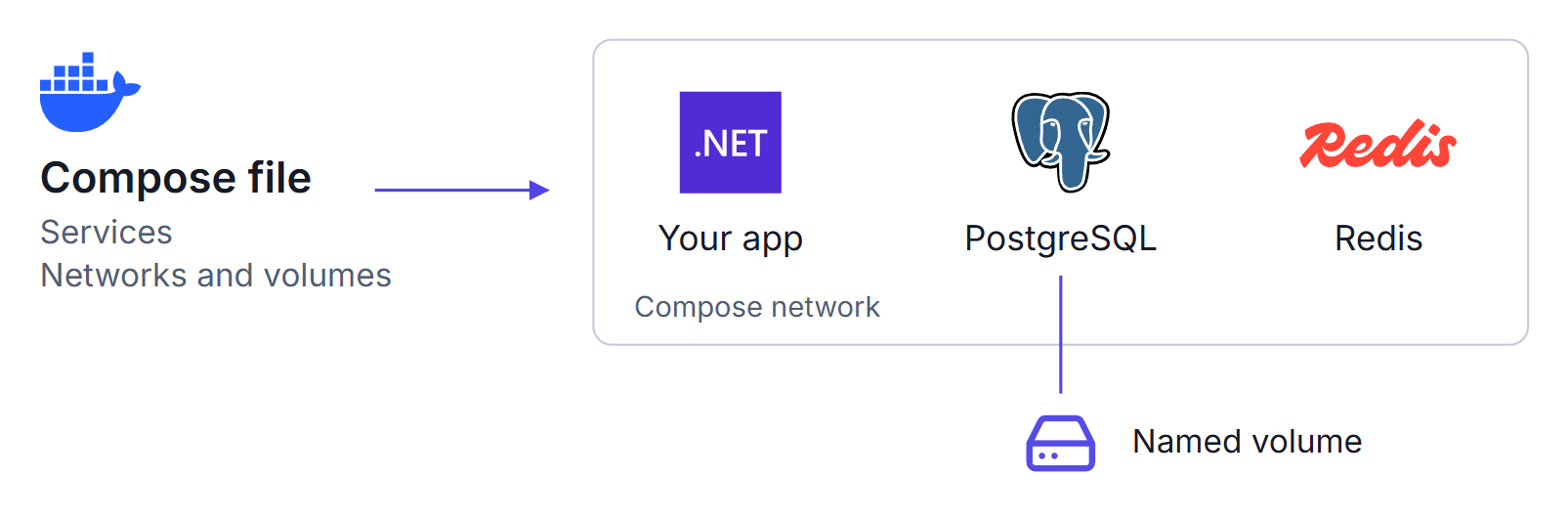
This was my test file.
Port 15810 is my lab's, so pick your own and keep the 127.0.0.1, because a bare 5432:5432 publishes on every interface and Docker's published ports bypass UFW:
services:
  db:
    image: postgres:18
    environment:
      POSTGRES_PASSWORD: ${POSTGRES_PASSWORD:?Set POSTGRES_PASSWORD}
    ports:
      - '127.0.0.1:15810:5432'
    volumes:
      - pgdata:/var/lib/postgresql
volumes:
  pgdata:
After I changed the variable and recreated the container, the log showed Skipping initialization (trimmed):
docker compose logs db | grep -E "Skipping initialization|FATAL|DETAIL"
db-1  | PostgreSQL Database directory appears to contain a database; Skipping initialization
db-1  | 2026-11-07 10:20:54.002 UTC [44] FATAL:  password authentication failed for user "postgres"
db-1  | 2026-11-07 10:20:54.002 UTC [44] DETAIL:  Connection matched file "/var/lib/postgresql/18/docker/pg_hba.conf" line 128: "host all all all scram-sha-256"
The fix goes through the socket, which needs no password, so it works when you no longer know the old one:
docker compose exec db psql -U postgres
\password postgres
Type the value your app sends at both prompts, then \q.
My rows survived, and Npgsql logged in with the same connection string that had failed.
If POSTGRES_USER was set at first boot, use that name in -U.
If the volume was initialized with POSTGRES_INITDB_ARGS="--auth-local=scram-sha-256 --auth-host=scram-sha-256", the socket and loopback ask for the password too, and this route is closed.
With --auth-local alone, -h 127.0.0.1 stayed trust.
To do this on a running stack, see changing the password with no failed logins.
The common advice is this command, and it deletes the volume and every table on it:
docker compose down -v
The new password then works because the database is brand new, and my next query returned ERROR: relation "orders" does not exist.
Only run it when you don't want the data, which can be true for cause 2.
Compose derives the volume name from the project name, so a new project in a folder with the same name picked up the earlier project's volume with no warning.
The only difference in up was a missing Volume <project>_pgdata Created line.
Replace pgauth-r1 with your project name and compare the volume's age with the CREATED column of docker compose ps:
docker volume ls --filter name=pgauth-r1
docker volume inspect pgauth-r1_pgdata --format "{{.CreatedAt}}"
Any recreate also makes the volume older, so check for tables you never made before you delete anything.
Why Does a Dollar Sign Break the Password?
Compose treats $ as the start of a variable.
With s3cr$t99, it looks for t99, finds nothing, prints a warning, and starts anyway:
msg="The \"t99\" variable is not set. Defaulting to a blank string."
The value the container received, for each way of writing it:
compose.yml  s3cr$t99                  [s3cr]
compose.yml  s3cr$$t99                 [s3cr$t99]
.env  PW=s3cr$t99                      [s3cr]
.env  PW="s3cr$t99"                    [s3cr]
.env  PW='s3cr$t99'                    [s3cr$t99]
On first boot the role gets s3cr, so the real password fails and s3cr logs in.
To see what Compose resolved, run this, and don't paste the output anywhere, because it prints the secret:
docker compose config | grep POSTGRES_PASSWORD
A correct value prints as s3cr$$t99, which looks wrong and isn't.
Fix .env with single quotes, then run \password if the role already has the short value:
POSTGRES_PASSWORD='s3cr$t99'
Why Does the Password Work in psql but Not in the App?
The app's bytes differ from what you typed.
In a URI, libpq decodes percent sequences before sending, so a role whose password really is ab%41cd fails until the % is encoded:
psql uri> postgresql://postgres:ab%41cd@db:5432/postgres
psql: error: connection to server at "db" (192.168.96.2), port 5432 failed: FATAL:  password authentication failed for user "postgres"
psql uri> postgresql://postgres:ab%2541cd@db:5432/postgres
psql OK: user=postgres
Npgsql takes no URI, and passing one throws Format of the initialization string does not conform to specification starting at index 0.
The same trap appears in a hand-written DATABASE_URL parser, because System.Uri.UserInfo stays encoded.
In the keyword form, Password=ab;cd throws Couldn't set cd;database, so quote it:
Host=db;Username=postgres;Password="ab;cd";Database=postgres
Threads often blame a trailing newline, and at first boot it is harmless.
POSTGRES_PASSWORD_FILE with LF or CRLF set the clean value on the role, and Compose .env and env_file stripped the CR.
The damage came on the reading side: Linux bash sourcing a CRLF file kept the \r, and Npgsql with an untrimmed File.ReadAllText through its connection string builder failed on CRLF.
Check the bytes, and note that pg.clean follows your umask, so remove it or restrict it afterwards:
od -c pg.secret
tr -d '\r\n' < pg.secret > pg.clean && od -c pg.clean
0000000   f   i   l   e   p   a   s   s  \r  \n
0000012
0000000   f   i   l   e   p   a   s   s
0000010
Is Another Postgres Answering on the Port?
Check this when the client connects through a published port, because the test at the top never touches that port.
Grep your container's log for the password line, not for FATAL.
Mine held an unrelated the database system is starting up line and no password failure, while the client got 28P01 from the other server.
Then ask who holds the port, using your port number:
docker ps --filter publish=15810 --format 'table {{.Names}}\t{{.Ports}}'
docker compose port db 5432
NAMES            PORTS
pgautha-r-db-1   127.0.0.1:15810->5432/tcp
127.0.0.1:15810
docker ps lists only containers, so it can't show a package install.
On the host, ss lists it, with a blank process column in my Ubuntu 24.04 test:
ss -ltnp "sport = :5432"
With package Postgres on 127.0.0.1:5432, publishing 5432 failed with address already in use.
Publishing 5433 left a client on 5432 getting 28P01, and my container's log stayed clean.
What If POSTGRES_USER Changed?
This is the one cause the server names:
FATAL:  password authentication failed for user "admin"
DETAIL:  Role "admin" does not exist.
The first-boot rule applies here too, so the new name never gets created, and the container stays healthy.
Setting POSTGRES_USER=shop from first boot also means postgres never existed.
Restore the variable, or create the role through the socket with the first-boot name in -U:
docker compose exec db psql -U shop -d shop
CREATE ROLE admin LOGIN SUPERUSER;
\password admin
\q
SUPERUSER is there because this role replaces the bootstrap user, so leave it off an app login.
Why Does One Npgsql Login Log Two Failures?
Npgsql tries GSS encryption first and retries without it after any error, including this one. Each attempt is a separate connection, so one failed open wrote two lines on a plain server. That matters if you alert on this line or run Fail2ban against it.
This setting brought it to one line:
Host=db;Username=postgres;Password=wrong-pass;Database=postgres;GSS Encryption Mode=Disable
The Cannot load library libgssapi_krb5.so.2 line on stderr is not the cause.
It appeared on a good password too, and the count stayed at two on an image that had the library.
Summary
psql through docker exec tells you nothing about a password, because the image trusts the socket and the loopback addresses.
Test from a one-off container over the Compose network, and use the result to split the seven causes into a role problem or a client problem.
The client text is identical for all of them, and the server log names only a missing role, so use the tells in the table.
No fix here costs you data except docker compose down -v.
One \password through the socket repairs causes 1 and 2 and finishes cause 3.
These results come from containers in a WSL2 lab, so run the test on your own server before you change anything.
My self-hosting course configures the app's secrets when it deploys a .NET API with PostgreSQL on a private Docker network.
Thanks for reading.
And stay awesome!
Frequently Asked Questions
Why does changing POSTGRES_PASSWORD not work?
The image applies that variable only when the data directory is empty. On an existing volume it skips initialization, so the role keeps its old password. In testing, docker inspect showed the new value while the new password failed and the old one still logged in.
Why does psql inside the container connect without a password?
The official image sets up trust authentication for the local socket and the loopback addresses, so psql through docker exec is never asked for a password. In testing, a wrong password over 127.0.0.1 logged in and the server log recorded method=trust. Test from another container over the Compose network instead.
How do I reset the Postgres password without deleting the volume?
Open psql through the local socket with docker compose exec, run the \password command for the role, and type the new value at the prompt. The data stays, because this changes the role in place. Running docker compose down -v also gets you a working password, and it deletes every table on the volume.
What does SQLSTATE 28P01 mean in Npgsql?
It is the Postgres code for a failed password login, and Npgsql raises it as a PostgresException with that SqlState and a null Detail. All seven causes I reproduced gave it, so the code alone does not tell you which one you have.
Does a trailing newline in a password file cause this?
Not at first boot. POSTGRES_PASSWORD_FILE with LF or CRLF set the clean value on the role in testing. The damage is on the client side: Linux bash sourcing a CRLF file keeps the carriage return, and so does Npgsql when an untrimmed file goes through its connection string builder.
