

ASP.NET Core and EF Core give you two practical pagination strategies.
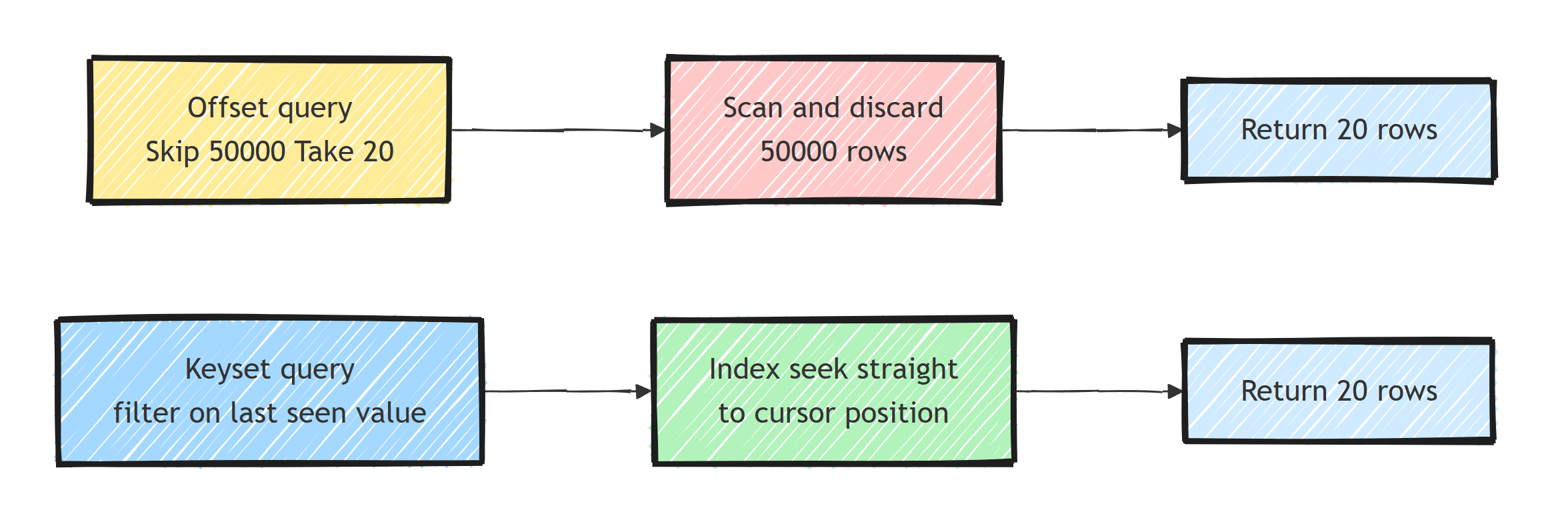
Offset pagination uses Skip and Take, which lets users jump to any page number, but the database reads and discards every skipped row.
Keyset pagination filters on the last seen value instead, so an index seeks straight to the cursor position and page depth stops mattering.
An API that returns an unbounded collection gets slower as the table grows.
Why Pagination Matters
Take a query returning 100,000 orders. Without pagination, you're loading all of them into memory, serializing to JSON, and sending over the network. The response is slow and server memory spikes.
Pagination loads a small subset at a time: 20 records per page instead of 100,000. Unbounded queries are one of the most common EF Core query performance mistakes, and pagination is the fix.
Offset Pagination
The most common approach. Use Skip and Take:
app.MapGet("/api/orders", async (
    ApplicationDbContext db,
    int page = 1,
    int pageSize = 20) =>
{
    if (page < 1) page = 1;
    if (pageSize < 1) pageSize = 20;
    if (pageSize > 100) pageSize = 100; // Prevent abuse

    var totalCount = await db.Orders.CountAsync();

    var orders = await db.Orders
        .OrderByDescending(o => o.CreatedAt)
        .Skip((page - 1) * pageSize)
        .Take(pageSize)
        .Select(o => new OrderResponse(
            o.Id,
            o.Status.ToString(),
            o.TotalAmount,
            o.CreatedAt))
        .ToListAsync();

    return new PagedResponse<OrderResponse>(
        orders,
        page,
        pageSize,
        totalCount);
});
The response wrapper:
public sealed record PagedResponse<T>(
    List<T> Items,
    int Page,
    int PageSize,
    int TotalCount)
{
    public int TotalPages => (int)Math.Ceiling(TotalCount / (double)PageSize);
    public bool HasNextPage => Page < TotalPages;
    public bool HasPreviousPage => Page > 1;
}

public sealed record OrderResponse(
    Guid Id,
    string Status,
    decimal TotalAmount,
    DateTime CreatedAt);
Generated SQL:
SELECT o."Id", o."Status", o."TotalAmount", o."CreatedAt"
FROM "Orders" AS o
ORDER BY o."CreatedAt" DESC
LIMIT @take OFFSET @skip;
The Problem With Offset Pagination
Offset pagination has a scaling issue. OFFSET 50000 means the database must scan and discard 50,000 rows before returning the next 20. The deeper you paginate, the slower it gets.
The COUNT(*) query also runs on every request.
On a large filtered table, the count query can cost more than fetching the page.
If the UI doesn't display total pages, skip the count.
Keyset Pagination (Cursor-Based)
Keyset pagination uses the last seen value as a cursor. I explained why this is so fast in understanding cursor pagination.
app.MapGet("/api/orders", async (
    ApplicationDbContext db,
    DateTime? cursor,
    int pageSize = 20) =>
{
    if (pageSize < 1) pageSize = 20;
    if (pageSize > 100) pageSize = 100;

    IQueryable<Order> query = db.Orders;

    if (cursor.HasValue)
    {
        query = query.Where(o => o.CreatedAt < cursor.Value);
    }

    var orders = await query
        .OrderByDescending(o => o.CreatedAt)
        .Take(pageSize + 1) // Take one extra to check for next page
        .Select(o => new OrderResponse(
            o.Id,
            o.Status.ToString(),
            o.TotalAmount,
            o.CreatedAt))
        .ToListAsync();

    var hasNextPage = orders.Count > pageSize;
    if (hasNextPage)
    {
        orders.RemoveAt(orders.Count - 1);
    }

    var nextCursor = orders.LastOrDefault()?.CreatedAt;

    return new CursorPagedResponse<OrderResponse>(
        orders, nextCursor, hasNextPage);
});

public sealed record CursorPagedResponse<T>(
    List<T> Items,
    DateTime? NextCursor,
    bool HasNextPage);
Generated SQL:
SELECT o."Id", o."Status", o."TotalAmount", o."CreatedAt"
FROM "Orders" AS o
WHERE o."CreatedAt" < @cursor
ORDER BY o."CreatedAt" DESC
LIMIT @take;
No OFFSET. The database uses the index to jump directly to the cursor position. Performance is constant regardless of how deep you paginate.
One provider note: with Npgsql, timestamp columns map to timestamptz by default, and parameter values must have DateTimeKind.Utc, so convert incoming cursor values with DateTime.SpecifyKind if they arrive unspecified.
Compound Cursors
When multiple rows can have the same CreatedAt, use a compound cursor:
app.MapGet("/api/orders", async (
    ApplicationDbContext db,
    DateTime? cursorDate,
    Guid? cursorId,
    int pageSize = 20) =>
{
    IQueryable<Order> query = db.Orders;

    if (cursorDate.HasValue && cursorId.HasValue)
    {
        query = query.Where(o =>
            o.CreatedAt < cursorDate.Value ||
            (o.CreatedAt == cursorDate.Value &&
             o.Id < cursorId.Value));
    }

    var orders = await query
        .OrderByDescending(o => o.CreatedAt)
        .ThenByDescending(o => o.Id)
        .Take(pageSize + 1)
        .Select(o => new OrderResponse(
            o.Id, o.Status.ToString(), o.TotalAmount, o.CreatedAt))
        .ToListAsync();

    var hasNextPage = orders.Count > pageSize;
    if (hasNextPage) orders.RemoveAt(orders.Count - 1);

    var last = orders.LastOrDefault();

    return new
    {
        Items = orders,
        NextCursorDate = last?.CreatedAt,
        NextCursorId = last?.Id,
        HasNextPage = hasNextPage
    };
});
Guid has comparison operators since .NET 7, and EF Core translates o.Id < cursorId.Value into a plain SQL comparison.
Back it with a composite index on (CreatedAt, Id) so the whole predicate stays an index seek.
Extracting a Reusable Pagination Extension
public static class PaginationExtensions
{
    public static async Task<PagedResponse<T>> ToPagedListAsync<T>(
        this IQueryable<T> query,
        int page,
        int pageSize,
        CancellationToken ct = default)
    {
        var totalCount = await query.CountAsync(ct);

        var items = await query
            .Skip((page - 1) * pageSize)
            .Take(pageSize)
            .ToListAsync(ct);

        return new PagedResponse<T>(items, page, pageSize, totalCount);
    }
}
Usage:
var result = await db.Orders
    .OrderByDescending(o => o.CreatedAt)
    .Select(o => new OrderResponse(
        o.Id, o.Status.ToString(), o.TotalAmount, o.CreatedAt))
    .ToPagedListAsync(page, pageSize, ct);
Filtering + Pagination
Always apply filters before pagination:
app.MapGet("/api/orders", async (
    ApplicationDbContext db,
    OrderStatus? status,
    DateTime? fromDate,
    int page = 1,
    int pageSize = 20) =>
{
    var query = db.Orders.AsQueryable();

    if (status.HasValue)
        query = query.Where(o => o.Status == status.Value);

    if (fromDate.HasValue)
        query = query.Where(o => o.CreatedAt >= fromDate.Value);

    return await query
        .OrderByDescending(o => o.CreatedAt)
        .Select(o => new OrderResponse(
            o.Id, o.Status.ToString(), o.TotalAmount, o.CreatedAt))
        .ToPagedListAsync(page, pageSize);
});
Index Requirements
Pagination queries need proper indexes:
// EF Core index configuration
public class OrderConfiguration : IEntityTypeConfiguration<Order>
{
    public void Configure(EntityTypeBuilder<Order> builder)
    {
        // Index for ordering + pagination
        builder.HasIndex(o => o.CreatedAt)
               .IsDescending();

        // Composite index for filtered pagination
        builder.HasIndex(o => new { o.Status, o.CreatedAt })
               .IsDescending(false, true);
    }
}
Without these indexes, the database does a full table scan for every page request.
Offset vs Keyset - When to Use Each
- Jumping to an arbitrary page: only offset can do it; keyset moves strictly forward (and optionally backward)
- Performance at depth: offset degrades linearly; keyset stays constant
- Implementation effort: offset is a few lines; keyset needs cursors and tiebreakers
- Stability under concurrent inserts: offset pages shift when rows are added; keyset pages don't skip or duplicate rows
- Best fit: offset for admin UIs and small datasets; keyset for public APIs, infinite scroll, and large datasets
Use offset pagination for admin pages where users need "go to page 5". Use keyset pagination for public APIs and infinite scroll feeds. Pagination design is one of the topics I cover end to end in Pragmatic REST APIs.
Summary
Cap every collection response and apply filters before pagination. Offset pagination is appropriate when random page numbers matter and the result set stays modest. For deep or continuously changing feeds, use a unique, stable ordering and a matching index to build a keyset cursor.
Frequently Asked Questions
What is the difference between offset and keyset pagination?
Offset pagination skips rows with Skip/Take, so work grows with page depth. Keyset pagination filters after the last seen value and lets a matching index seek to that position, avoiding work proportional to the offset.
Why is OFFSET pagination slow on large tables?
OFFSET 50000 forces the database to read and discard 50,000 rows before returning your page. The cost grows linearly with page depth, which hurts on large datasets.
When should I use cursor pagination in an API?
Use it for infinite scroll feeds, large datasets, and public APIs where clients only move forward. Use offset pagination when users need to jump to an arbitrary page number.
How do I handle ties when using a timestamp as a pagination cursor?
Add a unique tiebreaker column like the ID to the sort order and the cursor. Otherwise rows sharing the same timestamp can be skipped or duplicated across pages.
Should an API return the total count with paginated results?
Only if the UI needs it, because COUNT(*) on a large filtered table can cost more than fetching the page itself. Cursor-based APIs typically return just a next cursor and a has-more flag.
