
The "instance of entity type cannot be tracked" error means a DbContext was asked to track two different objects with the same entity type and key value.
EF Core allows only one tracked instance per key, so Attach, Update, or Add throws when an earlier query already tracked that row.
The right default is to copy the incoming values onto the tracked instance with Entry(existing).CurrentValues.SetValues(incoming).
The full error reads: "The instance of entity type 'Order' cannot be tracked because another instance with the same key value for Id is already being tracked. When attaching existing entities, ensure that only one entity instance with a given key value is attached."
It shows up when a controller loads an entity for validation and then calls Update with a mapped DTO.
Or when a test seeds data and the code under test attaches its own copy.
Or in a background job that processes the same entity twice in one batch.
The reflexive fix is to scatter AsNoTracking until the error goes away.
That stops the exception and can break code paths that rely on tracking.
What Does the Error Mean?
A DbContext enforces identity resolution: for a given entity type and key value, it tracks at most one instance.
Identity resolution lets EF Core figure out which row to update and guarantees that two queries for order 42 in the same context hand you the same object.
The error is EF Core telling you a second instance with the same key tried to enter the change tracker.
Something earlier put instance A in the tracker, and now Attach, Update, or Add is bringing in instance B with the same key.
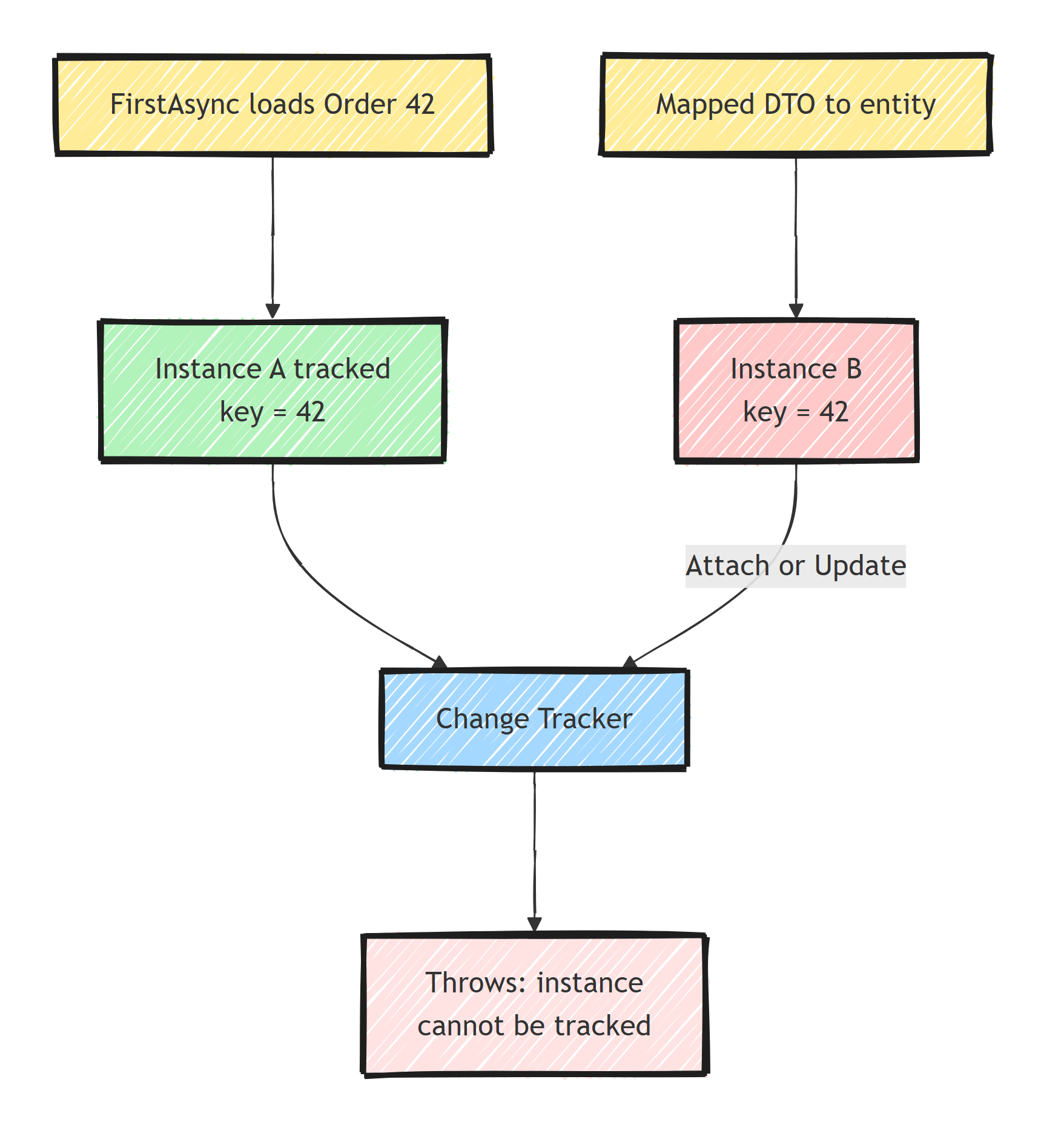
The fix belongs at the earlier line that left instance A tracked. The line that throws is only where EF Core detects the collision. I covered how tracking works under the hood in understanding the EF Core change tracker.
The Classic Reproduction
Almost every occurrence reduces to this shape:
public async Task UpdateProduct(Guid id, ProductDto dto)
{
    // Instance A enters the change tracker
    var product = await context.Products.FirstAsync(p => p.Id == id);

    if (product.IsArchived)
    {
        throw new InvalidOperationException("Archived products are read-only.");
    }

    // Instance B: a different object, same key. Throws.
    var updated = dto.ToEntity(id);
    context.Products.Update(updated);

    await context.SaveChangesAsync();
}
FirstAsync tracked instance A.
Update(updated) tries to track instance B with the same key.
Collision.
Other common variants of the same bug:
- Repositories that load an aggregate for a check, then a service that attaches a mapper-produced copy.
- Seeding an entity in an integration test with the same context the handler uses.
- A long-lived context in a background job accumulating tracked entities across iterations until a duplicate arrives.
Fix 1: Update the Tracked Instance (the Right Default)
If the context already tracks the entity, do not attach a second copy. Copy the incoming values onto the tracked instance:
public async Task UpdateProduct(Guid id, ProductDto dto)
{
    var product = await context.Products.FirstAsync(p => p.Id == id);

    if (product.IsArchived)
    {
        throw new InvalidOperationException("Archived products are read-only.");
    }

    context.Entry(product).CurrentValues.SetValues(dto);

    await context.SaveChangesAsync();
}
CurrentValues.SetValues copies matching scalar properties from any object (entity, DTO, anonymous type) onto the tracked entity.
Only properties that actually changed are marked modified, so the generated UPDATE touches only real changes.
There is no second instance to collide with, and the SQL statement is smaller than the one Update would produce.
For domain models with behavior, skip SetValues and call the entity's own methods (product.Rename(dto.Name)).
Either way, you change the tracked instance instead of attaching a second one.
Fix 2: Check the Tracker Before Attaching
Sometimes you receive a detached entity and legitimately do not know whether the context tracks a copy.
Resolve through Local first:
public void Upsert(Product incoming)
{
    var tracked = context.Products.Local
        .FirstOrDefault(p => p.Id == incoming.Id);

    if (tracked is not null)
    {
        context.Entry(tracked).CurrentValues.SetValues(incoming);
    }
    else
    {
        context.Products.Update(incoming);
    }
}
Local looks only at the change tracker, no database round trip.
This is the pattern for generic repository code where you cannot control what callers loaded earlier.
Fix 3: Stop Tracking What You Only Read
If the earlier load was purely for validation or display, it never needed tracking:
var product = await context.Products
    .AsNoTracking()
    .FirstAsync(p => p.Id == id);
This is the legitimate use of AsNoTracking: a query whose results you will never save.
The anti-pattern is adding it reactively wherever the exception pops, which litters the codebase and eventually breaks a code path that relied on tracking.
The distinction, plus what identity resolution does for you, is the subject of AsNoTracking and identity resolution.
FindAsync is often the better tool for load-then-modify flows, since it returns the already-tracked instance without a database round trip when there is one.
More on that in Find vs FirstOrDefault.
Fix 4: Clear the Tracker in Long-Lived Contexts
Batch jobs that reuse one context across thousands of iterations accumulate tracked entities. Eventually the same key comes around twice and throws. Between logical units of work, reset:
foreach (var batch in batches)
{
    await ProcessBatch(context, batch);
    await context.SaveChangesAsync();

    context.ChangeTracker.Clear();
}
ChangeTracker.Clear() detaches everything efficiently.
It also caps memory growth in long-running processing.
Better yet, create a short-lived context per batch with IDbContextFactory<T>, which also works with DbContext pooling.
The Fix That Is Not a Fix
You will find advice to set the entry state manually:
context.Entry(updated).State = EntityState.Modified;
This throws the same exception when another instance with the same key is tracked, so it is not even a workaround.
When it does work, it marks every property modified and produces a full-row update.
The same goes for disabling tracking globally with ChangeTracker.QueryTrackingBehavior = QueryTrackingBehavior.NoTracking: your updates keep working only until some code path expects tracked entities, and then you have a subtler bug than the one you started with.
Summary
"Cannot be tracked" means one context was asked to track two objects with the same key, and identity resolution allows only one.
Find the earlier load that left the first instance tracked.
Then pick the fix that matches intent: copy values onto the tracked instance with SetValues (the right default for update endpoints), resolve through Local when you receive detached entities, use AsNoTracking for loads that were never going to save, and ChangeTracker.Clear() between batches in long-lived contexts.
If the error keeps reappearing across a codebase, the root cause is usually architectural: multiple layers each loading their own copy of the same aggregate. Load the aggregate once per unit of work and pass that instance down the call stack.
Frequently Asked Questions
What causes the "instance cannot be tracked" error in EF Core?
A DbContext can track only one instance per entity type and key. The error is thrown when you call Attach, Update, or Add with a new object whose key matches an entity the context is already tracking, usually one loaded earlier in the same request.
Does AsNoTracking fix the cannot be tracked error?
Sometimes, but it treats the symptom. It stops the first instance from being tracked so the second one no longer collides. The better fix is to update the already-tracked instance, for example with Entry(existing).CurrentValues.SetValues(incoming).
What is the difference between Attach and Update in EF Core?
Both start tracking a detached entity and both throw if another instance with the same key is already tracked. Attach marks it Unchanged, Update marks it and all its properties Modified so the entire row is updated on SaveChanges.
How do I update an entity from a DTO without this error?
Load or Find the entity first, then copy the DTO values onto the tracked instance using SetValues or property assignments. Because you modify the tracked instance instead of attaching a second one, there is no collision.
When should I use ChangeTracker.Clear?
Use it in long-lived contexts like background jobs processing many batches, where accumulated tracked entities cause collisions and memory growth. In a normal per-request context you should rarely need it.


