
Every .NET team versioning a relational database eventually holds the same debate: EF Core Migrations, DbUp, or FluentMigrator. The comparison threads treat it as a feature checklist, but the tools differ on one axis that decides the outcome:
Who owns the schema: your C# model, or explicit scripts?
EF Core Migrations: The Model Owns the Schema
With EF Core Migrations, you change your C# entities and configuration, and the tooling diffs the new model against the last snapshot to generate the change:
dotnet ef migrations add AddProductSku
dotnet ef database update
The generated migration is C# you can inspect and edit:
public partial class AddProductSku : Migration
{
    protected override void Up(MigrationBuilder migrationBuilder)
    {
        migrationBuilder.AddColumn<string>(
            name: "sku",
            table: "products",
            type: "character varying(32)",
            maxLength: 32,
            nullable: true);

        migrationBuilder.CreateIndex(
            name: "ix_products_sku",
            table: "products",
            column: "sku",
            unique: true);
    }

    protected override void Down(MigrationBuilder migrationBuilder)
    {
        migrationBuilder.DropIndex("ix_products_sku", "products");
        migrationBuilder.DropColumn("sku", "products");
    }
}
Applied migrations are tracked in __EFMigrationsHistory.
For production deployment you don't run database update from a laptop; you generate idempotent SQL scripts or, better, migration bundles, a self-contained executable your pipeline runs.
Strengths:
- The schema can't drift from the model, because the model generates the schema
- Fastest iteration loop while the domain is evolving
Downmethods and tooling support for rollback scenarios
Weaknesses:
- Generated SQL is what the provider decides; the escape hatch (
migrationBuilder.Sql(...)) is still required for triggers, complex data backfills, and provider-specific DDL the provider does not model - The diff knows what changed but not how you meant it: a renamed property becomes drop-column-plus-add-column (data loss) unless you catch it and rewrite the migration
- Merge conflicts on the model snapshot get more frequent as the team grows
I wrote a full operational guide in EF Core migrations: a detailed guide, plus the rules in EF Core migrations best practices.
DbUp: Scripts Own the Schema
DbUp is simpler: it runs your .sql files, in order, once each, and records them in a journal table.
dotnet add package dbup-postgresql
// A console project your pipeline runs before the app deploys
using DbUp;

string connectionString = args[0];

var upgrader = DeployChanges.To
    .PostgresqlDatabase(connectionString)
    .WithScriptsEmbeddedInAssembly(
        typeof(Program).Assembly,
        script => !script.Contains(".NoTransaction."))
    .WithTransactionPerScript()
    .LogToConsole()
    .Build();

var result = upgrader.PerformUpgrade();
if (!result.Successful) return 1;

// Second pass for scripts that Postgres refuses to run
// inside a transaction (CREATE INDEX CONCURRENTLY)
var noTxUpgrader = DeployChanges.To
    .PostgresqlDatabase(connectionString)
    .WithScriptsEmbeddedInAssembly(
        typeof(Program).Assembly,
        script => script.Contains(".NoTransaction."))
    .WithoutTransaction()
    .LogToConsole()
    .Build();

result = noTxUpgrader.PerformUpgrade();

return result.Successful ? 0 : 1;
The scripts must be embedded resources.
Without this item in the .csproj, DbUp finds no scripts and still reports a successful upgrade:
<ItemGroup>
  <EmbeddedResource Include="Scripts\**\*.sql" />
</ItemGroup>
Each migration is a plain SQL file:
-- Scripts/0007_add_product_sku.sql
ALTER TABLE products ADD COLUMN sku varchar(32);
-- Scripts/NoTransaction/0008_add_product_sku_index.sql
CREATE UNIQUE INDEX CONCURRENTLY ix_products_sku
ON products (sku)
WHERE sku IS NOT NULL;
The column starts nullable so existing rows do not all receive the same placeholder and immediately violate the unique index. Backfill real, unique SKUs in batches before a later migration makes the column non-nullable.
Postgres hard-fails CREATE INDEX CONCURRENTLY inside a transaction.
That is why the script lives in a NoTransaction folder and runs through the second upgrader built with .WithoutTransaction().
Keep each concurrent-index file to one statement, with no BEGIN or COMMIT in the script.
Concurrent builds do not block ordinary writes, but they can fail because of cancellation, deadlocks, or duplicate data and leave an invalid index behind.
Check pg_index.indisvalid after a failure and run DROP INDEX CONCURRENTLY ix_products_sku as its own autocommit command before retrying.
Do not hide this with IF NOT EXISTS: PostgreSQL can find the invalid relation, skip the build, and leave the unusable index in place.
This capability is not exclusive to script-driven migrations.
The Npgsql EF Core provider supports .IsCreatedConcurrently() for modeled indexes.
DbUp's advantage here is that the exact SQL and its non-transactional execution boundary are visible in the migration itself.
Strengths:
- Total SQL control. What's in the file is what runs. DBAs can review a plain
.sqldiff in a PR without knowing C#. - Works for anything: schema, data fixes, permissions, stored procedures, and databases shared by multiple applications
- Easy to debug; the tool does little beyond running scripts in order and recording them in the journal
Weaknesses:
- Nothing writes the SQL for you; every column addition is manual work
- Forward-only. There's no down migration concept; recovery is "write a new script" (which is what most teams do in production anyway)
- Nothing stops schema and C# model drifting apart; you need integration tests against a migrated database to catch mismatches
FluentMigrator: Explicit Migrations, C# Syntax
FluentMigrator sits between the two: you write each migration explicitly (like DbUp), but in C# with a dialect-abstracting fluent API (like EF):
dotnet add package FluentMigrator.Runner
dotnet add package Npgsql
using FluentMigrator;

[Migration(202607030001)]
public class AddProductSku : Migration
{
    public override void Up()
    {
        // Nullable for the same reason as the DbUp script: existing rows
        // must not all share one placeholder SKU. PostgreSQL unique indexes
        // allow any number of NULLs (SQL Server needs a filtered index).
        Alter.Table("products")
            .AddColumn("sku").AsString(32).Nullable();

        Create.Index("ix_products_sku")
            .OnTable("products").OnColumn("sku").Unique();
    }

    public override void Down()
    {
        Delete.Index("ix_products_sku").OnTable("products");
        Delete.Column("sku").FromTable("products");
    }
}
Running the migrations takes a few lines in a console project.
FluentMigrator loads the Npgsql driver by name at runtime, which is why the install step adds that package:
using FluentMigrator.Runner;
using Microsoft.Extensions.DependencyInjection;

using var services = new ServiceCollection()
    .AddFluentMigratorCore()
    .ConfigureRunner(runner => runner
        .AddPostgres()
        .WithGlobalConnectionString(args[0])
        .ScanIn(typeof(AddProductSku).Assembly).For.Migrations())
    .AddLogging(logging => logging.AddFluentMigratorConsole())
    .BuildServiceProvider();

services.GetRequiredService<IMigrationRunner>().MigrateUp();
Its distinct selling point is multi-database targeting: one migration codebase that runs on SQL Server, PostgreSQL, and SQLite, with IfDatabase(...) branches for the exceptions.
If you ship an on-premises product where customers choose their database engine, that's the reason to pick it.
If you don't need that, you write every migration by hand (no generation) and still don't see the literal SQL in review (no script transparency). For a single-database team, that's DbUp's manual work without DbUp's SQL visibility, which is why FluentMigrator has become a niche choice as EF Core's tooling matured.
Which Migration Tool Should You Choose?
The three tools side by side:
| Concern | EF Core Migrations | DbUp | FluentMigrator |
|---|---|---|---|
| Who owns the schema | The C# model | SQL scripts | Explicit C# migrations |
| How changes are written | Generated by diffing the model | Hand-written SQL | Hand-written fluent C# |
| SQL in code review | Whatever the provider generates | Exactly what runs | Hidden behind the fluent API |
| Rollback | Down methods | Forward-only, write a new script | Down methods |
| Main strength | Fastest iteration while the domain evolves | Total SQL control | One codebase for several database engines |
| Best fit | One app owns the database | DBA review or a shared database | Products shipped to customer-chosen engines |
These four questions settle it.
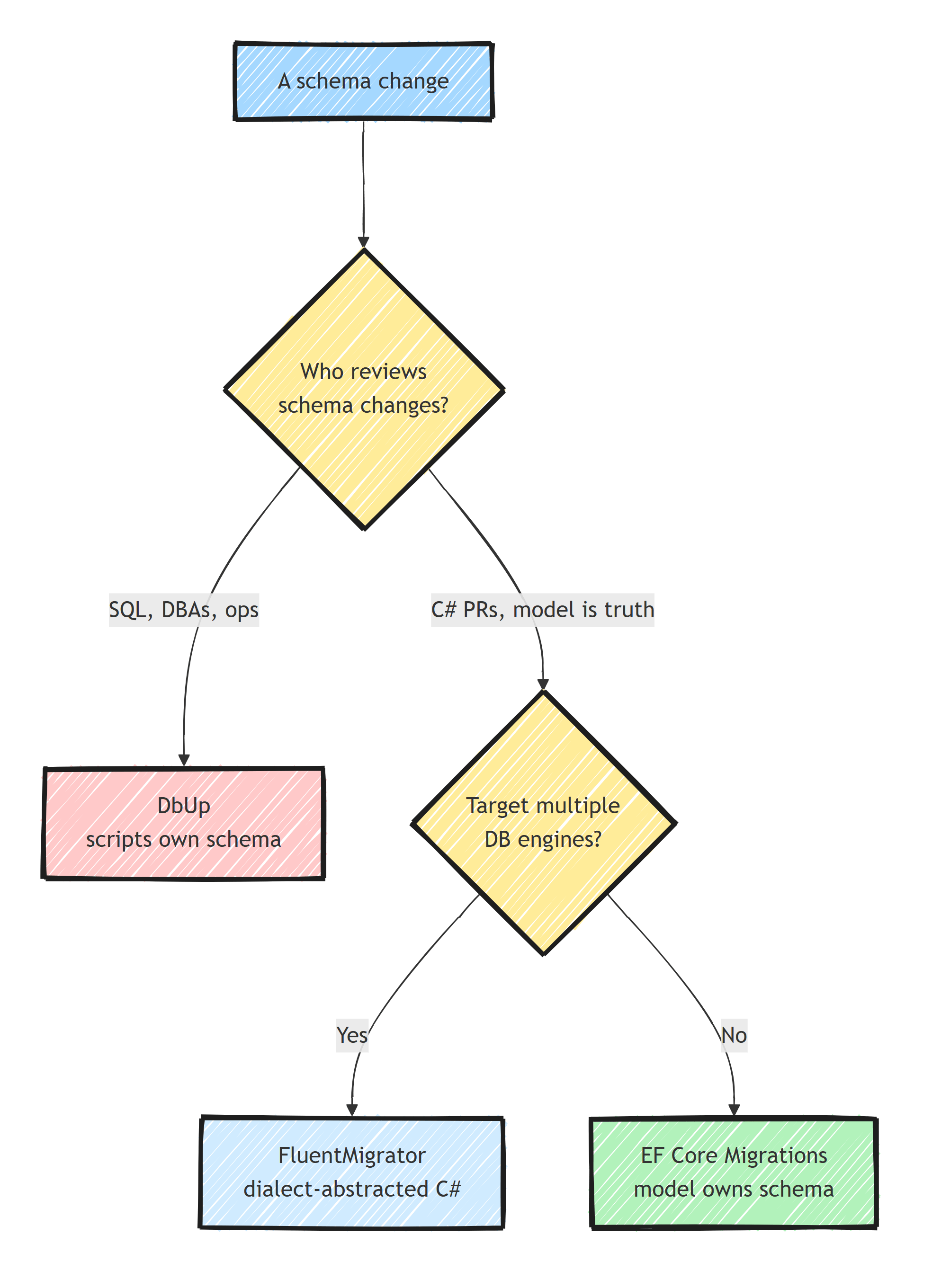
1. Who reviews schema changes? If developers review C# PRs and the model is the source of truth: EF Core Migrations. If DBAs (or a data team) must review the actual SQL, or ops applies changes through a controlled process: DbUp.
2. Does one application own the database? EF's model-diffing assumes the model is the single source of truth. A database shared by several services, ETL jobs, and a reporting stack has no single model, so script-driven migration is the better fit. (If you're in a modular monolith, ownership per module matters too; that's the schema-per-module discussion.)
3. How database-specific is your schema?
Heavy use of triggers, advanced partition maintenance, hand-written backfills, or DDL your provider does not model means model-driven generation is mostly generating Sql(...) escape hatches.
At that point DbUp gives you the same work with less ceremony.
4. Do you target multiple database engines? Yes: FluentMigrator. No: it's rarely the right pick.
Team profile shortcut: product teams with EF Core, one service, one database, evolving domain → EF Core Migrations with bundles in the pipeline. Enterprises with DBA gates, shared databases, or SQL-fluent teams → DbUp. ISVs shipping to customer-chosen databases → FluentMigrator.
Two practices matter more than the tool, whatever you pick:
- Migrations run in the deployment pipeline, not at application startup, and not from developer machines. A bundle or DbUp console step with its own credentials, before the new app version rolls out.
- Expand-and-contract for anything breaking. Additive change, deploy code that handles both shapes, then remove the old shape later. That's what makes zero-downtime migrations work regardless of tooling, and I walked through a full example in a practical demo of zero-downtime migrations.
Mixing is also legitimate: EF Core as the ORM with DbUp owning deployment is a common pairing; you lose generation but keep everything else.
Summary
All three tools version schema competently; they differ on who owns the schema.
- EF Core Migrations: the model owns the schema. Best productivity when one app owns the database and developers own the changes. Ship with migration bundles.
- DbUp: scripts own the schema. Best when SQL is the review language, the database is shared, or your DDL is too database-specific for a generator. Forward-only by design.
- FluentMigrator: explicit C# migrations with dialect abstraction. Pick it when one codebase must migrate multiple database engines.
Pick based on ownership and deployment, run whatever you pick from the pipeline, and use expand-and-contract for breaking changes.
Frequently Asked Questions
What is the difference between EF Core Migrations and DbUp?
EF Core Migrations generates schema changes by diffing your C# model against a snapshot, so the model drives the schema. DbUp runs plain SQL scripts you write yourself, in order, tracking which ones already ran.
Is DbUp better than EF Core Migrations?
Neither is better universally. EF Core Migrations is more productive when the application model owns the schema. DbUp is better when DBAs review every change, when you need database-specific SQL, or when multiple applications share the database.
Can I use EF Core and DbUp together?
Yes. A common setup uses EF Core as the ORM while DbUp owns schema deployment. You give up migration generation, but keep full SQL control. EF Core also supports generating idempotent SQL scripts from migrations that DbUp-style pipelines can apply.
What happened to FluentMigrator?
FluentMigrator is still maintained and works fine. It occupies a middle position, with explicit migrations written in C# using a fluent API that abstracts the SQL dialect. It is most attractive when you target multiple database engines with one migration codebase.
