
Most systems read far more than they write. Ratios of 10:1 are ordinary, 100:1 isn't rare. So when the primary database runs hot, the standard move is to add read replicas and point queries at them.
The mechanics in .NET are easy. The semantics are harder: a replica is the recent past, and code written against "the database" as a single source of truth will misbehave in ways that look like data loss.
What a Replica Gives You (and What It Costs)
PostgreSQL streaming replication, SQL Server availability group secondaries, and managed offerings (RDS/Aurora replicas, Azure SQL read scale-out) all follow the same shape:
- Writes go to the primary only
- Changes flow to replicas asynchronously (in the default configurations)
- Replicas serve read-only queries
You gain read throughput roughly linearly with replica count, plus a warm failover target.
You pay with replication lag. Under normal conditions it's single-digit milliseconds. Under load spikes, vacuum storms, long transactions on the replica, or network hiccups, it can stretch to seconds or minutes. Your design has to be correct at the p99 lag, not the median.
Synchronous replication exists, but paying a commit-latency tax on every write to make replicas read-consistent is usually the wrong trade; if you need that, you likely wanted vertical scaling or caching instead.
Routing in .NET: Two Contexts Beat Clever Interceptors
You'll find blog posts wiring EF Core interceptors that rewrite connection strings per query. I recommend against it. Whether a read can tolerate staleness is a business decision per call site, and hiding it inside infrastructure means nobody makes that decision.
The explicit approach: two DbContext types over the same model.
public class AppDbContext(DbContextOptions<AppDbContext> options)
    : DbContext(options)
{
    public DbSet<Order> Orders => Set<Order>();
    public DbSet<Customer> Customers => Set<Customer>();
}

// Same model, replica connection, hard read-only
public class ReadOnlyDbContext(DbContextOptions<ReadOnlyDbContext> options)
    : DbContext(options)
{
    public DbSet<Order> Orders => Set<Order>();
    public DbSet<Customer> Customers => Set<Customer>();

    protected override void OnConfiguring(DbContextOptionsBuilder optionsBuilder) =>
        optionsBuilder.UseQueryTrackingBehavior(QueryTrackingBehavior.NoTracking);

    // SaveChanges() and SaveChangesAsync(ct) call these two overloads,
    // so overriding them blocks every save path
    public override int SaveChanges(bool acceptAllChangesOnSuccess) =>
        throw new InvalidOperationException("This context is read-only.");

    public override Task<int> SaveChangesAsync(
        bool acceptAllChangesOnSuccess, CancellationToken cancellationToken = default) =>
        throw new InvalidOperationException("This context is read-only.");
}
// Program.cs
builder.Services.AddDbContext<AppDbContext>(options =>
    options.UseNpgsql(builder.Configuration.GetConnectionString("Primary")));

builder.Services.AddDbContext<ReadOnlyDbContext>(options =>
    options.UseNpgsql(builder.Configuration.GetConnectionString("Replica")));
Now the type system documents the routing: a handler that injects ReadOnlyDbContext has declared "stale data is acceptable here".
NoTracking by default is the right call for a context that never saves, since it skips change tracking on every query.
If you use CQRS, the mapping is natural: queries take the read context, commands take the primary context.
The multi-context mechanics are the same as I covered in using multiple EF Core DbContexts in a single application.
For load balancing across several replicas, don't do it in C#.
Put the replicas behind one endpoint: PgBouncer/HAProxy, Npgsql's multiple-hosts connection string (Host=replica1,replica2;Target Session Attributes=prefer-standby;Load Balance Hosts=true), or your cloud provider's reader endpoint, which does this for you.
Keep Load Balance Hosts=true in that string: without it, Npgsql tries the hosts in the listed order and sends connections to the first available standby until that host's pool is exhausted.
Replication Lag: The Bug Class
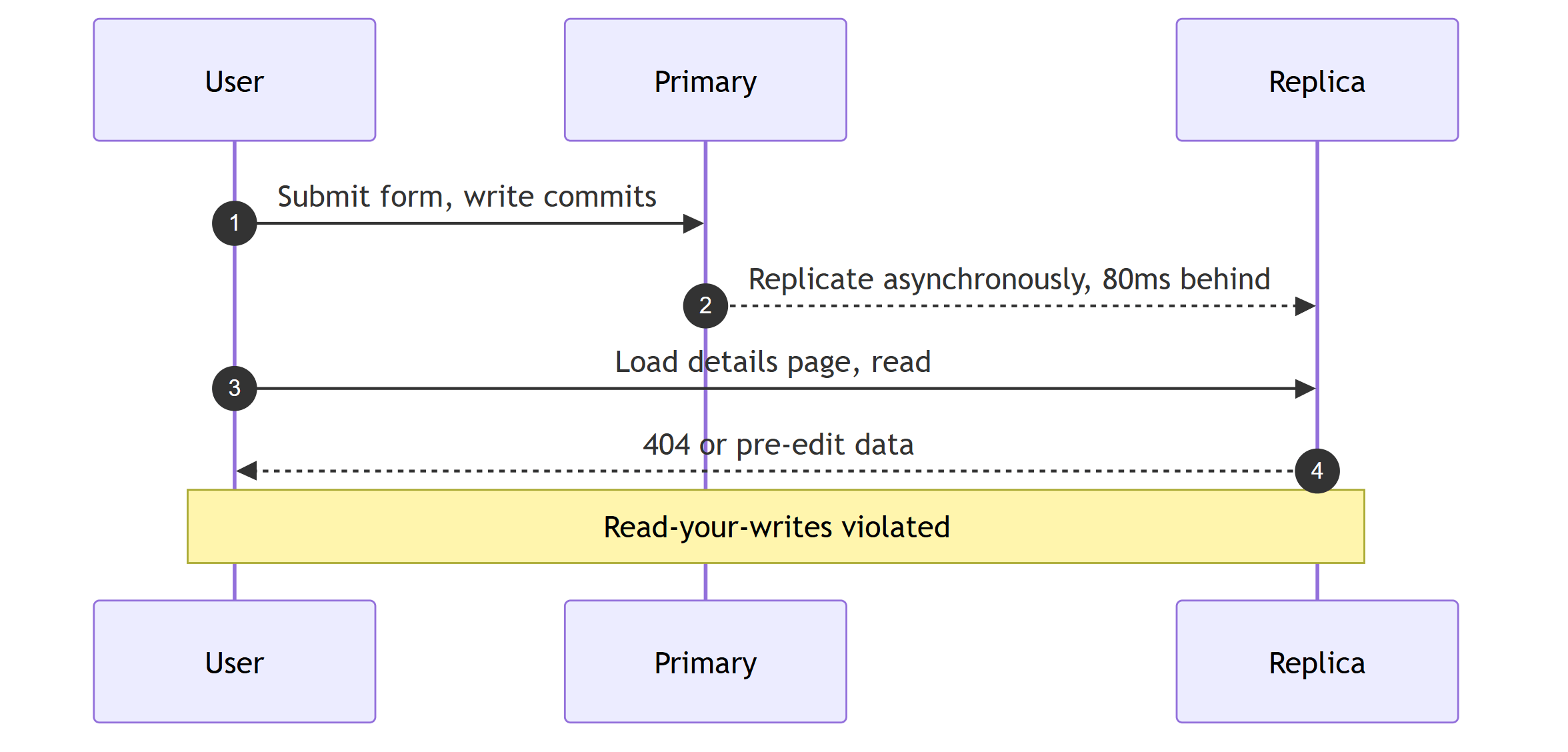
Here's the typical failure:
- User submits a form; the write commits on the primary.
- The app redirects to a details page.
- The details page reads from a replica that's 80ms behind.
- The user sees a 404, or the pre-edit data, for the thing they just saved.
No request fails, so your logs look clean. The system violated read-your-writes, the invariant users assume without knowing its name.
The same shape recurs server-side: a background job writes a row and immediately queries for "unprocessed rows" on the replica; an event handler reads an aggregate that the command just modified. That last one is a big reason outbox-pattern processors should always read from the primary.
Protecting Read-Your-Writes
Ordered from simplest to most precise; most systems only need the first two.
1. Route by call site (enough for most flows).
Reads that follow a write in the same user flow go to the primary.
Browse lists, search pages, dashboards, reports go to replicas.
With the two-context setup, this is just choosing which context the handler injects.
The details page after a save reads AppDbContext; the order history page reads ReadOnlyDbContext.
2. Pin the user to the primary briefly after a write. When flows are too dynamic to route statically, set a short-lived marker (a cookie, or an entry keyed by user id) after each write, and route that user's reads to the primary while it's fresh:
public sealed class ReadRoutingService(IHttpContextAccessor accessor)
{
    private const string CookieName = "rw-pin";
    private static readonly TimeSpan PinDuration = TimeSpan.FromSeconds(10);

    public void PinToPrimary()
    {
        accessor.HttpContext?.Response.Cookies.Append(
            CookieName,
            DateTimeOffset.UtcNow.Add(PinDuration).ToUnixTimeSeconds().ToString(),
            new CookieOptions { HttpOnly = true, MaxAge = PinDuration });
    }

    public bool ShouldReadFromPrimary()
    {
        string? value = accessor.HttpContext?.Request.Cookies[CookieName];

        return value is not null &&
               long.TryParse(value, out long expiresAt) &&
               DateTimeOffset.FromUnixTimeSeconds(expiresAt) > DateTimeOffset.UtcNow;
    }
}
Register it with builder.Services.AddHttpContextAccessor() and builder.Services.AddScoped<ReadRoutingService>(), and call PinToPrimary() after a successful write.
A handler that injects both contexts then picks one per read:
IQueryable<Order> orders = readRouting.ShouldReadFromPrimary()
    ? appDbContext.Orders.AsNoTracking()
    : readOnlyDbContext.Orders;
Base the pin duration on your measured p99 lag plus a margin.
3. Wait for the replica to catch up (precise, PostgreSQL). Capture the primary's WAL position after the write, and have the replica read wait until it has replayed past it:
-- On the primary, after committing:
SELECT pg_current_wal_lsn();

-- On the replica, before reading:
SELECT pg_last_wal_replay_lsn() >= '0/3000148'::pg_lsn;
This gives exact read-your-writes without pinning, at the cost of plumbing an LSN token through the request flow (SQL Server AGs and MySQL GTIDs have equivalents). It's the right tool for APIs that hand out "read tokens" to clients, and overkill for a typical web app.
Monitor replication lag.
On PostgreSQL: SELECT now() - pg_last_xact_replay_timestamp() on the replica, exported to your dashboards with an alert threshold.
Every consistency mechanism above assumes a maximum lag; the alert tells you when actual lag exceeds it.
What to Send to Replicas First
You don't flip the whole app at once. The highest-value, lowest-risk candidates:
- Reports and analytics queries: long-running, table-scanning, and nobody cares about 5 seconds of staleness. Getting these off the primary is often the whole win.
- Search and browse endpoints: high volume, naturally tolerant of staleness.
- Dashboards and counts: same profile.
Keep on the primary:
- Anything inside a transaction or that feeds a decision to write (read-modify-write flows, uniqueness checks)
- Auth/session reads where staleness has security implications
- Outbox processors, saga handlers, and queue pollers
Before you build any of this, check whether a cache already solves your problem. A replica is, functionally, a slightly stale copy of your data; if a 30-second cached response is acceptable, output caching is far less machinery than replication-aware routing. Replicas earn their complexity when reads are too varied or too fresh-sensitive for caching, which is the same judgment call I walked through in scaling monoliths.
Summary
Read replicas are the standard lever for read-heavy scale, and the .NET wiring is simple: a second, read-only DbContext pointed at the replica endpoint, chosen explicitly per call site.
The design work is handling staleness, because a replica is the recent past.
- Route staleness-tolerant reads (reports, search, browse) to replicas; keep read-after-write flows and write-feeding reads on the primary
- Protect read-your-writes with call-site routing first, short post-write pinning second, LSN tracking only when you need precision
- Measure replication lag continuously and design for its p99, not its average
With those three in place, replicas can serve most of your read traffic while users still see their own writes.
Frequently Asked Questions
What is a read replica?
A read replica is a copy of your primary database that receives changes through replication and serves read-only queries. It offloads read traffic from the primary, which continues to handle all writes.
How do I use read replicas with EF Core?
The simplest reliable approach is two DbContext registrations: one pointing at the primary for writes and one read-only context pointing at the replica endpoint. Command interceptors that reroute automatically look attractive but hide the routing decision that lag makes important.
What is replication lag and why does it matter?
Replication lag is the delay between a commit on the primary and that change becoming visible on a replica, usually a few milliseconds, but seconds or even minutes under write bursts, vacuum activity, or long-running queries on the replica. Code that writes and immediately reads from a replica can miss its own write, which users perceive as data loss.
What does read-your-writes consistency mean?
It is the guarantee that after a user performs a write, subsequent reads by that same user reflect the write. Replicas do not provide it by default, so you route post-write reads to the primary or wait until the replica has caught up.
