
Zero-downtime migrations come from the expand-contract pattern: add the new structure, migrate data and code onto it, then drop the old structure once nothing uses it. Each phase deploys and reverses independently, so old and new code always find a compatible schema.
Application code and database schema do not switch versions at exactly the same instant. During a rolling deployment, old and new instances must both work against the same intermediate schema.
The Deployment Problem
In a typical deployment, you update the database schema and deploy new application code at the same time. If the migration takes 30 seconds but the deployment takes 2 minutes, there's a window where the old code runs against the new schema, or the new code runs against the old schema.
Either scenario can cause errors. Renaming a column breaks the old code. Removing a column breaks queries that reference it.
The Expand-Contract Pattern
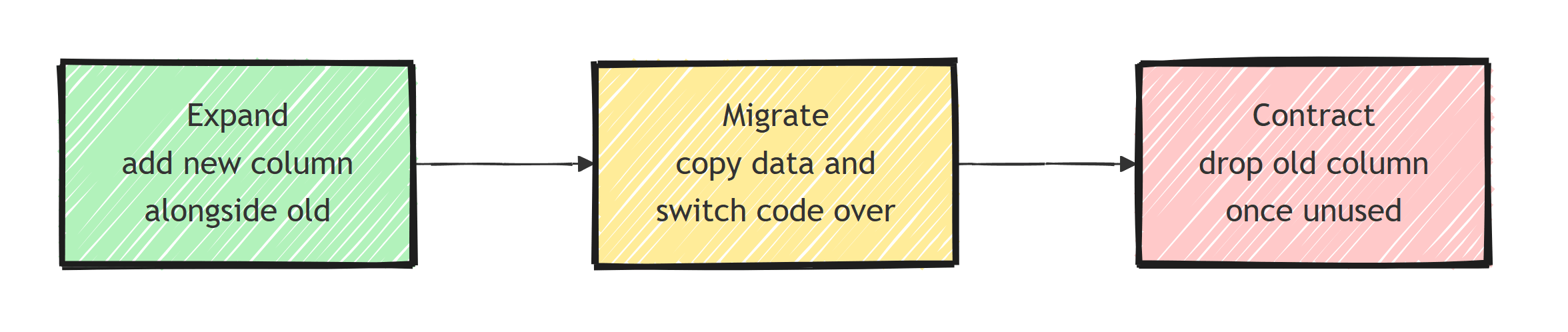
The expand-contract pattern splits every breaking change into three safe steps:
- Expand: add the new structure alongside the old one
- Migrate: move data and update code to use the new structure
- Contract: remove the old structure once nothing depends on it
Each step is deployed independently. At no point does old code break, because the old structure is still present during the expand and migrate phases.
Additive-Only Migrations
The safest migrations only add things:
// ✅ Safe - additive changes
migrationBuilder.AddColumn<string>(
    name: "PhoneNumber",
    table: "Customers",
    nullable: true); // Must be nullable or have a default

migrationBuilder.CreateTable(
    name: "CustomerPreferences",
    columns: table => new
    {
        Id = table.Column<Guid>(),
        CustomerId = table.Column<Guid>(),
        Theme = table.Column<string>(defaultValue: "light")
    });

migrationBuilder.CreateIndex(
    name: "IX_Orders_CustomerId",
    table: "Orders",
    column: "CustomerId");
Adding nullable columns and new tables is normally compatible with old code because it ignores the new structures. Index creation is logically additive but can still block writes or consume substantial resources, so use the provider's online or concurrent option and test it on production-scale data.
// ❌ Dangerous - breaking changes
migrationBuilder.DropColumn(name: "Phone", table: "Customers");
migrationBuilder.RenameColumn(
    name: "Name", table: "Products", newName: "Title");
migrationBuilder.AlterColumn<string>(
    name: "Email", table: "Customers", nullable: false);
Dropping columns, renaming columns, and making nullable columns required are all breaking changes. They need the expand-contract pattern.
How Do You Rename a Column Without Downtime?
Renaming a column is one of the most common breaking changes. Doing it safely with EF Core takes three deployments.
Step 1: Expand - Add the New Column
public partial class AddTitleColumn : Migration
{
    protected override void Up(MigrationBuilder migrationBuilder)
    {
        migrationBuilder.AddColumn<string>(
            name: "Title",
            table: "Products",
            nullable: true);

        migrationBuilder.Sql(
            @"UPDATE ""Products"" SET ""Title"" = ""Name""");
    }
}
Deploy this migration. Both Name and Title columns exist. Old code uses Name, new code doesn't exist yet.
Step 2: Migrate - Write to Both, Read From New
Update your DbContext configuration to map the entity to the new column:
public class ProductConfiguration : IEntityTypeConfiguration<Product>
{
    public void Configure(EntityTypeBuilder<Product> builder)
    {
        builder.Property(p => p.Title)
            .HasColumnName("Title");

        // Ignore the old property in the model
        builder.Ignore(p => p.Name);
    }
}
Old instances keep writing only Name until the rollout finishes, so you need a trigger that keeps both columns in sync.
Ship it in its own migration before the new code, and re-run the backfill after creating the trigger, because rows that old code changed since Step 1 have a stale or NULL Title:
public partial class SyncTitleAndName : Migration
{
    protected override void Up(MigrationBuilder migrationBuilder)
    {
        migrationBuilder.Sql(@"
            CREATE OR REPLACE FUNCTION sync_product_title()
            RETURNS TRIGGER AS $$
            BEGIN
                IF TG_OP = 'INSERT' THEN
                    IF NEW.""Title"" IS NULL THEN
                        NEW.""Title"" = NEW.""Name"";
                    ELSIF NEW.""Name"" IS NULL THEN
                        NEW.""Name"" = NEW.""Title"";
                    END IF;
                ELSIF NEW.""Title"" IS DISTINCT FROM OLD.""Title"" THEN
                    NEW.""Name"" = NEW.""Title"";
                ELSIF NEW.""Name"" IS DISTINCT FROM OLD.""Name"" THEN
                    NEW.""Title"" = NEW.""Name"";
                END IF;
                RETURN NEW;
            END;
            $$ LANGUAGE plpgsql;

            CREATE TRIGGER trg_sync_product_title
            BEFORE INSERT OR UPDATE ON ""Products""
            FOR EACH ROW EXECUTE FUNCTION sync_product_title();

            UPDATE ""Products"" SET ""Title"" = ""Name""
            WHERE ""Title"" IS DISTINCT FROM ""Name"";
        ");
    }
}
The trigger must fire on INSERT OR UPDATE, not just updates.
Old code inserts rows with only Name set, new code inserts rows with only Title set, and an update-only trigger would leave the other column NULL.
Deploy. All code works: old code reads/writes Name, new code reads/writes Title, and the trigger copies each write to the other column.
The new code never writes Name itself, so the trigger is what writes to both columns in this step.
Step 3: Contract - Remove the Old Column
Once no running code references Name, clean up:
public partial class DropNameColumn : Migration
{
    protected override void Up(MigrationBuilder migrationBuilder)
    {
        migrationBuilder.Sql(
            @"DROP TRIGGER IF EXISTS trg_sync_product_title
              ON ""Products""");

        migrationBuilder.DropColumn(
            name: "Name",
            table: "Products");
    }
}
Non-Nullable Column Strategy
Adding a required column to an existing table breaks if there's existing data. The safe approach:
// Step 1: Add as nullable with a default
migrationBuilder.AddColumn<string>(
    name: "Region",
    table: "Customers",
    nullable: true,
    defaultValue: "US");

// Step 2: Backfill existing rows
migrationBuilder.Sql(
    @"UPDATE ""Customers"" SET ""Region"" = 'US' WHERE ""Region"" IS NULL");

// Step 3: In a LATER migration, make it required
migrationBuilder.AlterColumn<string>(
    name: "Region",
    table: "Customers",
    nullable: false,
    defaultValue: "US");
Split steps 1-2 and step 3 into separate deployments. The application code should handle null values during the transition period.
Index Creation Without Blocking Writes
On large tables, a regular PostgreSQL CREATE INDEX allows reads but blocks writes on the target table. PostgreSQL also supports concurrent index creation:
public partial class AddOrderStatusIndex : Migration
{
    protected override void Up(MigrationBuilder migrationBuilder)
    {
        migrationBuilder.Sql(
            @"CREATE INDEX CONCURRENTLY ""IX_Orders_Status""
              ON ""Orders"" (""Status"");",
            suppressTransaction: true);
    }

    protected override void Down(MigrationBuilder migrationBuilder)
    {
        migrationBuilder.Sql(
            @"DROP INDEX CONCURRENTLY IF EXISTS ""IX_Orders_Status"";",
            suppressTransaction: true);
    }
}
CREATE INDEX CONCURRENTLY builds the index without blocking writes.
The concurrent create and drop commands both require suppressTransaction: true because PostgreSQL refuses to run either one inside a transaction block.
The deployment runner must also execute the generated script as written instead of wrapping the entire file in its own transaction.
The build still performs extra scans, consumes I/O, and may wait for old transactions to finish.
Keep the concurrent build in a dedicated migration with no later schema operations.
It cannot be atomic with EF's migrations-history insert, and a failed build can leave an invalid index that still consumes write overhead.
Inspect and remove that invalid index before retrying rather than adding IF NOT EXISTS to the create command.
I cover more deployment strategies in EF Core migrations best practices.
Applying Migrations in Production
Don't call Database.Migrate() at startup in production. It holds a lock, runs synchronously, and can fail in ways that leave the database in a partial state.
Instead, run migrations as a separate deployment step:
# Run migrations from CI/CD pipeline
dotnet ef database update --connection "$CONNECTION_STRING"
Or use a dedicated migration runner:
// In a console app or init container (host is the built IHost)
using var scope = host.Services.CreateScope();
var context = scope.ServiceProvider.GetRequiredService<AppDbContext>();

var pending = await context.Database.GetPendingMigrationsAsync();
if (pending.Any())
{
    await context.Database.MigrateAsync();
}
Run migrations before deploying new application code. The expand phase ensures backwards compatibility, so the old code keeps working while migrations run.
Migration Checklist
Before deploying a migration to production, verify:
- Can the old application code run against the new schema?
- Can the new application code run against the old schema?
- Are all new columns nullable or have defaults?
- Are destructive changes (drops, renames) in a separate contract migration?
- Have large table operations been tested for lock duration?
Summary
Expand the schema so old and new application versions can run together, migrate reads and writes, and contract only after the old path is gone. Backfill required data in bounded batches and treat index builds or table rewrites as operational work even when the schema change is additive. Run migrations from the deployment pipeline and verify both forward compatibility and rollback behavior before production.
Frequently Asked Questions
What is the expand-contract pattern for database migrations?
Expand-contract splits every breaking schema change into three phases: expand (add the new structure alongside the old), migrate (move data and switch code to the new structure), and contract (remove the old structure). Each phase deploys independently, so old and new code always find a compatible schema.
Should I run EF Core migrations at application startup?
Not in production. Startup migrations hold locks, make instances that start at once wait on each other (EF Core 8 and earlier let them race), and can fail mid-way. Run migrations as a separate deployment step from CI/CD, a migration console app, or an init container before rolling out new application code.
How do I rename a column without downtime in EF Core?
Never use a direct rename. Add the new column and copy the data (deployment 1), switch the code to the new column while keeping both in sync (deployment 2), then drop the old column once nothing references it (deployment 3).
Are additive migrations always safe?
Mostly. Adding nullable columns and new tables does not break running code, but large index builds can block writes or consume substantial I/O. PostgreSQL CREATE INDEX CONCURRENTLY avoids blocking writes but must run outside a transaction and can leave an invalid index after failure; SQL Server online index support depends on the edition, version, and index operation.
How do I add a required column to a table with existing data?
Add it as nullable with a default value first, backfill existing rows, and only make it non-nullable in a later migration after all running code writes the column. Doing it in one step fails or blocks on existing rows.
