
Dapper is a micro-ORM that extends IDbConnection with methods that execute your SQL and map the results to C# objects.
It doesn't generate SQL, track changes, or lazy-load anything.
Dapper is predictable because what you wrote is what runs, and the SQL you tested in your SQL client is the SQL production sends.
(And when the plan surprises you by ignoring an index, the cause is usually a non-sargable predicate.)
Every ORM discussion eventually produces the sentence "I just want to write the SQL myself." Dapper is for exactly that person.
Here are the patterns that cover 95% of real-world Dapper usage.
Setup
Dapper is a set of extension methods on IDbConnection, so it works with any ADO.NET provider:
dotnet add package Dapper
dotnet add package Npgsql
dotnet add package Npgsql.DependencyInjection
Register a connection factory so handlers can rent connections cheaply.
With PostgreSQL, the modern approach is a shared NpgsqlDataSource, registered with the AddNpgsqlDataSource extension from Npgsql.DependencyInjection:
// Program.cs
builder.Services.AddNpgsqlDataSource(
    builder.Configuration.GetConnectionString("Database")!);
public class ProductRepository(NpgsqlDataSource dataSource)
{
    public async Task<Product?> GetByIdAsync(int id, CancellationToken ct)
    {
        await using NpgsqlConnection connection =
            await dataSource.OpenConnectionAsync(ct);

        return await connection.QuerySingleOrDefaultAsync<Product>(
            new CommandDefinition(
                "SELECT id, name, price, created_at FROM products WHERE id = @Id",
                new { Id = id },
                cancellationToken: ct));
    }
}
Note the CommandDefinition wrapper.
Dapper's simple overloads have no CancellationToken parameter, so passing ct to the method and stopping there means the query itself can't be cancelled.
Wrapping the SQL and parameters in a CommandDefinition is how the token reaches the actual database call.
The await using matters too: connections must go back to the pool, and forgetting disposal leads to connection pool exhaustion.
One mapping note for PostgreSQL: snake_case columns map to PascalCase properties if you enable it once at startup:
Dapper.DefaultTypeMap.MatchNamesWithUnderscores = true;
Queries: The Core Four
Dapper's query surface is small enough to memorize:
// Many rows
IEnumerable<Product> products = await connection.QueryAsync<Product>(
    "SELECT * FROM products WHERE price > @MinPrice",
    new { MinPrice = 100m });

// Exactly one row (throws if zero or more than one)
Product product = await connection.QuerySingleAsync<Product>(
    "SELECT * FROM products WHERE id = @Id", new { Id = 42 });

// Zero or one row
Product? maybe = await connection.QuerySingleOrDefaultAsync<Product>(
    "SELECT * FROM products WHERE sku = @Sku", new { Sku = "ABC-1" });

// A single scalar
int count = await connection.ExecuteScalarAsync<int>(
    "SELECT COUNT(*) FROM products");
And for writes, ExecuteAsync returns affected rows:
int rows = await connection.ExecuteAsync(
    """
    UPDATE products
    SET price = @Price
    WHERE id = @Id
    """,
    new { Id = 42, Price = 129.99m });
Parameters are always the anonymous-object form. Never interpolate values into the SQL string; parameterization is both your SQL injection defense and what lets the database reuse query plans.
You can also pass an array or list as a parameter value.
On PostgreSQL, Dapper sends it as a single array parameter, which pairs with = ANY(@Ids):
var products = await connection.QueryAsync<Product>(
    "SELECT * FROM products WHERE id = ANY(@Ids)", // PostgreSQL
    new { Ids = new[] { 1, 5, 9 } });
(On SQL Server use WHERE id IN @Ids and Dapper rewrites it to individual parameters.)
Multi-Mapping: Joins Into Object Graphs
Dapper doesn't know about relationships, so joins map through a callback.
The splitOn column tells Dapper where one entity's columns end and the next begins:
const string sql =
    """
    SELECT o.id, o.total, o.created_at,
           c.id, c.name, c.email
    FROM orders o
    JOIN customers c ON c.id = o.customer_id
    WHERE o.created_at >= @Since
    """;

IEnumerable<Order> orders = await connection.QueryAsync<Order, Customer, Order>(
    sql,
    (order, customer) =>
    {
        order.Customer = customer;
        return order;
    },
    new { Since = DateTime.UtcNow.AddDays(-7) },
    splitOn: "id");
For one-to-many (an order with its lines), the join repeats the parent per child row, so you deduplicate with a dictionary:
var lookup = new Dictionary<int, Order>();

await connection.QueryAsync<Order, OrderLine, Order>(
    """
    SELECT o.id, o.total, l.id, l.product_name, l.quantity
    FROM orders o
    JOIN order_lines l ON l.order_id = o.id
    """,
    (order, line) =>
    {
        if (!lookup.TryGetValue(order.Id, out Order? existing))
        {
            existing = order;
            existing.Lines = [];
            lookup.Add(existing.Id, existing);
        }

        existing.Lines.Add(line);
        return existing;
    },
    splitOn: "id");

List<Order> orders = lookup.Values.ToList();
This is the most mechanical part of Dapper, and I went deeper on the variants in mastering Dapper relationship mappings.
When a read model needs three or more collections, QueryMultiple is usually cleaner than a mega-join.
QueryMultiple: Several Result Sets, One Round Trip
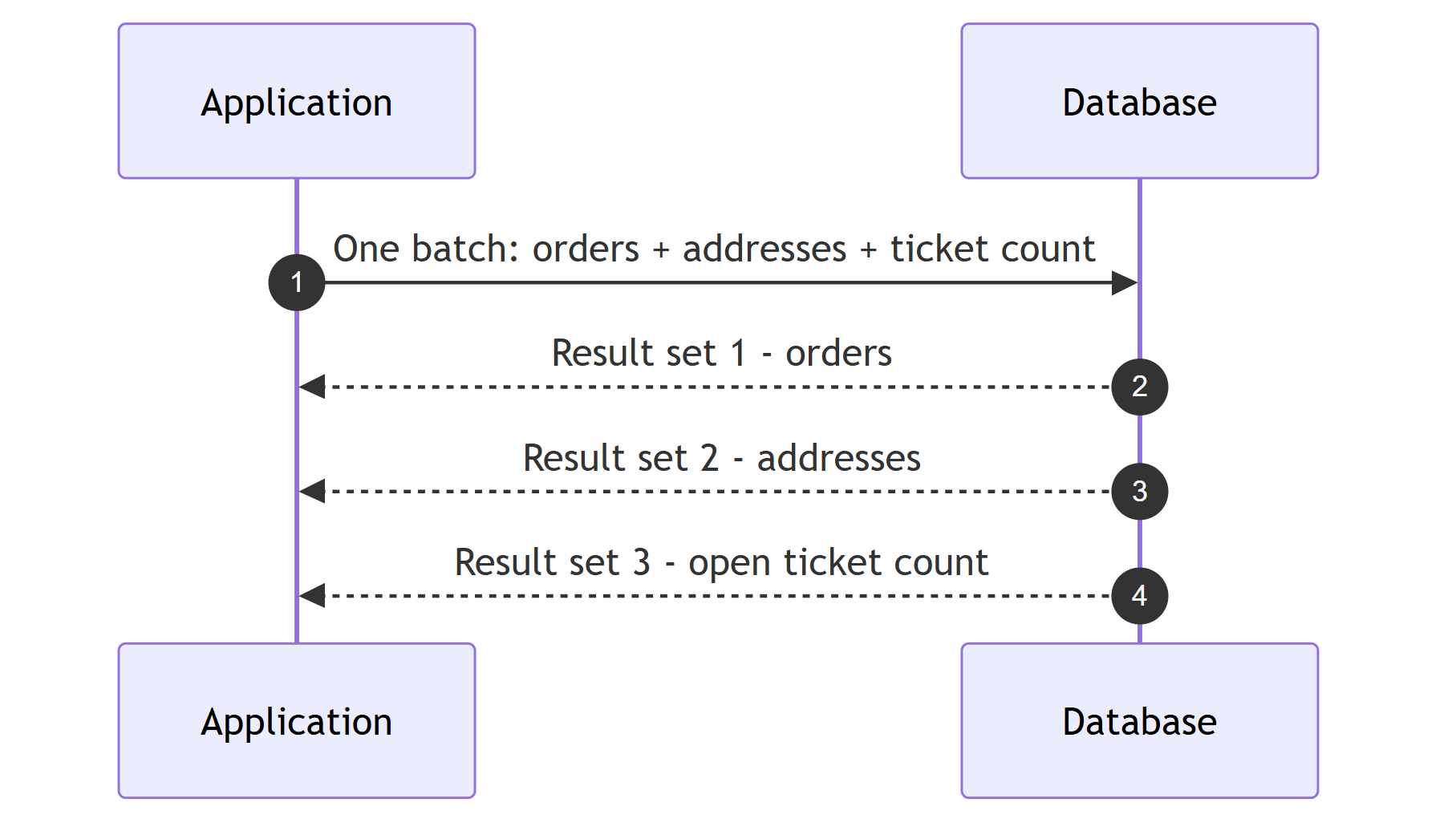
Dashboards and detail pages often need unrelated result sets. Send them as one batch:
const string sql =
    """
    SELECT * FROM orders WHERE customer_id = @CustomerId;
    SELECT * FROM addresses WHERE customer_id = @CustomerId;
    SELECT COUNT(*) FROM support_tickets WHERE customer_id = @CustomerId;
    """;

await using var multi = await connection.QueryMultipleAsync(
    sql, new { CustomerId = customerId });

List<Order> orders = (await multi.ReadAsync<Order>()).ToList();
List<Address> addresses = (await multi.ReadAsync<Address>()).ToList();
int openTickets = await multi.ReadSingleAsync<int>();
One round trip instead of three. On a 5ms-latency connection, that's 10ms saved per page load for free.
Transactions
Dapper rides on ADO.NET transactions; you pass the transaction to each call:
await using NpgsqlConnection connection = await dataSource.OpenConnectionAsync(ct);
await using NpgsqlTransaction transaction = await connection.BeginTransactionAsync(ct);

try
{
    await connection.ExecuteAsync(
        new CommandDefinition(
            "UPDATE accounts SET balance = balance - @Amount WHERE id = @From",
            new { Amount = 100m, From = fromId },
            transaction: transaction,
            cancellationToken: ct));

    await connection.ExecuteAsync(
        new CommandDefinition(
            "UPDATE accounts SET balance = balance + @Amount WHERE id = @To",
            new { Amount = 100m, To = toId },
            transaction: transaction,
            cancellationToken: ct));

    await transaction.CommitAsync(ct);
}
catch
{
    await transaction.RollbackAsync(ct);
    throw;
}
Forgetting to pass transaction to one of the calls is the classic bug, and the two big providers handle it differently.
With Npgsql, a command on a connection that has an open transaction runs inside that transaction anyway, so the code works right up until someone refactors it onto a second connection and that statement commits on its own, outside the transaction.
With Microsoft.Data.SqlClient, the same mistake throws an InvalidOperationException, which is annoying but at least loud.
Pass the transaction explicitly to every call so the code behaves the same on both providers.
If you need cross-statement consistency guarantees beyond this, that's transaction isolation level territory.
Where Does Dapper Fit Next to EF Core?
I don't treat this as either/or, and most of my systems use both:
- EF Core for the write side: change tracking, transactions and unit-of-work semantics, migrations, and domain model persistence
- Dapper for the read side: reports, dashboards, list endpoints with heavy filtering, anything where I want to hand-tune the SQL and see exactly what runs
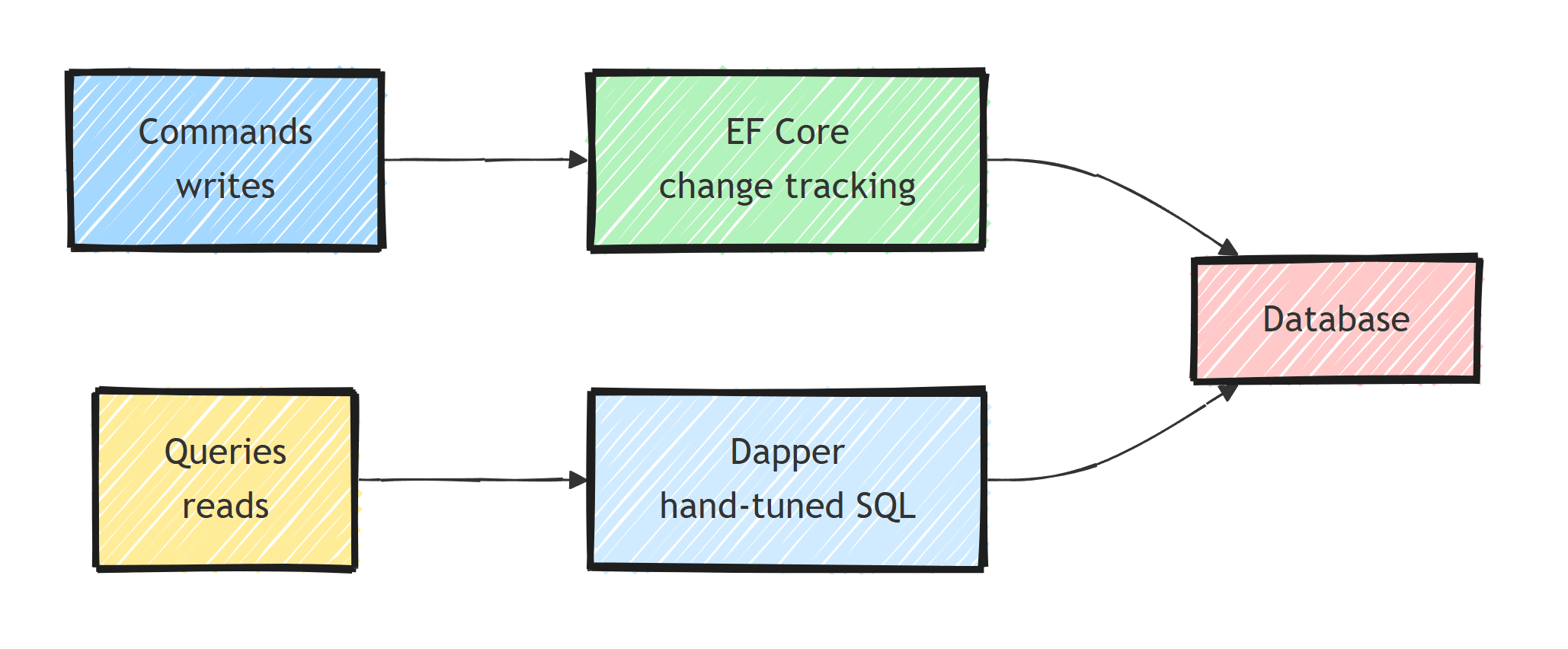
Writes benefit from EF Core's tracking and consistency machinery, and hot reads benefit from precise SQL and minimal materialization cost. When an EF Core LINQ query translates badly, you can rewrite just that query in Dapper (or EF Core raw SQL) and leave the rest on EF Core.
I put the detailed comparison and decision criteria in EF Core vs Dapper. Choose Dapper where SQL control and predictability matter more than productivity features, which for most teams means the read-heavy 20% of the data access layer.
Two things Dapper deliberately won't do for you:
- No SQL generation: every schema change means finding the affected SQL strings. Integration tests against a real database (Testcontainers) are non-negotiable.
- No change tracking: updates are explicit statements.
Dapper also leaves schema evolution to another tool. The EF Core Migrations vs DbUp vs FluentMigrator comparison helps choose who should own that SQL.
Summary
Keep Dapper explicit. You write the SQL and Dapper maps the results to objects, with no generated queries or change tracking in between.
The working set of patterns is small:
QueryAsync/QuerySingleOrDefaultAsync/ExecuteAsync/ExecuteScalarAsyncwith anonymous-object parameters, always- Multi-mapping with
splitOnfor joins, dictionary deduplication for collections QueryMultipleto batch independent result sets into one round trip- Explicit transactions passed to every participating call
await usingon every connection, because leaked connections exhaust the pool
Pair it with EF Core instead of replacing EF Core, and point it at your read-heavy paths.
Frequently Asked Questions
What is Dapper in .NET?
Dapper is a micro-ORM that extends IDbConnection with methods that execute your SQL and map results to C# objects. It does not generate SQL, track changes, or manage relationships. You write the SQL, Dapper handles parameters and materialization.
Is Dapper faster than EF Core?
For equivalent queries the difference is small in absolute terms, since both are dominated by database time. Dapper avoids EF Core query translation and change tracking overhead. The bigger difference is control, because with Dapper the SQL is exactly what you wrote.
Does Dapper prevent SQL injection?
Yes, when you use parameters. Dapper turns anonymous object properties into real database parameters. String concatenation or interpolation into the SQL text remains injectable, exactly like raw ADO.NET.
Can I use Dapper and EF Core in the same application?
Yes, and it is a common setup: EF Core for writes and change tracking, Dapper for complex read queries and reports. They can even share the same connection and transaction when needed.


