
Start with schema-per-module: each module owns a schema inside one shared database, which gives you real data isolation with far less operational overhead. Graduate to database-per-module when a module needs independent scaling, independent backup and restore, or is about to become a microservice.
When you build a modular monolith, one of the earliest decisions you'll face is how to isolate data between modules. The two common strategies are schema-per-module and database-per-module.
They're the two strongest levels on the data isolation spectrum, which also includes table prefixes at the weak end.
Both enforce module boundaries at the data layer. But they make different trade-offs around complexity, consistency, and your future migration path. The right choice depends on where your system is today.
Schema-Per-Module
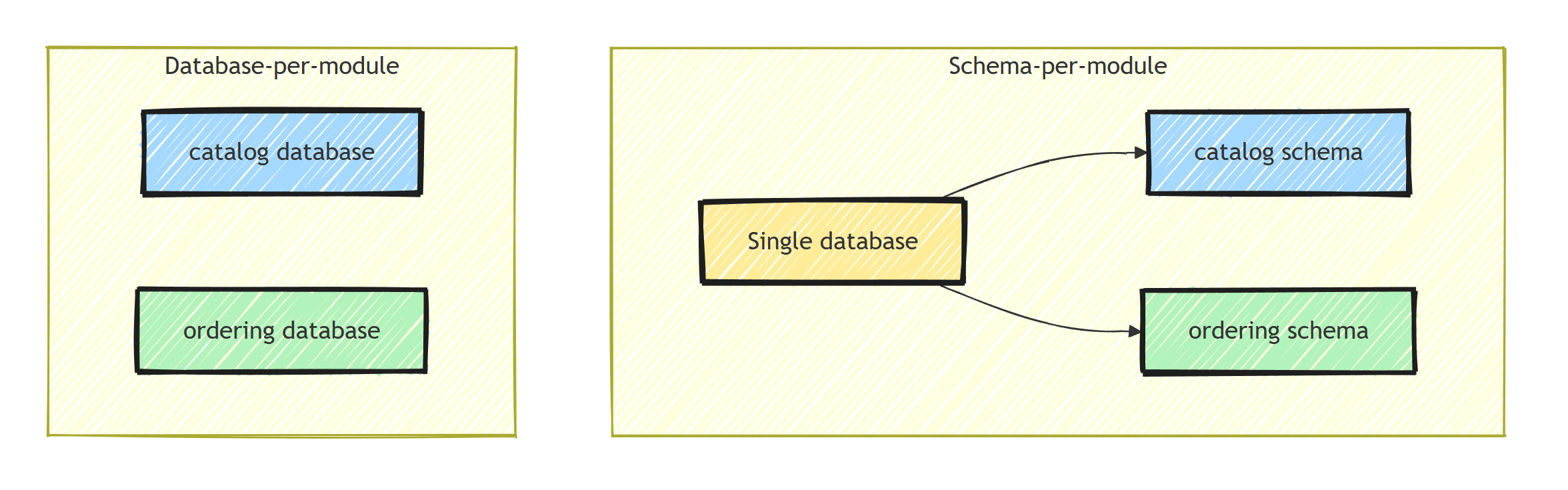
The schema-per-module strategy keeps all modules inside a single database but assigns each module its own schema. The catalog module owns catalog.products, while the ordering module owns ordering.orders. They share a database server and connection string but have logically separated table namespaces.
In EF Core, you configure this with HasDefaultSchema on each DbContext:
public class CatalogDbContext : DbContext
{
    public DbSet<Product> Products => Set<Product>();

    protected override void OnModelCreating(ModelBuilder modelBuilder)
    {
        modelBuilder.HasDefaultSchema("catalog");

        modelBuilder.ApplyConfigurationsFromAssembly(
            typeof(CatalogDbContext).Assembly);
    }
}

public class OrderingDbContext : DbContext
{
    public DbSet<Order> Orders => Set<Order>();

    protected override void OnModelCreating(ModelBuilder modelBuilder)
    {
        modelBuilder.HasDefaultSchema("ordering");

        modelBuilder.ApplyConfigurationsFromAssembly(
            typeof(OrderingDbContext).Assembly);
    }
}
Both contexts share the same connection string. Each one also gets its own migrations history table, inside its own schema, so the modules can add and apply migrations independently:
var connectionString = builder.Configuration
    .GetConnectionString("DefaultConnection");

builder.Services.AddDbContext<CatalogDbContext>(options =>
    options.UseNpgsql(connectionString, npgsql =>
        npgsql.MigrationsHistoryTable(
            "__EFMigrationsHistory", "catalog")));

builder.Services.AddDbContext<OrderingDbContext>(options =>
    options.UseNpgsql(connectionString, npgsql =>
        npgsql.MigrationsHistoryTable(
            "__EFMigrationsHistory", "ordering")));
Without the MigrationsHistoryTable call, both contexts record their migrations in the same default __EFMigrationsHistory table, which couples the modules' migration workflows.
This strategy works well when you're starting out or when your modules share traffic patterns and don't need independent scaling. With one database, you have a single backup strategy, monitoring target, and connection string in your configuration.
Database-Per-Module
The database-per-module strategy gives each module its own database entirely. The catalog module connects to myshop_catalog, and the ordering module connects to myshop_ordering. There's no way to accidentally join across module boundaries because the tables are in separate databases.
The EF Core setup uses distinct connection strings:
builder.Services.AddDbContext<CatalogDbContext>(options =>
    options.UseNpgsql(builder.Configuration
        .GetConnectionString("CatalogDb")));

builder.Services.AddDbContext<OrderingDbContext>(options =>
    options.UseNpgsql(builder.Configuration
        .GetConnectionString("OrderingDb")));
Your configuration carries multiple connection strings:
{
  "ConnectionStrings": {
    "CatalogDb": "Host=localhost;Database=myshop_catalog;Username=app;Password=secret",
    "OrderingDb": "Host=localhost;Database=myshop_ordering;Username=app;Password=secret"
  }
}
Migrations are independent. Each module runs its own migration at startup without any coordination:
using var scope = app.Services.CreateScope();

var catalogDb = scope.ServiceProvider.GetRequiredService<CatalogDbContext>();
await catalogDb.Database.MigrateAsync();

var orderingDb = scope.ServiceProvider.GetRequiredService<OrderingDbContext>();
await orderingDb.Database.MigrateAsync();
This strategy works well when you need physical isolation between modules. If one module has heavy write loads and another is read-heavy, separate databases let you tune each independently. It also gives you independent backup and restore capabilities.
What Are the Real Trade-offs?
Choosing between schema-per-module and database-per-module comes down to five areas.
Cross-module transactions. With schemas, both modules share a database, so you can wrap operations across modules in a single transaction. Treat that as an escape hatch, not a feature. Every shared transaction couples the modules a little more. With separate databases, cross-module transactions are impossible by construction. You'll need patterns like the outbox pattern or sagas to maintain consistency across module boundaries. This is a significant complexity jump.
Deployment complexity. Schema-per-module means one database to provision, monitor, and back up. Database-per-module multiplies that by the number of modules. If you have five modules, you now have five databases to manage. In production, this means more connection pools, monitoring dashboards, and backup schedules.
Performance isolation. Schemas share the same database resources (CPU, memory, I/O). A poorly optimized query in one module can degrade performance for every other module. Separate databases on separate servers give you resource isolation, so you can allocate more resources to your busiest module without touching the others. Several databases on one PostgreSQL instance still share its CPU, memory, and I/O.
Developer experience. Schema-per-module is simpler for local development.
You need one PostgreSQL instance and one connection string.
Database-per-module means each developer needs several databases and a connection string per module, though one PostgreSQL instance can host all of them (like the localhost configuration above).
That adds some setup friction.
Migration path to microservices. If you plan to eventually extract modules into microservices, database-per-module puts you closer to that goal. Each module already owns its data store. With schema-per-module, extracting a module means migrating its schema into a new database and updating all module communication to handle network boundaries.
Head-to-Head Comparison
Here's the whole comparison condensed:
| Schema-per-module | Database-per-module | |
|---|---|---|
| Isolation level | Logical, in one database | Physical, separate databases |
| Cross-module transactions | Possible, but discouraged | Impossible, forces saga and outbox patterns |
| Deployment overhead | One database to manage | One database per module |
| Performance isolation | Shared CPU, memory, and I/O | Independent resources on separate servers |
| Local dev setup | One connection string | Several databases and connection strings (one instance can host them) |
| Migration to microservices | Data extraction step required first | Already separated |
| Backup and restore | All-or-nothing | Per module |
| Connection pooling | A single pool | One pool per module, watch total connection counts |
Enforcing the Boundary Either Way
Whichever strategy you pick, isolation only holds if nothing bypasses it. Use a separate database user per module (with permissions limited to its own schema or database) so a cross-module query fails with a permission error instead of succeeding unnoticed. I cover more enforcement techniques in how to keep your data boundaries intact.
Summary
Start with schema-per-module. It gives you data isolation with minimal infrastructure overhead. You get separate namespaces, independent migration histories, and a clear boundary that prevents accidental cross-module queries through EF Core.
Then graduate to database-per-module when you hit one of these triggers:
- A module needs independent scaling due to different load patterns
- You need to restore one module's data without affecting others
- A noisy-neighbor problem is degrading performance across modules (put the new database on its own server)
- You're actively planning to extract a module into a service
The transition from schemas to databases is straightforward. You create the new database, migrate the schema's tables into it, and update the connection string. No changes to your DbContext classes or application code beyond configuration.
Thanks for reading, and stay awesome!
Frequently Asked Questions
Should each module in a modular monolith have its own database?
Usually not at the start. Schema-per-module in a single database gives you real isolation with far less operational overhead. Move a module to its own database when it needs independent scaling, backups, or is about to become a microservice.
What is schema-per-module?
Each module owns a database schema inside one shared database, for example catalog.products and ordering.orders. Modules share a server and connection string, but each EF Core DbContext only maps its own schema.
Can you do cross-module transactions with schema-per-module?
Physically yes, since everything is one database. But you should avoid it, because a shared transaction couples modules and blocks future extraction. Prefer integration events and the outbox pattern for cross-module consistency.
How do EF Core migrations work with multiple DbContexts in one database?
Give each DbContext its own migrations history table using MigrationsHistoryTable, ideally inside the module schema. Each module can then add and apply migrations independently without collisions.
Is it hard to move from schema-per-module to database-per-module?
No, and that is the main reason to start with schemas. If modules never query each other directly, moving one to its own database is mostly a data copy plus a connection string change.


