
The moment someone says "we need search", someone else says "so, Elasticsearch?" That means running a separate cluster, building a sync pipeline, and keeping your index consistent with your database.
For ranked keyword search over your application's data, PostgreSQL already ships everything you need: language-aware tokenization, ranking, and indexes that make it fast. And the Npgsql EF Core provider maps the entire pipeline to LINQ, so it stays in your normal query code. This website is static, so its own search uses a build-time Lunr.js index instead, described in how I implemented full-text search on my website. That post closes with a first PostgreSQL full-text query in EF Core, and this article covers the full setup.
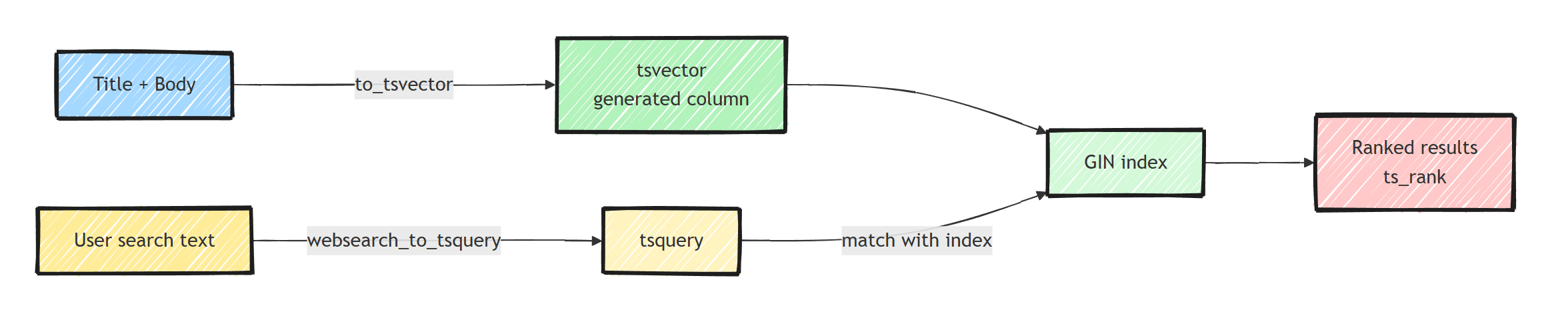
How PostgreSQL Full-Text Search Works
Two types do the work:
- tsvector: a document reduced to normalized lexemes.
to_tsvector('english', 'The quick brown foxes jumped')produces'brown':3 'fox':4 'jump':5 'quick':2. Stemming ("foxes" to "fox"), stop-word removal ("the"), and position tracking all happen here. - tsquery: a search expression.
websearch_to_tsquery('english', 'quick fox -dog')produces'quick' & 'fox' & !'dog'.
The @@ operator matches them, and because both sides are normalized the same way, "jumping foxes" finds "fox jumped":
SELECT to_tsvector('english', 'The quick brown foxes jumped')
       @@ websearch_to_tsquery('english', 'jumping foxes');
-- true
Computing to_tsvector per row per query would be slow.
The production setup stores the tsvector as a generated column, indexes it with GIN, and lets queries hit the index.
The EF Core Mapping
Install the provider, plus EFCore.NamingConventions for the snake_case table and column names used in the SQL below:
dotnet add package Npgsql.EntityFrameworkCore.PostgreSQL
dotnet add package EFCore.NamingConventions
builder.Services.AddDbContext<AppDbContext>(options =>
    options
        .UseNpgsql(builder.Configuration.GetConnectionString("Database"))
        .UseSnakeCaseNamingConvention());
Model a Post entity with a search vector.
The property type comes from the Npgsql provider (NpgsqlTypes.NpgsqlTsVector), which ships with Npgsql.EntityFrameworkCore.PostgreSQL:
using NpgsqlTypes;

public class Post
{
    public int Id { get; set; }
    public string Title { get; set; } = string.Empty;
    public string Body { get; set; } = string.Empty;

    public NpgsqlTsVector SearchVector { get; private set; } = null!;
}
Configure it as a stored generated column with a GIN index:
using Microsoft.EntityFrameworkCore;

public class AppDbContext(DbContextOptions<AppDbContext> options) : DbContext(options)
{
    public DbSet<Post> Posts => Set<Post>();

    protected override void OnModelCreating(ModelBuilder modelBuilder)
    {
        modelBuilder.Entity<Post>()
            .HasGeneratedTsVectorColumn(
                p => p.SearchVector,
                "english",
                p => new { p.Title, p.Body })
            .HasIndex(p => p.SearchVector)
            .HasMethod("GIN");
    }
}
The migration creates the generated column and the index:
CREATE TABLE posts (
    id integer GENERATED BY DEFAULT AS IDENTITY,
    title text NOT NULL,
    body text NOT NULL,
    search_vector tsvector GENERATED ALWAYS AS (to_tsvector('english', title || ' ' || body)) STORED NOT NULL,
    CONSTRAINT pk_posts PRIMARY KEY (id)
);

CREATE INDEX ix_posts_search_vector ON posts USING GIN (search_vector);
Because the column is generated, it can never drift from the source columns. Update a post's title and the vector updates in the same statement, transactionally. An external search engine makes you manage a sync pipeline and eventual consistency between your data and your index; database-native search has neither.
Querying With LINQ
The provider translates the whole search surface through EF.Functions:
public record PostResult(int Id, string Title);

public async Task<List<PostResult>> SearchAsync(
    string term, CancellationToken ct)
{
    return await dbContext.Posts
        .Where(p => p.SearchVector.Matches(
            EF.Functions.WebSearchToTsQuery("english", term)))
        .OrderByDescending(p => p.SearchVector.Rank(
            EF.Functions.WebSearchToTsQuery("english", term)))
        .Select(p => new PostResult(p.Id, p.Title))
        .Take(20)
        .ToListAsync(ct);
}
dbContext is the injected AppDbContext.
This translates to search_vector @@ websearch_to_tsquery(...) with ts_rank ordering, and the @@ predicate uses the GIN index.
WebSearchToTsQuery is the safe choice for raw user input:
ToTsQueryexpects valid tsquery syntax and throws on input likefox &PlainToTsQuery(what theMatches(string)overload calls, with no configuration argument, so it uses the server'sdefault_text_search_config) ANDs all words but supports no operatorsWebSearchToTsQueryaccepts anything, never errors, and supports quoted phrases,or, and-exclusion, the syntax users already know from search engines
ts_rank weighs term frequency, and you usually want title matches to outrank body matches.
Assign weights by building the vector with setweight.
HasGeneratedTsVectorColumn has no option for weights, so replace it with HasComputedColumnSql and write the expression yourself:
modelBuilder.Entity<Post>(builder =>
{
    builder.Property(p => p.SearchVector)
        .HasComputedColumnSql(
            """
            setweight(to_tsvector('english', coalesce(title, '')), 'A') ||
            setweight(to_tsvector('english', coalesce(body, '')), 'B')
            """,
            stored: true);

    builder.HasIndex(p => p.SearchVector).HasMethod("GIN");
});
The migration emits the same GENERATED ALWAYS AS (...) STORED column with this expression, so the model and the database stay in sync (EF Core migrations guide).
The expression is raw SQL, so it uses the database column names, not the C# property names.
Queries stay unchanged, and Rank respects the weights automatically: a title match now outranks a body match.
Highlighting and Pagination
Two features round out a real search page.
Result snippets with the matched terms highlighted come from ts_headline.
The provider maps it to GetResultHeadline on the query, so snippets stay in LINQ:
public record SearchHit(int Id, string Title, string Snippet);

var results = await dbContext.Posts
    .Where(p => p.SearchVector.Matches(
        EF.Functions.WebSearchToTsQuery("english", term)))
    .OrderByDescending(p => p.SearchVector.Rank(
        EF.Functions.WebSearchToTsQuery("english", term)))
    .Take(20)
    .Select(p => new SearchHit(
        p.Id,
        p.Title,
        EF.Functions.WebSearchToTsQuery("english", term)
            .GetResultHeadline("english", p.Body, "MaxWords=30, MinWords=15")))
    .ToListAsync(ct);
EF Core translates the projection to ts_headline('english', p.body, websearch_to_tsquery('english', @term), 'MaxWords=30, MinWords=15'), with term sent as a parameter.
If you would rather write the query by hand, an interpolated SqlQuery keeps term a parameter too, the same mechanics as any EF Core raw SQL query.
ts_headline re-parses the original document text, and the PostgreSQL docs warn it can be slow.
PostgreSQL evaluates it after the sort, so with LIMIT 20 it runs only for the 20 rows you return.
Pagination works with regular Skip/Take on the ranked query.
Offset pagination is fine here because search UIs rarely go past a few pages.
Performance and Limits
What to expect and where the edges are:
- Speed: the GIN index finds matching rows without scanning the table, but
ts_rankordering scores every matching row beforeLIMITapplies, so latency grows with the number of matches, not the table size. Selective terms stay fast; a term that matches most documents does not. Verify your query uses the index with EXPLAIN ANALYZE; you should see a Bitmap Index Scan on the GIN index, not a Seq Scan with a filter. - Write cost: the generated column recomputes on every write to the source columns, and GIN index maintenance isn't free. For write-heavy tables, GIN's
fastupdatemechanism amortizes this; for most content tables it's irrelevant. - Typo tolerance: stemming does no fuzzy matching, so "Postgre" won't match "PostgreSQL". If you need fuzzy matching, combine with the
pg_trgmextension (trigram similarity, also GIN-indexable) for a "did you mean" layer. - Language: the
'english'configuration bakes in English stemming. Multilingual content needs a config per language or the'simple'config (no stemming). - When you've outgrown it: heavy faceted navigation, aggregation-driven relevance, or nine-figure document counts across nodes are Elasticsearch/OpenSearch territory. If you want meaning-based matching rather than keyword matching, use embeddings and vector search, which PostgreSQL also handles via pgvector. Keyword FTS and vector search complement each other.
Summary
Ranked full-text search with zero new infrastructure:
- A
tsvectorgenerated column built from your searchable fields, weighted so titles beat bodies - One GIN index on that column
Matches+WebSearchToTsQuery+Rankin LINQ for the query path, andGetResultHeadlineforts_headlinesnippets- The vector updates in the same transaction as your data, so there is no sync pipeline to maintain
Reach for a dedicated search engine when you need facets, fuzzy matching on every field, or distributed scale.
Frequently Asked Questions
Does PostgreSQL have built-in full-text search?
Yes. PostgreSQL ships tsvector and tsquery types, language-aware stemming, stop word handling, ranking functions, and GIN indexes. For most applications it removes the need for a separate search engine.
How do I use PostgreSQL full-text search with EF Core?
The Npgsql provider maps it end to end. Add an NpgsqlTsVector property, configure it as a generated column with HasGeneratedTsVectorColumn, index it with a GIN index, and query with Matches and WebSearchToTsQuery through EF.Functions.
What is the difference between a tsvector and a tsquery?
A tsvector is the indexed representation of a document: normalized lexemes with positions. A tsquery is the search expression with operators like AND, OR, and phrase matching. The match operator checks a tsquery against a tsvector.
When should I use Elasticsearch instead of PostgreSQL full-text search?
When you need features PostgreSQL lacks or does poorly at scale: complex faceting and aggregations, sophisticated typo tolerance, distributed indexes over hundreds of millions of documents, or search-specific analyzers. For ranked keyword search over application data, PostgreSQL is usually enough.
