
open failed: administratively prohibited means the SSH server's policy refused your forward, so it never tried the database.
Run sudo journalctl -t sshd -t sshd-session on the server and read the matching line, because journalctl -u ssh leaves it out.
That line tells you which kind of setting to change.
connect failed and Address already in use are covered below.
I reproduced these on November 7, 2026, with ssh -L from a client container to a systemd Ubuntu 24.04 container running Docker 29.9.3, OpenSSH 9.6, and Postgres 18.6 on a WSL2 kernel.
I repeated the policy refusals, the journal behavior, and the lockouts on the official Ubuntu 24.04 and 26.04 cloud images under QEMU, and a few client lines on Windows OpenSSH.
Nothing ran on a real VPS or behind a provider firewall, I tested no macOS client, and provider images can differ.
Which Log Shows Why the Forward Failed?
Run this on the server right after the failure:
sudo journalctl -t sshd -t sshd-session --since '10 minutes ago' --no-pager --grep 'refused|denied|connect_to|connect to'
Nov 07 14:00:24 vps sshd[20886]: refused local port forward: originator 127.0.0.1 port 40438, target 172.18.0.2 port 5432
Nov 07 14:00:40 vps sshd[21306]: Received request from 192.168.32.3 port 46666 to connect to host 172.18.0.2 port 5432, but the request was denied.
List both -t names, because 26.04 logs under sshd-session and -t sshd alone returned nothing there.
journalctl -u ssh is the obvious place to look, and it found none of these lines on either cloud image.
Ubuntu's pam_systemd moves a logged-in session out of ssh.service into a session scope, and the forwarding failure is logged from that scope.
The unit still shows Accepted publickey, so the log looks healthy with the failure missing, and adding -u ssh to the command above narrows it to 0 lines.
I didn't test other distributions or hardened PAM stacks.
Where rsyslog runs, as it does on both cloud images, the same lines are in auth.log:
sudo grep -E 'sshd(-session)?\[[0-9]+\]: .*(refused|denied|connect_to|connect to)' /var/log/auth.log | tail -2
What Does administratively prohibited Mean?
A forward to a Postgres container can fail in three places: the listener on your laptop, the SSH server's policy, and the last hop to the target.
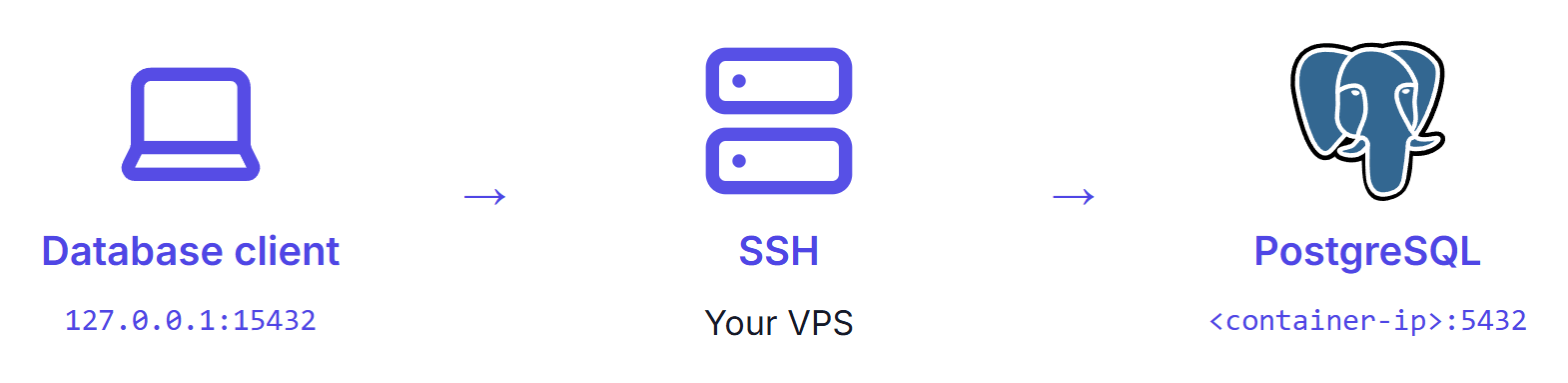
This error is the middle one.
It is SSH's reason code 1, and a refused target came back as code 2.
The nine configurations I tested all print one client line in the ssh terminal, and the channel number in it varies and means nothing:
channel 1: open failed: administratively prohibited: open failed
psql only reports server closed the connection unexpectedly.
The server prints one of two lines, and that split is your first clue:
refused local port forward: originator 127.0.0.1 port 42662, target 172.18.0.2 port 5432
Received request from 192.168.32.3 port 49804 to connect to host 172.18.0.2 port 5432, but the request was denied.
| Server line | Cause | Fix |
|---|---|---|
| refused local port forward | AllowTcpForwarding no or remote, DisableForwarding yes, or a Match block setting one | Change the setting that applies to this user |
| refused local port forward | restrict or no-port-forwarding on the key | Add port-forwarding after restrict, or use another key |
| the request was denied | PermitOpen lists another target, or none, or the same target spelled differently | Add the exact host:port the client asks for |
| the request was denied | permitopen= on the key lists another target | Fix the key's permitopen |
Before you change any of these, read the lockout steps.
To split the rows that share a server line, read the key's options from the client, which also works when you have no access to the server's log:
ssh -v -N -L 127.0.0.1:15432:172.18.0.2:5432 deploy@vps
debug1: Remote: /home/deploy/.ssh/authorized_keys:1: key options: agent-forwarding permitopen port-forwarding pty user-rc x11-forwarding
permitopen in that list means the key has an allow-list, a missing port-forwarding means it can't forward at all, and neither says anything about sshd_config.
Spelling counts, because PermitOpen does no name lookups, and PermitOpen 127.0.0.1:5432 refused a client asking for localhost three of three times.
What Do the connect failed Errors Mean?
Here the policy allowed the forward, and the server tried the target and failed.
The client line is channel 1: open failed: connect failed: followed by the ending in the first column.
The server line names the target it tried, so compare that with what you meant to forward to:
| Client line ends | Server line | Cause and fix |
|---|---|---|
| Connection refused | error: connect_to 172.18.0.2 port 5433: failed. | Nothing listens there. Check the port and that the service is running |
| Connection refused | error: connect_to localhost port 5432: failed. | localhost means the server, and nothing is published there. Forward to the container address, or publish on 127.0.0.1 |
| Connection refused | error: connect_to 127.0.0.1 port 5432: failed. | Nothing is published on loopback, or the target is bound to another interface. Forward to the container address, or to the address in the ports line |
| Connection refused | error: connect_to 172.18.0.2 port 5432: failed. | listen_addresses set to 127.0.0.1 inside the container, or a stale address now held by a container without 5432. Fix the setting, or get the current address |
| No route to host, after about 3 s | error: connect_to 172.18.0.2 port 5432: failed. | A stale address that nothing holds. Get the current address and reopen the tunnel |
| Name or service not known, or Temporary failure in name resolution | error: connect_to db: unknown host (Name or service not known) | A Compose service or container name, resolved on the host, which has no Docker DNS. Use an address or a loopback publish |
| open failed | error: connect to 192.0.2.10 port 5432 failed: No route to host | An immediate routing error that only the server names. Fix the route or target |
| Connection timed out, after 133.8 s | error: connect_to 192.0.2.1 port 5432: failed. | Packets dropped on the way. Check the firewall and address, and set connect_timeout on the client |
That timeout came from a simulated packet drop.
ssh and the journal stay silent until it expires, so a 5-second client limit shows only timeout expired.
The setup guide measures what moves a container's address, including a stale tunnel that logged in to another Postgres with no SSH error.
What Does Address Already in Use Mean?
This failure is on your laptop, and the server logs nothing about it beyond a normal login and disconnect:
bind [127.0.0.1]:15432: Address already in use
channel_setup_fwd_listener_tcpip: cannot listen to port: 15432
Could not request local forwarding.
ssh keeps running after this unless you set ExitOnForwardFailure, so stop the holder or pick another port.
When the holder is an older tunnel, your queries go to its target.
With an older tunnel to a second server (staging) on 15432, a new tunnel aimed at shop printed these lines and stayed up, and all 3 queries reached staging, where the missing orders table gave it away.
The two shared a role, password, and database name in my lab.
Why Does the Tunnel Look Fine Until the First Query?
The server only sees a forward when a connection arrives, so until then ssh sits there with a working listener on your laptop.
The client accepts your local connection itself and only then asks the server, so a port check succeeds even when the far side refuses.
These are the probes I compared with the option set, and the table shows exit codes from three runs per row:
ssh -N -o ExitOnForwardFailure=yes -L 127.0.0.1:15432:172.18.0.2:5432 deploy@vps
nc -z -w2 127.0.0.1 15432
pg_isready -h 127.0.0.1 -p 15432
psql -h 127.0.0.1 -p 15432 -U app -d shop -c 'SELECT count(*) FROM orders'
| Case | ssh | nc -z | psql |
|---|---|---|---|
| Healthy | Running | 0 | 0 |
| Local port taken | Exit 255 | Not run | Not run |
| Target refuses | Running | 0 | 2 |
| Forwarding prohibited | Running | 0 | 2 |
| Unknown name | Running | 0 | 2 |
The man page says the option doesn't apply to connections made over the forward (page dated October 30, 2026, read November 7, 2026).
pg_isready reported no response in the failing rows, but it also said accepting connections with a wrong password.
Only a real query with your own login proves the path, and a copy with the same tables can still answer it, as the setup guide shows.
How Do You Fix It Without Locking Yourself Out?
Read the policy first, which changes nothing:
sudo sshd -T | grep -E '^(allowtcpforwarding|permitopen|disableforwarding) '
sudo sshd -T -C user=deploy,host=check,addr=203.0.113.9 | grep -E '^(allowtcpforwarding|permitopen|disableforwarding) '
Use your own login in the second line, because plain sshd -T doesn't apply Match blocks.
Under Match User deploy, the first printed allowtcpforwarding yes and the second printed no.
Edit the line that sets the value, because the first value read wins, as the hardening checklist explains.
With 40-vendor.conf saying no and 60-mine.conf saying yes, the result was no.
A stricter benchmark may turn forwarding off on purpose, so ask before you reverse it.
To allow one login, add this at the end of a file in sshd_config.d.
AllowTcpForwarding local allowed -L and refused -R, and a Match block runs to the end of its file:
Match User deploy
    AllowTcpForwarding local
Without Match, it applies to every account: my second login could forward again, and -R failed.
DisableForwarding yes overrides it, and with both set sshd -T printed local while the forward was still refused.
Keep the session you are in open, change one thing, and apply it with the guard:
sudo sshd -t && sudo systemctl restart ssh
Then log in from a second terminal before you close the first, because the guard catches a bad file and not a bad policy. To go back, remove the block or put the old line back from the open session, and run the same command.
On both cloud images a bad file stopped at the guard with ssh still active, while the same file with an unguarded restart closed port 22 three of three times, with open sessions surviving.
An AllowUsers line without my own login passed the guard and refused the next login with Permission denied (publickey)., and only the open session could undo it.
If the server is down, use a session that survived, or your provider's console, which I didn't test. A reboot doesn't help: with the bad file in place, 8 of 8 logins failed after one. Use your own file name in the first line, or put the old line back if you edited an existing file, and keep these as three separate lines:
sudo rm /etc/ssh/sshd_config.d/00-lab.conf
sudo systemctl reset-failed ssh.service ssh.socket
sudo systemctl restart ssh
That worked three of three times on each cloud image.
restart alone failed right after a failure and left port 22 closed, so keep reset-failed.
On a server without socket activation that line prints Unit ssh.socket not loaded. and exits 1, and restart still brought SSH back.
Don't judge the file with sshd -t while the service is down, because it fails on the missing /run/sshd.
Then open a new tunnel to test, because a running one keeps the policy it started with. An open tunnel kept working after I banned forwarding, and one opened during the ban kept failing after I lifted it.
Don't reproduce these refusals on a production server, since the log and sshd -T already answer the question.
Outside a Match block a ban applies to every account, and AllowTcpForwarding no and DisableForwarding yes also broke ProxyJump through that server, which can cut you off from anything behind it.
Fixing a Key
For a key restriction, use the form that worked, with the target spelled as the client asks for it:
restrict,port-forwarding,permitopen="172.18.0.2:5432" ssh-ed25519 AAAA...
Test this on a second key or account, never on the key you log in with.
restrict removes the terminal with PTY allocation request failed on channel 0, though commands still run, so that key could repair its own line with ssh tunnel@vps "sed -i 's/^restrict[^ ]* //' ~/.ssh/authorized_keys".
That sed strips the options from every line starting with restrict, so back the file up first.
Summary
administratively prohibited is one client line for at least nine configurations, and it means the server refused by policy.
journalctl -t sshd -t sshd-session shows which of two server lines you have, and ssh -v separates a key option from an sshd setting.
connect failed means the server tried the target, so check the address or port.
Change sshd one line at a time with the guard in front of the restart and a second terminal open.
Then reopen the tunnel and run a real query, because ssh with ExitOnForwardFailure stayed up and a port check passed when the forward was refused.
My self-hosting course practices opening this kind of tunnel to a private Postgres container.
Thanks for reading.
And stay awesome!
Frequently Asked Questions
What does open failed administratively prohibited mean?
The SSH server refused your forward because of its policy, so it never tried the target. It is reason code 1 in the SSH protocol. Nine configurations I tested print the same client line, including sshd settings and key options, so only the server log or a verbose client tells them apart.
How is it different from connect failed connection refused?
Administratively prohibited means the server declined to try. Connect failed means the policy allowed the forward and the server tried the target, which then failed. That is a different reason code in the protocol, and the fix is usually the address or port and not an sshd setting.
Why does journalctl -u ssh not show the error?
On Ubuntu 24.04 and 26.04 cloud images, a logged-in session moves out of the ssh unit into a session scope, and forwarding failures are logged from there. The unit still shows accepted logins, so the log looks healthy. Filter by identifier with both sshd and sshd-session, and do not add the unit filter.
Does ExitOnForwardFailure catch this error?
No. It exited on a local bind failure and stayed up when the forward was prohibited or the target refused. The local port also keeps accepting connections, so a port check passes too. Only a real query with your own login tests the whole path.
Can changing sshd settings lock me out?
Yes. On Ubuntu cloud images, a restart with a bad file and no sshd -t check closed port 22 three of three times, and a reboot did not fix it. The check also missed an AllowUsers line that left out my own login. Keep an open session and test a new login before closing it.
