
53300: too many clients already.
If you run .NET against Postgres long enough, you will meet this error, usually at the worst time, because connection usage peaks exactly when traffic does.
This error is almost always self-inflicted, and the root cause is usually invisible in the code.
The modern fix is NpgsqlDataSource, which gives the pool a single owner.
Why Pools Exist at All
Opening a physical PostgreSQL connection is expensive. A TCP handshake, TLS negotiation, authentication, and a backend process forked on the server. Doing that per HTTP request would dominate your latency budget.
So Npgsql pools.
When you call OpenAsync, you usually get an already-open physical connection from a pool, and Dispose returns it instead of closing it.
Opening a pooled connection costs microseconds; opening a physical one costs milliseconds and server resources.
Every connection also costs the server memory and a process slot, which is why Postgres has a hard max_connections cap (100 by default).
The pool is how a busy app stays under it.
The Old Model and Its Trap
The pattern most of us learned:
await using var connection = new NpgsqlConnection(connectionString);
await connection.OpenAsync(ct);
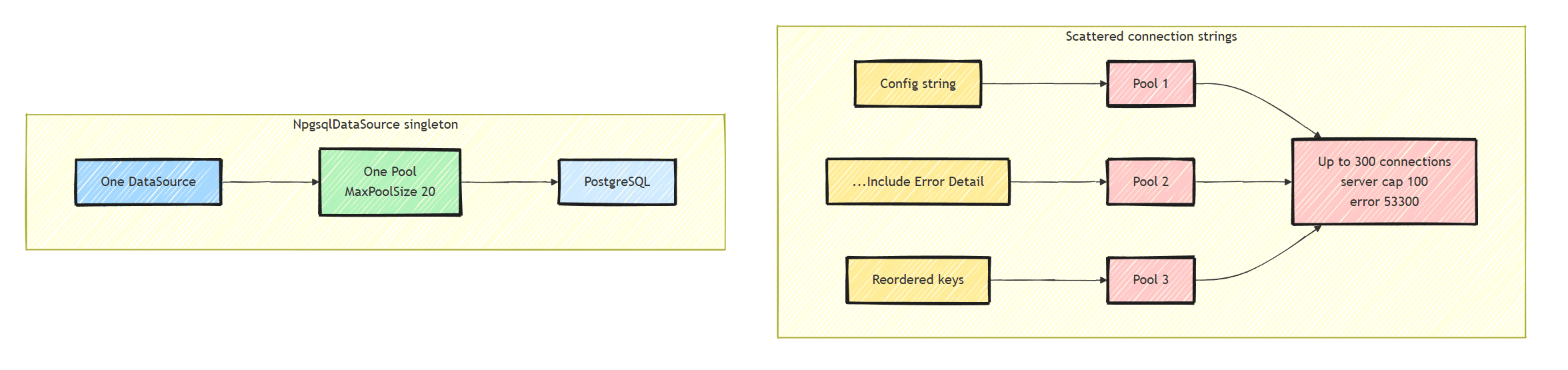
Looks harmless. But a data-source-less connection string spins up an implicit pool, keyed by the exact connection string.
Now scatter this through a codebase.
One service reads the string from configuration.
Another appends ;Include Error Detail=true for debugging.
A third goes through a builder that reorders keys or tweaks a timeout.
Each distinct string gets its own pool, and each pool holds up to its own MaxPoolSize (default 100) connections.
Three accidental pools at the default size can claim 300 connections against a server capped at 100.
That is where 53300 comes from.
The connections are also invisible in your code review. Nobody wrote "create three pools". The pools came from small differences between the strings.
NpgsqlDataSource: The Explicit Owner
NpgsqlDataSource (introduced in Npgsql 7) makes the pool an object you build once, configure in one place, and share everywhere.
var dataSourceBuilder = new NpgsqlDataSourceBuilder(
    new NpgsqlConnectionStringBuilder(rawConnectionString)
    {
        Pooling = true,
        MinPoolSize = 0,                  // don't hold idle connections when quiet
        MaxPoolSize = 20,                 // the ceiling that keeps you under the server cap
        ConnectionIdleLifetime = 5,       // seconds an idle connection survives
        ConnectionPruningInterval = 2,    // how often the pruner runs
        Timeout = 30,                     // connect timeout (s)
        CommandTimeout = 60               // per-command timeout (s)
    }.ConnectionString);

await using var dataSource = dataSourceBuilder.Build();   // owns the pool

// Borrow a connection from the pool:
await using var connection = await dataSource.OpenConnectionAsync(ct);
In an ASP.NET Core app, register it as a singleton and stop passing connection strings around entirely:
builder.Services.AddSingleton(_ =>
    new NpgsqlDataSourceBuilder(connectionString).Build());
Every part of the app now uses the same pool and the same settings. Nobody can accidentally mint a second pool, because nobody touches raw strings anymore.
Tuning the Pool
The settings above are the ones that matter. What each does, and a reasonable starting point:
- MaxPoolSize (default 100): the ceiling of physical connections this pool will open. Default is far too generous for most apps. Start at 20. When all connections are busy, the next
OpenAsyncwaits (up toTimeout) rather than opening more, which is exactly the backpressure you want. - MinPoolSize (default 0): connections kept open even when idle. Zero means a quiet app releases its connections instead of holding them open. Raise it only if you have measured cold-connection latency spikes after idle periods.
- ConnectionIdleLifetime (default 300 s): how long an idle connection survives before the pruner closes it. Five to thirty seconds is plenty for web workloads and gets you back under budget quickly after a burst.
- ConnectionPruningInterval (default 10 s): how often the pruner wakes up. Keep it a fraction of the idle lifetime.
- Timeout (default 15 s): how long
OpenAsyncwaits for a connection, including waiting for the pool to free one. If you hit this with the pool maxed, that is exhaustion, not a network problem. - CommandTimeout (default 30 s): per-command. Raise it deliberately for known-slow operations, not globally.
Then do the arithmetic:
MaxPoolSize x number of app instances must stay under the server's max_connections.
Four instances at MaxPoolSize = 20 can claim 80 connections.
Against a default max_connections = 100, that leaves 20 for migrations, background jobs, dashboards, and your own psql session during an incident.
Do this multiplication before you deploy, and see my write-up on diagnosing pool exhaustion and timeouts for the symptom-side view.
Handing the Data Source to EF Core
If you use EF Core with PostgreSQL, pass the data source, not a string. Resolve the singleton you registered above from the service provider:
builder.Services.AddDbContextPool<AppDbContext>((sp, options) =>
    options.UseNpgsql(
        sp.GetRequiredService<NpgsqlDataSource>(),
        npgsql => npgsql.EnableRetryOnFailure(3)));
Now EF Core, Dapper, and any raw Npgsql code all draw from the same pool with the same limits. Even stored procedures and functions called through EF Core use the same connections.
Two related notes.
DbContext pooling is a separate optimization (recycling context instances, not connections); the two pools compose fine.
And EnableRetryOnFailure gives you connection resiliency for transient network blips.
Npgsql also offers multiplexing (Multiplexing = true), where multiple logical commands share physical connections without checking them out.
It can raise throughput for high-concurrency, short-command workloads, but it changes transaction ergonomics, so treat it as an opt-in experiment, not a default.
Lifecycle Rules
- The app-wide data source is a singleton that lives for the process. You do not dispose it per request; DI disposes it at shutdown.
- If you create ad-hoc data sources (tests, tools, migrations), dispose them deterministically. Each one owns a pool. An undisposed pool keeps idle connections open until
ConnectionIdleLifetimeexpires (300 seconds by default), keeps itsMinPoolSizeconnections until process exit, and never gets back connections that were opened but not disposed. That is enough to exhaustmax_connectionsin a test suite that mints many data sources, as described in flaky Postgres integration tests.
Watching the Pool in Production
You can measure pool health from both sides of the connection.
On the .NET side, Npgsql publishes metrics through System.Diagnostics.Metrics: connections in use and idle (db.client.connection.count), the pool ceiling, pending requests, and timeouts, each tagged with the pool name.
If you already export OpenTelemetry metrics, add the Npgsql meter and the pool becomes a dashboard panel.
The number to alert on is pending requests (db.client.connection.npgsql.pending_requests): a sustained nonzero value means callers are queuing for connections, which is exhaustion in progress.
On the Postgres side, one query shows who is actually holding what:
SELECT application_name, state, count(*)
FROM pg_stat_activity
WHERE backend_type = 'client backend'
GROUP BY application_name, state
ORDER BY count(*) DESC;
Set a distinct Application Name per service in the connection string and this query becomes a per-service connection census.
A service showing more connections than MaxPoolSize times its instance count points to multiple pools.
The PersistSecurityInfo Gotcha
Npgsql strips sensitive values (the password) from the ConnectionString of an opened connection, and from NpgsqlDataSource.ConnectionString, unless PersistSecurityInfo=true is set.
So this innocent-looking code breaks:
// Somewhere: grab the "same" connection string to build a helper connection.
var s = connection.ConnectionString;         // password has been stripped!
await using var other = new NpgsqlConnection(s);
await other.OpenAsync(ct);                   // fails: no password was supplied
The failure appears far from the cause, typically in some utility that rebuilt a connection string from an existing connection or data source.
The fix is to never round-trip connection strings through opened objects: keep the authoritative string (or better, the data source) in one place and inject it.
If you must round-trip, PersistSecurityInfo=true keeps the password in the returned string, which also exposes it to anything that logs or inspects ConnectionString (diagnostics, exception logs, a debugger).
This is one more argument for the data source model: when the only thing you pass around is NpgsqlDataSource, there is no string to mangle.
(And keep the real credentials out of source in the first place, per user secrets.)
Diagnosing Pool Exhaustion
The symptom is a NpgsqlException wrapping a TimeoutException: "The connection pool has been exhausted".
It means Timeout seconds passed while every one of the pool's MaxPoolSize connections stayed busy.
The checklist, in order of likelihood:
- A leak. Some code path opens connections (or creates data sources) without disposing them. Look for missing
await using, and for long-lived objects that capture connections. - Long transactions. A connection inside an open transaction cannot go back to the pool. Slow queries and chatty transactions keep connections checked out.
- The pool is too small. Only after ruling out 1 and 2, raise
MaxPoolSize, and redo the instances-times-pool arithmetic againstmax_connections.
With a bounded pool and a short idle lifetime, the connection count rises with load and falls within seconds after, instead of ratcheting up until the server refuses new connections.
Summary
- The data source owns the pool. Build it once, register it as a singleton, and hand it to EF Core and everything else. Scattered connection strings create scattered pools, which is how you hit
53300. - Bound the pool (
MaxPoolSizearound 20) and do the multiplication: pool size times instances, comfortably undermax_connections. MinPoolSize = 0with a shortConnectionIdleLifetimemeans a quiet app gives its connections back.- Never round-trip connection strings through opened connections; Npgsql strips the password unless
PersistSecurityInfois set. - When the pool is exhausted, look for a leak first, then long transactions, and only then raise the pool size.
Frequently Asked Questions
What is NpgsqlDataSource?
NpgsqlDataSource is the modern Npgsql entry point that owns a connection pool and its configuration. You build it once, register it as a singleton, and open connections from it instead of constructing NpgsqlConnection objects from raw connection strings.
What causes PostgreSQL error 53300 too many clients already?
The server has hit its max_connections cap. From .NET this usually means multiple connection pools, each created by a slightly different connection string, or MaxPoolSize multiplied across app instances exceeding the server limit.
What is a good MaxPoolSize for Npgsql?
Small. Start around 20 per application instance and make sure MaxPoolSize times the number of instances stays comfortably under the PostgreSQL max_connections setting, leaving headroom for migrations, admin tools, and background jobs.
Why does the connection string from an NpgsqlConnection or NpgsqlDataSource no longer contain my password?
For security, Npgsql strips the password from the ConnectionString of an opened connection and of a data source unless Persist Security Info is enabled. If you rebuild a connection string from a data source or open connection, the password is no longer in it.
