
Teams usually discover partitioning after a DELETE FROM events WHERE created_at < '2025-01-01' runs for hours, writes WAL for every deleted row, and leaves the table full of dead space.
Partitioning doesn't primarily exist to make queries faster.
It exists to make data lifecycle operations instant.
Dropping a partition takes milliseconds, while DELETE takes hours.
What Partitioning Actually Is
A partitioned table is a virtual parent with physical child tables. You query the parent; PostgreSQL routes rows to children based on a partition key.
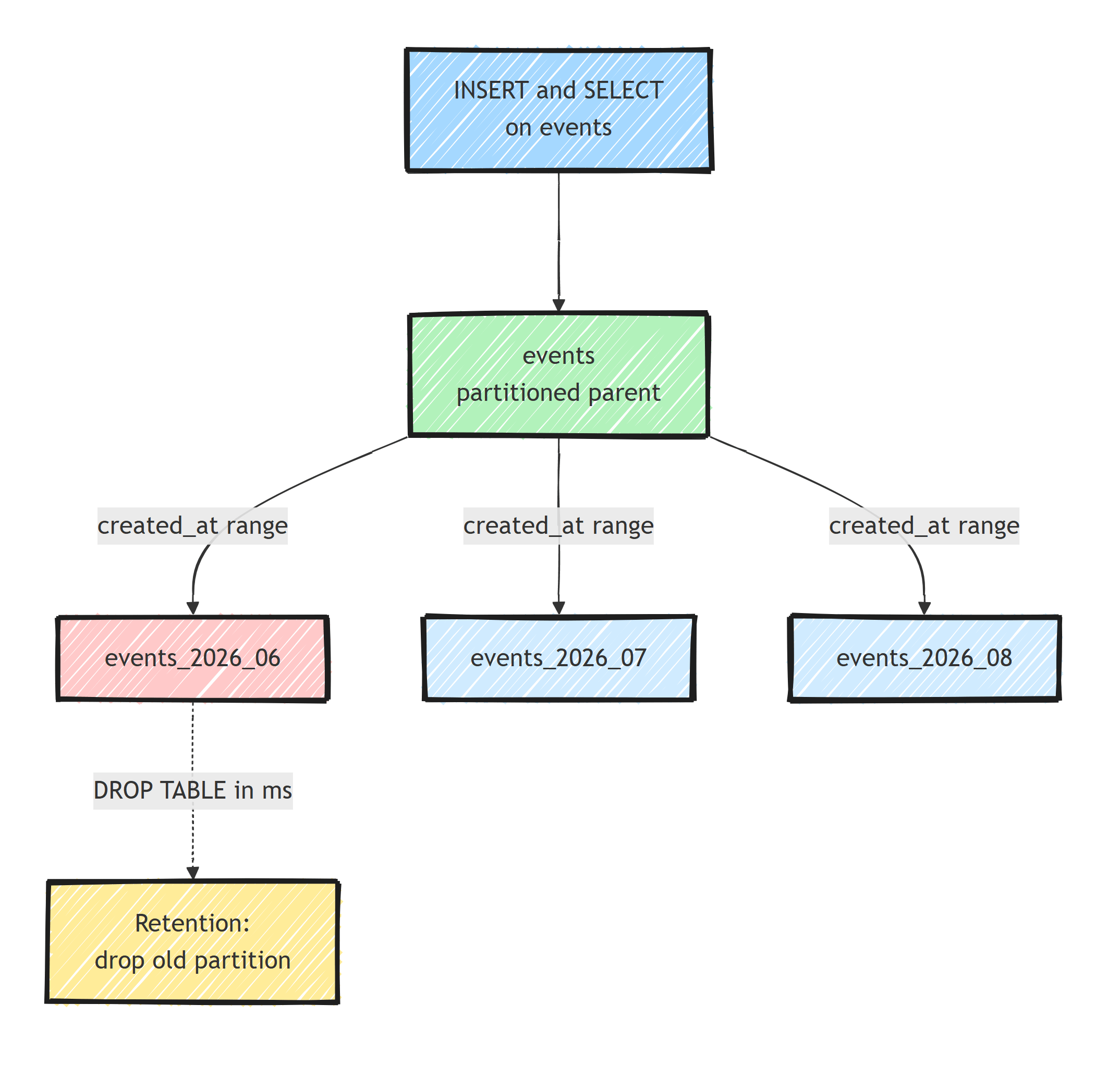
Three strategies exist:
- Range: each partition holds a range of values, almost always time. This is the one you want 90% of the time.
- List: each partition holds explicit values, like a tenant or region ID.
- Hash: rows are spread evenly by hash. Useful only for spreading write hotspots, since you can never drop a "hash partition of old data".
The declaration looks like this:
CREATE TABLE events (
    id BIGINT GENERATED ALWAYS AS IDENTITY,
    type TEXT NOT NULL,
    payload JSONB NOT NULL,
    created_at TIMESTAMPTZ NOT NULL DEFAULT now(),
    PRIMARY KEY (id, created_at)
) PARTITION BY RANGE (created_at);

CREATE TABLE events_2026_06 PARTITION OF events
    FOR VALUES FROM ('2026-06-01') TO ('2026-07-01');

CREATE TABLE events_2026_07 PARTITION OF events
    FOR VALUES FROM ('2026-07-01') TO ('2026-08-01');
Notice the primary key is (id, created_at), not just id.
Every unique constraint on a partitioned table must include the partition key, because PostgreSQL has no global index across partitions.
This is the first design consequence: the primary key only guarantees that each (id, created_at) pair is unique.
Nothing stops two rows with the same id and different timestamps, even inside one partition.
If your application relies on id being unique, generate it from a sequence (the identity column does this) and never insert explicit ids.
The Retention Win, Quantified
Compare the two ways of removing June's data from a 500 million row table.
Without partitioning:
DELETE FROM events WHERE created_at < '2026-07-01';
- Runs for hours, holding vacuum back the entire time.
- Writes WAL for every deleted row, which also floods your replicas.
- Leaves every deleted row as dead space; the table doesn't shrink until a
VACUUM FULL, which takes an exclusive lock.
With partitioning:
DROP TABLE events_2026_06;
- Completes in milliseconds. It's a file unlink, not row-by-row work.
- Takes a brief
ACCESS EXCLUSIVElock on the parent table, so it waits for queries already running againstevents. - Disk space returns to the OS immediately.
- Leaves no dead rows for vacuum to clean up, and doesn't write WAL for every row.
If you prefer to archive instead of destroy, DETACH PARTITION ... CONCURRENTLY removes the partition from the parent without that lock and without dropping it, and you can dump it to cold storage at your leisure.
This is why queue and log tables are good candidates for partitioning. The outbox processor in scaling the outbox pattern marks messages as processed instead of deleting them, so the table keeps growing until something cleans it up. Partitioning it by day turns that cleanup into dropping old partitions, once every message in them is processed.
Partition Pruning: The Query-Side Benefit
Queries that filter on the partition key only touch the relevant partitions. The planner proves the other partitions can't contain matching rows and skips them:
EXPLAIN SELECT count(*)
FROM events
WHERE created_at >= '2026-07-01'
  AND created_at < '2026-08-01'
  AND type = 'order_placed';
The plan shows a scan on events_2026_07 only.
Drop the upper bound and the plan also scans events_2026_08 and every later partition, because rows in them still match created_at >= '2026-07-01'.
A query without the partition key hits every partition.
SELECT * FROM events WHERE id = 12345 scans an index on each of your 24 partitions.
That's 24 index lookups instead of 1, so partitioning can make key-only lookups slower.
Partition by the column your hot queries already filter on. If your access pattern is time-based (dashboards, recent activity, retention), range-by-time is a natural fit. Confirm pruning with EXPLAIN ANALYZE; the plan will list exactly which partitions were scanned.
Using It From EF Core
EF Core doesn't need to know the table is partitioned. Inserts, updates, and LINQ queries against the parent table work unchanged, because the routing happens inside PostgreSQL.
public class Event
{
    public long Id { get; set; }
    public string Type { get; set; } = string.Empty;
    public string Payload { get; set; } = "{}";
    public DateTime CreatedAt { get; set; }
}
The catch is migrations.
EF Core's migration builder can't emit PARTITION BY, so you create the table with raw SQL inside a migration:
public partial class CreateEventsTable : Migration
{
    protected override void Up(MigrationBuilder migrationBuilder)
    {
        migrationBuilder.Sql(
            """
            CREATE TABLE events (
                id BIGINT GENERATED ALWAYS AS IDENTITY,
                type TEXT NOT NULL,
                payload JSONB NOT NULL,
                created_at TIMESTAMPTZ NOT NULL DEFAULT now(),
                PRIMARY KEY (id, created_at)
            ) PARTITION BY RANGE (created_at);

            CREATE INDEX ix_events_type ON events (type, created_at);
            """);
    }

    protected override void Down(MigrationBuilder migrationBuilder)
    {
        migrationBuilder.Sql("DROP TABLE events;");
    }
}
Then tell EF Core to treat the entity as already mapped, and exclude it from model-diff churn by matching your entity configuration to reality.
The snake_case column names come from UseSnakeCaseNamingConvention() in the EFCore.NamingConventions package:
modelBuilder.Entity<Event>(builder =>
{
    builder.ToTable("events");
    builder.HasKey(e => new { e.Id, e.CreatedAt });

    // The database generates id, so EF Core must not send it
    builder.Property(e => e.Id).UseIdentityAlwaysColumn();

    // Without this, EF Core sends the string as text and the insert fails
    builder.Property(e => e.Payload).HasColumnType("jsonb");
});
If you keep the entity configuration aligned with the SQL, later migrations won't try to "fix" the table.
EF Core always sends CreatedAt, so the column's DEFAULT now() never applies; set it to DateTime.UtcNow when you create the event.
The migration also creates no partitions, so inserts fail until the job in the next section has created the current month's partition.
The general techniques from EF Core migrations: a detailed guide apply; you're just supplying the DDL yourself for this one table.
Automating Partition Creation
Static partitions run out.
An insert whose key matches no partition fails with an error unless a DEFAULT partition exists, and a default partition accepts those rows without raising an error, which defeats the purpose.
You have three workable options:
- pg_partman, the standard extension. It pre-creates future partitions and detaches or drops old ones on a schedule. If you control the server (or your managed provider offers it, and RDS, Cloud SQL, and Azure all do), use this.
- A background job in your app. A small scheduled task that runs
CREATE TABLE IF NOT EXISTS ... PARTITION OF ...for the next couple of months, and drops expired ones. - Manual, in migrations. Fine for list partitioning by tenant, where new partitions arrive rarely and deliberately.
Here's the app-side variant as a Quartz-style job body.
It takes the NpgsqlDataSource that builder.Services.AddNpgsqlDataSource(connectionString) (from the Npgsql.DependencyInjection package) registers:
public async Task ManagePartitionsAsync(NpgsqlDataSource dataSource, CancellationToken ct)
{
    var now = DateTime.UtcNow;
    var currentMonth = new DateTime(now.Year, now.Month, 1, 0, 0, 0, DateTimeKind.Utc);

    await using var connection = await dataSource.OpenConnectionAsync(ct);

    // This month and next month, so inserts always have a partition
    for (var offset = 0; offset <= 1; offset++)
    {
        var from = currentMonth.AddMonths(offset);
        var to = from.AddMonths(1);

        await using var command = connection.CreateCommand();

        // The +00 offset pins the bounds to UTC, whatever the session time zone is
        command.CommandText =
            $"""
            CREATE TABLE IF NOT EXISTS events_{from:yyyy_MM} PARTITION OF events
            FOR VALUES FROM ('{from:yyyy-MM-dd} 00:00:00+00') TO ('{to:yyyy-MM-dd} 00:00:00+00');
            """;

        await command.ExecuteNonQueryAsync(ct);
    }
}
Run it once at startup, then daily.
Creating a partition that already exists is a no-op thanks to IF NOT EXISTS, and a daily run creates next month's partition well before inserts on the 1st need it.
A Quartz scheduled job handles both triggers.
When Not to Partition
Partitioning has costs, so skip it when the wins don't apply:
- The table is small. Under 100 GB or so, indexes alone are fine. Partitioning adds planner overhead and operational moving parts for nothing.
- You never delete by range. If data lives forever and queries filter by user rather than time, sharding or a different partitioning axis may fit better, or nothing at all.
- You need global unique constraints on columns other than the partition key. There's no way to express them.
- Hot queries don't include the partition key. You'd be turning one index scan into N.
For append-heavy time-series tables where you only ever need cheap scans, a BRIN index is an alternative that gets you part of the read-side benefit with none of the DDL complexity. It doesn't help retention, which is usually the actual problem.
Summary
Partition when you delete by time range.
Retention then becomes a DROP TABLE that finishes in milliseconds, instead of a multi-hour DELETE that bloats the table and floods the WAL.
The .NET-specific parts are small:
- Create the partitioned table with
migrationBuilder.Sql, since EF Core can't emit the DDL. - Give the entity a composite key that includes the partition key.
- Automate partition creation with pg_partman or a daily background job.
- Keep the partition key in your hot queries so the planner can prune partitions.
Everything else, EF Core treats as an ordinary table.
Frequently Asked Questions
When should I partition a PostgreSQL table?
The strongest signal is time-based retention: you regularly delete old rows from a large table. Partitioning by time lets you drop a whole partition instantly instead of running a long, bloating DELETE. Tables under roughly 100 GB rarely need it.
Does partitioning make queries faster?
Only queries that filter on the partition key benefit, because the planner can skip irrelevant partitions (partition pruning). Queries without the key touch every partition and can even get slower than on an unpartitioned table.
Does EF Core support PostgreSQL table partitioning?
EF Core queries a partitioned table like any normal table, so reads and writes work unchanged. But EF Core migrations cannot create partitioned tables or partitions, so you write that DDL with raw SQL in a migration.
Why is dropping a partition faster than DELETE?
DELETE marks each row dead one by one, writes WAL for every row, and leaves bloat for vacuum to clean up. DROP TABLE on a partition just removes files from disk, which is a metadata operation that takes milliseconds regardless of row count.
Can a partitioned table have a primary key?
Yes, but every unique constraint, including the primary key, must contain the partition key column. That is why partitioned tables typically use a composite key like (id, created_at).
