
EF Core connection resiliency is the built-in retry logic you enable with EnableRetryOnFailure in the provider options, which installs an execution strategy that retries transient failures with exponential backoff.
Short network interruptions, failovers, and throttling are temporary, so a retry usually succeeds.
Explicit transactions are the exception: wrap them in CreateExecutionStrategy so a retry cannot replay half the work.
A database operation can fail even when the query and data are valid. EF Core execution strategies handle the retry loop when you define the correct transactional boundary.
Transient Failures Are Normal
In cloud environments, database connections fail when a load balancer rotates, Azure SQL throttles requests, or the network drops for a moment. These are transient failures: the same operation usually succeeds if you retry it.
Without retry logic, a brief network blip causes 500 errors for your users. EF Core's execution strategy solves this by automatically retrying failed operations.
Enabling Retry Logic
SQL Server / Azure SQL
builder.Services.AddDbContext<ApplicationDbContext>(options =>
{
    options.UseSqlServer(connectionString, sqlOptions =>
    {
        sqlOptions.EnableRetryOnFailure(
            maxRetryCount: 5,
            maxRetryDelay: TimeSpan.FromSeconds(30),
            errorNumbersToAdd: null);
    });
});
PostgreSQL (Npgsql)
builder.Services.AddDbContext<ApplicationDbContext>(options =>
{
    options.UseNpgsql(connectionString, npgsqlOptions =>
    {
        npgsqlOptions.EnableRetryOnFailure(
            maxRetryCount: 5,
            maxRetryDelay: TimeSpan.FromSeconds(30),
            errorCodesToAdd: null);
    });
});
Both use exponential backoff with jitter by default.
What Gets Retried?
EF Core retries these operations:
SaveChangesAsync()ToListAsync(),FirstOrDefaultAsync(), etc.- Any LINQ query execution
It retries only transient SQL errors. Constraint violations, syntax errors, and other non-transient failures are not retried.
SQL Server Transient Error Numbers
The default transient error list for SQL Server includes, among others:
- 20: Instance error
- 64: Connection error
- 233: Connection closed
- 10053: Transport error
- 10054: Connection reset
- 10060: Connection timeout
- 40143: Throttled (Azure SQL)
- 40197: Service error (Azure SQL)
- 40501: Service busy (Azure SQL)
- 40613: Database unavailable (Azure SQL)
- 49918: Not enough resources (Azure SQL)
- 49919: Too many requests (Azure SQL)
- 49920: Too many requests (Azure SQL)
Command timeouts (error -2) are not on the list. EF Core leaves them out on purpose, because a command that timed out may still have completed on the server.
You can add custom error numbers, for example to retry command timeouts when your operations are idempotent:
sqlOptions.EnableRetryOnFailure(
    maxRetryCount: 5,
    maxRetryDelay: TimeSpan.FromSeconds(30),
    errorNumbersToAdd: [-2]);
The Transaction Problem
Retries don't work with manual transactions:
// ❌ This throws InvalidOperationException with retry enabled
using var transaction = await _db.Database.BeginTransactionAsync();

order.Status = OrderStatus.Confirmed;
await _db.SaveChangesAsync();

payment.Status = PaymentStatus.Captured;
await _db.SaveChangesAsync();

await transaction.CommitAsync();
If the first SaveChangesAsync succeeds but the second fails, EF Core can't retry the second without replaying the first.
The retry strategy doesn't know about your transaction boundaries.
The Fix: CreateExecutionStrategy
var strategy = _db.Database.CreateExecutionStrategy();

await strategy.ExecuteAsync(async () =>
{
    // Each attempt starts from a clean change tracker
    _db.ChangeTracker.Clear();

    using var transaction = await _db.Database.BeginTransactionAsync();

    var order = await _db.Orders.FirstAsync(o => o.Id == orderId);
    order.Status = OrderStatus.Confirmed;
    await _db.SaveChangesAsync();

    var payment = await _db.Payments.FirstAsync(p => p.Id == paymentId);
    payment.Status = PaymentStatus.Captured;
    await _db.SaveChangesAsync();

    await transaction.CommitAsync();
});
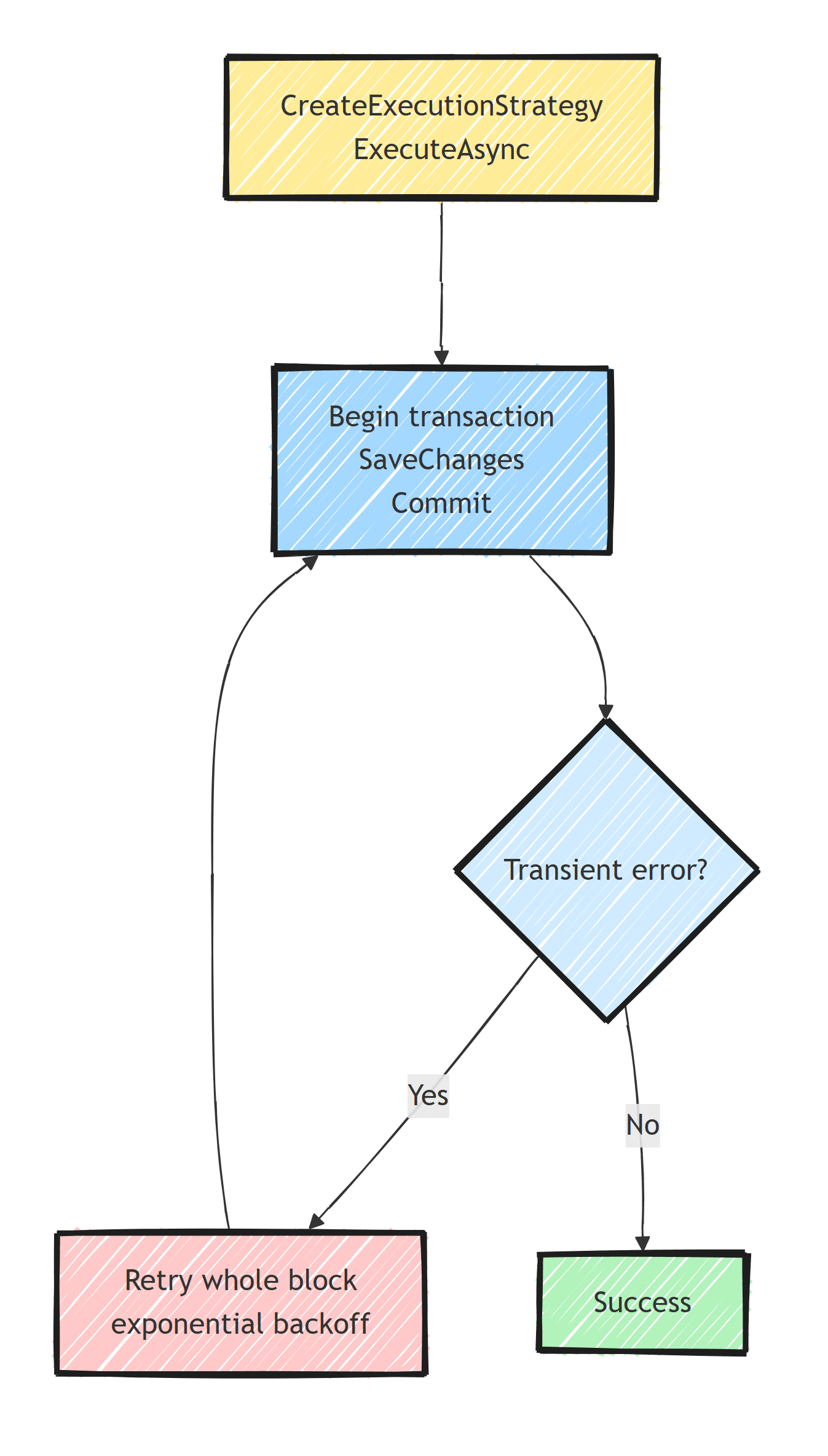
ExecuteAsync wraps the entire operation, including the transaction, as a single retriable unit.
If any step fails with a transient error, the whole block is retried from the beginning.
That is why the block clears the change tracker and loads the entities itself.
With entities tracked from before the block, the first SaveChangesAsync marks the order change as saved, and a retry after a later failure commits the payment without the order update.
Custom Execution Strategy
For fine-grained control, create a custom strategy:
public class CustomRetryStrategy : SqlServerRetryingExecutionStrategy
{
    private readonly ILogger<CustomRetryStrategy> _logger;

    public CustomRetryStrategy(
        ExecutionStrategyDependencies dependencies,
        int maxRetryCount,
        TimeSpan maxRetryDelay,
        ILogger<CustomRetryStrategy> logger)
        : base(dependencies, maxRetryCount, maxRetryDelay, null)
    {
        _logger = logger;
    }

    protected override bool ShouldRetryOn(Exception exception)
    {
        var shouldRetry = base.ShouldRetryOn(exception);

        if (shouldRetry)
        {
            _logger.LogWarning(exception,
                "Transient database error. Retrying...");
        }

        return shouldRetry;
    }

    protected override TimeSpan? GetNextDelay(Exception lastException)
    {
        var delay = base.GetNextDelay(lastException);

        if (delay.HasValue)
        {
            _logger.LogWarning(
                "Retrying in {Delay}ms after error: {Message}",
                delay.Value.TotalMilliseconds,
                lastException.Message);
        }

        return delay;
    }
}
Register it (note the AddDbContext overload that exposes the service provider, so we can resolve the logger):
builder.Services.AddDbContext<ApplicationDbContext>((sp, options) =>
{
    options.UseSqlServer(connectionString, sqlOptions =>
    {
        sqlOptions.ExecutionStrategy(dependencies =>
            new CustomRetryStrategy(
                dependencies,
                maxRetryCount: 5,
                maxRetryDelay: TimeSpan.FromSeconds(30),
                sp.GetRequiredService<ILogger<CustomRetryStrategy>>()));
    });
});
Retry With Polly
For more advanced policies, combine EF Core with Polly. With Polly v8, that means a resilience pipeline:
var pipeline = new ResiliencePipelineBuilder()
    .AddRetry(new RetryStrategyOptions
    {
        ShouldHandle = new PredicateBuilder()
            .Handle<SqlException>(ex => ex.IsTransient)
            .Handle<TimeoutException>(),
        MaxRetryAttempts = 3,
        BackoffType = DelayBackoffType.Exponential,
        Delay = TimeSpan.FromSeconds(1),
        OnRetry = args =>
        {
            logger.LogWarning(
                "Retry {Attempt} after {Delay}ms: {Error}",
                args.AttemptNumber,
                args.RetryDelay.TotalMilliseconds,
                args.Outcome.Exception?.Message);

            return ValueTask.CompletedTask;
        }
    })
    .Build();

await pipeline.ExecuteAsync(async ct =>
{
    await _db.SaveChangesAsync(ct);
});
In most cases, EF Core's built-in retry is enough, because it already knows which provider errors are transient.
Use Polly when you need circuit breakers or more complex resilience patterns, and avoid stacking Polly retries on top of EnableRetryOnFailure (you'd multiply the attempts).
Idempotency Matters
Retries mean your operation might execute more than once. Make sure your operations are idempotent.
A retry can repeat a write when the INSERT commits on the server but the connection drops before the acknowledgment reaches your app.
EF Core sees a transient error and retries.
With database-generated keys, you get a duplicate row; with a client-generated key, the retry fails on the primary key violation.
// ❌ Not idempotent - a retry can re-execute an insert that already committed
var order = new Order { Id = Guid.NewGuid(), Total = 100 };
_db.Orders.Add(order);
await _db.SaveChangesAsync();

// ✅ Idempotent - the whole check-then-write block is retried
var strategy = _db.Database.CreateExecutionStrategy();

await strategy.ExecuteAsync(async () =>
{
    _db.ChangeTracker.Clear();

    var order = await _db.Orders.FindAsync(orderId);
    if (order is null)
    {
        order = new Order { Id = orderId, Total = 100 };
        _db.Orders.Add(order);
    }
    else
    {
        order.Total = 100;
    }

    await _db.SaveChangesAsync();
});
The check only helps if it runs again on every attempt.
EnableRetryOnFailure on its own retries just the SaveChangesAsync call, with the order still in the Added state, so it sends the same INSERT again.
Clearing the change tracker makes FindAsync read the database instead of returning the order the failed attempt added.
Or use the Inbox Pattern for message consumers.
Health Check Integration
Monitor connection health alongside retry:
builder.Services.AddHealthChecks()
    .AddSqlServer(
        connectionString,
        name: "sql-server",
        timeout: TimeSpan.FromSeconds(5),
        tags: ["db", "ready"]);
Summary
Enable the provider's retry strategy for transient database failures.
When you open an explicit transaction, execute the entire transaction through CreateExecutionStrategy so a retry cannot replay only half the work.
Assume the final commit can be ambiguous and give externally visible operations an idempotency strategy.
Frequently Asked Questions
How do I enable retry logic in EF Core?
Call EnableRetryOnFailure in the provider options when configuring the DbContext, for example inside UseSqlServer or UseNpgsql. This installs a retrying execution strategy with exponential backoff for transient errors.
What errors does EnableRetryOnFailure retry?
Only errors the provider classifies as transient, such as connection timeouts, dropped connections, and Azure SQL throttling codes. Constraint violations, syntax errors, and other deterministic failures are never retried.
Why does BeginTransaction throw when retry on failure is enabled?
BeginTransaction itself succeeds. The InvalidOperationException comes from the first query or SaveChanges inside the transaction, because the execution strategy cannot safely retry part of a user-defined transaction. Wrap the whole transaction in Database.CreateExecutionStrategy().ExecuteAsync so the entire block retries as one unit.
Do I need Polly if EF Core has built-in retries?
Usually not for database calls. EF Core execution strategies understand provider-specific transient errors. Add Polly when you need capabilities EF Core lacks, like circuit breakers across your data layer.
Are retried EF Core operations safe to run twice?
Not automatically. A retry can re-execute an insert whose first attempt actually committed. Design operations to be idempotent, for example with client-generated keys and upsert logic.
