
SQLite has a reputation problem in the .NET world. Developers treat it as a toy for tests and mobile apps and rule it out for production.
Meanwhile, the SQLite project's own guidance says it works well for most low- to medium-traffic websites, and sqlite.org runs on it. A single modern server with NVMe storage and WAL mode can serve thousands of requests per second from SQLite. It runs in-process, so there are no network hops, and deploying it means copying one file.
Here's how to set it up with EF Core, what the single-writer rule costs you, and the signals that you've outgrown it.
The Setup That Matters
Install the provider:
dotnet add package Microsoft.EntityFrameworkCore.Sqlite
using Microsoft.EntityFrameworkCore;

public class Order
{
    public int Id { get; set; }
    public long TotalCents { get; set; }
    public DateTime CreatedAtUtc { get; set; }
}

public class AppDbContext(DbContextOptions<AppDbContext> options) : DbContext(options)
{
    public DbSet<Order> Orders => Set<Order>();
}
Out of the box, SQLite uses a rollback journal and conservative settings tuned for 2005-era hardware.
You change them with PRAGMAs, and only journal_mode = WAL is stored in the database file.
The others apply to one connection, and Microsoft.Data.Sqlite pools connections, so a PRAGMA you run once at startup only reaches the connection that ran it.
Apply the per-connection ones every time EF Core opens a connection, with an interceptor:
using System.Data.Common;
using Microsoft.EntityFrameworkCore.Diagnostics;

public sealed class SqlitePragmaInterceptor : DbConnectionInterceptor
{
    private const string Pragmas =
        "PRAGMA synchronous = NORMAL; PRAGMA busy_timeout = 5000;";

    public override void ConnectionOpened(
        DbConnection connection,
        ConnectionEndEventData eventData)
    {
        using var command = connection.CreateCommand();
        command.CommandText = Pragmas;
        command.ExecuteNonQuery();
    }

    public override async Task ConnectionOpenedAsync(
        DbConnection connection,
        ConnectionEndEventData eventData,
        CancellationToken cancellationToken = default)
    {
        await using var command = connection.CreateCommand();
        command.CommandText = Pragmas;
        await command.ExecuteNonQueryAsync(cancellationToken);
    }
}
Register it with the context, and set WAL mode once at startup:
using Microsoft.EntityFrameworkCore;

builder.Services.AddDbContext<AppDbContext>(options =>
    options
        .UseSqlite(builder.Configuration.GetConnectionString("Database"))
        .AddInterceptors(new SqlitePragmaInterceptor()));

var app = builder.Build();

using (var scope = app.Services.CreateScope())
{
    var db = scope.ServiceProvider.GetRequiredService<AppDbContext>();
    db.Database.ExecuteSqlRaw("PRAGMA journal_mode = WAL;");
}
Foreign keys have a connection string keyword, so they don't need the interceptor:
{
  "ConnectionStrings": {
    "Database": "Data Source=/var/lib/myapp/app.db;Foreign Keys=True"
  }
}
What each one buys you:
journal_mode = WALis the big one, covered next. It's persistent, so setting it once per database file is enough, but running it at startup is harmless.synchronous = NORMALis the recommended pairing with WAL. Commits stop waiting for an fsync, which speeds up writes. A committed transaction still survives an application crash, but the most recent ones can roll back after a power loss or an operating system crash.busy_timeout = 5000makes SQLite wait up to 5 seconds for the write lock before it reports "database is locked". Microsoft.Data.Sqlite also retries busy commands until the command timeout expires (30 seconds by default, set withDefault Timeoutin the connection string).Foreign Keys=TruesendsPRAGMA foreign_keys = 1on every open. SQLite itself doesn't enforce foreign keys by default; the e_sqlite3 library bundled with Microsoft.Data.Sqlite is compiled with them on, but being explicit costs nothing.
WAL Mode and Concurrency
In the default rollback-journal mode, a writer takes an exclusive lock that blocks readers, and readers block the writer. Under web traffic, that means every write stalls the whole application.
Write-Ahead Logging changes this.
Writes append to a separate -wal file, and each reader sees a consistent snapshot: the main file plus the WAL changes committed before its read started.
Readers and the writer no longer block each other, and reads scale across as many threads as you have.
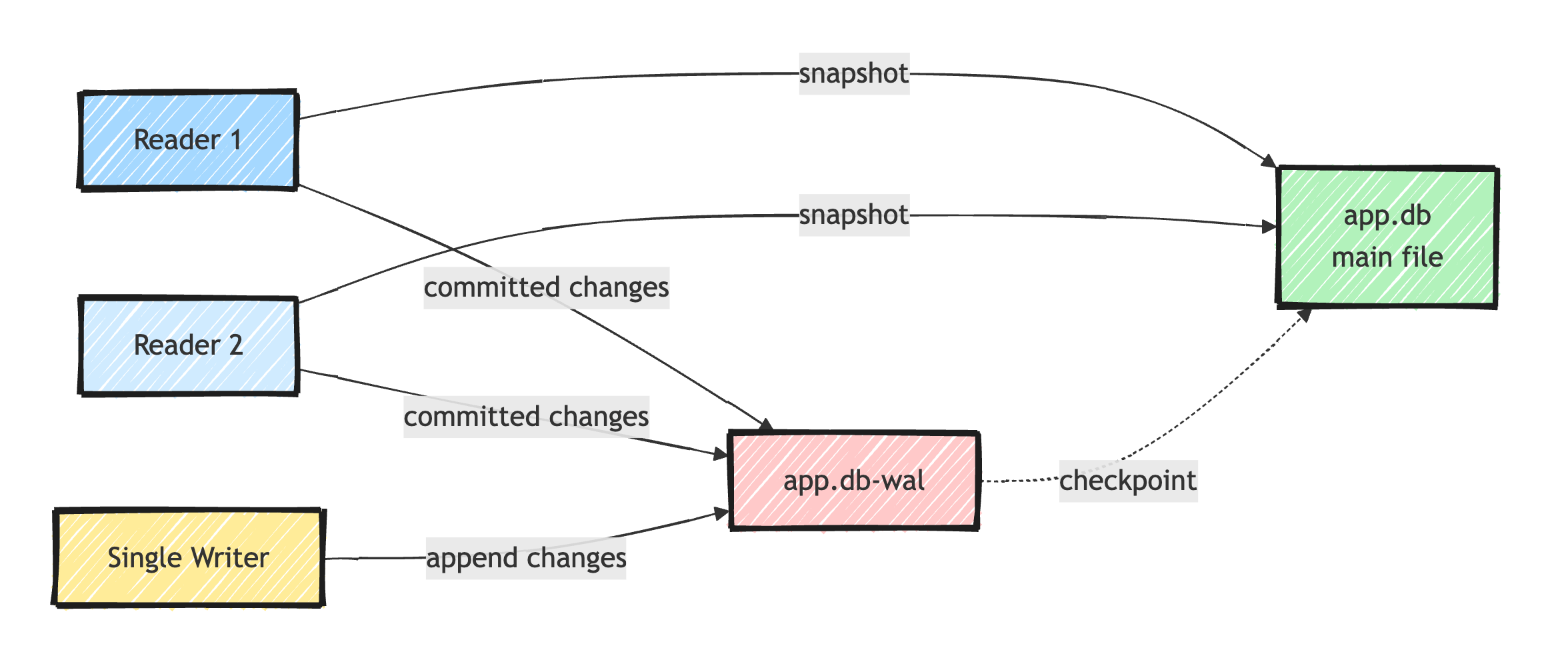
That's the concurrency profile of a typical web app: many reads, occasional writes. With WAL enabled, the "SQLite locks constantly" experience mostly disappears.
The WAL file is periodically checkpointed back into the main database automatically.
A SQLite database in WAL mode is three files (app.db, app.db-wal, app.db-shm), which matters when you back it up.
The Single-Writer Limit
SQLite allows exactly one write transaction at a time, and no setting changes that. Concurrent write transactions don't interleave; they queue.
The practical question is what that costs. A typical write transaction (insert a row, update two others, commit) takes well under a millisecond on NVMe. If writes are serialized at 0.5 ms each, that's a theoretical ceiling around 2,000 write transactions per second, minus contention overhead.
Most applications never get close. A SaaS app doing 50 writes per second is using 2.5% of that budget.
Two things hurt:
- Long write transactions. A transaction that takes 200 ms holds every other writer back for 200 ms. Keep write transactions short, and never do network calls inside one.
- Many app instances. Two processes can share a SQLite file on one machine, but the moment you scale to multiple servers, there's no file to share. This usually forces the move before throughput does.
busy_timeout handles lock waits at the SQLite level, but under heavy contention you'll still occasionally see SqliteException with SQLITE_BUSY.
Wrap critical writes with a retry, the same way you'd handle optimistic concurrency conflicts on a client-server database.
EF Core Quirks You Should Know
The provider is first-party and solid, but SQLite's minimal type system leaks through in specific places:
- Migrations rebuild tables. SQLite's
ALTER TABLEcan't drop or alter columns the way other databases can, so EF Core migrations emit a create-copy-drop-rename sequence. It works, but on a large table it's a heavy operation, and some operations (like altering a column with complex constraints) need manual SQL. The fundamentals from EF Core migrations still apply. decimalis stored as text. EF Core translates LINQ comparisons, ordering, andSumthrough functions and a collation it registers on the connection (ef_compare,EF_DECIMAL), but raw SQL and other tools see text, so a plainORDER BYsorts lexically. For money, store cents in along.DateTimeOffsetcomparisons don't translate to SQL. Prefer UTCDateTimecolumns, which are stored as sortable ISO-8601 text.- No sequences, and
GUIDordering follows text rules. Auto-increment integer keys work perfectly. - Concurrency tokens work fine with a manually maintained version column; there's no
rowversionequivalent that updates itself.
None of these are blockers if you know about them before your first migration.
For integration tests, resist the old habit of using SQLite in-memory as a stand-in for your production database. If production is Postgres, test against Postgres with Testcontainers. SQLite-for-tests only makes sense when SQLite is also what you ship.
Where SQLite Fits
SQLite fits these four cases well:
- Single-server web apps. A side project, an internal tool, or a small SaaS on one VPS. Without a database server, there's nothing to patch and no database credentials to protect, and backups are file copies (use the
VACUUM INTOcommand or Litestream for safe live backups). - Read-heavy workloads. Content sites, catalogs, dashboards. WAL-mode reads are in-process file reads, mostly served from SQLite's page cache and the OS cache, with no network round trip, which beats a remote Postgres on latency.
- Edge and embedded scenarios. One database file per device or per location, replicated up when connected.
- The prototype that needs to become real today. You can build something like a URL shortener end to end without provisioning anything.
Litestream tails the WAL and continuously replicates it to S3-compatible storage. That gives a single-server SQLite deployment disaster recovery for the cost of object storage.
When to Graduate
These signals usually appear in this order:
- You need a second application server. SQLite is in-process; two machines can't share it. This is the hard stop, and it applies at any load.
- Sustained write contention. If "database is locked" errors or long lock waits show up in your logs at normal traffic, your write transactions are either too long or too frequent for a single writer.
- You need database-level access control. Separate users, network isolation, per-role permissions: SQLite has none, because there's no server.
- You're fighting the type system. Real
decimalmath in SQL,timestamptz, jsonb indexing, full-text search at scale.
When those hit, EF Core makes the provider swap mostly mechanical, and I've covered the destination in EF Core with PostgreSQL: getting started. Regenerate migrations, fix the handful of type mismatches, and move the data with a one-off script.
To keep that move small, minimize raw SQL and keep your data access behind your DbContext.
Summary
SQLite handles more production traffic than its reputation suggests.
Configured with WAL mode, synchronous = NORMAL, and a busy_timeout, it serves real web traffic from a single server with less operational surface than any client-server database.
It has three hard limits:
- One machine. The moment you need a second app server, you're done.
- One writer at a time. Fine for hundreds of writes per second, wrong for write-heavy parallel workloads.
- A minimal type system. Plan around decimals and dates from the start.
Frequently Asked Questions
Can SQLite be used in production?
Yes, for the right shape of workload: a single application server, read-heavy traffic, and moderate write volume. With WAL mode enabled, SQLite serves thousands of requests per second on commodity hardware, and the SQLite project says it works well for most low- to medium-traffic websites, including sqlite.org itself.
What is WAL mode in SQLite and why does it matter?
Write-Ahead Logging mode appends changes to a log file instead of rewriting pages in place. Its practical effect is that readers no longer block the writer and the writer no longer blocks readers.
How many concurrent writes can SQLite handle?
Exactly one transaction can write at a time, and other writers queue behind it. Since a typical write transaction takes well under a millisecond, this still allows hundreds to thousands of writes per second, but they are serialized, not parallel.
When should I switch from SQLite to PostgreSQL?
When you need more than one application server writing to the database, when sustained write concurrency causes busy timeouts, when you need database users and network access control, or when you rely on types and features SQLite lacks.
Does EF Core work well with SQLite?
Yes. Microsoft.EntityFrameworkCore.Sqlite is a first-party provider and supports migrations, LINQ translation, and transactions. The main gaps are limited ALTER TABLE support (migrations rebuild tables) and a small native type system that affects decimals and date ordering.
