

EF Core infers simple relationships by convention, and the Fluent API configures the rest: HasMany().WithOne() for one-to-many, HasOne().WithOne().HasForeignKey<TDependent>() for one-to-one, and HasMany().WithMany() for many-to-many.
Ambiguity around which side holds the foreign key or what a delete does becomes a schema decision whether you intended it or not.
This article covers each relationship type, owned types, indexes, and delete behaviors.
Why Fluent API Over Conventions?
An entity relationship in EF Core is a link between two entity types, made up of a foreign key on the dependent side, the navigation properties you use to traverse it, and a delete behavior.
EF Core can infer relationships from conventions, but Fluent API gives you explicit control.
The IEntityTypeConfiguration<T> pattern keeps that configuration explicit and separated by entity:
public class OrderConfiguration : IEntityTypeConfiguration<Order>
{
    public void Configure(EntityTypeBuilder<Order> builder)
    {
        builder.ToTable("orders");
        builder.HasKey(o => o.Id);

        // Relationships defined here
    }
}
Register all configurations:
protected override void OnModelCreating(ModelBuilder modelBuilder)
{
    modelBuilder.ApplyConfigurationsFromAssembly(
        typeof(ApplicationDbContext).Assembly);
}
The relationships this article configures, and how they connect, look like this:
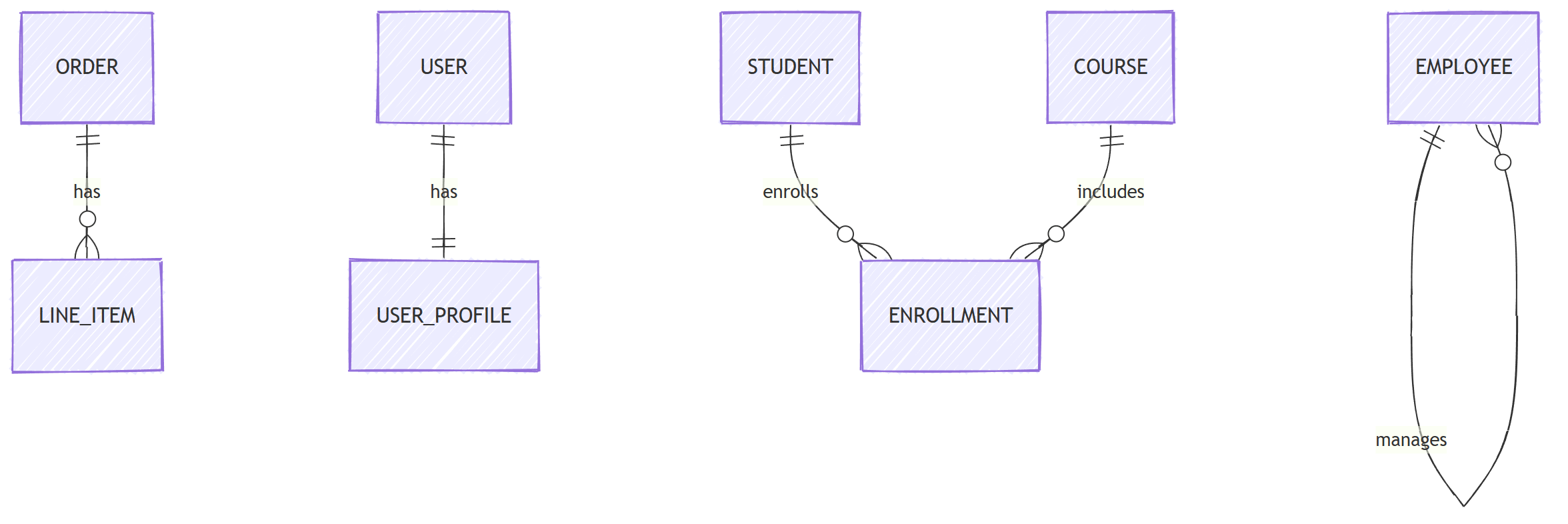
The same self-reference can represent an arbitrary tree; hierarchical data in EF Core covers recursive reads, deletes, and larger-tree alternatives.
One-to-Many
The most common relationship. An order has many line items:
public class Order
{
    public Guid Id { get; set; }
    public string CustomerName { get; set; }
    public DateTime CreatedAt { get; set; }
    public List<LineItem> LineItems { get; set; } = [];
}

public class LineItem
{
    public Guid Id { get; set; }
    public Guid OrderId { get; set; }      // FK
    public string ProductName { get; set; }
    public int Quantity { get; set; }
    public decimal UnitPrice { get; set; }
    public Order Order { get; set; }        // Navigation
}
Configure with Fluent API:
public class OrderConfiguration : IEntityTypeConfiguration<Order>
{
    public void Configure(EntityTypeBuilder<Order> builder)
    {
        builder.HasMany(o => o.LineItems)
            .WithOne(li => li.Order)
            .HasForeignKey(li => li.OrderId)
            .OnDelete(DeleteBehavior.Cascade);
    }
}
Cascade means deleting an order also deletes its line items.
If that's not what you want, use Restrict or SetNull instead.
Without Navigation on the Child
If you don't want a navigation property from LineItem back to Order:
public class LineItem
{
    public Guid Id { get; set; }
    public Guid OrderId { get; set; }  // FK only, no nav property
    public string ProductName { get; set; }
}

// Configuration
builder.HasMany(o => o.LineItems)
    .WithOne()
    .HasForeignKey(li => li.OrderId);
One-to-One
A user has one profile:
public class User
{
    public Guid Id { get; set; }
    public string Email { get; set; }
    public UserProfile? Profile { get; set; }
}

public class UserProfile
{
    public Guid Id { get; set; }
    public Guid UserId { get; set; }
    public string DisplayName { get; set; }
    public string? Bio { get; set; }
    public User User { get; set; }
}
public class UserConfiguration : IEntityTypeConfiguration<User>
{
    public void Configure(EntityTypeBuilder<User> builder)
    {
        builder.HasOne(u => u.Profile)
            .WithOne(p => p.User)
            .HasForeignKey<UserProfile>(p => p.UserId)
            .OnDelete(DeleteBehavior.Cascade);
    }
}
HasForeignKey<UserProfile> makes it explicit which side holds the foreign key.
EF Core can infer it here because only UserProfile has a matching UserId property, but it throws when it cannot tell the dependent side.
Many-to-Many
A student enrolls in many courses. A course has many students:
public class Student
{
    public Guid Id { get; set; }
    public string Name { get; set; }
    public List<Course> Courses { get; set; } = [];
}

public class Course
{
    public Guid Id { get; set; }
    public string Title { get; set; }
    public List<Student> Students { get; set; } = [];
}
EF Core 5+ creates the join table automatically:
builder.HasMany(s => s.Courses)
    .WithMany(c => c.Students)
    .UsingEntity(j => j.ToTable("student_courses"));
Many-to-Many With Payload
When the join table needs extra columns (like enrollment date):
public class Enrollment
{
    public Guid StudentId { get; set; }
    public Guid CourseId { get; set; }
    public DateTime EnrolledAt { get; set; }
    public Grade? Grade { get; set; }
    public Student Student { get; set; }
    public Course Course { get; set; }
}

public enum Grade
{
    A, B, C, D, F
}
public class EnrollmentConfiguration
    : IEntityTypeConfiguration<Enrollment>
{
    public void Configure(EntityTypeBuilder<Enrollment> builder)
    {
        builder.ToTable("enrollments");

        builder.HasKey(e => new { e.StudentId, e.CourseId });

        builder.HasOne(e => e.Student)
            .WithMany(s => s.Enrollments)
            .HasForeignKey(e => e.StudentId);

        builder.HasOne(e => e.Course)
            .WithMany(c => c.Enrollments)
            .HasForeignKey(e => e.CourseId);
    }
}
Now Student and Course reference Enrollment instead of each other directly:
public class Student
{
    public Guid Id { get; set; }
    public string Name { get; set; }
    public List<Enrollment> Enrollments { get; set; } = [];
}
Self-Referencing Relationship
An employee has a manager (who is also an employee):
public class Employee
{
    public Guid Id { get; set; }
    public string Name { get; set; }
    public Guid? ManagerId { get; set; }
    public Employee? Manager { get; set; }
    public List<Employee> DirectReports { get; set; } = [];
}
builder.HasOne(e => e.Manager)
    .WithMany(e => e.DirectReports)
    .HasForeignKey(e => e.ManagerId)
    .OnDelete(DeleteBehavior.Restrict);
ManagerId is nullable, so EF Core's default here is ClientSetNull, and deleting a manager never cascades down the org chart.
Restrict goes one step further: instead of setting the loaded reports' ManagerId to null, EF Core refuses the delete until you reassign them.
Owned Types (Value Objects)
For value objects, use owned types:
public class Order
{
    public Guid Id { get; set; }
    public Address ShippingAddress { get; set; }
    public Money TotalAmount { get; set; }
}

public class Address
{
    public string Street { get; set; }
    public string City { get; set; }
    public string ZipCode { get; set; }
    public string Country { get; set; }
}

public sealed record Money(decimal Amount, string Currency);
builder.OwnsOne(o => o.ShippingAddress, address =>
{
    address.Property(a => a.Street).HasColumnName("shipping_street");
    address.Property(a => a.City).HasColumnName("shipping_city");
    address.Property(a => a.ZipCode).HasColumnName("shipping_zip");
    address.Property(a => a.Country).HasColumnName("shipping_country");
});

builder.OwnsOne(o => o.TotalAmount, money =>
{
    money.Property(m => m.Amount).HasColumnName("total_amount");
    money.Property(m => m.Currency).HasColumnName("total_currency");
});
By default, owned types configured with OwnsOne are stored in the same table as the parent entity, so reading them needs no joins.
I cover them in depth (including collections and DDD usage) in owned types for DDD value objects.
Loading Related Data
Once a relationship is configured, you still have to decide how to load it.
Your options are eager loading with Include, explicit loading, and lazy loading.
I compare their query patterns and pitfalls in lazy vs eager vs explicit loading.
When you Include multiple collections, watch out for cartesian explosion, and reach for query splitting when result sets multiply.
Indexes
EF Core creates an index on foreign key columns by convention, so OrderId is already covered.
Add indexes for the columns your queries filter and sort on:
builder.HasIndex(o => o.CreatedAt);
builder.HasIndex(o => o.CustomerName);

// Unique index
builder.HasIndex(u => u.Email).IsUnique();

// Composite index
builder.HasIndex(e => new { e.CourseId, e.EnrolledAt });
Delete Behaviors
Cascade: deleting the parent also deletes its childrenRestrict: deleting a parent with children throws an exceptionSetNull: deleting the parent sets the FK to null on the children (requires a nullable FK)ClientSetNull: like SetNull, but only for children the context is currently tracking; untracked children cause a database FK violationNoAction: the database decides (engine-dependent)
The defaults are Cascade for required relationships and ClientSetNull for optional ones.
Be explicit about what you want, especially in PostgreSQL and SQL Server, where accidental cascades on big tables are expensive.
Summary
Use conventions for unambiguous relationships and Fluent API where the foreign key, principal side, or delete behavior needs to be explicit. Model a many-to-many join as an entity as soon as the relationship carries data of its own. Review the generated constraints and indexes to confirm the database enforces what you configured.
Frequently Asked Questions
How do I configure a one-to-many relationship in EF Core?
Use HasMany on the parent, WithOne on the child, and HasForeignKey to name the FK property. EF Core can infer simple cases by convention, but explicit configuration documents intent and lets you control delete behavior.
Do I need a join entity for many-to-many in EF Core?
Not since EF Core 5, which creates the join table automatically from HasMany().WithMany(). You only need an explicit join entity when the relationship carries extra data, such as an enrollment date or a grade.
What is the default delete behavior in EF Core?
Cascade for required relationships and ClientSetNull for optional ones. ClientSetNull only nulls the FK on entities the context is tracking, so be explicit about the behavior you actually want.
Which side holds the foreign key in a one-to-one relationship?
EF Core infers it by convention when only one side has a matching FK property, such as UserProfile.UserId, and throws when it cannot tell. The generic HasForeignKey<TDependent> call makes the choice explicit. The dependent side holds the FK column and usually a unique index on it.
Should navigation properties go on both sides of a relationship?
Only where you actually navigate. A child-to-parent navigation you never use adds coupling for no benefit, and EF Core fully supports one-directional relationships with WithOne() or WithMany() left empty.
