

Cascade delete removes dependent entities, like the OrderLine rows under an Order, when the principal entity is deleted.
You configure it per relationship with OnDelete(DeleteBehavior.Cascade), which makes EF delete tracked dependents and makes the migration emit ON DELETE CASCADE on the foreign key.
Required relationships get Cascade by convention, and optional ones get ClientSetNull, which only nulls the foreign key on dependents EF has already loaded.
Delete an order and its order lines should go with it. EF Core handles this, and most developers stop reading there.
Then a delete that always worked starts throwing foreign key violations in production, for some rows but not others. The usual cause is that DeleteBehavior configures two different mechanisms, one in EF's memory and one in the database, and they do not have to agree.
The Two Mechanisms
When you delete a principal (the Order), something has to happen to its dependents (the OrderLine rows holding the foreign key).
Two independent actors can handle it:
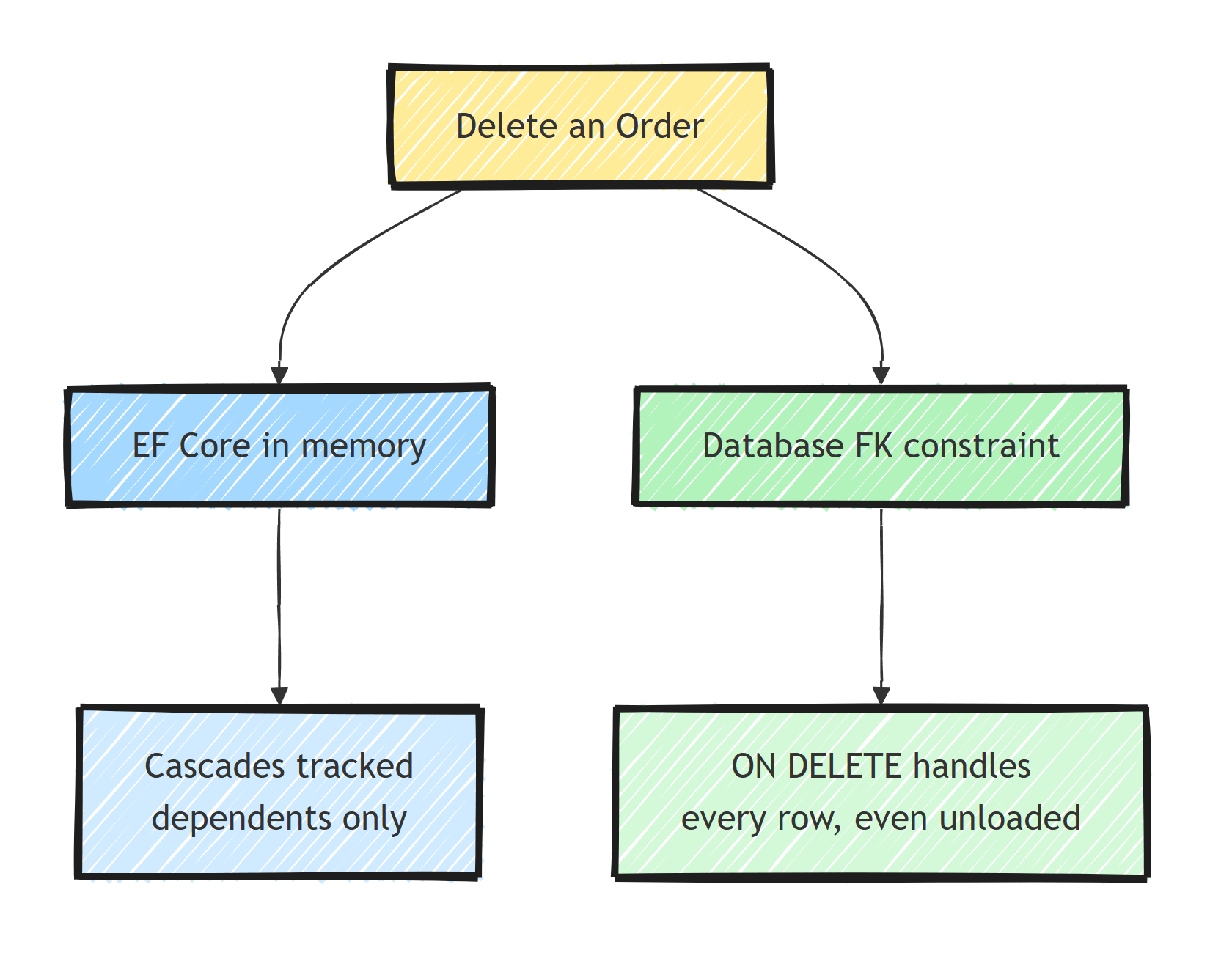
EF Core, in memory.
The change tracker knows about the entities it is tracking.
If you delete an order while its lines are loaded and tracked, EF marks the lines Deleted too and issues DELETE statements for them, children first, in the right order.
The database, via the foreign key constraint.
The migration generates ON DELETE CASCADE (or SET NULL, or NO ACTION) on the FK.
The database then handles dependents for every delete, including rows EF has never seen.
EF's in-memory cascade only applies to tracked entities.
If the lines are not loaded, EF sends one DELETE for the order and leaves the rest to the database.
What happens next depends entirely on the constraint the migration created.
What Does DeleteBehavior Actually Map To?
Each DeleteBehavior value answers both questions at once: what EF does to tracked dependents, and what DDL the migration generates.
Cascade: EF deletes tracked dependents, and the database getsON DELETE CASCADE. Both actors cascade. Unloaded dependents are handled by the database.ClientCascade: EF deletes tracked dependents, but the database getsNO ACTION/RESTRICT. If any dependent is not loaded when you delete the principal, the database throws an FK violation.SetNull: the database getsON DELETE SET NULL, and EF nulls the FK on tracked dependents. Only valid for optional (nullable FK) relationships.ClientSetNull(the default for optional relationships): EF nulls the FK on tracked dependents, the database getsNO ACTION. Same trap asClientCascade, with nulling instead of deleting.Restrict/NoAction: nobody cascades. EF will even throw atSaveChangesif you leave tracked dependents orphaned. Deleting a principal with existing dependents is an error unless you handle the dependents yourself first.
And the conventions that decide which one you get when you configure nothing:
- Required relationship (non-nullable FK):
Cascade. - Optional relationship (nullable FK):
ClientSetNull.
Configuration lives in OnModelCreating, per relationship:
modelBuilder.Entity<Order>()
    .HasMany(o => o.Lines)
    .WithOne(l => l.Order)
    .HasForeignKey(l => l.OrderId)
    .OnDelete(DeleteBehavior.Cascade);
With the Client* behaviors, the database does nothing to dependents, so any delete that touches unloaded dependents will fail with an FK violation.
The Classic Failure, Step by Step
This is the "works in tests, fails in production" bug.
Say the relationship between Blog and Post is configured as ClientCascade, or it is optional and got the default ClientSetNull.
Now delete a blog by id without loading its posts:
var blog = await dbContext.Blogs.FirstAsync(b => b.Id == blogId);

dbContext.Blogs.Remove(blog);

await dbContext.SaveChangesAsync();
// PostgresException: 23503: update or delete on table "Blogs"
// violates foreign key constraint "FK_Posts_Blogs_BlogId" on table "Posts"
In your test, the blog had no posts (or you had them loaded from an earlier assertion), so it passed.
If the blog has 400 posts that EF never loaded, the database sees a bare DELETE FROM Blogs, and the NO ACTION constraint rejects it.
(On SQL Server the same failure surfaces as a SqlException about a conflicted REFERENCE constraint.)
Three legitimate fixes, in order of my preference:
// 1. Let the database own it: switch to DeleteBehavior.Cascade
//    (migration adds ON DELETE CASCADE).

// 2. Delete dependents explicitly with a set-based query first.
await dbContext.Posts
    .Where(p => p.BlogId == blogId)
    .ExecuteDeleteAsync();

await dbContext.Blogs
    .Where(b => b.Id == blogId)
    .ExecuteDeleteAsync();

// 3. Load the graph so EF's client cascade has something to work on.
var blog = await dbContext.Blogs
    .Include(b => b.Posts)
    .FirstAsync(b => b.Id == blogId);

dbContext.Blogs.Remove(blog); // posts marked Deleted too
await dbContext.SaveChangesAsync();
Option 3 is the one to be suspicious of: loading 400 rows to delete them is pure waste.
ExecuteDeleteAsync bypasses the change tracker entirely, so client-side behaviors never run.
With bulk deletes, the ON DELETE clause in your schema is the only delete behavior that applies.
And when a delete spans multiple statements like option 2, wrap it in a transaction.
Why ClientCascade Exists at All: SQL Server's Cascade Paths
ClientCascade exists because SQL Server refuses some cascades.
Create a schema where the same table is reachable through two ON DELETE CASCADE chains (a diamond), and the migration fails with:
Msg 1785: Introducing FOREIGN KEY constraint 'FK_...' on table '...'
may cause cycles or multiple cascade paths.
Specify ON DELETE NO ACTION or ON UPDATE NO ACTION,
or modify other FOREIGN KEY constraints.
The standard example: Customer has Orders, Customer has Addresses, and Order references Address.
Deleting a customer can reach the order both directly and through the address, and SQL Server will not create the second cascade.
PostgreSQL allows this, so this is one of the behavioral differences to plan for if you work across PostgreSQL and SQL Server.
Your options when you hit error 1785:
- Break one edge of the diamond with
DeleteBehavior.RestrictorNoActionand delete that path explicitly in code. - Use
ClientCascadeon that edge: EF still cascades tracked graphs, and you accept the load-before-delete obligation documented above. - Reconsider whether both relationships should be required. Often one of them is really optional, and an optional relationship with the default
ClientSetNull(NO ACTIONin the database) dissolves the diamond. Database-levelSetNulldoes not, because SQL Server countsON DELETE SET NULLas a cascade path too.
Use ClientCascade only as a workaround for error 1785.
Cascades and Aggregates: Being Deliberate
My rule for choosing behaviors comes from domain design:
Cascade inside an aggregate, restrict between aggregates.
OrderLine cannot exist without its Order, so cascade and let the database enforce it.
But Order referencing Customer is a relationship between aggregates, and deleting a customer should not remove all of their orders as a side effect.
That edge gets Restrict, and "delete a customer" becomes an explicit use case that decides what happens to orders.
This mapping between aggregate boundaries and FK behaviors is a recurring theme in modeling aggregates with EF Core, and it is the approach I teach in Pragmatic Domain-Driven Design.
Two more pitfalls:
Soft delete and database cascades conflict.
If Order is soft-deleted (an IsDeleted flag plus a query filter), the parent row never gets a SQL DELETE in normal operation.
But any hard delete (cleanup jobs, GDPR erasure) will physically cascade through ON DELETE CASCADE to children you meant to keep as soft-deleted history.
Soft-deleted aggregates should pair with Restrict semantics and propagate the flag explicitly to dependents.
Verify the DDL, not the C#.
The migration shows the constraint the database actually gets.
Read the generated migration (or the SQL from dotnet ef migrations script) and confirm the onDelete: values match your intent, the same way you would review any migration before it ships.
Summary
DeleteBehaviorsets two things at once: EF's handling of tracked dependents and theON DELETEclause in your schema. Bugs happen when the two disagree.Cascademeans the database covers unloaded rows.ClientCascadeandClientSetNullmean it does not, and deletes fail the moment dependents exist that EF has not loaded.ExecuteDeleteAsyncskips the change tracker, so only the database behavior applies to it.- SQL Server's multiple-cascade-paths error is the main legitimate reason
ClientCascadeexists. Prefer breaking the diamond withRestrictplus explicit deletes. - Design rule: cascade within an aggregate, restrict between aggregates, and never mix database cascades with soft delete without deciding exactly what a hard delete should destroy.
Frequently Asked Questions
What is cascade delete in EF Core?
When a principal entity like an Order is deleted, cascade delete removes its dependent entities like OrderLines automatically. EF Core can perform the cascade on tracked entities in memory, and the database can enforce it with an ON DELETE CASCADE constraint. By default both are configured for required relationships.
What is the difference between DeleteBehavior.Cascade and ClientCascade?
Cascade configures both EF and the database to cascade, so the delete works even for rows EF never loaded. ClientCascade only cascades entities tracked in the DbContext, and the database gets ON DELETE NO ACTION or RESTRICT, so deleting with unloaded dependents throws a foreign key violation.
Why does SQL Server complain about multiple cascade paths?
SQL Server refuses to create a table that can be reached by more than one ON DELETE CASCADE chain, failing the migration with error 1785. The fix is switching some relationships to Restrict or NoAction and handling those deletes in code.
Does cascade delete work with soft delete?
Not out of the box. A database cascade physically removes dependent rows even if the parent was only meant to be soft-deleted, and soft-deleting a parent does not touch dependents at all. Soft delete designs should use Restrict semantics and handle propagation explicitly.
