

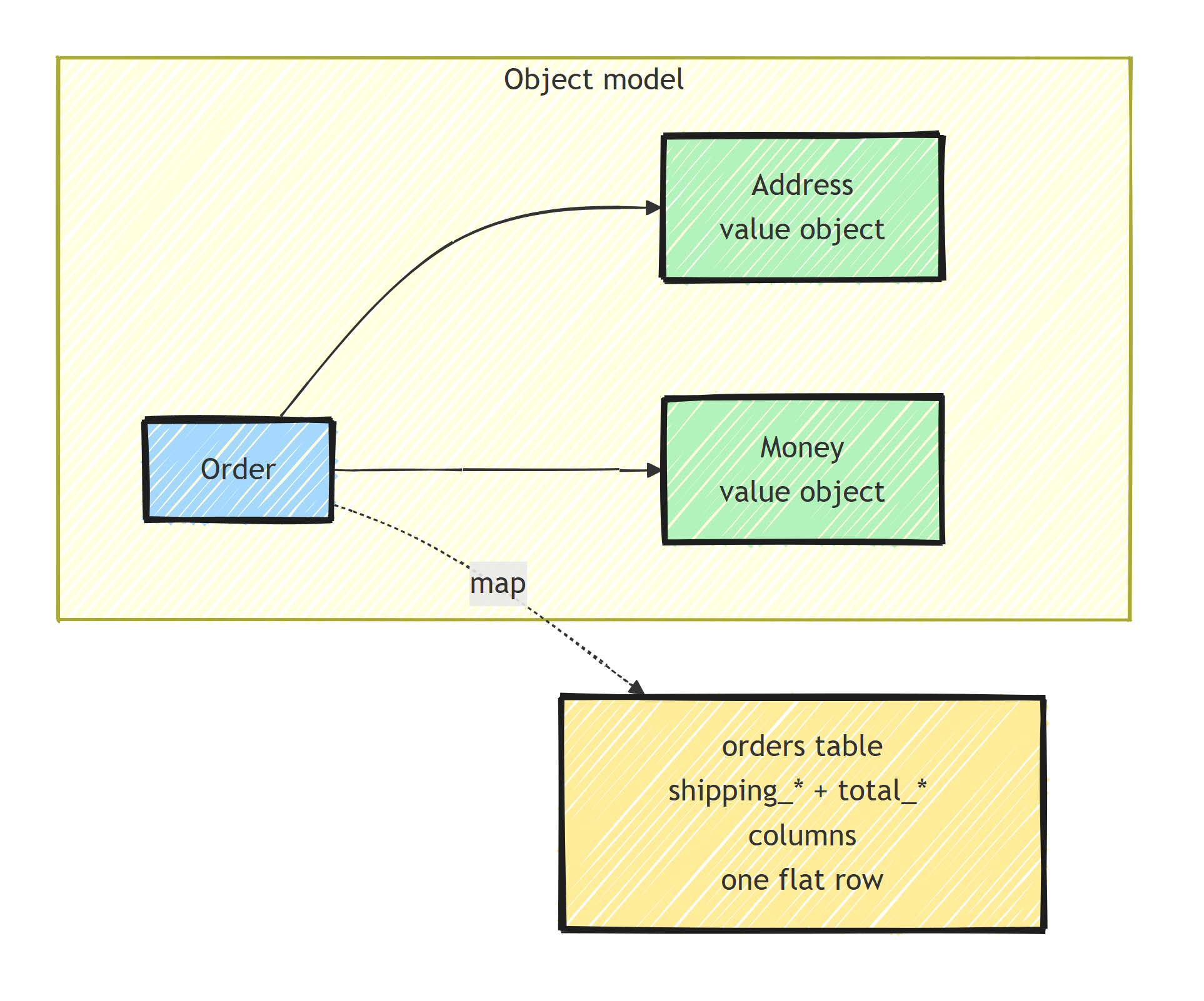
Complex types in EF Core 8 map value objects, types with no identity of their own, directly into the owner's table as regular columns. They have no key and no navigation properties, so EF treats them as values rather than entities. In EF Core 8 a complex property is always required, and EF Core 10 added optional complex properties plus JSON mapping with collection support.
Here is how to configure, query, and update them, and what changed in EF Core 9 and 10.
What Are Complex Types?
Complex types model value objects, which are types defined by their properties rather than an identity. In the original EF Core 8 implementation, unlike owned types, complex types:
- Cannot be null
- Cannot have a primary key
- Cannot reference other entities (no navigation properties)
- Always live inside the parent entity's table
They map cleanly to the DDD concept of a value object.
Defining Complex Types
public sealed record Address(
    string Street,
    string City,
    string State,
    string ZipCode,
    string Country);

public sealed record Money(decimal Amount, string Currency);

public class Order
{
    public Guid Id { get; private set; }
    public Address ShippingAddress { get; set; } = null!;
    public Money TotalAmount { get; set; } = null!;
    public DateTime CreatedAt { get; private set; }
}
Configuration
Fluent API
modelBuilder.Entity<Order>(builder =>
{
    builder.HasKey(o => o.Id);

    builder.ComplexProperty(o => o.ShippingAddress, address =>
    {
        address.Property(a => a.Street)
            .HasColumnName("shipping_street")
            .HasMaxLength(200);

        address.Property(a => a.City)
            .HasColumnName("shipping_city")
            .HasMaxLength(100);

        address.Property(a => a.State)
            .HasColumnName("shipping_state")
            .HasMaxLength(100);

        address.Property(a => a.ZipCode)
            .HasColumnName("shipping_zip")
            .HasMaxLength(20);

        address.Property(a => a.Country)
            .HasColumnName("shipping_country")
            .HasMaxLength(100);
    });

    builder.ComplexProperty(o => o.TotalAmount, money =>
    {
        money.Property(m => m.Amount)
            .HasColumnName("total_amount")
            .HasPrecision(18, 2);

        money.Property(m => m.Currency)
            .HasColumnName("total_currency")
            .HasMaxLength(3);
    });
});
Generated Table
CREATE TABLE orders (
    id UUID PRIMARY KEY,
    shipping_street VARCHAR(200) NOT NULL,
    shipping_city VARCHAR(100) NOT NULL,
    shipping_state VARCHAR(100) NOT NULL,
    shipping_zip VARCHAR(20) NOT NULL,
    shipping_country VARCHAR(100) NOT NULL,
    total_amount DECIMAL(18,2) NOT NULL,
    total_currency VARCHAR(3) NOT NULL,
    created_at TIMESTAMP NOT NULL
);
The columns are NOT NULL because complex types cannot be null.
Nested Complex Types
Complex types can contain other complex types:
public sealed record Coordinates(double Latitude, double Longitude);

public sealed record Address(
    string Street,
    string City,
    string State,
    string ZipCode,
    string Country,
    Coordinates Location);
builder.ComplexProperty(o => o.ShippingAddress, address =>
{
    address.Property(a => a.Street).HasColumnName("shipping_street");
    address.Property(a => a.City).HasColumnName("shipping_city");
    // ...

    address.ComplexProperty(a => a.Location, location =>
    {
        location.Property(l => l.Latitude).HasColumnName("shipping_lat");
        location.Property(l => l.Longitude).HasColumnName("shipping_lng");
    });
});
All properties are still flattened into the same table.
Querying
You can filter by complex type properties just like regular columns:
// Find orders shipping to a specific city
var orders = await db.Orders
    .Where(o => o.ShippingAddress.City == "London")
    .ToListAsync();

// Find orders over a certain amount
var largeOrders = await db.Orders
    .Where(o => o.TotalAmount.Amount > 1000 &&
                o.TotalAmount.Currency == "USD")
    .ToListAsync();
EF Core translates this to standard SQL:
SELECT * FROM orders
WHERE shipping_city = 'London';

SELECT * FROM orders
WHERE total_amount > 1000 AND total_currency = 'USD';
Updating Complex Types
Replace the entire value object (the records here are immutable):
// ✅ Replace the whole value object
order.ShippingAddress = new Address(
    "456 Oak Ave",
    order.ShippingAddress.City,
    order.ShippingAddress.State,
    order.ShippingAddress.ZipCode,
    order.ShippingAddress.Country,
    order.ShippingAddress.Location);

await db.SaveChangesAsync();
With records, use the with expression:
order.ShippingAddress = order.ShippingAddress with { Street = "456 Oak Ave" };
await db.SaveChangesAsync();
EF Core detects which properties changed and only updates those columns.
Complex Types vs Owned Types
Here's how the two compare, feature by feature (in EF Core 8):
- Nullability: complex types can never be null; owned types can be optional
- Identity: complex types have no key at all; owned types carry a hidden shadow key
- Navigation properties: complex types can't reference entities; owned types can
- Separate table: complex types are always inlined into the parent table; owned types can move to their own table with
ToTable() - Collections: complex types don't support collections; owned types do via
OwnsMany - Version support: complex types need EF Core 8+; owned types have existed since EF Core 2.0
- Semantics: complex types are values; owned types are still entities
I go deeper on the owned-type approach in value objects with EF Core.
When to Choose Complex Types
- You want value semantics with no identity or navigation
- You want the value flattened into the owner's table or, on EF Core 10, mapped to a JSON column
- You are on EF Core 8 or later and the version supports the nullability and collection shape you need
When to Choose Owned Types
- You need navigation properties to other entities
- You want to store the value in a separate table
- You need an owned collection mapped to its own table
- You are on EF Core 2-7
Multiple Entities With the Same Complex Type
public sealed record FullName(string First, string Last);

public class Customer
{
    public Guid Id { get; set; }
    public FullName Name { get; set; } = null!;
    public Address BillingAddress { get; set; } = null!;
}

public class Supplier
{
    public Guid Id { get; set; }
    public FullName ContactName { get; set; } = null!;
    public Address WarehouseAddress { get; set; } = null!;
}
Configure each independently:
modelBuilder.Entity<Customer>(builder =>
{
    builder.ComplexProperty(c => c.Name, name =>
    {
        name.Property(n => n.First).HasColumnName("first_name");
        name.Property(n => n.Last).HasColumnName("last_name");
    });
    builder.ComplexProperty(c => c.BillingAddress, addr =>
    {
        addr.Property(a => a.Street).HasColumnName("billing_street");
        addr.Property(a => a.City).HasColumnName("billing_city");
    });
});

modelBuilder.Entity<Supplier>(builder =>
{
    builder.ComplexProperty(s => s.ContactName, name =>
    {
        name.Property(n => n.First).HasColumnName("contact_first_name");
        name.Property(n => n.Last).HasColumnName("contact_last_name");
    });
    builder.ComplexProperty(s => s.WarehouseAddress, addr =>
    {
        addr.Property(a => a.Street).HasColumnName("warehouse_street");
        addr.Property(a => a.City).HasColumnName("warehouse_city");
    });
});
Limitations
Complex types in EF Core 8 have restrictions:
- Cannot be null: use owned types if nullability is needed
- No collections: use
OwnsManyfor lists of value objects - No lazy loading: they're always loaded with the parent
- No separate table: always in the same table as the entity
- Equality not used by EF Core: change detection is property-by-property, not structural equality
What Changed in EF Core 9 and 10
Complex types were a v1 feature in EF Core 8, and the team has been closing the gaps since:
- EF Core 10 added support for optional (nullable) complex properties when the complex type contains at least one required property
- EF Core 10 made complex types the primary mechanism for mapping to JSON columns, which previously required owned types with
ToJson() - Complex type collections are supported when mapped to JSON
If you're on .NET 10, the "use owned types because complex types can't do X" cases have mostly disappeared. Check the EF Core release notes for your exact version before designing around an EF Core 8 limitation.
Summary
Complex types express values with no identity or navigation and keep their members queryable through LINQ. EF Core 8 maps required values into the owner's table; EF Core 10 adds optional complex properties and JSON mapping that can contain collections. Use owned types when you need an entity relationship, a separate table, or support on an older EF Core version.
Frequently Asked Questions
What are complex types in EF Core?
Complex types, introduced in EF Core 8, model value objects: types defined by their properties rather than an identity. They have no key, no navigation properties, and their columns are flattened into the parent entity table.
What is the difference between complex types and owned types in EF Core?
Owned types are entities under the hood, with a hidden key, optional separate tables, and collection support. Complex types are pure values: in EF Core 8 they cannot be null or form collections, but they have cleaner value semantics and can be shared safely between entities.
Can complex types be null in EF Core?
Not in EF Core 8, where complex properties are always required. EF Core 10 added support for optional complex properties, so on current versions a complex type can be nullable.
Can I query complex type properties in LINQ?
Yes. Complex type properties translate to regular columns, so a filter like Where(o => o.ShippingAddress.City == "London") becomes a simple WHERE clause with no joins.
Should I use complex types or owned types for DDD value objects?
On EF Core 8+, prefer complex types for value objects because they match value semantics exactly. Fall back to owned types when you need features complex types lack on your EF Core version, such as collections or separate tables.
