
To use EF Core with multiple databases, define a separate DbContext class per database and register each one in dependency injection with its own connection string.
You also have to keep each database's models, migrations, and transaction expectations separate.
Each database needs an explicit DbContext boundary so it's always clear which store owns an entity or migration.
Why Multiple Databases?
A single DbContext pointing to a single database works for most applications. But eventually you might need to split things up. Common reasons include:
- Module isolation: in a modular monolith, each module owns its data
- Read/write separation: queries go to a read replica
- Multi-tenancy: each tenant has a separate database
- Legacy integration: your app needs data from an existing database
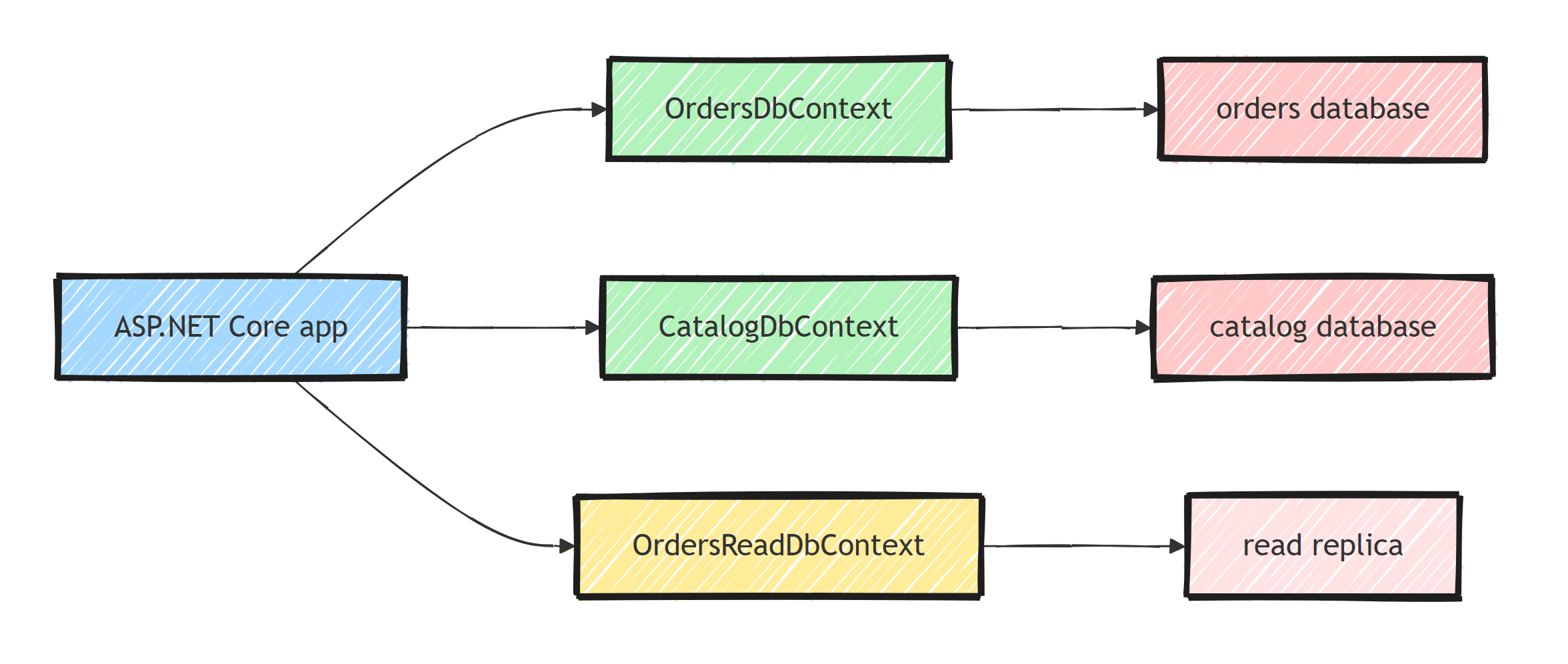
EF Core handles all of these with multiple DbContext classes, each configured with its own connection string.
Defining Multiple DbContexts
Start by creating separate DbContext classes for each database:
public class OrdersDbContext : DbContext
{
    public OrdersDbContext(DbContextOptions<OrdersDbContext> options)
        : base(options) { }

    public DbSet<Order> Orders { get; set; }
    public DbSet<OrderLineItem> OrderLineItems { get; set; }

    protected override void OnModelCreating(ModelBuilder modelBuilder)
    {
        modelBuilder.ApplyConfigurationsFromAssembly(
            typeof(OrdersDbContext).Assembly,
            t => t.Namespace?.Contains("Orders") == true);
    }
}

public class CatalogDbContext : DbContext
{
    public CatalogDbContext(DbContextOptions<CatalogDbContext> options)
        : base(options) { }

    public DbSet<Product> Products { get; set; }
    public DbSet<Category> Categories { get; set; }

    protected override void OnModelCreating(ModelBuilder modelBuilder)
    {
        modelBuilder.ApplyConfigurationsFromAssembly(
            typeof(CatalogDbContext).Assembly,
            t => t.Namespace?.Contains("Catalog") == true);
    }
}
Each context only knows about its own entities. This enforces clear boundaries between modules.
Connection String Management
Store connection strings in appsettings.json:
{
  "ConnectionStrings": {
    "OrdersDb": "Host=localhost;Database=orders;Username=app;Password=secret",
    "CatalogDb": "Host=localhost;Database=catalog;Username=app;Password=secret"
  }
}
Then register each context in DI with its own connection string:
builder.Services.AddDbContext<OrdersDbContext>(options =>
    options.UseNpgsql(
        builder.Configuration.GetConnectionString("OrdersDb")));

builder.Services.AddDbContext<CatalogDbContext>(options =>
    options.UseNpgsql(
        builder.Configuration.GetConnectionString("CatalogDb")));
The generic DbContextOptions<T> parameter is what makes this work. Each context receives its own options instance. For more tips on configuring your DbContext, see my article on DbContext configuration best practices.
I also covered the same-database variant of this setup in Using Multiple EF Core DbContexts in a Single Application. The registration story is identical; only the connection strings differ.
Running Migrations Per Context
With multiple contexts, you must specify which context a migration belongs to. Use the --context flag:
# Create a migration for OrdersDbContext
dotnet ef migrations add InitialOrders \
    --context OrdersDbContext \
    --output-dir Migrations/Orders

# Create a migration for CatalogDbContext
dotnet ef migrations add InitialCatalog \
    --context CatalogDbContext \
    --output-dir Migrations/Catalog
Apply them separately:
dotnet ef database update --context OrdersDbContext
dotnet ef database update --context CatalogDbContext
Keep migrations in separate folders to avoid confusion, and name each folder after its module or context. For more deployment strategies, see EF Core migrations best practices.
Using Multiple Contexts in a Service
Inject both contexts when a service needs data from multiple databases:
public class OrderSummaryService
{
    private readonly OrdersDbContext _ordersDb;
    private readonly CatalogDbContext _catalogDb;

    public OrderSummaryService(
        OrdersDbContext ordersDb,
        CatalogDbContext catalogDb)
    {
        _ordersDb = ordersDb;
        _catalogDb = catalogDb;
    }

    public async Task<OrderSummaryDto?> GetOrderSummary(Guid orderId)
    {
        var order = await _ordersDb.Orders
            .AsNoTracking()
            .Include(o => o.LineItems)
            .FirstOrDefaultAsync(o => o.Id == orderId);

        if (order is null)
        {
            return null;
        }

        var productIds = order.LineItems
            .Select(li => li.ProductId)
            .ToList();

        var products = await _catalogDb.Products
            .AsNoTracking()
            .Where(p => productIds.Contains(p.Id))
            .ToDictionaryAsync(p => p.Id);

        return new OrderSummaryDto
        {
            OrderId = order.Id,
            Items = order.LineItems.Select(li => new LineItemDto
            {
                ProductName = products[li.ProductId].Name,
                Quantity = li.Quantity,
                Price = li.Price
            }).ToList()
        };
    }
}
You cannot join across contexts in a single LINQ query. Each context only knows about its own database. You have to load data separately and combine in memory.
Read/Write Separation
A common pattern is routing read queries to a replica:
public class OrdersReadDbContext : DbContext
{
    public OrdersReadDbContext(
        DbContextOptions<OrdersReadDbContext> options)
        : base(options) { }

    public DbSet<Order> Orders { get; set; }

    protected override void OnModelCreating(ModelBuilder modelBuilder)
    {
        modelBuilder.ApplyConfigurationsFromAssembly(
            typeof(OrdersDbContext).Assembly,
            t => t.Namespace?.Contains("Orders") == true);
    }
}
Register it with the read replica connection string:
builder.Services.AddDbContext<OrdersReadDbContext>(options =>
    options.UseNpgsql(
            builder.Configuration.GetConnectionString("OrdersReadReplica"))
        .UseQueryTrackingBehavior(QueryTrackingBehavior.NoTracking));
Setting NoTracking as default makes sense for read-only contexts since you'll never call SaveChanges on them.
One gotcha with read replicas: replication lag. A write followed immediately by a read from the replica can return stale data. Route "read your own writes" queries (like fetching the entity you just created) to the primary, and reserve the replica for queries that tolerate slightly stale data.
Shared Entity Types Across Contexts
Sometimes two contexts need the same entity.
For example, both Orders and Catalog reference a Product. Don't share entity classes directly. Instead, each context should have its own representation:
// In the Orders module
public class OrderProduct
{
    public Guid Id { get; set; }
    public string Name { get; set; }
    public decimal Price { get; set; }
}

// In the Catalog module
public class Product
{
    public Guid Id { get; set; }
    public string Name { get; set; }
    public string Description { get; set; }
    public decimal Price { get; set; }
    public Guid CategoryId { get; set; }
}
This keeps each module independent. If the Catalog module adds a column, the Orders module isn't affected.
Same Database, Multiple Contexts
You don't need multiple physical databases to benefit from multiple contexts.
In a modular monolith, a common setup is one database with a schema per module, and one DbContext per schema:
protected override void OnModelCreating(ModelBuilder modelBuilder)
{
    modelBuilder.HasDefaultSchema("orders");
}
You get the module boundaries and independent migrations without the operational cost of extra databases. I cover the tradeoffs in modular monolith data isolation.
Cross-Database Transactions
EF Core doesn't support distributed transactions across databases out of the box.
TransactionScope with two connections requires a distributed transaction coordinator, which only works on Windows with SQL Server and has no place in cloud-native systems.
If you need atomicity across two databases, consider:
- The outbox pattern: write to a local outbox table, then process asynchronously
- Eventual consistency with domain events
- A saga or process manager for complex workflows
Summary
Give each database its own DbContext, options, migration history, and model ownership.
Queries do not join across those boundaries, and a local EF transaction cannot make independent databases atomic.
Coordinate cross-database workflows with idempotent messages, an outbox, or a saga.
Frequently Asked Questions
Can EF Core work with multiple databases in one application?
Yes. Create a separate DbContext class per database, each registered in dependency injection with its own connection string via the generic DbContextOptions<T>.
Can I join tables from two different databases in one EF Core query?
No. A LINQ query executes against a single DbContext and a single database. Load the data from each context separately and combine the results in memory.
How do migrations work with multiple DbContexts?
Every dotnet ef command needs the --context flag to specify which context it targets. Keep each context's migrations in a separate folder using --output-dir, and apply them independently.
How do I handle transactions across two databases in EF Core?
EF Core has no built-in distributed transaction support across databases. Use the outbox pattern and eventual consistency, or a saga for multi-step workflows, instead of trying to make two databases commit atomically.
Can two DbContexts share the same database?
Yes, and it is a common modular monolith setup: each module gets its own DbContext and schema within one physical database. You still avoid cross-context navigation properties to keep module boundaries intact.
