

Npgsql refuses to write a DateTime whose Kind is Local or Unspecified into a timestamp with time zone column, because since version 6 that type maps strictly to UTC values.
A non-UTC Kind does not identify an absolute instant, so the driver reports an error rather than assuming a time zone.
The fix is to normalize instants to UTC at the boundary instead of enabling the legacy timestamp switch.
Your app works on SQL Server, or on an older Npgsql version. You point it at PostgreSQL with the current stack and the first save throws:
"Cannot write DateTime with Kind=Unspecified to PostgreSQL type 'timestamp with time zone', only UTC is supported."
Or the Kind=Local variant of the same exception.
A search turns up a one-line fix, the Npgsql.EnableLegacyTimestampBehavior switch, at the top of every result.
Do not start there.
The exception is Npgsql refusing to guess what your ambiguous DateTime means, and the switch tells it to go back to guessing.
The fix is making your DateTime values unambiguous, and it is not much more work.
Why Npgsql 6+ Is Strict
PostgreSQL has two timestamp types, and they mean different things:
timestamp with time zone(timestamptz): an absolute instant. Postgres normalizes it to UTC internally; no zone is stored.timestamp without time zone(timestamp): a wall-clock reading with no inherent zone.
.NET's DateTime carries a Kind flag: Utc, Local, or Unspecified.
Before Npgsql 6, the driver accepted ambiguous values and could let time-zone assumptions surface later as stored-data bugs.
Since Npgsql 6, the mapping is strict:
DateTimewithKind=Utcmaps totimestamptz. This is the default mapping forDateTimeproperties in EF Core with Npgsql.DateTimewithKind=LocalorUnspecifiedmaps totimestamponly.- Writing a non-UTC
Kindto atimestamptzcolumn is an error, the one you are staring at, because interpreting it would require assuming a time zone.
Reading is symmetric: timestamptz comes back as Kind=Utc.
The driver enforces the invariant that absolute instants cross the wire in UTC.
Step 1: Find the Offending Value
The exception tells you the Kind but not the property. Typical sources, starting with the most common boundaries:
DateTime.Nowanywhere in the codebase. It producesKind=Local. Grep for it; every hit is a bug in a service that stores instants.- JSON deserialization. A payload with
"2026-07-03T09:00:00"(no offset) deserializes toKind=Unspecified. API DTOs are the top source ofUnspecifiedvalues. - Database reads from other systems, CSV imports, and
DateTime.ParsewithoutDateTimeStyles.AdjustToUniversal. - Values constructed with
new DateTime(...)without specifying a kind:Unspecifiedby default. - Entities materialized by other ORMs or Dapper from
timestampcolumns.
Temporarily enabling sensitive data logging in EF Core query logging shows the parameter values, which usually pinpoints the property fast.
Step 2: Normalize at the Boundary
The durable fix is a rule: inside the application, instants are UTC. Convert at the edges where non-UTC values enter.
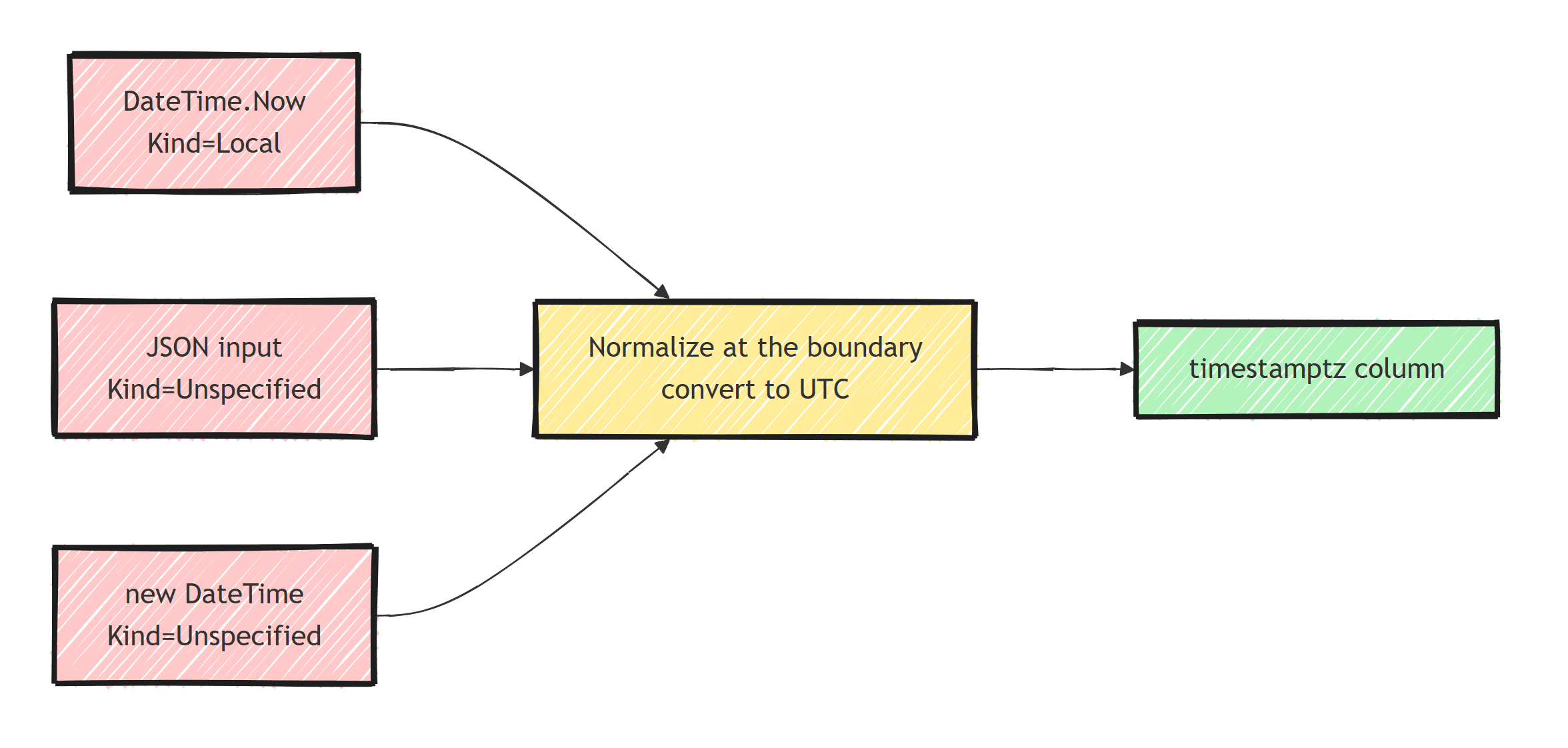
Producing timestamps yourself is the easy case:
// wrong for stored instants
order.CreatedAt = DateTime.Now;

// right
order.CreatedAt = DateTime.UtcNow;
Better still, take time as a dependency with .NET 8's TimeProvider (timeProvider.GetUtcNow()), which also makes the code testable.
API input deserves an explicit contract.
If clients send offsets (2026-07-03T09:00:00+02:00), bind to DateTimeOffset and convert:
public record CreateBookingRequest(DateTimeOffset StartsAt);

var booking = new Booking
{
    StartsAtUtc = request.StartsAt.UtcDateTime // Kind=Utc, unambiguous
};
If clients send zoneless wall-clock times, you must know the intended zone and say so in code:
public record CreateLocalBookingRequest(DateTime LocalStartsAt);

var zone = TimeZoneInfo.FindSystemTimeZoneById("Europe/Oslo");

var utc = TimeZoneInfo.ConvertTimeToUtc(
    DateTime.SpecifyKind(request.LocalStartsAt, DateTimeKind.Unspecified),
    zone);
Values you already know are UTC but arrive as Unspecified (a UTC string without the Z, a read from a legacy timestamp column) just need their Kind stamped:
var utc = DateTime.SpecifyKind(value, DateTimeKind.Utc);
SpecifyKind does not convert; it asserts.
Only use it when the assertion is true.
Step 3: Enforce It in the Model
Boundary conversions are easy to miss as a codebase grows, so back them with a model-wide value converter that makes non-UTC values impossible to persist:
public class UtcDateTimeConverter : ValueConverter<DateTime, DateTime>
{
    public UtcDateTimeConverter()
        : base(
            v => v.Kind == DateTimeKind.Utc ? v : v.ToUniversalTime(),
            v => DateTime.SpecifyKind(v, DateTimeKind.Utc))
    {
    }
}

// In your DbContext:
protected override void ConfigureConventions(
    ModelConfigurationBuilder configurationBuilder)
{
    configurationBuilder.Properties<DateTime>()
        .HaveConversion<UtcDateTimeConverter>();
}
The catch: ToUniversalTime() on an Unspecified value assumes the server's local zone, which is correct only if the value really is in that zone.
If you would rather fail loudly than guess, throw in the converter for Unspecified instead of converting.
On containers pinned to UTC the distinction rarely bites, but choose one behavior explicitly.
Registering converters model-wide like this is the same technique from custom model conventions in EF Core.
What About the Legacy Switch?
The escape hatch exists:
AppContext.SetSwitch("Npgsql.EnableLegacyTimestampBehavior", true);
It restores pre-6 behavior: no Kind validation, timestamptz values read back as Kind=Local, and ambiguous values accepted without an error.
The legitimate use is a large legacy codebase mid-migration to Postgres, where you need the app running while you clean up call sites incrementally.
Set it, file the tech-debt issue, and remove it when the converter and boundary fixes land.
With the switch on, nothing stops timestamps from shifting by your UTC offset depending on which server wrote them.
Choosing Types Going Forward
- Instants (created-at, occurred-at, expires-at):
DateTimein UTC orDateTimeOffset, columntimestamptz. Both work with Npgsql;DateTimeOffsetmust have offset zero on write, and the offset is not stored. I compared the two types in DateTime vs DateTimeOffset in C#. - Wall-clock values (a clinic's opening hour, a scheduled local delivery slot):
timestampcolumn viaHasColumnType("timestamp without time zone")withUnspecifiedKind, plus a separate time zone id column. Forcing these to UTC destroys information; they are not instants. - Dates and times alone:
DateOnlyandTimeOnlymap cleanly todateandtimewith Npgsql, and have noKindto get wrong.
If you are new to Postgres, the setup fundamentals are in getting started with EF Core and PostgreSQL. Fix this error properly before data accumulates, because rewriting mis-zoned historical timestamps later is hard (sometimes impossible) and needs a carefully staged migration.
Summary
Npgsql throws this exception because timestamptz holds absolute instants, and absolute instants must arrive as UTC.
A DateTime with Kind=Local or Unspecified does not identify an instant, and since version 6 the driver will not assume a time zone for it.
Fix the sources: UtcNow (or TimeProvider) for generated timestamps, explicit offset or zone handling for external input, SpecifyKind only where UTC is already a fact.
Back it with a model-wide UTC converter so non-UTC values never reach the database, and reserve the legacy switch for migration bridges with an expiry date.
Put these fixes in place early, because every ambiguous timestamp written before then has to be fixed with a data migration.
Frequently Asked Questions
Why does Npgsql throw cannot write DateTime with Kind=Unspecified or Local?
Since Npgsql 6, the PostgreSQL timestamptz type maps strictly to UTC DateTime values. Writing a DateTime whose Kind is Local or Unspecified would be ambiguous, so Npgsql rejects it instead of guessing the time zone.
Should I enable Npgsql.EnableLegacyTimestampBehavior?
Only as a temporary bridge while migrating an old codebase. The legacy switch restores the pre-6 behavior of writing whatever DateTime it gets without validation, which lets time zone bugs back in without any error. New code should normalize to UTC instead.
What is the difference between timestamp and timestamptz in PostgreSQL?
timestamp stores a wall-clock date and time with no time zone meaning. timestamptz stores an absolute instant, normalized to UTC internally. Npgsql maps UTC DateTimes to timestamptz and non-UTC Kinds to timestamp.
How do I fix the error for DateTime values from an API or form?
Values parsed from JSON or user input usually arrive with Kind=Unspecified. Convert them to UTC at the boundary: interpret them in the correct source time zone with TimeZoneInfo, or require offsets in the API contract and accept DateTimeOffset instead.
Does using DateTimeOffset avoid the problem?
Largely, yes. Npgsql maps DateTimeOffset to timestamptz and requires offset zero on write. Converting is trivial and unambiguous, since any DateTimeOffset identifies an exact instant. The offset itself is not stored; timestamptz keeps only the UTC instant.


