
Headplane runs without the Docker socket in limited mode, and policy editing still works through Headscale's database mode. A read-only socket mount limits nothing, because a container wrote a root-owned file on the host through one. Headplane's docs call limited mode not recommended for production, so this setup is my judgment.
I tested Headplane 0.8.2, Headscale 0.29.7 and Caddy 2.11.8 with the VPS and four machines running as containers on separate Docker networks.
Certificates came from Caddy's internal CA and names from /etc/hosts, so real DNS, Let's Encrypt and real NAT traversal were not part of the test.
I also didn't run a provider reboot, or Headplane's agent, web SSH or OIDC.
This guide adds Headplane to the stack from my Headscale setup guide, which lives in /opt/headscale and defines <HEADSCALE_HOST>, with the server commands run as root.
The override file and config template below are also in the sample download, and the sample's test script doesn't run them.
Does Headplane Need the Docker Socket?
No.
I'd run Headplane in limited mode (agent and Docker integration off) on 127.0.0.1 through an SSH tunnel, with database policy mode.
Headplane's docs don't recommend limited mode for production, and say it lacks network management, remote web SSH and more.
In my runs, the DNS page showed The Headscale configuration is read-only, nothing restarted Headscale after a settings save, and the agent that syncs OS versions and connectivity details stayed off.
So this is my judgment, based on the socket tests below and on policy editing working without a socket.
Headplane's documented Compose line mounts the socket with :ro, and that limits nothing.
Through a mount confirmed read-only, a container wrote a root-owned file on the host and read /etc/shadow (trimmed):
/run/docker.sock ro,nosuid,nodev,noexec,
uid in child: 0
docker run exit=0
--- on the host: written-through-ro-socket owner=root
--- control: the same command with no socket mounted
docker run exit=1
marker present: 0
:ro applies to the socket file and not to the API behind it, so that container and anyone who compromises it get root-equivalent access to the host.
I didn't look for a vulnerability in Headplane, and this test doesn't show one.
I also tried the socket proxy Headplane's docs mention, with the tecnativa/docker-socket-proxy image, and it didn't help.
With POST=0, Headplane's restart was denied 11 times with no UI error.
With POST=1, the proxy allowed creating a container that bound / from the host.
How Do You Run Headplane in Limited Mode?
Create the directory:
cd /opt/headscale
mkdir -p headplane/data
compose.override.yaml, which Compose merges automatically:
services:
  headplane:
    image: ghcr.io/tale/headplane:0.8.2
    container_name: headplane
    restart: unless-stopped
    ports:
      - "127.0.0.1:3000:3000"
    volumes:
      - ./headplane/config.yaml:/etc/headplane/config.yaml:ro
      - ./headplane/data:/var/lib/headplane
      - ./config/config.yaml:/etc/headscale/config.yaml:ro
headplane/config.yaml:
server:
  host: "0.0.0.0"
  port: 3000
  base_url: "http://localhost:3000"
  cookie_secret: "<COOKIE_SECRET>"
  cookie_secure: true
  data_path: "/var/lib/headplane"
headscale:
  url: "http://headscale:8080"
  public_url: "https://<HEADSCALE_HOST>"
  config_path: "/etc/headscale/config.yaml"
integration:
  agent:
    enabled: false
  docker:
    enabled: false
Generate <COOKIE_SECRET> with openssl rand -hex 16.
Don't copy the placeholder from Headplane's example config, because Headplane starts with it and gives no warning.
chmod 600 headplane/config.yaml
docker compose up -d
docker exec headscale headscale apikeys create --expiration 1d
A Headscale API key logs in to Headplane, has no scope, controls the whole tailnet, and defaults to 90 days. So use a 1 day key as printed, and expire it when you finish:
docker exec headscale headscale apikeys list
docker exec headscale headscale apikeys expire --prefix <PREFIX_FROM_THE_LIST>
How Do You Log In Through an SSH Tunnel?
Open the tunnel from your machine, go to http://localhost:3000/admin, and paste the key.
<VPS_SSH> is your SSH login, such as deploy@203.0.113.10:
ssh -L 3000:127.0.0.1:3000 <VPS_SSH>
Check that the page is Headplane before you paste the key.
If port 3000 is taken on your machine, use ssh -L 3100:127.0.0.1:3000 <VPS_SSH> and http://localhost:3100/admin.
I didn't run port 3100 itself, but base_url doesn't need to match, because another run logged in with base_url set to a different address.
Login worked in Chrome, the only browser I tried, despite the page's insecure connection warning.
Routing /admin through Caddy puts the login page on the internet, so I'd keep it on loopback.
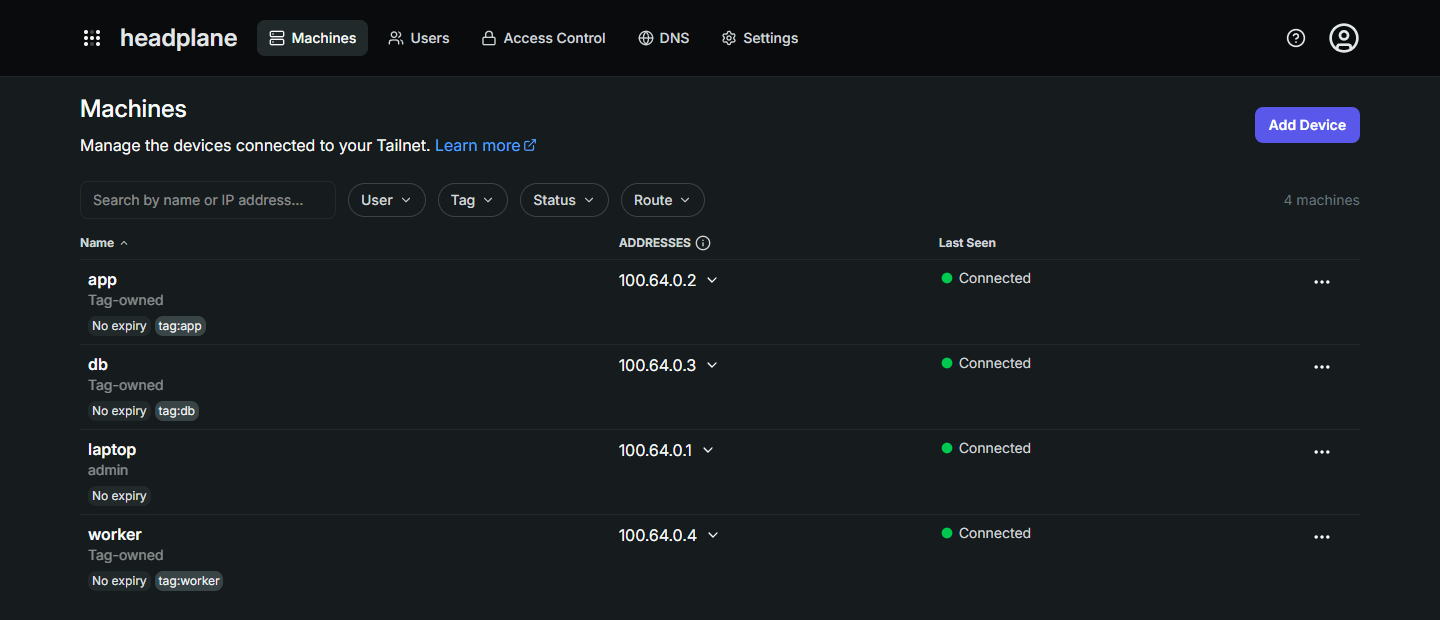
This is the Machines page from one of my runs:
To change settings in the UI without the socket, drop :ro from the ./config/config.yaml line in compose.override.yaml, run docker compose up -d, and keep a copy of config.yaml, because saving rewrites it.
Then save in the UI and run docker compose restart headscale over SSH, with policy check first in file mode, where the policy lives in config/policy.hujson.
The cost is that the Headplane container can now rewrite Headscale's config.
I ran this once by disabling Magic DNS.
The file changed with no UI error, and Headscale kept the old config until that restart.
The client then reported MagicDNS: disabled tailnet-wide, though names still resolved in the 10 s I watched.
How Do You Edit Policy in Headplane?
To edit policy in the UI, switch Headscale to database mode.
With policy.mode: database and nothing stored, Headscale allows everything, so the order matters.
Headplane reads the old config file until it restarts, so the last line restarts it:
cd /opt/headscale
docker compose stop headscale
sed -i -e 's|^  mode: file|  mode: database|' -e 's|^  path: /etc/headscale/policy.hujson|  path: ""|' config/config.yaml
docker compose run --rm --no-deps headscale policy set --bypass-grpc-and-access-database-directly --force --file /etc/headscale/policy.hujson
docker compose run --rm --no-deps headscale policy get --bypass-grpc-and-access-database-directly --force | grep -q 'tag:worker'
docker compose up -d headscale
docker compose restart headplane
Run these one at a time.
The grep -q line prints nothing and must exit 0, so run echo $? right after it.
tag:worker comes from the setup guide's policy, so grep for a tag from your own policy.
If policy set or grep fails, don't leave Headscale stopped.
restart: always starts it after a Docker restart, and should after a reboot, with everything allowed.
Put the config back and start it in file mode:
sed -i -e 's|^  mode: database|  mode: file|' -e 's|^  path: ""|  path: /etc/headscale/policy.hujson|' config/config.yaml
docker compose up -d headscale
In 3 of 3 scripted runs the worker machine, which that policy denies db, never saw it.
With a missing policy file, my script stopped at the failed policy set before Headscale started, so stop there too.
In an earlier run in database mode, still with no socket, the Access Control page (/admin/acls) lost its Read-only ACL Policy banner.
I clicked Edit file, added a // edited in headplane comment and saved, and policy get then printed that comment.
The rules still applied afterwards.
I didn't repeat that edit after the order printed above, and I didn't use the visual editor, which warns that saving drops comments.
The policy now lives in the database and not in git, so editing config/policy.hujson changes nothing, and that database needs a backup.
The file steps in my access policy guide no longer apply.
How Do You Go Back to File Mode?
To go back, stop editing in the UI and run this as one paste with Headscale running.
It must print BACK IN FILE MODE.
In my run with four nodes joined, worker still couldn't reach db.
Without the checks, a run with Headscale stopped replaced the policy with an empty file and allowed everything.
cd /opt/headscale \
  && docker exec headscale headscale policy get > config/policy.hujson.new \
  && test -s config/policy.hujson.new \
  && docker exec headscale headscale policy check --file /etc/headscale/policy.hujson.new \
  && mv config/policy.hujson.new config/policy.hujson \
  && docker compose stop headscale \
  && sed -i -e 's|^  mode: database|  mode: file|' -e 's|^  path: ""|  path: /etc/headscale/policy.hujson|' config/config.yaml \
  && docker compose up -d headscale \
  && docker compose restart headplane \
  && echo "BACK IN FILE MODE" \
  || echo "STOPPED: read the error above"
Summary
Headplane doesn't need the Docker socket, and a :ro mount limits nothing, so I'd run it in limited mode.
Headplane's docs call limited mode not recommended for production, so that is my judgment and not a measurement.
Keep it on 127.0.0.1 behind an SSH tunnel, and use a 1 day API key that you expire when you finish.
To edit policy in the UI, store and verify the policy in database mode with Headscale stopped, because that mode allows everything with nothing stored.
All of this ran in containers on Docker networks, and Chrome was the only browser I tried.
The rest of the stack is in my Headscale guide, and my self-hosting course sets up private administration over Tailscale on a real server.
Thanks for reading.
And stay awesome!
Frequently Asked Questions
Does Headplane need the Docker socket?
No. I ran it in limited mode, with the agent and Docker integration off, and policy editing still worked through database mode. Headplane docs call limited mode not recommended for production, so this is my judgment.
Does mounting the Docker socket read-only protect the host?
No. Through a mount confirmed read-only, a container wrote a root-owned file on the host in my test. The flag applies to the socket file and not to the API behind it, so I would run Headplane with no socket.
Does a Docker socket proxy make Headplane safe?
It did not help in my test with the tecnativa/docker-socket-proxy image. With POST=0, the restart from Headplane was denied 11 times with no UI error. With POST=1, the proxy allowed creating a container that bound the root of the host.
How do you edit Headscale policy in Headplane?
Switch Headscale to database mode. With nothing stored, that mode allows everything, so stop Headscale, store and verify the policy, and only then start it.
