
A composite primary key in EF Core is a primary key made of two or more columns, declared with HasKey and an anonymous type or with the [PrimaryKey] attribute in EF Core 7+.
It is the right shape for join tables and for child rows that are always reached through their parent.
Everywhere else, a surrogate key with a unique index gives you the same guarantees with less friction.
Every EF Core tutorial shows entities with a single Id property.
Then you model a join table or a child entity that has no natural single-column identity, and suddenly you need a composite key.
The configuration is one line, but it changes several behaviors.
Find takes multiple arguments in a specific order, relationships need multi-column foreign keys, and the order of key columns decides what your primary key index can do.
Configuring a Composite Key
Composite keys cannot be configured with the [Key] attribute on individual properties.
You need either the Fluent API or the [PrimaryKey] attribute (EF Core 7+).
Here is the classic example, an order line that is identified by the order and the product:
public class OrderItem
{
    public Guid OrderId { get; set; }
    public Guid ProductId { get; set; }
    public int Quantity { get; set; }
    public decimal UnitPrice { get; set; }

    public Order Order { get; set; } = null!;
    public Product Product { get; set; } = null!;
}
The Fluent API configuration:
public class OrderItemConfiguration : IEntityTypeConfiguration<OrderItem>
{
    public void Configure(EntityTypeBuilder<OrderItem> builder)
    {
        builder.HasKey(oi => new { oi.OrderId, oi.ProductId });
    }
}
Or with the attribute, where the order of names matters just as much:
[PrimaryKey(nameof(OrderId), nameof(ProductId))]
public class OrderItem
{
    // ...
}
The order you declare the columns in is the order of the primary key index.
(OrderId, ProductId) means the database can seek efficiently on OrderId alone, but a query filtering only on ProductId scans.
Put the column you filter by most often first.
I covered how index column order affects query plans in PostgreSQL indexes for .NET developers.
How Find Changes
FindAsync is built around primary keys, so with a composite key it takes multiple values:
var item = await context.OrderItems.FindAsync(orderId, productId);
Two things to watch:
- The values must be passed in the declaration order from
HasKey. Swap them and you getnullinstead of an error, because both values areGuid.FindAsynctakesparams object[], so the compiler cannot catch the swap either. FindAsyncchecks the change tracker before querying the database, same as with single keys. That is usually a free cache hit, but it can return stale data in long-lived contexts.
I dig into that behavior in Find vs FirstOrDefault in EF Core.
If the argument order makes you nervous, a FirstOrDefaultAsync with named predicates is more explicit:
var item = await context.OrderItems
    .FirstOrDefaultAsync(oi => oi.OrderId == orderId && oi.ProductId == productId);
Relationships Against a Composite Key
Once an entity has a composite key, any entity referencing it needs a composite foreign key with matching column types and order.
public class Shipment
{
    public Guid Id { get; set; }
    public Guid OrderId { get; set; }
    public Guid ProductId { get; set; }

    public OrderItem OrderItem { get; set; } = null!;
}

public class ShipmentConfiguration : IEntityTypeConfiguration<Shipment>
{
    public void Configure(EntityTypeBuilder<Shipment> builder)
    {
        builder.HasOne(s => s.OrderItem)
            .WithMany()
            .HasForeignKey(s => new { s.OrderId, s.ProductId });
    }
}
Every referencing table carries both columns, join conditions need two predicates, and each new relationship can get the column order wrong. EF Core validates the shapes at model building time, which helps, but it does not remove the extra configuration. The patterns for configuring these correctly are the same ones I covered in entity relationships in EF Core.
No Value Generation
Single-column integer keys get identity values from the database by convention.
Composite keys get nothing by default.
You can opt in on one key part with ValueGeneratedOnAdd() (for example, an identity column inside the composite key), but otherwise you set every key component yourself before SaveChanges.
If you forget one, EF Core inserts the CLR default (Guid.Empty or 0), and the mistake only shows up as a foreign key violation or, on the next insert, a duplicate key violation.
That is fine for join tables where both values are existing foreign keys. It is painful for anything else, because you have just signed up for client-side key management. If you find yourself inventing one of the key parts (a sequence number, a timestamp), that is a strong sign you want a surrogate key instead, or database-generated ids like the ones I compared in identity vs sequence vs HiLo key generation.
Composite Keys in Many-to-Many Join Entities
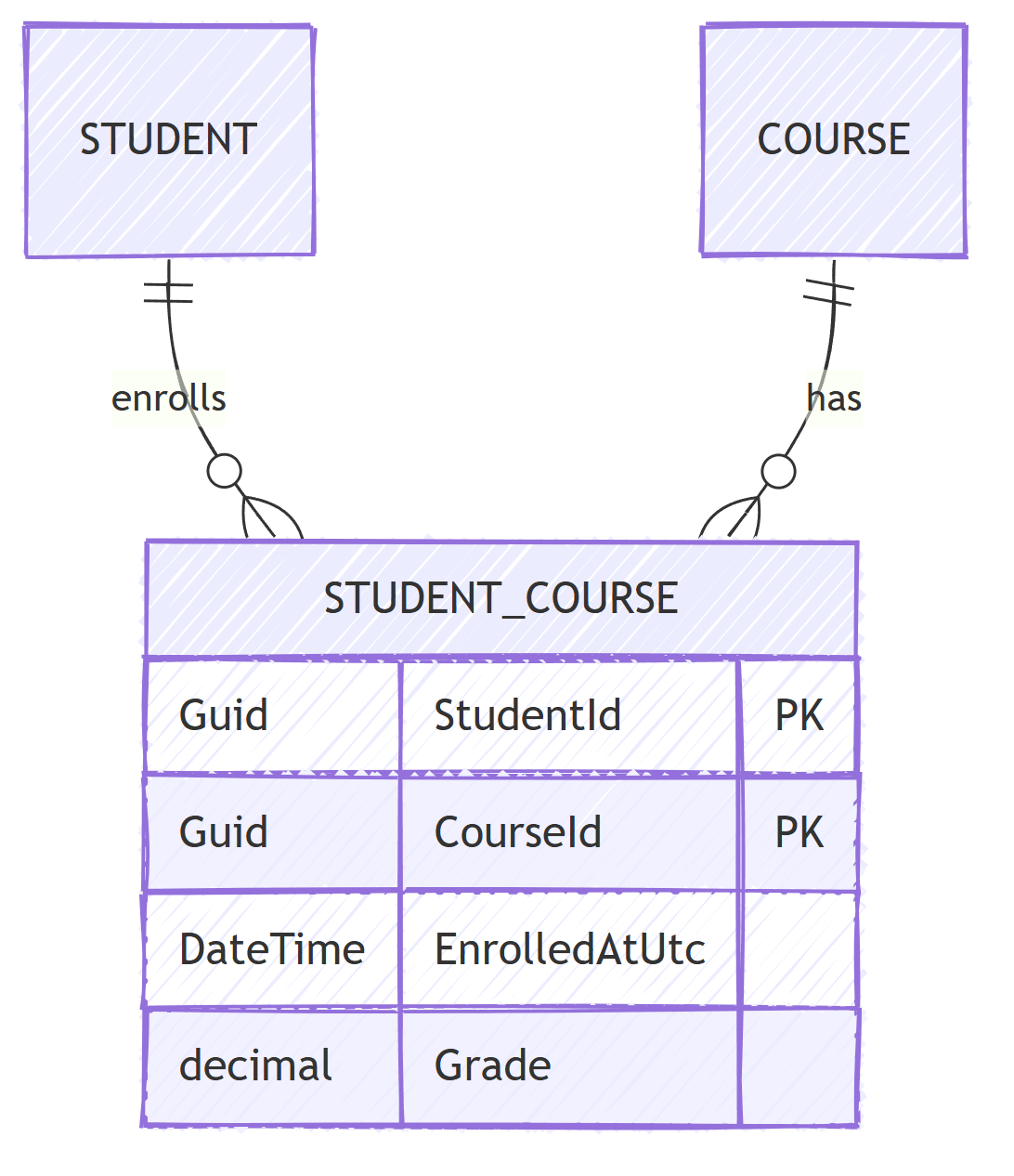
The clearest use for a composite key is an explicit join entity. EF Core creates exactly this shape when you let it scaffold a skip navigation, and you can take control of it when the join table carries payload:
public class StudentCourse
{
    public Guid StudentId { get; set; }
    public Guid CourseId { get; set; }
    public DateTime EnrolledAtUtc { get; set; }
    public decimal? Grade { get; set; }
}

modelBuilder.Entity<Student>()
    .HasMany(s => s.Courses)
    .WithMany(c => c.Students)
    .UsingEntity<StudentCourse>(
        j => j.HasOne<Course>().WithMany().HasForeignKey(sc => sc.CourseId),
        j => j.HasOne<Student>().WithMany().HasForeignKey(sc => sc.StudentId),
        j => j.HasKey(sc => new { sc.StudentId, sc.CourseId }));
Here the composite key is doing double duty: it is the identity and a uniqueness constraint that prevents duplicate enrollments. No surrogate key can give you the second part for free.
When Does a Surrogate Key Win?
My rule of thumb after years of maintaining both:
- Composite key: join tables, child tables always accessed through the parent, tables nothing else references.
- Surrogate key plus unique index: everything else.
The surrogate-plus-unique-index pattern gives you the same duplicate protection without the downsides:
// OrderItem gains a surrogate key property:
// public Guid Id { get; set; }

builder.HasKey(oi => oi.Id);

builder.HasIndex(oi => new { oi.OrderId, oi.ProductId })
    .IsUnique();
Reasons the surrogate wins more often than you would expect:
- Referencing gets simpler. Foreign keys are one column, joins are one predicate, and no downstream table repeats your key structure.
- The key never changes. Natural key values can change. A product merge or an order renumbering with a composite natural key is a multi-table migration you do not want to write.
- APIs and URLs stay clean.
/order-items/{id}beats encoding two guids into a route. - Tooling assumes single keys. Generic repositories,
FindAsyncwrappers, and audit patterns all get uglier with composite keys.
The cost is one extra column and one extra index. For a high-volume join table with no inbound references, that cost buys you nothing, which is why join tables stay composite.
Summary
HasKey with an anonymous type (or [PrimaryKey]) defines a composite key, FindAsync needs values in declaration order, relationships need matching multi-column foreign keys, and value generation is off by default.
Use them where they model reality: join entities and parent-scoped children where the pair of foreign keys is the identity, and the key doubles as a uniqueness constraint. For anything that other tables reference or that surfaces in an API, a surrogate key with a unique index gives you the same guarantees with far less friction.
In both the primary key and the backing unique index, put the column you filter by most first.
Frequently Asked Questions
How do I define a composite primary key in EF Core?
Use the Fluent API with HasKey and an anonymous type, for example builder.HasKey(e => new { e.OrderId, e.ProductId }). Since EF Core 7 you can also use the PrimaryKey attribute on the entity class. Data annotations on individual properties cannot define composite keys.
Can I use FindAsync with a composite key?
Yes. Pass the key values in the same order they were declared in HasKey, for example context.OrderItems.FindAsync(orderId, productId). Passing them in the wrong order throws or returns null.
Do composite keys work with database-generated values?
Not by convention. EF Core only sets up value generation automatically for single-column keys. You can opt in on one key part with ValueGeneratedOnAdd (for example, an identity column inside the composite key), but otherwise you supply every key value yourself before calling SaveChanges.
Should I use a composite key or a surrogate key?
Use composite keys for join tables and child tables that are always accessed through the parent. Use a surrogate key when other tables need to reference the row, when the natural key can change, or when you want simpler APIs and URLs.


