
Ask a room of developers what read committed guarantees, and most will say something like "my transaction is isolated from other transactions".
It isn't. Under read committed, two transactions can both read an account balance of $100, both approve a $100 withdrawal, and both commit. Your database did exactly what you asked, and your invariant is gone.
Isolation levels are a contract about which anomalies are allowed, not a dial from "unsafe" to "safe". The examples below demonstrate each anomaly with two competing .NET transactions, so you can see what you're buying at each level.
The Setup
One table, one row:
CREATE TABLE accounts (
    id INT PRIMARY KEY,
    balance NUMERIC NOT NULL
);

INSERT INTO accounts VALUES (1, 100);
And a helper that opens a transaction at a chosen isolation level with EF Core:
using System.Data; // IsolationLevel

await using var transaction = await dbContext.Database
    .BeginTransactionAsync(IsolationLevel.ReadCommitted);
I'll use PostgreSQL semantics as the primary lens, and call out where SQL Server differs. For the basics of transactions in EF Core, start with working with transactions in EF Core.
Read Committed: The Default, and Its Holes
Read committed guarantees one thing: you never see uncommitted data. Every statement sees a snapshot of the database as of the moment that statement started.
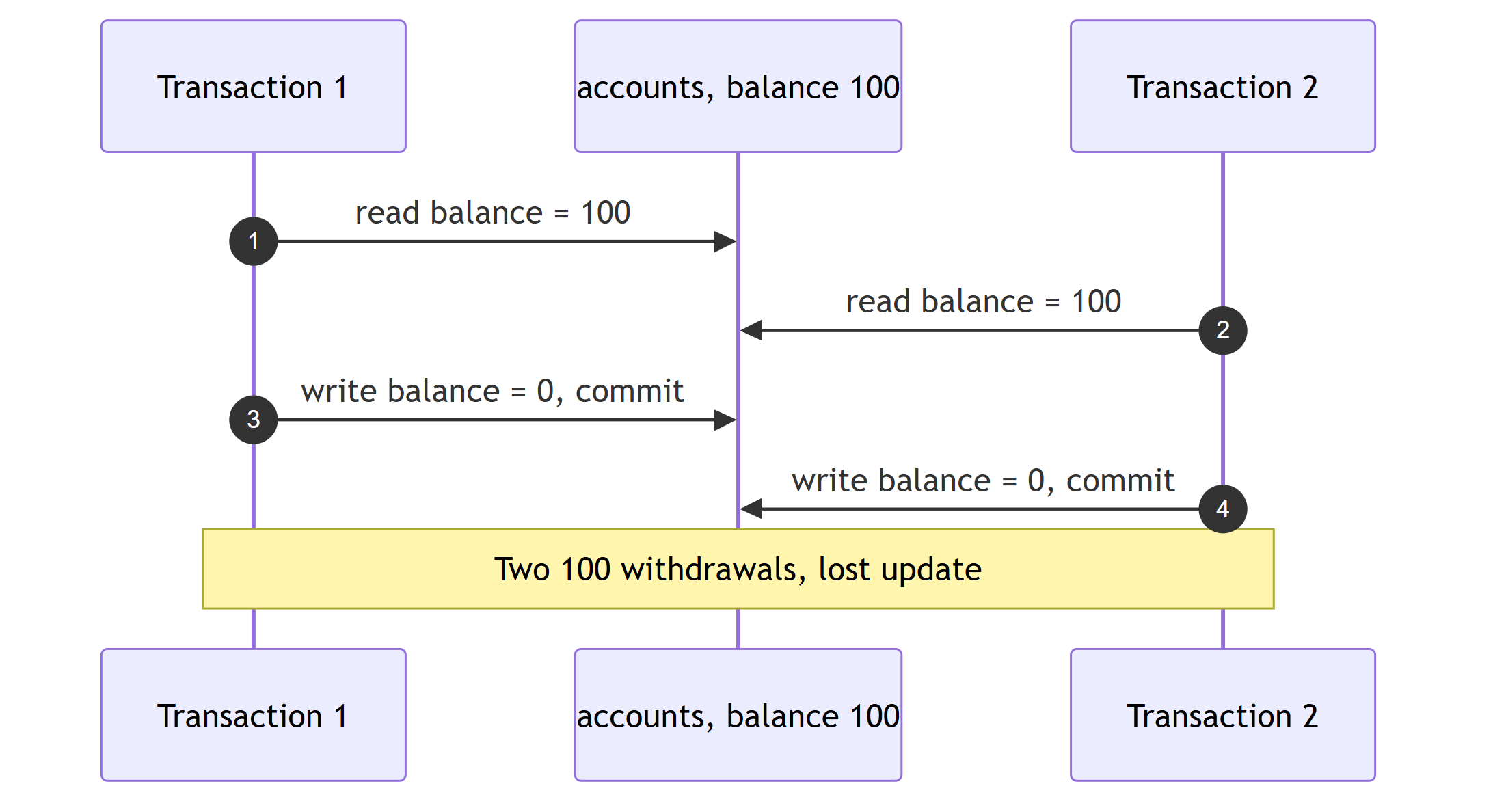
Here's the lost update it does not prevent. Two request handlers run concurrently:
// Runs in two parallel requests (T1 and T2)
await using var tx = await dbContext.Database
    .BeginTransactionAsync(IsolationLevel.ReadCommitted);

var account = await dbContext.Accounts.SingleAsync(a => a.Id == 1);

// Both T1 and T2 read balance = 100 here.

if (account.Balance >= 100)
{
    account.Balance -= 100;

    await dbContext.SaveChangesAsync();
}

await tx.CommitAsync();
The interleaving:
- T1 reads balance = 100.
- T2 reads balance = 100.
- T1 writes balance = 0 and commits.
- T2 writes balance = 0 and commits.
Two $100 withdrawals from a $100 account, and the final balance says 0 instead of -100. Neither transaction raised an error.
If T2's UPDATE runs while T1 still holds the row lock, Postgres makes it wait and then re-reads the row.
That doesn't help, because the balance check already happened in C# against the stale value, and the UPDATE EF generates just sets the computed value.
Read committed also allows a non-repeatable read: run the same SELECT twice inside one transaction, and a concurrent commit in between can change the result.
Any report that reads the same data twice can get two different results.
The fixes at this level don't involve changing the isolation level at all:
- Make the operation atomic in SQL:
UPDATE accounts SET balance = balance - 100 WHERE id = 1 AND balance >= 100and check the affected row count. - Use optimistic concurrency with a version column, so T2's stale write throws a
DbUpdateConcurrencyException. - Use pessimistic locking with SELECT FOR UPDATE, so T2 blocks until T1 finishes and then re-reads.
Most production systems run read committed everywhere and patch the holes with these three tools. That's a legitimate strategy, as long as you know the holes exist.
Repeatable Read: A Frozen Snapshot
At repeatable read, PostgreSQL gives the whole transaction one snapshot, taken at its first statement. Every read, no matter when it runs, sees that snapshot. Non-repeatable reads and phantoms are gone (yes, phantoms too, in Postgres; the SQL standard permits them at this level, but Postgres's implementation prevents them).
Postgres also detects lost updates at this level.
Rerun the withdrawal demo with IsolationLevel.RepeatableRead:
- T1 reads balance = 100.
- T2 reads balance = 100.
- T1 writes and commits.
- T2's write fails:
40001: could not serialize access due to concurrent update.
The database refuses to let T2 overwrite a row that changed after its snapshot. Your code's job is to catch and retry.
EF Core wraps the error from SaveChangesAsync: the default execution strategy throws an InvalidOperationException around a DbUpdateException around the PostgresException.
A failed CommitAsync throws the PostgresException directly, so the check walks the whole exception chain:
const int maxRetries = 3;

for (int attempt = 1; attempt <= maxRetries; attempt++)
{
    try
    {
        // The withdrawal above, run at IsolationLevel.RepeatableRead
        await ExecuteWithdrawalAsync(dbContext);

        break;
    }
    catch (Exception ex) when (IsSerializationFailure(ex) && attempt < maxRetries)
    {
        dbContext.ChangeTracker.Clear();
    }
}

static bool IsSerializationFailure(Exception? ex) =>
    ex is not null &&
    (ex is PostgresException { SqlState: PostgresErrorCodes.SerializationFailure } ||
     IsSerializationFailure(ex.InnerException));
Repeatable read is the right level for multi-statement reads that must be consistent: financial reports, exports, anything that reads related data in several queries and needs them to agree.
SQL Server's repeatable read works differently: it holds shared locks on every row you read until commit, which blocks writers instead of failing readers, and introduces deadlock risk.
Snapshot isolation (IsolationLevel.Snapshot, requires enabling on the database) is the closer equivalent to Postgres behavior.
Serializable: The Level That Handles Write Skew
Snapshot isolation still permits one anomaly: write skew. Two transactions read overlapping data, make disjoint writes based on what they read, and jointly violate a rule that each one individually preserved.
The classic example: a hospital requires at least one doctor on call.
await using var tx = await dbContext.Database
    .BeginTransactionAsync(IsolationLevel.RepeatableRead);

int onCall = await dbContext.Doctors.CountAsync(d => d.IsOnCall);

if (onCall >= 2)
{
    // Alice removes herself in T1; Bob removes himself in T2.
    var me = await dbContext.Doctors.SingleAsync(d => d.Id == currentDoctorId);
    me.IsOnCall = false;

    await dbContext.SaveChangesAsync();
}

await tx.CommitAsync();
Both transactions count 2 doctors on call, so both see the condition satisfied. Alice's transaction updates Alice's row; Bob's updates Bob's row. No row was modified by both, so snapshot isolation sees no conflict, and both commit. Now zero doctors are on call.
IsolationLevel.Serializable exists for exactly this.
Postgres tracks read/write dependencies between concurrent transactions and aborts one of them with a 40001 when the combination couldn't have happened in any serial order.
When both doctors' transactions run their updates before either commits, both updates succeed and the second CommitAsync fails.
The retry loop from the previous section applies unchanged, because its check also matches the unwrapped PostgresException that a failed commit throws.
The cost is bookkeeping overhead plus a retry rate that depends on contention, and it's usually smaller than you'd expect. Reserve serializable for transactions whose correctness depends on a condition over rows you read but don't write: no overlapping meeting-room bookings, unique-username-without-a-constraint, minimum staffing rules.
The alternative at lower levels is to materialize the conflict: lock a parent row with FOR UPDATE, or add a constraint the database can enforce directly.
That's often the better engineering trade, and it's the approach behind pessimistic locking in EF Core with PostgreSQL.
Read Uncommitted: Skip It
Read uncommitted allows dirty reads, which return data from transactions that may still roll back.
PostgreSQL accepts the syntax but treats it as read committed.
On SQL Server it can produce inconsistent reports (rows read twice or skipped during page splits), and WITH (NOLOCK) is the same isolation level applied as a table hint.
Avoid it in new code.
Which Isolation Level Should You Use?
A practical set of defaults:
- Read committed everywhere, plus optimistic concurrency tokens on entities where lost updates matter. This covers most of a typical system.
- Atomic SQL updates for counters, balances, and inventory, so the read-modify-write cycle never leaves the database.
- Repeatable read for multi-query reads that must be internally consistent.
- Serializable with retries for the handful of invariants that span rows, or restructure so a constraint or a SKIP LOCKED queue makes the conflict explicit.
Whichever level you pick, keep transactions short. Every isolation level degrades, in throughput or in retry rate, when transactions hold snapshots and locks for hundreds of milliseconds.
Summary
Each isolation level allows a different set of anomalies:
- Read committed: no dirty reads, but non-repeatable reads, phantoms, and lost updates are all on the table.
- Repeatable read (Postgres): one frozen snapshot, lost updates rejected with serialization errors, write skew still possible.
- Serializable: full protection, paid for with retries.
The anomaly you're most likely to hit is the lost update under read committed, and raising the isolation level is rarely the fix. Use a concurrency token, an atomic update, or an explicit lock on the rows the invariant depends on.
Frequently Asked Questions
What is the default transaction isolation level?
Read committed, in both PostgreSQL and SQL Server. It guarantees you never see uncommitted data, but it allows non-repeatable reads, phantoms, and lost updates from read-modify-write cycles.
Does read committed prevent lost updates?
No. Two transactions can both read the same row, compute new values from what they read, and write them back. The second commit overwrites the first without an error. You need optimistic concurrency, explicit locks, atomic updates, or a stricter isolation level.
What is the difference between repeatable read in PostgreSQL and SQL Server?
PostgreSQL implements repeatable read as snapshot isolation: the transaction sees a frozen snapshot and gets a serialization error if it conflicts with a concurrent update. SQL Server implements it with shared locks that block writers, which prevents different anomalies and can deadlock instead.
When should I use serializable isolation?
When correctness depends on a condition over multiple rows, such as enforcing that at least one doctor stays on call, or no overlapping bookings exist. Serializable prevents write skew, which snapshot isolation allows. Be ready to retry serialization failures.
How do I set the isolation level in EF Core?
Pass an IsolationLevel value to Database.BeginTransactionAsync, for example IsolationLevel.Serializable. The level applies to that transaction only, and you should wrap serializable transactions in retry logic for serialization failures.
