
RabbitMQ deletes messages, Kafka keeps them. A queue tracks messages and destroys them on acknowledgment; a log appends messages, retains them for a configured time, and consumers just move a cursor. Pick RabbitMQ for commands, jobs, and flexible routing; pick Kafka for event streams that multiple systems consume independently, replay, and high sustained throughput. Almost every practical difference between the two follows from that first line.
Most "RabbitMQ vs Kafka" comparisons eventually collapse into feature bingo: this one has routing, that one has replay, this one has priorities, that one has partitions. Skip the bingo and derive each difference from the root design decision instead.
The Root Difference, Precisely
RabbitMQ is a smart broker managing queues. A message is published to an exchange, routed into one or more queues, delivered to a consumer, and on acknowledgment it is gone. The broker's job is tracking the state of every individual message: delivered, unacked, requeued, dead-lettered.
Kafka is a distributed, partitioned, append-only log. A message is appended to a partition and stays there until retention expires (hours, days, or forever), consumed or not. The broker tracks almost nothing per message; each consumer group remembers one number per partition: its offset.
RabbitMQ deletes state as work completes, while Kafka never mutates the log and lets each consumer group keep its own position.

Consequence 1: Replay
Kafka: move your offset backwards and re-read yesterday. Rebuild a projection, backfill a new service, replay production traffic into a test consumer. The messages stay in the log until retention expires.
RabbitMQ: the message you acked an hour ago no longer exists. Replay requires you to have stored the messages somewhere else first, or to republish from the source system.
If your architecture leans on event history (event sourcing adjacency, rebuilding read models, audit-grade streams), this consequence alone decides the question.
Consequence 2: Fan-Out
Ten services want every OrderPlaced event.
RabbitMQ: the broker copies the message into ten queues (a fanout exchange bound ten times). That is ten copies and ten sets of delivery state, paid for at publish time.
Kafka: nothing is copied. Ten consumer groups hold ten offsets against the same partition data. An eleventh subscriber tomorrow costs one more integer per partition, and it can start from the beginning of retention. This is why fan-out-heavy event-driven architectures tend to use logs: a new subscriber costs almost nothing and can read the history.
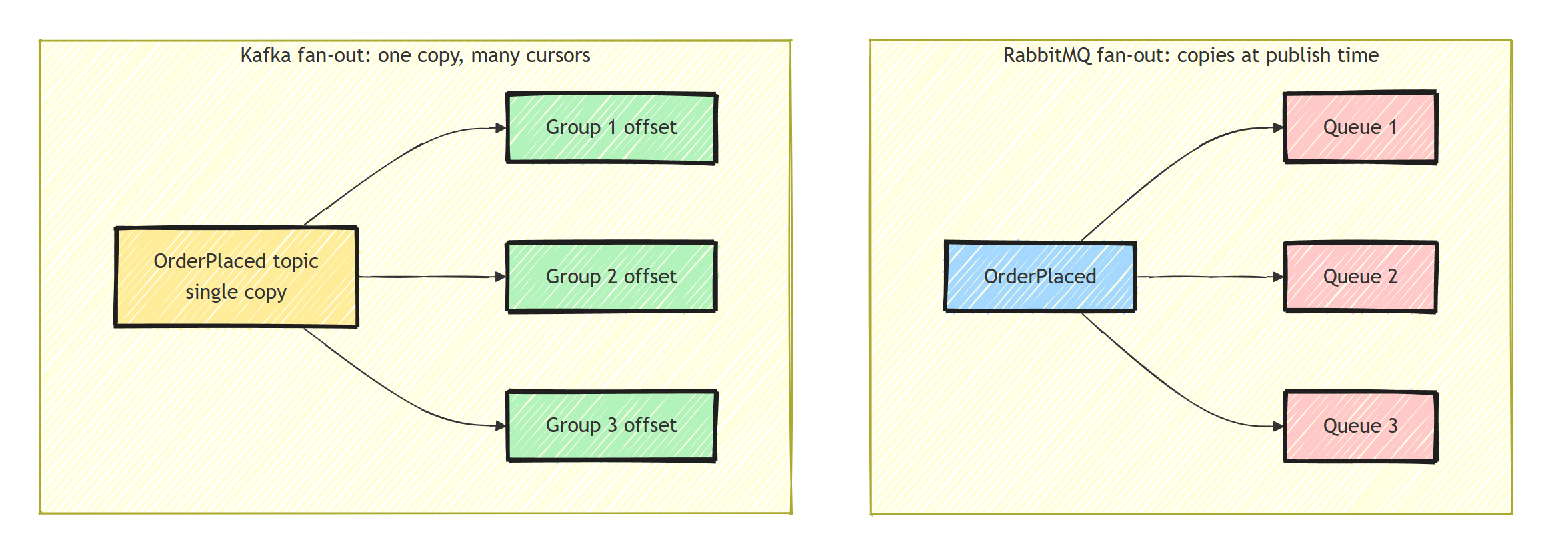
RabbitMQ fan-out works fine at normal scale. But every new subscriber adds another copy of every message.
Consequence 3: Competing Consumers and Ordering
Here the queue wins one back.
RabbitMQ: point five consumers at one queue and the broker deals messages out one at a time, tracking each individually. Scale to six consumers mid-burst and the sixth starts pulling work immediately. Per-message acknowledgment means a slow message does not block its neighbors, and a failed one can be individually requeued, delayed, or dead-lettered.
Kafka: parallelism is partitions. A partition is consumed by exactly one consumer in a group, in order, because an ordered log cannot be dealt out message-by-message without ceasing to be ordered. Your consumer count is capped by partition count, rebalances briefly pause consumption when membership changes, and one slow message holds up everything behind it in its partition (head-of-line blocking).
The flip side: Kafka gives you per-key ordering for free. Messages with the same key go to the same partition, so they stay in order at any scale. In RabbitMQ, ordering holds only within a queue consumed by a single consumer; the moment you add competing consumers, redeliveries can interleave and order is gone. That is the trade I explained in solving message ordering from first principles: queues optimize for fair work distribution, logs for ordered streams, and you cannot fully have both at once.
The partition cap and head-of-line blocking above apply to classic consumer groups, which is what Confluent.Kafka supports.
Kafka 4.2 made share groups (KIP-932) production-ready, with per-message acknowledgment and more consumers than partitions, but the .NET client has no share consumer yet.
Consequence 4: Routing and Broker Smarts
Because RabbitMQ tracks every message anyway, it can afford to be clever per message: exchanges route on keys, patterns, and headers; messages carry TTLs and priorities; unroutable messages can bounce to alternate exchanges. Even delayed and scheduled delivery is possible, though not out of the box: the rabbitmq-delayed-message-exchange community plugin is a separate download you install and enable on the broker.
Kafka's broker is deliberately dumb: append bytes, serve byte ranges, replicate. "Routing" is choosing a topic and a key at the producer. Filtering happens in consumers or stream processors. Delay, priority, and per-message TTL do not exist, because implementing them would mean mutating an append-only log.
If your system needs rich broker-side routing (per-tenant queues, priority lanes, selective subscriptions), RabbitMQ hands it to you. On Kafka you rebuild those as topics-plus-convention, and some (priority, per-message delay) never stop being awkward.
Consequence 5: Throughput
Kafka's throughput comes from the log structure: sequential appends, batched and compressed reads, zero per-message broker state, and horizontal spread across partitions.
RabbitMQ is not slow (tens of thousands per second per node is normal, more with tuning), but per-message tracking, routing decisions, and deletion have a floor cost that log appends do not. At modest volumes, both may have ample capacity, so throughput should not outweigh delivery semantics or operational fit.
Consequence 6: Failure Handling
A work-distribution system needs to retry, delay, or quarantine individual messages. RabbitMQ's per-message state makes all of it native: nack with requeue, retry topologies with backoff, dead-letter exchanges, delivery counts.
Kafka cannot treat one message specially without blocking its partition, so failure handling moves into your code: catch, produce to a retry or dlq topic, commit, and keep moving.
It works, but you build and maintain the retry topology that RabbitMQ provides natively.
Redelivery happens in both, so idempotent consumers are mandatory either way.
The .NET Angle
Client maturity is a wash: RabbitMQ.Client (now fully async in v7) and Confluent.Kafka are both first-rate, and I have getting-started guides for each (RabbitMQ, Kafka).
The framework layer tilts slightly RabbitMQ-ward: MassTransit, NServiceBus, Wolverine, and Rebus all treat queues as the native abstraction, with sagas, retries, and outbox integration designed around per-message acknowledgment. Kafka support exists (MassTransit riders, Confluent's own libraries) but consumer ergonomics, especially error handling, stay closer to the metal.
Operationally: modern Kafka (KRaft, no ZooKeeper) is far easier than its reputation, but a well-run Kafka cluster is still more system than a well-run RabbitMQ node, and a managed service is less work than either. If your team is small, weight this heavily.
Side-by-Side Comparison
Here's how the queue and the log stack up, consequence by consequence:
| RabbitMQ | Kafka | |
|---|---|---|
| Core model | Queue: messages deleted on acknowledgment | Log: messages retained, consumers track offsets |
| Replay | Gone once acked | Move the offset back and re-read |
| Fan-out | Broker copies the message into each bound queue | One copy, one offset per consumer group |
| Ordering | Only within a queue with a single consumer | Per-key ordering within a partition |
| Scaling consumers | Add consumers to a queue at any time | Capped by partition count |
| Routing | Broker-side exchanges, TTLs, priorities | Topic and key at the producer; filtering in consumers |
| Failure handling | Native retries, delays, dead-letter exchanges | Retry and DLQ topics built in your own code |
| Throughput | Tens of thousands per second per node | High sustained throughput via partitioning and batching |
| Best for | Commands, jobs, task distribution | Event streams, replay, multiple independent readers |
How Do You Choose?
Ask what the messages are:
- Commands and jobs ("resize this image", "send this email"): work to be done once, deleted when done, retried individually when failed. That is a queue. RabbitMQ.
- Events as facts ("order placed", "price changed"): a stream multiple systems read independently, possibly including systems that do not exist yet. That is a log. Kafka.
- Both, which is common: many organizations run RabbitMQ for task distribution and Kafka for the event backbone.
- Neither at your scale: if you are adding your first queue to a monolith, a broker may be premature entirely; the outbox pattern plus a Postgres queue is often enough.
The mistake to avoid is buying Kafka for a job workload because of throughput charts, then hand-building acknowledgment, delay, retries, and DLQs on top of a log that supports none of them natively. Or the mirror image: building an event backbone on RabbitMQ and discovering that "replay last month for the new consumer" is impossible, because those messages were deleted on acknowledgment.
Summary
Queues delete messages on acknowledgment, and logs retain them. From that difference, RabbitMQ gives you per-message acknowledgment, rich routing, native retries and dead-lettering, and elastic competing consumers, at the cost of no history and copy-based fan-out. Kafka gives you replay, cursor-based fan-out, per-key ordering, and high sustained sequential throughput, at the cost of partition-bound parallelism and do-it-yourself failure handling.
Classify your messages as work (RabbitMQ) or as facts (Kafka). If one system has both kinds, run both brokers.
Frequently Asked Questions
What is the main difference between RabbitMQ and Kafka?
RabbitMQ is a queue: messages are delivered to consumers and deleted on acknowledgment. Kafka is a log: messages are retained for a configured period and consumers track their own position. Almost every other difference, including replay and fan-out behavior, follows from that.
Is Kafka faster than RabbitMQ?
For raw sequential throughput, generally yes, because appending to a partitioned log and batching reads is mechanically cheaper than per-message routing, tracking, and deletion. For per-message latency at modest volumes both are fast enough that the operational differences matter more.
Can Kafka replace RabbitMQ as a work queue?
It can, but awkwardly. Classic Kafka consumer groups have no per-message acknowledgment, no built-in delayed redelivery, no priority, and no native dead-letter queue, so competing-consumer job processing takes more work. Kafka 4.2 share groups add per-message acknowledgment and queue-style consumers, but the .NET client (Confluent.Kafka) has no share consumer yet. If your workload is jobs and commands, a queue is the better fit.
Which should a .NET team pick by default?
If you need task distribution, RPC-style commands, and flexible routing, pick RabbitMQ. If you need event streams that multiple systems consume independently, replay, or very high sustained throughput, pick Kafka. Many organizations run both for different jobs.


