
RabbitMQ routes messages from exchanges into queues so .NET services can process work asynchronously. The RabbitMQ.Client 7 API supports async publishing and consumption, including publisher confirms and manual acknowledgments. Reliable processing also needs durable topology, bounded retries, and idempotent handlers because failures can cause redelivery.
What Is RabbitMQ?
RabbitMQ is a message broker, a middleman that accepts messages from producers and delivers them to consumers. Instead of services calling each other directly over HTTP, they communicate through messages. This decouples services and lets work happen asynchronously.
RabbitMQ supports message queue patterns without the complexity of cloud-specific services. It can run in Docker, Kubernetes, or on a virtual machine.
Its model of exchanges, queues, and bindings teaches fundamental messaging concepts that apply to any broker.
Core Concepts
Before writing code, understand these building blocks:
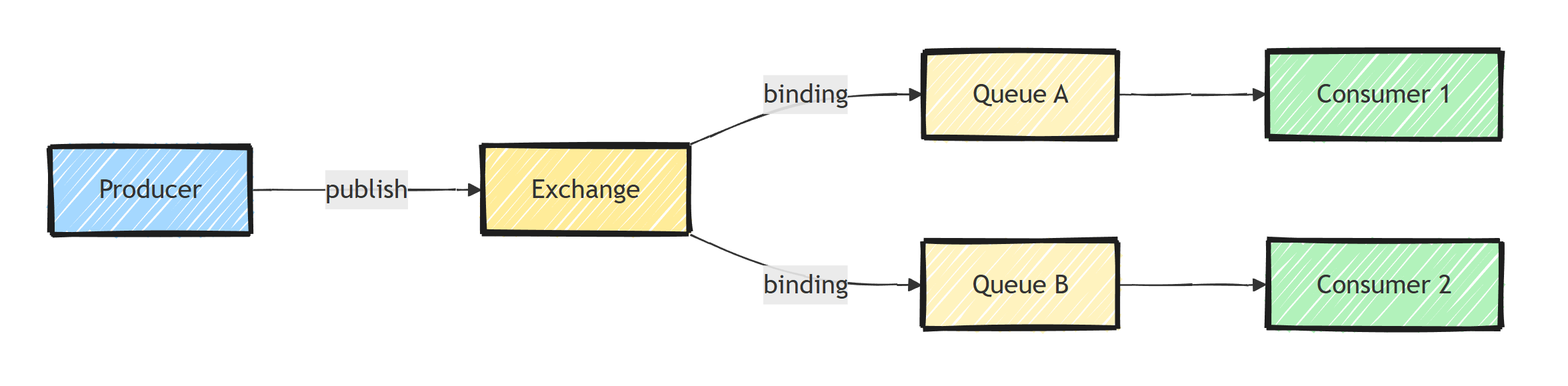
- Producer: Sends messages to an exchange
- Exchange: Routes messages to queues based on rules (bindings)
- Queue: Stores messages until a consumer processes them
- Consumer: Receives and processes messages from a queue
- Binding: A rule connecting an exchange to a queue
Think of it as a mail system: the producer drops mail at the post office (exchange), the post office routes it to the right mailbox (queue), and the recipient (consumer) picks it up.
Setting Up RabbitMQ
Run RabbitMQ locally with Docker:
docker run -d --name rabbitmq \
  -p 5672:5672 \
  -p 15672:15672 \
  rabbitmq:4-management
The management UI is available at http://localhost:15672 (guest/guest).
Keep it open while you experiment.
Watching queues fill and drain is the fastest way to build intuition.
Install the .NET client:
dotnet new console -n RabbitDemo --framework net10.0
cd RabbitDemo
dotnet add package RabbitMQ.Client --version 7.2.2
Version 7 of RabbitMQ.Client is fully async, which is what you'll see in the examples below.
Publishing Messages
Put the following publishing and consuming blocks in Program.cs, in that order.
The RabbitMQ .NET client guide documents the async API and channel concurrency rules:
using System.Text.Json;
using RabbitMQ.Client;
using RabbitMQ.Client.Events;

var factory = new ConnectionFactory
{
    HostName = "localhost",
    UserName = "guest",
    Password = "guest"
};

await using var connection = await factory.CreateConnectionAsync();
await using var channel = await connection.CreateChannelAsync(
    new CreateChannelOptions(
        publisherConfirmationsEnabled: true,
        publisherConfirmationTrackingEnabled: true));

await channel.ExchangeDeclareAsync("orders-dlx", ExchangeType.Direct, durable: true);
await channel.QueueDeclareAsync("orders-dlq", true, false, false);
await channel.QueueBindAsync("orders-dlq", "orders-dlx", "orders");

await channel.QueueDeclareAsync(
    queue: "orders",
    durable: true,
    exclusive: false,
    autoDelete: false,
    arguments: new Dictionary<string, object?>
    {
        ["x-dead-letter-exchange"] = "orders-dlx",
        ["x-dead-letter-routing-key"] = "orders"
    });

var order = new OrderCreated(Guid.NewGuid(), "Widget", 2, 29.99m);
var body = JsonSerializer.SerializeToUtf8Bytes(order);

var properties = new BasicProperties
{
    Persistent = true,
    ContentType = "application/json",
    MessageId = order.OrderId.ToString()
};

await channel.BasicPublishAsync(
    exchange: string.Empty,
    routingKey: "orders",
    mandatory: true,
    basicProperties: properties,
    body: body);
Publishing to the empty (default) exchange with the queue name as the routing key delivers straight to that queue.
Durable queues and persistent messages allow recovery after a normal broker restart.
The confirm-enabled channel waits for broker acceptance; mandatory: true also reports unroutable publications as failures.
A connection failure can still leave the producer uncertain whether a publish succeeded, so retry with a stable message ID and make consumers idempotent.
The dead-letter topology preserves rejected messages for inspection in this local demo; production dead-letter safety depends on queue type and broker configuration.
Consuming Messages
Set up a consumer to process messages:
await channel.BasicQosAsync(prefetchSize: 0, prefetchCount: 10, global: false);

var consumer = new AsyncEventingBasicConsumer(channel);

consumer.ReceivedAsync += async (sender, ea) =>
{
    try
    {
        var order = JsonSerializer.Deserialize<OrderCreated>(ea.Body.Span)
            ?? throw new JsonException("Expected an order object.");

        Console.WriteLine($"Processing order: {order?.OrderId}");

        // This demo logs only. Commit business work before acknowledging.

        await channel.BasicAckAsync(ea.DeliveryTag, multiple: false);
    }
    catch (Exception ex)
    {
        Console.WriteLine($"Error: {ex.Message}");

        // Reject without requeue - see the warning below
        await channel.BasicNackAsync(ea.DeliveryTag, multiple: false, requeue: false);
    }
};

await channel.BasicConsumeAsync(
    queue: "orders",
    autoAck: false,
    consumer: consumer);

Console.WriteLine("Press Enter to stop.");
Console.ReadLine();

public sealed record OrderCreated(
    Guid OrderId, string Product, int Quantity, decimal UnitPrice);
In this consumer:
BasicQoslimits how many unacknowledged messages a consumer receives (prefetch)autoAck: falsemeans you manually acknowledge messages after processingBasicNackwithrequeue: falsediscards the failed message (or dead-letters it, if configured)
Watch out for the requeue trap.
It's tempting to call BasicNackAsync with requeue: true so failed messages get retried.
But if the message itself is broken (say, invalid JSON), it will fail forever, and RabbitMQ will redeliver it in a hot loop that pegs your CPU and floods your logs.
Route failures to a dead letter queue instead, and requeue only errors you know are transient.
Exchange Types
RabbitMQ has four exchange types for different routing patterns:
The following alternatives assume their named queues have already been declared as durable queues. They are separate topology examples, not additions required by the orders demo.
Direct Exchange: Routes to queues where the binding key exactly matches the routing key.
await channel.ExchangeDeclareAsync("order-events", ExchangeType.Direct, durable: true);

await channel.QueueBindAsync("order-processing", "order-events", "order.created");
await channel.QueueBindAsync("notification-queue", "order-events", "order.completed");
Fanout Exchange: Broadcasts to all bound queues (like pub/sub).
await channel.ExchangeDeclareAsync("notifications", ExchangeType.Fanout, durable: true);

// All bound queues receive every message
await channel.QueueBindAsync("email-queue", "notifications", "");
await channel.QueueBindAsync("sms-queue", "notifications", "");
await channel.QueueBindAsync("push-queue", "notifications", "");
Topic Exchange: Routes based on pattern matching with wildcards.
await channel.ExchangeDeclareAsync("logs", ExchangeType.Topic, durable: true);

// * matches one word, # matches zero or more words
await channel.QueueBindAsync("all-errors", "logs", "*.error");
await channel.QueueBindAsync("order-logs", "logs", "orders.#");
Headers Exchange: Routes based on message header attributes instead of routing keys. You'll rarely need this one in practice.
Hosting Consumers in ASP.NET Core
Keep a connection for the service lifetime and give each independently publishing task or consumer its own channel.
Concurrent publishing on one channel requires synchronization.
The console demo keeps its connection alive with Console.ReadLine; a hosted service must stay active until shutdown and dispose its channel and connection afterward.
When a handler depends on a scoped DbContext, create an async DI scope for each delivery.
Stop accepting new deliveries during shutdown, wait for in-flight work within the shutdown deadline, and leave unfinished messages unacknowledged for redelivery.
Do not return from ExecuteAsync immediately after registering a callback and assume the host will supervise those callbacks.
For hosted applications, MassTransit supplies connection management, receive endpoints, scoped consumers, and error queues. Configure retry middleware explicitly; automatic message retries are not enabled by default. Its v8 examples and v9 licensing considerations are covered in that guide. The competing consumers guide shows a complete worker registration.
Common Beginner Mistakes
A few things that bite almost everyone the first time:
- Creating a connection per message. Connections are heavyweight TCP connections. Create one and reuse it.
- Forgetting durability on one side. A persistent message in a non-durable queue still disappears on broker restart.
- Using
autoAck: truefor important work. If your process crashes mid-processing, the message is gone. - Requeueing poison messages forever. Use dead letter queues for messages that can't be processed.
- Assuming exactly-once delivery. RabbitMQ is at-least-once. Duplicate deliveries happen, so make your handlers idempotent.
Summary
Choose the exchange from the routing semantics, then bind a durable queue for every independently operated consumer. Use publisher confirms, persistent messages, manual acknowledgments, bounded prefetch, and a DLQ instead of endlessly requeueing poison messages. RabbitMQ.Client exposes those mechanics directly; MassTransit is a useful higher-level option when retry, outbox, and lifecycle conventions should be standardized.
Frequently Asked Questions
What is RabbitMQ used for in .NET applications?
RabbitMQ is a message broker that lets .NET services communicate asynchronously instead of calling each other directly over HTTP. Common uses are background processing, event-driven communication between services, and buffering work during traffic spikes.
Should I use RabbitMQ.Client or MassTransit?
Use RabbitMQ.Client to learn the fundamentals or for very simple scenarios. For production systems, MassTransit is usually the better choice because it handles serialization, retries, error queues, and consumer lifecycle for you.
What is the difference between an exchange and a queue in RabbitMQ?
Producers publish to exchanges, never directly to queues. An exchange routes each message to zero or more queues based on bindings, and consumers read from queues. This indirection is what enables routing patterns like fanout and topic.
How do I prevent losing messages in RabbitMQ?
Declare queues as durable, publish messages as persistent, and use manual acknowledgments so a message is only removed after successful processing. Use publisher confirms to detect broker acceptance, and an outbox when publication must agree with a database transaction. Consumers still need idempotency.
Is RabbitMQ free?
Yes. RabbitMQ is open source under the Mozilla Public License, and you can run it anywhere with Docker. Commercial support and extra features are available through Broadcom (VMware Tanzu).
