
A good SQL index comes from the queries your application runs, not from the table schema.
For these B-tree queries, start with equality columns, then the column you sort or range on.
Verify the choice with EXPLAIN ANALYZE: in this demo, the issue-and-user query falls from a 16.6ms sequential scan to a 0.04ms composite index scan.
MongoDB Connects Live, Operational Data to the AI Tools Builders Use. Explore New MongoDB capabilities for the Agentic Era.
AI coding agents are fast, but they also burn tokens finding the code they need to change. Sonar Vortex feeds agents exact architectural context before they write a single line of code. Learn how Sonar gives agents the structure that saves your tokens.
What does a good SQL index look like?
The answer will vary based on your queries and access paths.
The only way to confidently know is to examine the query plans with EXPLAIN ANALYZE and figure out from there which index might help.
So let's do exactly that. I seeded a Postgres 18 instance in Docker with an issue tracker: 100 users, 10,000 issues, and 1 million comments. By the end, one query drops from 436ms to half a millisecond.
You can work through the same indexing decisions in the SQL indexing companion lab. It includes a deterministic dataset, Docker setup, and staged queries to measure on your machine. The lab is a new example dataset, so its timings will differ from the original measurements below.
What Is a SQL Index?
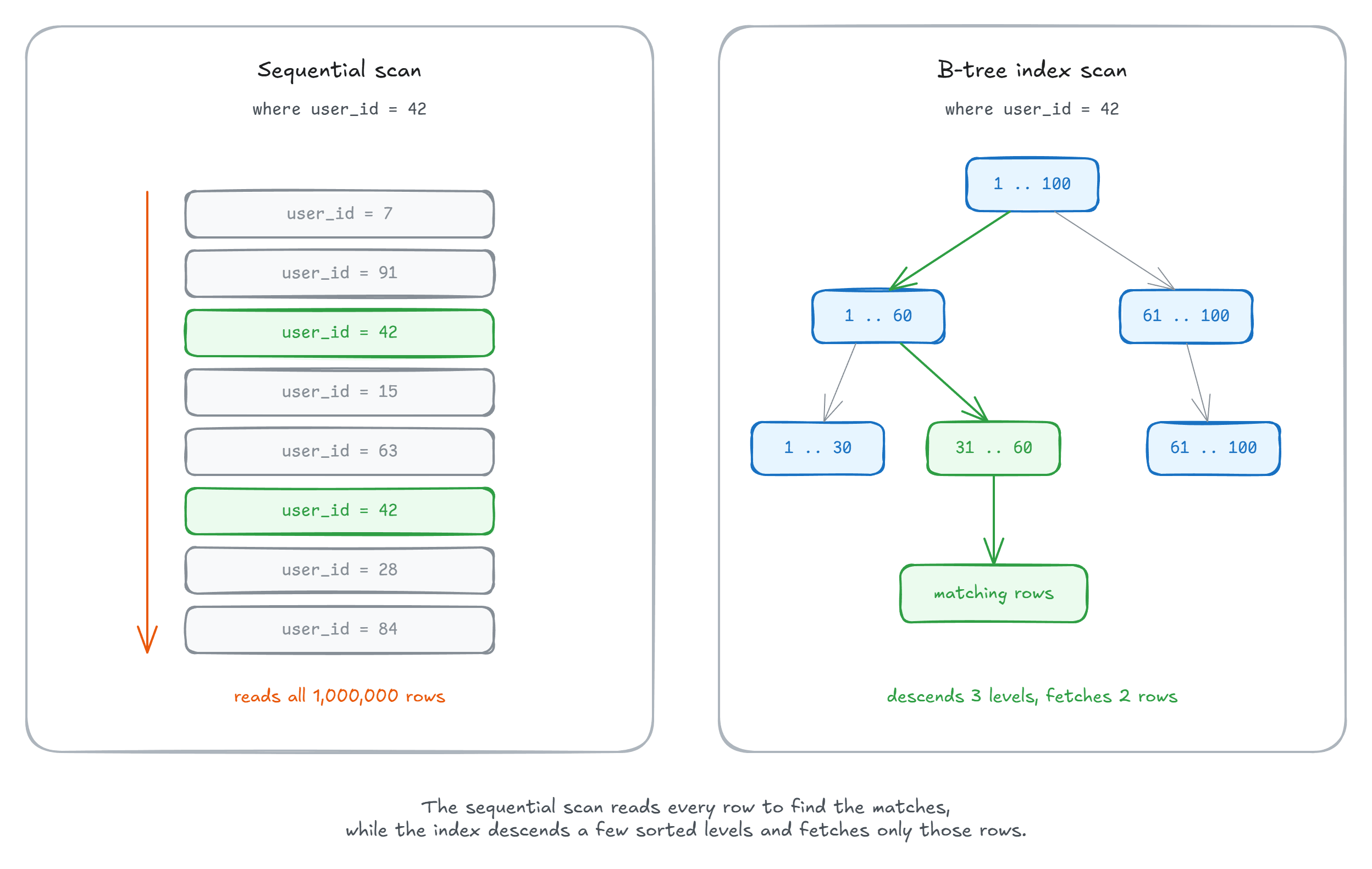
An index stores your chosen columns in sorted order, with every entry pointing back to its full row. The default kind in every major database is the B-tree: a shallow tree, a few levels deep even at millions of rows. A sequential scan reads all 1 million comments; an index scan descends those few levels and fetches only the matches.
Start With the Query, Not the Table
You don't pick indexes by staring at the schema; they come from the queries your application actually runs.
My comments table serves three access patterns:
- All comments by a user
- All comments for an issue
- Comments for an issue from one user, newest first, last month only
Reading the First Plan
The first pattern, with no index beyond the primary key:
EXPLAIN ANALYZE
SELECT COUNT(*)
FROM comments
WHERE user_id = 1;

---
Finalize Aggregate
  ->  Gather
        ->  Partial Aggregate
              ->  Parallel Seq Scan on comments  (actual time=0.010..11.727 rows=3356.67 loops=3)
                    Filter: (user_id = 1)
                    Rows Removed by Filter: 329977
Execution Time: 17.066 ms
EXPLAIN ANALYZE runs the query for real and prints the plan Postgres used: a Parallel Seq Scan reads all 1 million rows to count 10,070, in 17ms.
Create the index and rerun the query:
CREATE INDEX ix_comments_user_id
ON comments (user_id);
Aggregate
  ->  Index Only Scan using ix_comments_user_id on comments  (actual time=0.024..0.348 rows=10070.00 loops=1)
        Index Cond: (user_id = 1)
        Heap Fetches: 0
Execution Time: 0.612 ms
17ms down to 0.6ms.
The index contains the data needed for this COUNT(*), so Postgres can use an Index Only Scan.
The plan reports Heap Fetches: 0: this run avoided heap reads because the relevant pages were marked all-visible.
An index-only scan can still fetch heap rows to check visibility when those bits aren't set.
Column Order Is Everything
The third access pattern is the interesting one:
SELECT *
FROM comments
WHERE issue_id = 10
  AND user_id = 29
  AND created_at >= NOW() - INTERVAL '1 month'
ORDER BY created_at DESC;
With no index, it's another sequential scan: 16.6ms.
With single-column indexes on issue_id and user_id, Postgres intersects them with a BitmapAnd and still sorts the survivors: 0.6ms, in three steps.
A composite index answers the whole query in one motion:
CREATE INDEX ix_comments_issue_user_date
ON comments (issue_id, user_id, created_at DESC);
Index Scan using ix_comments_issue_user_date on comments  (actual time=0.019..0.026 rows=2.00 loops=1)
  Index Cond: ((issue_id = 10) AND (user_id = 29) AND (created_at >= (now() - '1 mon'::interval)))
Execution Time: 0.039 ms
All three conditions moved into the Index Cond, and the Sort is gone: the index already returns rows ordered by created_at DESC.
Runtime: 0.04ms, over 400x faster.
A composite index sorts by its first column, then the second within equal values, then the third.
Postgres jumps straight to the issue_id = 10, user_id = 29 section and reads it in order.
Leading-column constraints usually give a B-tree index its narrowest scan: issue_id alone works, and issue_id plus user_id narrows it further.
The leftmost prefix rule is a useful design guideline, not a ban on querying later columns.
PostgreSQL 18 can use a skip scan for user_id alone, making repeated searches across distinct issue_id values.
That is most useful when there are few distinct leading values; otherwise a broad index scan or sequential scan may be cheaper.
With 10,000 issues in this demo, keep the dedicated user_id index until plans and timings show it is unnecessary.
The rule of thumb: equality columns first, then the column you sort or range on.
The Query Our New Index Can't Serve
Every issue tracker runs this dashboard query: the 25 newest open issues, each with its latest comment, fetched by a LATERAL subquery:
SELECT i.id, c.body, c.created_at
FROM issues i
CROSS JOIN LATERAL (
  SELECT body, created_at
  FROM comments
  WHERE issue_id = i.id
  ORDER BY created_at DESC
  LIMIT 1
) c
WHERE i.status = 'open'
ORDER BY i.created_at DESC
LIMIT 25;
Nested Loop  (actual time=0.790..352.076 rows=6537.00 loops=1)
  ->  Seq Scan on issues i  (rows=6537.00 loops=1)
  ->  Limit  (rows=1.00 loops=6537)
        ->  Sort  (actual time=0.053..0.053 rows=1.00 loops=6537)
              ->  Bitmap Index Scan on ix_comments_issue_user_date  (loops=6537)
Execution Time: 435.794 ms
The composite index gets used, but its entries are sorted by user_id before created_at, so a Sort runs 6,537 times, once per open issue: 436ms.
Column order strikes again.
For this access path, created_at must come right after issue_id:
CREATE INDEX ix_comments_issue_date
ON comments (issue_id, created_at DESC);
Each probe becomes a one-row index scan: 25ms.
But the LIMIT still can't stop the loop, because issues arrive unsorted.
One more index streams them newest-first:
CREATE INDEX ix_issues_status_date
ON issues (status, created_at DESC);
Limit  (actual time=0.086..0.465 rows=25.00 loops=1)
  ->  Nested Loop  (actual time=0.085..0.463 rows=25.00 loops=1)
        ->  Index Scan using ix_issues_status_date on issues i  (rows=25.00 loops=1)
        ->  Limit  (rows=1.00 loops=25)
              ->  Index Scan using ix_comments_issue_date on comments  (rows=1.00 loops=25)
Execution Time: 0.489 ms
Every node reads only what it returns: 25 issues, 25 probes, one comment each. 0.5ms, nearly 900x faster.
What Do Indexes Cost?
Indexes add write and maintenance overhead, but not every change rewrites every index. For example, eligible HOT updates avoid new index entries when indexed values are unchanged and the updated row fits on the same heap page. They take disk space, too:
SELECT indexrelname AS index_name,
       pg_size_pretty(pg_relation_size(indexrelid)) AS size
FROM pg_stat_user_indexes
WHERE relname = 'comments';
Each composite index weighs 30 MB for 1 million comments, against about 7 MB per single-column one.
And (issue_id, created_at DESC) makes the plain issue_id index redundant, so drop it.
Index the queries you actually run, not the ones you might run someday.
Wrapping an indexed column in a function can prevent a direct lookup through the plain-column index. A matching expression index can help, a tradeoff I covered in Why Postgres Ignores Your Index.
Summary
- Design indexes from your queries, not your tables.
- Start with equality columns, then the sort or range column. Verify this B-tree rule of thumb against each query.
- Leading columns matter, but skip scans can use later predicates. Check the plan before dropping a dedicated index.
- An ordered index lets this dashboard's
LIMITstop early. Without it, the sort still consumes the matching issues. EXPLAIN ANALYZEis the proof. Read the plan, not just the timing.- Every index costs writes and space.
Once the indexes are right, cursor pagination is the natural next step, built on exactly these composite indexes.
Thanks for reading.
And stay awesome!
Frequently Asked Questions
What is a composite index?
A composite B-tree index stores several columns together, sorted by the first column, then by the second within equal values, then by the third. Postgres can jump straight to the section matching the leading columns and read it in order.
What order should columns go in a composite index?
Equality columns first, then the column you sort or range on. On the demo query, an index on (issue_id, user_id, created_at DESC) moved all three conditions into the index condition and removed the sort, going from 16.6ms to 0.04ms.
What is the leftmost prefix rule?
Leading-column constraints usually make a composite B-tree index most efficient. With (issue_id, user_id, created_at DESC), user_id alone can still use the index, but may require a broad scan. PostgreSQL 18 can use skip scans when repeated searches across a small number of distinct leading values are cheaper.
Why is my query still doing a sort when it uses an index?
The index returns rows in the wrong order. A dashboard query hit the index on (issue_id, user_id, created_at DESC), which sorts by user_id before created_at, so Postgres ran a sort once per open issue, 6,537 times, and the query took 436ms.
What is an Index Only Scan in Postgres?
An Index Only Scan gets the required data values from the index. It can still fetch heap rows to check visibility unless their pages are marked all-visible in the visibility map. The measured count query had zero heap fetches and ran in 0.6ms instead of 17ms.
Do indexes slow down writes?
Indexes add write and maintenance overhead, though the cost depends on the operation. PostgreSQL can avoid new index entries for eligible HOT updates. Indexes also use disk space: each comments composite index in this demo weighed 30 MB for 1 million rows, against about 7 MB per single-column index.


