
To test time-dependent code in .NET, inject TimeProvider and use FakeTimeProvider to advance time in your tests.
This lets you check exact expiry boundaries and complete delays without waiting.
Delays and timed cancellation must use the same provider; direct calls to DateTime.UtcNow still read the real clock.
Your usage changes fast, but your spend doesn't have to. Archera guarantees cloud commitments on AWS / Azure / GCP; you get reservation savings without the downside. Start with $0 platform fees.
AWS Guide to Cloud Architecture Diagrams
Enhance visibility into your cloud architecture with expert insights from AWS + Datadog.
In this ebook,
AWS Solutions Architects Jason Mimick and James Wenzel guide you through best practices
for creating professional and impactful diagrams.
Download the ebook today!
I have time-dependent code in my application that I need to test.
Take an invitation link that expires after five minutes. I want to check that you can accept it before it expires, and that you can't accept it afterward.
But I don't want every test to wait five minutes. Shortening the expiry to a few milliseconds still leaves me depending on the runner's timing. And there's a case that's easy to miss: what happens at exactly the expiry time?
I'd rather tell the test what time it is.
That's what TimeProvider, built into .NET 8 and later, lets us do.
Make the Clock a Dependency
The invitation needs to compare the current time with its expiry timestamp.
I'll give the policy a clock so the test can choose what "now" means.
Here's InvitationPolicy.cs:
public sealed class InvitationPolicy(TimeProvider clock)
{
    public bool CanAccept(DateTimeOffset expiresAt) =>
        clock.GetUtcNow() < expiresAt;
}
I'm treating the invitation as expired the moment it reaches expiresAt.
That's why the comparison uses <.
Changing it to <= would let the invitation through, so I want a test that catches that change.
In production, we still need the real clock.
Register it in your API's Program.cs:
builder.Services.AddSingleton(TimeProvider.System);
builder.Services.AddSingleton<InvitationPolicy>();
Your handler can now inject InvitationPolicy and pass the expiry timestamp from the database.
This only checks expiry; you still need authorization and protection against accepting the same invitation twice.
If this rule already lives in a domain entity, I'd pass the current DateTimeOffset into its method instead.
You don't need a clock service inside every entity.
Test the Exact Boundary
Add the testing package to your xUnit project:
dotnet add package Microsoft.Extensions.TimeProvider.Testing
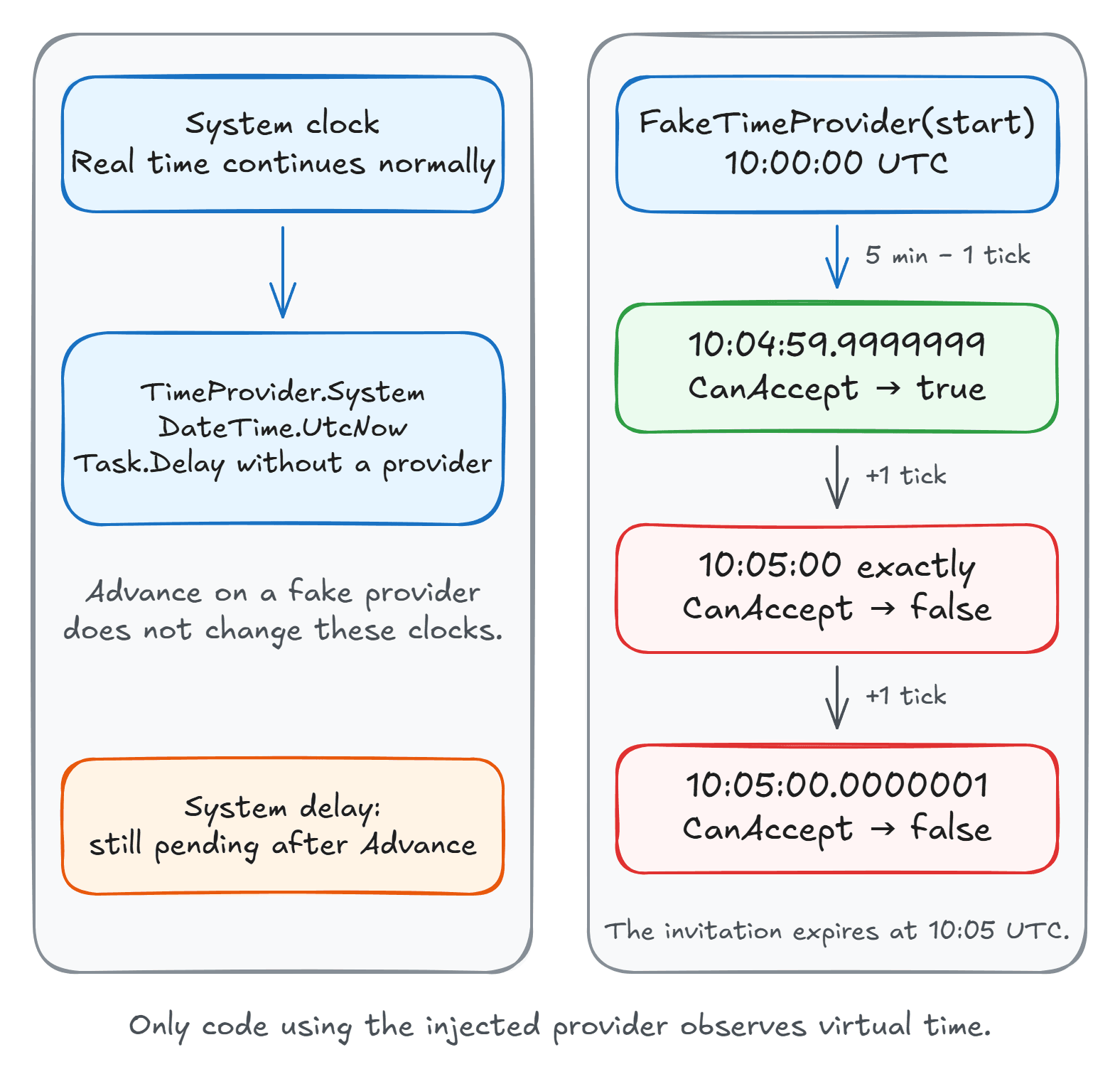
In ClockTests.cs, use a FakeTimeProvider to check just before expiry, at expiry, and just after:
using Microsoft.Extensions.Time.Testing;
using Xunit;

public sealed class ClockTests
{
    [Fact]
    public void Invitation_expires_at_the_boundary()
    {
        var start = new DateTimeOffset(2026, 9, 26, 10, 0, 0, TimeSpan.Zero);
        var clock = new FakeTimeProvider(start);
        var policy = new InvitationPolicy(clock);
        var expiresAt = start.AddMinutes(5);

        clock.Advance(TimeSpan.FromMinutes(5) - TimeSpan.FromTicks(1));
        Assert.True(policy.CanAccept(expiresAt));

        clock.Advance(TimeSpan.FromTicks(1));
        Assert.False(policy.CanAccept(expiresAt));

        clock.Advance(TimeSpan.FromTicks(1));
        Assert.False(policy.CanAccept(expiresAt));
    }
}
Advance moves the fake clock forward without changing your machine's clock.
It stays at that instant until you advance it again, so a slow CI runner won't change what these assertions see.
Give each test its own instance so parallel tests can't interfere with each other.
Now try changing < to <= in the policy.
The middle assertion fails, even though the checks before and after the deadline still pass.
Testing only before and after expiry would miss that bug.
Test a Delay Without Waiting
So far, we've tested code that reads the current time.
Your code might also wait five minutes before retrying a failed operation.
If it uses Task.Delay(TimeSpan.FromMinutes(5)), that wait still uses real time.
Advancing our fake clock won't complete that delay, because the delay isn't using it.
To control the wait, pass clock to Task.Delay, as this test in ClockTests.cs shows:
[Fact]
public async Task Delay_completes_when_time_advances()
{
    var clock = new FakeTimeProvider();
    Task delay = Task.Delay(TimeSpan.FromMinutes(5), clock);
    Assert.False(delay.IsCompleted);

    clock.Advance(TimeSpan.FromMinutes(5));
    await delay.WaitAsync(TimeSpan.FromSeconds(5));
}
The first assertion checks that the delay hasn't completed yet. Advancing the fake clock by five minutes completes it immediately, so the test can finish without waiting those five minutes.
WaitAsync doesn't add another five-second delay.
It's a real-time limit: if you accidentally leave out clock, the test fails after five seconds instead of waiting five minutes.
Create the delay before advancing the clock, so there's a timer to complete.
For a retry loop, wait until each next delay is scheduled before advancing again; one large Advance call won't necessarily run the whole loop.
Check That the Timeout Cancels the Work
Now suppose an operation has a one-minute timeout.
I want to check that the work actually stops waiting when the deadline arrives.
The CancellationTokenSource overload that accepts TimeProvider lets us test that too.
I'll use a long delay to stand in for pending work.
Add this test to ClockTests.cs:
[Fact]
public async Task Timeout_cancels_pending_work()
{
    var clock = new FakeTimeProvider();
    using var timeout = new CancellationTokenSource(
        TimeSpan.FromMinutes(1), clock);
    Task work = Task.Delay(TimeSpan.FromHours(1), clock, timeout.Token);

    clock.Advance(TimeSpan.FromMinutes(1) - TimeSpan.FromTicks(1));
    Assert.False(timeout.IsCancellationRequested);
    Assert.False(work.IsCompleted);

    clock.Advance(TimeSpan.FromTicks(1));
    await Assert.ThrowsAnyAsync<OperationCanceledException>(
        () => work.WaitAsync(TimeSpan.FromSeconds(5)));
}
Try removing clock from the timeout, or timeout.Token from the delay.
Either way, the operation keeps waiting and the test fails on its five-second limit.
Cancellation is cooperative, though. Your HTTP client or database driver still has to observe the token. I'd also test what your handler returns when that happens.
Summary
I'd start with one expiry rule in your codebase. Replace its direct clock read and test the exact moment the result should change. If it also schedules work, pass the provider to those timers too.
You do have to pass the provider through the code that reads time or schedules work. A database or another process still has its own clock, so keep integration tests for things like database timestamps or cache expiry.
The TimeProvider lab has the complete tests, setup instructions, and a few changes you can make to see which bugs they catch.
I cover organizing tests around application use cases in Pragmatic Clean Architecture.
Thanks for reading.
And stay awesome!
Frequently Asked Questions
How do you test time-dependent code in .NET?
Inject TimeProvider and register TimeProvider.System in production. In tests, use a separate FakeTimeProvider with a fixed starting time, advance it explicitly, and assert the behavior immediately before, at, and after the deadline.
Does FakeTimeProvider change DateTime.UtcNow?
No. It only controls code that reads time or schedules timers through that provider. DateTime.UtcNow and Task.Delay calls without the provider still use real time.
Which package contains FakeTimeProvider?
Microsoft.Extensions.TimeProvider.Testing provides FakeTimeProvider in the Microsoft.Extensions.Time.Testing namespace. TimeProvider itself is built into .NET 8 and later.
