
ASP.NET Core validates a JWT by its signature and expiry, so a password change doesn't revoke the tokens you already issued.
The standard fix pairs a short-lived access token with a refresh token you can revoke, and treats a reused refresh token as stolen.
For immediate revocation, you can also compare a token_version claim with the user row on every request.
Localization that doesn't eat your sprint
Finding and translating every user-facing string by hand is slow and error-prone.
Let the AI-assisted localization in Telerik UI for Blazor do the heavy lifting, so your team can get back to building features.
See how it works.
Building new agentic features into your next release doesn't mean starting from scratch. Explore 4,000+ AI tools and agents in AWS Marketplace, alongside the cloud infrastructure and services to build and scale AI-powered applications. Learn more about AWS ISV.
This was a rough week for security. PHP disclosed two pre-auth remote code execution bugs, and CISA told everyone to patch immediately. GitLab fixed a CVSS 10.0 flaw that reaches back to version 7.0.
None of these is a JWT bug, but they made me check what my own APIs do with a leaked token.
With a plain JWT in ASP.NET Core, a leaked token keeps working until it expires. Here's why, and the two steps I use to fix it.
Why a Password Change Doesn't Stop a JWT
Here's a typical JWT setup in Program.cs:
builder.Services.AddAuthentication(JwtBearerDefaults.AuthenticationScheme)
    .AddJwtBearer(options =>
    {
        options.TokenValidationParameters = new TokenValidationParameters
        {
            ValidIssuer = "jwt-demo",
            ValidAudience = "jwt-demo",
            IssuerSigningKey = signingKey,
            ClockSkew = TimeSpan.FromSeconds(30)
        };
    });
On every request, the JWT bearer handler
checks the token's signature against IssuerSigningKey, then its issuer, audience, and exp claim.
It never reads your database.
That's the whole point of a JWT: any instance can validate it without a session store, so you can scale the API without shared state. It's also the problem. Nothing you change on the user row gets reflected in a token you already issued.
Step 1: Short Access Tokens and Revocable Refresh Tokens
This is where I'd start. It's the standard design, and most apps need nothing more.
Give the access token a short lifetime (I use 5 minutes) and pair it with a long-lived refresh token, stored as a hash in a table. When the access token expires, the client trades the refresh token for a new pair:
app.MapPost("/auth/refresh", async (RefreshRequest request, AppDbContext db, TokenService tokens) =>
{
    var hash = TokenService.Hash(request.RefreshToken);
    var stored = await db.RefreshTokens.Include(token => token.User)
        .SingleOrDefaultAsync(token => token.TokenHash == hash);
    if (stored is null || stored.ExpiresAt < DateTimeOffset.UtcNow)
    {
        return Results.Unauthorized();
    }

    var claimed = await db.RefreshTokens
        .Where(token => token.Id == stored.Id && token.UsedAt == null)
        .ExecuteUpdateAsync(set => set.SetProperty(token => token.UsedAt, DateTimeOffset.UtcNow));
    if (claimed == 0)
    {
        // Reused: revoke every token from that login.
        await db.RefreshTokens.Where(token => token.FamilyId == stored.FamilyId).ExecuteDeleteAsync();
        return Results.Unauthorized();
    }

    var session = tokens.CreateSession(stored.User, db, previous: stored);
    await db.SaveChangesAsync();
    return Results.Ok(session);
});
UsedAt == null is the important check here.
Only one request can mark a refresh token as used, even if two arrive at the same moment.
Every token from one login shares a FamilyId and the family's ExpiresAt,
so the session ends 14 days after login (or whatever lifetime you configure), however often it refreshes.
This is also called refresh token rotation
or daisy chaining.
Without reuse detection, an attacker replaying the refresh token can keep refreshing their session, even after the user logged in again. With it, the user's next refresh gets a 401 and revokes every token from that login, including the attacker's. Edge case: two browser tabs refreshing at the same time also look like reuse, so refresh from one place in the client.
Reuse detection has one blind spot: it only fires when the real client refreshes. If the user's laptop stays closed, the attacker keeps going until the chain lifetime runs out. DPoP goes further by binding each token to a key on the client, so a copy is useless on its own.
Each login is its own family, so I also put its FamilyId in the access token as a sid claim.
Logout then ends one device, and a password change ends all of them:
// Logout: this device only
await db.RefreshTokens.Where(token => token.FamilyId == sessionId).ExecuteDeleteAsync();

// Password change or "sign out everywhere": every device
await db.RefreshTokens.Where(token => token.UserId == userId).ExecuteDeleteAsync();
The rest of the setup is in JWT authentication in ASP.NET Core.
However this still leaves a gap. The old refresh token gets a 401 after the password change, but the old access token keeps working until it expires. With a 1-minute access token, it still works 60 seconds later and fails by 90 seconds: the lifetime plus 30 seconds of clock skew. With 5-minute tokens, that's a window of up to five and a half minutes. For most apps, I can live with this.
Step 2: Consider a Version Check on Every Request
Sometimes waiting for the token to expire is not acceptable. If you just deactivated an account, or you know a token leaked, you want it dead now.
For that, you can consider a version number on the user. Tradeoff: every request now asks a store (database) about the token, so the JWT flow isn't "stateless" anymore.
Add a token_version column, starting at 0, and copy it into the token as a claim:
new Claim("token_version", user.TokenVersion.ToString()),
On a password change, a sign-out from every device, or refresh token reuse,
increment it with ExecuteUpdateAsync.
Then compare the claim with the row in OnTokenValidated, which runs after the signature and expiry checks pass:
OnTokenValidated = async context =>
{
    var db = context.HttpContext.RequestServices.GetRequiredService<AppDbContext>();
    var user = await db.Users
        .Where(candidate => candidate.Id == userId)
        .Select(candidate => new { candidate.IsActive, candidate.TokenVersion })
        .SingleOrDefaultAsync();
    if (user is null || !user.IsActive || user.TokenVersion != tokenVersion)
    {
        context.Fail("The session is no longer valid.");
    }
}
context.Fail turns the request into a 401.
I read is_active in the same query, so deactivating a user ends their sessions too.
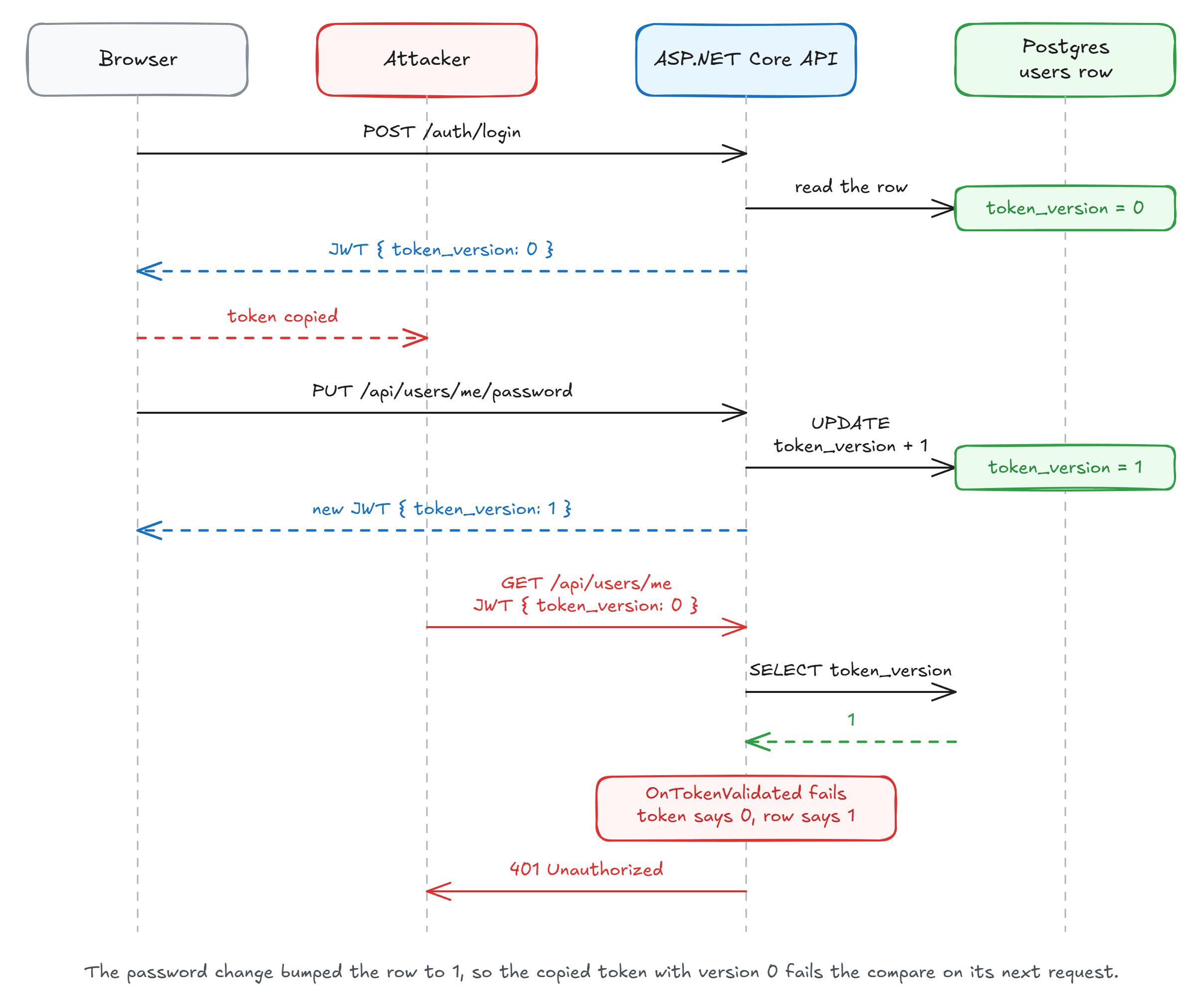
With the check on, the old access token gets a 401 right after the password change, and after refresh token reuse so does the attacker's.
What the Check Costs
I load-tested an endpoint with no other database work using k6, with Postgres and Redis in Docker Desktop on the same machine. The 1-user rows average three 60-second runs, and the 64-user rows are one run each:
| Load | Check | Requests/s | Average | p99 |
|---|---|---|---|---|
| 1 user | off | 4,678 | 0.16 ms | 0.63 ms |
| 1 user | Postgres | 1,210 | 0.81 ms | 1.78 ms |
| 1 user | Redis cache | 1,824 | 0.43 ms | 1.12 ms |
| 64 users | off | 160,063 | 0.31 ms | 1.54 ms |
| 64 users | Postgres | 20,987 | 2.96 ms | 12.78 ms |
| 64 users | Redis cache | 76,106 | 0.78 ms | 1.74 ms |
With one user, the Postgres lookup adds about 0.65 ms. Under load, throughput drops almost eight times. This endpoint does nothing else, so that's the worst case.
If that hurts your performance, put a cache in front of the DB lookup. Redis added 0.27 ms and kept about half the throughput.
I'd keep Postgres as the source of truth, though. With Redis flushed or stopped, the old token still got a 401 from the database.
What the Check Gives Up
A version bump signs out every device, which is why a normal logout only deletes one family. Logging out on your laptop shouldn't kick you out on your phone.
If one device's logout has to be immediate too, check the sid in the same query:
.Select(candidate => new
{
    candidate.IsActive,
    candidate.TokenVersion,
    SessionActive = db.RefreshTokens.Any(token => token.FamilyId == sessionId)
})
With that, the laptop's access token would get a 401 at logout, and the phone keeps working. It added about 0.07 ms per request with one user and cut throughput by about a tenth with 64 users.
The downside is authentication also fails when Postgres does. That's the price of asking the database on every request.
Summary
A JWT outlives a password change because the bearer handler never reads the user row. That's what keeps it stateless, and it's why revocation takes some work.
If you only do one thing, do step 1: short access tokens and refresh tokens you can delete, one family per login. Treat a reused refresh token as stolen, and cap each login with an absolute expiry.
Reach for the version check when a few minutes is too long.
A cache keeps its cost small, and a sid check covers a single device's logout.
This is also a good example of why auth is difficult to implement properly. There are many edge cases that perhaps never crossed your mind. Of course, nobody plans for an attacker stealing a user's access tokens. Still, it's a strong argument for using an identity provider.
Thanks for reading.
And stay awesome!
Frequently Asked Questions
Does changing a password invalidate a JWT in ASP.NET Core?
No. The JWT bearer handler checks the signature, issuer, audience, and expiry. A password change touches none of those, so a token you issued before the change stays valid until it expires unless you add your own check.
Do refresh tokens solve JWT revocation?
Mostly. Deleting the refresh token ends the session within one access token lifetime, for example 5 minutes. A token stolen inside that window keeps working until it expires. If that window is too long, or the JWT is the whole session, consider a per-request check as well.
What happens if an attacker steals a refresh token?
With plain rotation, whoever refreshes first gets a new token, and the attacker can keep refreshing even after the user logs in again. With reuse detection, the API marks each refresh token as used and revokes every token from that login when a used one comes back, so the stolen tokens stop working the next time the real client refreshes.
How do you log out one device without logging out the others?
Give each login its own refresh token family and put the family id in the access token as a sid claim. Logout deletes only that family, so other devices keep refreshing. A password change or a sign-out from every device deletes all of the user's refresh tokens and bumps token_version. To end the logged-out device's access token at once, also check in OnTokenValidated that its family still exists.
How does a token_version claim revoke a JWT?
The user row stores an integer version, and the API copies it into the token as a claim. OnTokenValidated reads the row on every request and fails authentication when the claim and the column differ. A password change or a sign-out from every device increments the column, which invalidates every token issued before the bump.
What does the token_version check cost?
One lookup per authenticated request. In my k6 test, a Postgres primary-key lookup added about 0.65 ms per request with one user, and a Redis cache in front of it added about 0.27 ms. With 64 concurrent users, an endpoint with no other work dropped from about 160,000 to 21,000 requests per second with Postgres, and to 76,000 with the cache.


