

JWT authentication in ASP.NET Core takes one package and a bit of configuration: install Microsoft.AspNetCore.Authentication.JwtBearer, configure token validation in AddJwtBearer, and issue short-lived access tokens paired with rotating refresh tokens.
A setup that works can still be insecure: weak keys, long-lived tokens, and skipped validation checks are each one config line away.
This guide covers the full setup: token generation, validation, refresh tokens, and the configuration mistakes that weaken an otherwise sound design. If another identity provider issues the token, use the stricter third-party JWT validation checklist.
What Is JWT Authentication?
JWT (JSON Web Token) is a compact, URL-safe token format used to represent claims between two parties. It's the most common way to authenticate REST APIs.
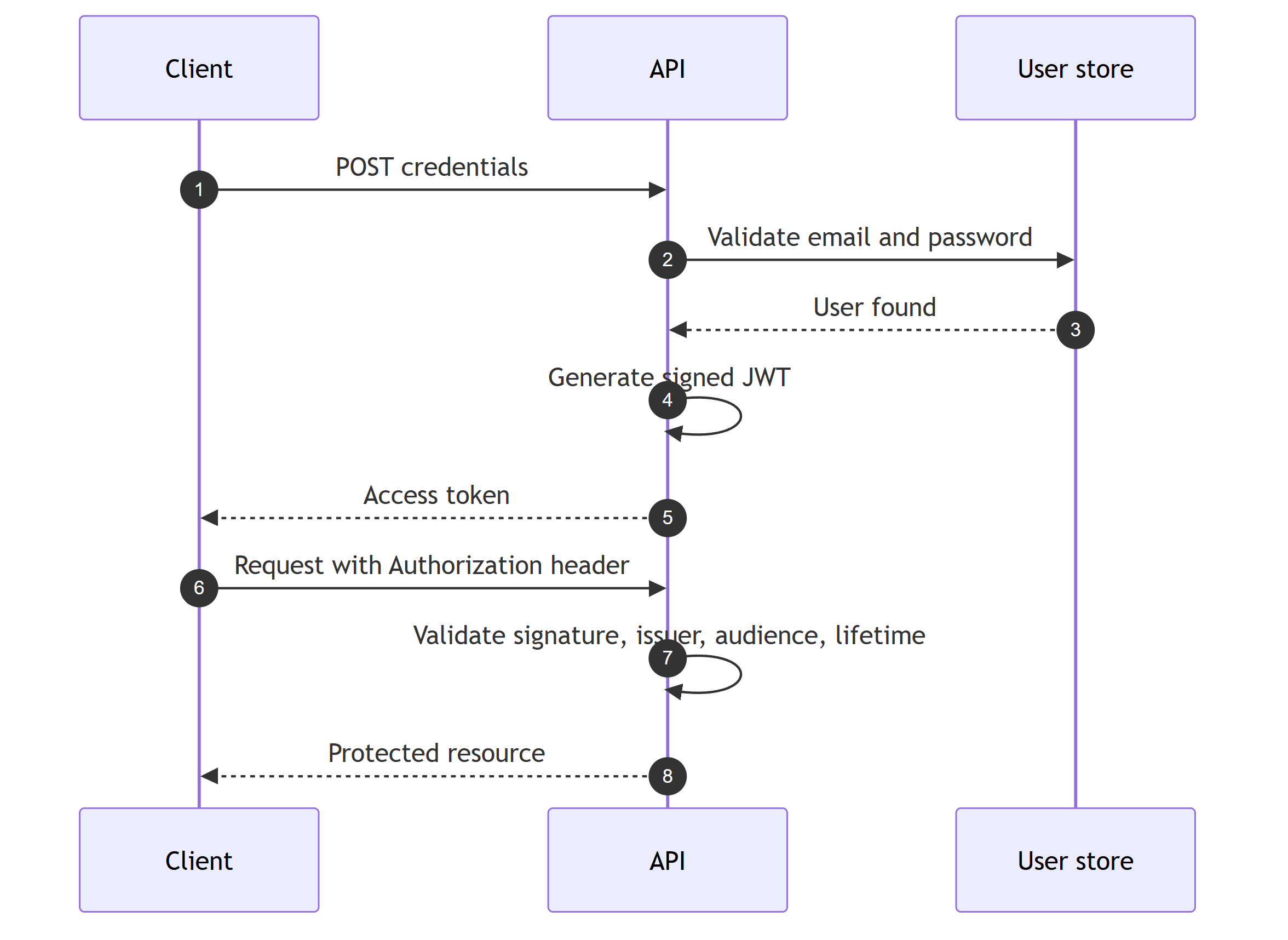
The flow:
- Client sends credentials (username + password)
- Server validates credentials and generates a JWT
- Client includes the JWT in the
Authorizationheader of subsequent requests - Server validates the JWT on every request
Setting Up JWT Authentication
Install the required package:
dotnet add package Microsoft.AspNetCore.Authentication.JwtBearer
Configure the authentication middleware:
builder.Services
    .AddAuthentication(JwtBearerDefaults.AuthenticationScheme)
    .AddJwtBearer(options =>
    {
        options.MapInboundClaims = false;

        options.TokenValidationParameters = new TokenValidationParameters
        {
            ValidateIssuer = true,
            ValidateAudience = true,
            ValidateLifetime = true,
            ValidateIssuerSigningKey = true,
            ValidIssuer = builder.Configuration["Jwt:Issuer"],
            ValidAudience = builder.Configuration["Jwt:Audience"],
            IssuerSigningKey = new SymmetricSecurityKey(
                Encoding.UTF8.GetBytes(builder.Configuration["Jwt:SecretKey"]!)),
            ClockSkew = TimeSpan.Zero  // Disable the default 5-minute grace period
        };
    });

builder.Services.AddAuthorization();
Note the MapInboundClaims = false line.
By default, the JWT handler renames standard claims to legacy XML claim type URIs, so sub arrives as ClaimTypes.NameIdentifier and FindFirst(JwtRegisteredClaimNames.Sub) returns null.
Disabling the mapping keeps claims exactly as they appear in the token, and it is the number one JWT gotcha I see in real projects.
Add the middleware in the correct order:
app.UseAuthentication();
app.UseAuthorization();
Generating JWT Tokens
Create a token provider service that issues both tokens: a short-lived JWT access token and a random refresh token persisted to the database.
The RefreshToken entity is defined in the refresh tokens section below.
public sealed class TokenProvider
{
    private readonly IConfiguration _configuration;
    private readonly AppDbContext _dbContext;

    public TokenProvider(IConfiguration configuration, AppDbContext dbContext)
    {
        _configuration = configuration;
        _dbContext = dbContext;
    }

    public (string AccessToken, string RefreshToken) GenerateTokens(User user)
    {
        var accessToken = GenerateAccessToken(user);

        var refreshToken = new RefreshToken
        {
            Id = Guid.NewGuid(),
            UserId = user.Id,
            Token = Convert.ToBase64String(RandomNumberGenerator.GetBytes(64)),
            ExpiresAt = DateTime.UtcNow.AddDays(7),
            CreatedAt = DateTime.UtcNow
        };

        _dbContext.RefreshTokens.Add(refreshToken);

        return (accessToken, refreshToken.Token);
    }

    private string GenerateAccessToken(User user)
    {
        var claims = new List<Claim>
        {
            new(JwtRegisteredClaimNames.Sub, user.Id.ToString()),
            new(JwtRegisteredClaimNames.Email, user.Email),
            new(JwtRegisteredClaimNames.Name, user.FullName),
            new("permission", "orders:read"),
            new("permission", "orders:write")
        };

        // Add role claims
        foreach (var role in user.Roles)
        {
            claims.Add(new(ClaimTypes.Role, role.Name));
        }

        var key = new SymmetricSecurityKey(
            Encoding.UTF8.GetBytes(_configuration["Jwt:SecretKey"]!));

        var credentials = new SigningCredentials(key, SecurityAlgorithms.HmacSha256);

        var tokenDescriptor = new SecurityTokenDescriptor
        {
            Subject = new ClaimsIdentity(claims),
            Expires = DateTime.UtcNow.AddMinutes(30),
            SigningCredentials = credentials,
            Issuer = _configuration["Jwt:Issuer"],
            Audience = _configuration["Jwt:Audience"]
        };

        return new JsonWebTokenHandler().CreateToken(tokenDescriptor);
    }
}
I'm using JsonWebTokenHandler from Microsoft.IdentityModel.JsonWebTokens here, not the legacy JwtSecurityTokenHandler.
It's the same handler ASP.NET Core uses to validate tokens since .NET 8, and it ships transitively with the JwtBearer package.
Register the provider (scoped, because it uses the DbContext):
builder.Services.AddScoped<TokenProvider>();
The Login Endpoint
The login endpoint returns both tokens. The access token authenticates requests, and the refresh token is the entry point for the refresh flow covered below.
public sealed record LoginRequest(string Email, string Password);

public sealed record LoginResponse(string AccessToken, string RefreshToken);
app.MapPost("/api/auth/login", async (
    LoginRequest request,
    IUserRepository userRepository,
    IPasswordHasher passwordHasher,
    TokenProvider tokenProvider,
    AppDbContext dbContext) =>
{
    var user = await userRepository.GetByEmailAsync(request.Email);

    if (user is null || !passwordHasher.Verify(request.Password, user.PasswordHash))
    {
        return Results.Unauthorized();
    }

    var (accessToken, refreshToken) = tokenProvider.GenerateTokens(user);

    await dbContext.SaveChangesAsync();

    return Results.Ok(new LoginResponse(accessToken, refreshToken));
});
The SaveChangesAsync call persists the refresh token that GenerateTokens added to the DbContext.
Security note: Always return the same error for "user not found" and "wrong password."
This keeps the response itself from revealing which emails are registered.
The check above still skips passwordHasher.Verify for unknown emails and answers them faster, so verify the password against a dummy hash in that case if you also need to close the timing gap.
Protecting Endpoints
Use RequireAuthorization() on Minimal API endpoints:
// Requires any authenticated user
app.MapGet("/api/orders", GetOrders)
    .RequireAuthorization();

// Requires specific role
app.MapPost("/api/orders", CreateOrder)
    .RequireAuthorization(policy => policy.RequireRole("Admin", "Manager"));

// Requires specific claim
app.MapDelete("/api/orders/{id}", DeleteOrder)
    .RequireAuthorization(policy => policy.RequireClaim("permission", "orders:delete"));
Or use the [Authorize] attribute on controllers:
[Authorize]
[ApiController]
[Route("api/[controller]")]
public class OrdersController : ControllerBase
{
    [Authorize(Roles = "Admin")]
    [HttpDelete("{id}")]
    public async Task<IActionResult> Delete(Guid id) { ... }
}
Accessing User Claims
Get the current user's information from the JWT claims:
public sealed class UserContext : IUserContext
{
    private readonly IHttpContextAccessor _httpContextAccessor;

    public UserContext(IHttpContextAccessor httpContextAccessor)
    {
        _httpContextAccessor = httpContextAccessor;
    }

    public Guid UserId => Guid.Parse(
        _httpContextAccessor.HttpContext?.User
            .FindFirst(JwtRegisteredClaimNames.Sub)?.Value
        ?? throw new UnauthorizedAccessException());

    public string Email =>
        _httpContextAccessor.HttpContext?.User
            .FindFirst(JwtRegisteredClaimNames.Email)?.Value
        ?? throw new UnauthorizedAccessException();

    public bool IsAuthenticated =>
        _httpContextAccessor.HttpContext?.User.Identity?.IsAuthenticated ?? false;
}
Looking up JwtRegisteredClaimNames.Sub only works because we set MapInboundClaims = false earlier.
With the default mapping, sub would arrive as ClaimTypes.NameIdentifier and UserId would throw for every authenticated user.
Register it:
builder.Services.AddHttpContextAccessor();
builder.Services.AddScoped<IUserContext, UserContext>();
Inject IUserContext into your Application layer to access the current user without depending on ASP.NET Core.
I covered this abstraction in depth in getting the current user in Clean Architecture.
For authorization beyond simple role checks, see my guide to claims-based authorization.
Refresh Tokens
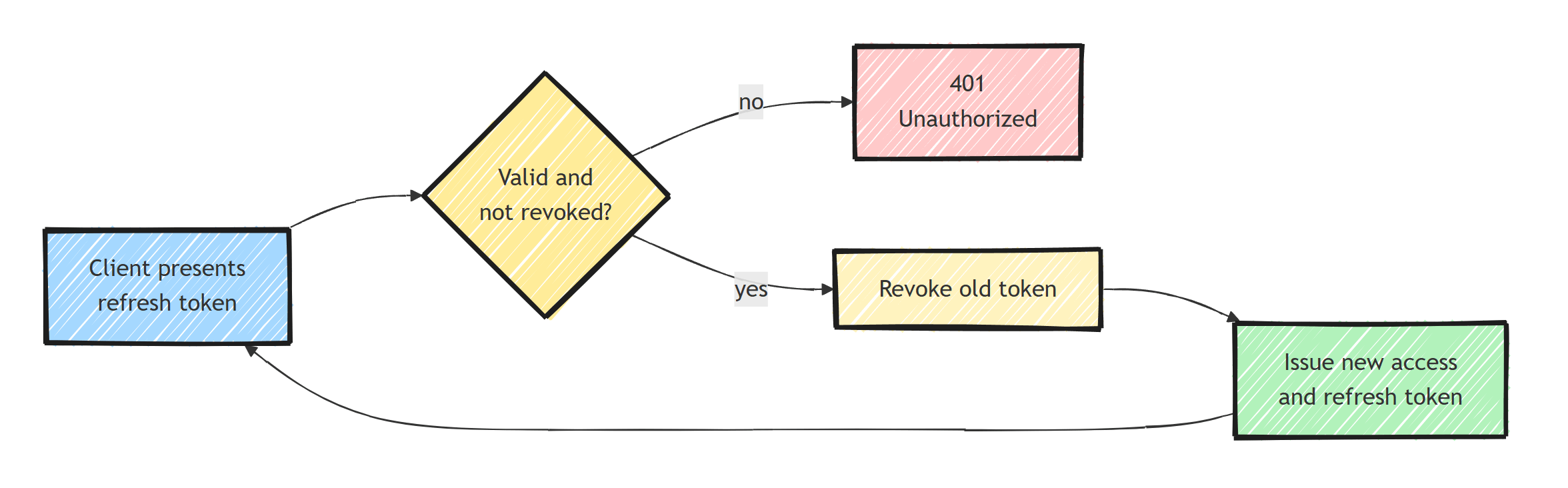
Access tokens should be short-lived (15-30 minutes). Use refresh tokens for extended sessions.
public sealed class RefreshToken
{
    public Guid Id { get; set; }
    public Guid UserId { get; set; }
    public string Token { get; set; }
    public DateTime ExpiresAt { get; set; }
    public bool IsRevoked { get; set; }
    public DateTime CreatedAt { get; set; }
}
This is the entity that TokenProvider.GenerateTokens stores on every login.
The client sends the refresh token back to exchange it for a new token pair:
public sealed record RefreshRequest(string RefreshToken);
app.MapPost("/api/auth/refresh", async (
    RefreshRequest request,
    AppDbContext dbContext,
    TokenProvider tokenProvider,
    IUserRepository userRepository) =>
{
    var storedToken = await dbContext.RefreshTokens
        .FirstOrDefaultAsync(r =>
            r.Token == request.RefreshToken &&
            !r.IsRevoked &&
            r.ExpiresAt > DateTime.UtcNow);

    if (storedToken is null)
    {
        return Results.Unauthorized();
    }

    // Rotate the refresh token
    storedToken.IsRevoked = true;

    var user = await userRepository.GetByIdAsync(storedToken.UserId);
    var (accessToken, newRefreshToken) = tokenProvider.GenerateTokens(user!);

    await dbContext.SaveChangesAsync();

    return Results.Ok(new LoginResponse(accessToken, newRefreshToken));
});
Key security practices:
- Rotate refresh tokens on every use (issue a new one, revoke the old)
- Store refresh tokens in the database (not just in memory)
- Set a reasonable expiration (7-14 days)
- Revoke all refresh tokens when the user changes their password
Rotation also lets you detect stolen tokens: if a revoked token is ever presented again, someone replayed it, and you should revoke the whole session family. I dig into that mechanism in refresh token rotation in ASP.NET Core.
Configuration
Store JWT settings in appsettings.json:
{
  "Jwt": {
    "Issuer": "https://myapp.com",
    "Audience": "https://myapp.com",
    "SecretKey": "your-256-bit-secret-key-here-minimum-32-chars"
  }
}
For production, use a proper secret management solution instead of appsettings.json.
Common Security Mistakes
-
Weak signing keys. Use at least 256-bit keys for HMAC. Better: use RSA keys.
-
Storing tokens in localStorage. Vulnerable to XSS. Use
HttpOnlycookies for web applications. -
Long-lived access tokens. Keep them short (15-30 minutes). Use refresh tokens for longer sessions.
-
Not validating all token properties. Always validate issuer, audience, lifetime, and signing key.
-
Setting
ClockSkewtoo high. The default 5-minute clock skew means expired tokens are valid for 5 extra minutes. Set it toTimeSpan.Zeroand handle clock synchronization at the infrastructure level. -
Including sensitive data in the payload. JWTs are signed but not encrypted by default. Don't put passwords, SSNs, or API keys in claims.
Summary
JWT authentication in ASP.NET Core is straightforward:
- Configure
AddJwtBearerwith proper validation andMapInboundClaims = false - Create a
TokenProviderthat generates access and refresh tokens - Use
RequireAuthorization()on endpoints - Implement refresh token rotation for extended sessions
- Store secrets properly and keep access tokens short-lived
For more advanced scenarios, consider using an identity provider like Keycloak instead of managing JWTs yourself.
Frequently Asked Questions
What is a JWT?
A JSON Web Token is a compact, signed token containing claims about a user. The server validates the signature on every request, so no session state is needed. JWTs are signed, not encrypted, so anyone can read the payload.
How long should a JWT access token live?
Keep access tokens short-lived, typically 15 to 30 minutes. Pair them with refresh tokens stored server-side so sessions can continue without re-login and can be revoked when needed.
Where should I store JWTs in a web application?
Avoid localStorage, which any XSS payload can read. HttpOnly cookies are safer for browser apps, though they require CSRF protection. Mobile and desktop clients can use platform secure storage.
Why set ClockSkew to zero in ASP.NET Core JWT validation?
The default 5-minute clock skew means an expired token is still accepted for up to 5 extra minutes. Setting ClockSkew to TimeSpan.Zero enforces exact expiration, assuming your servers use synchronized clocks.
Should I build JWT auth myself or use an identity provider?
For anything beyond a simple API, an identity provider like Keycloak, Auth0, or Microsoft Entra ID is usually the better choice. You get password policies, MFA, token rotation, and revocation without maintaining that security-critical code yourself.
