
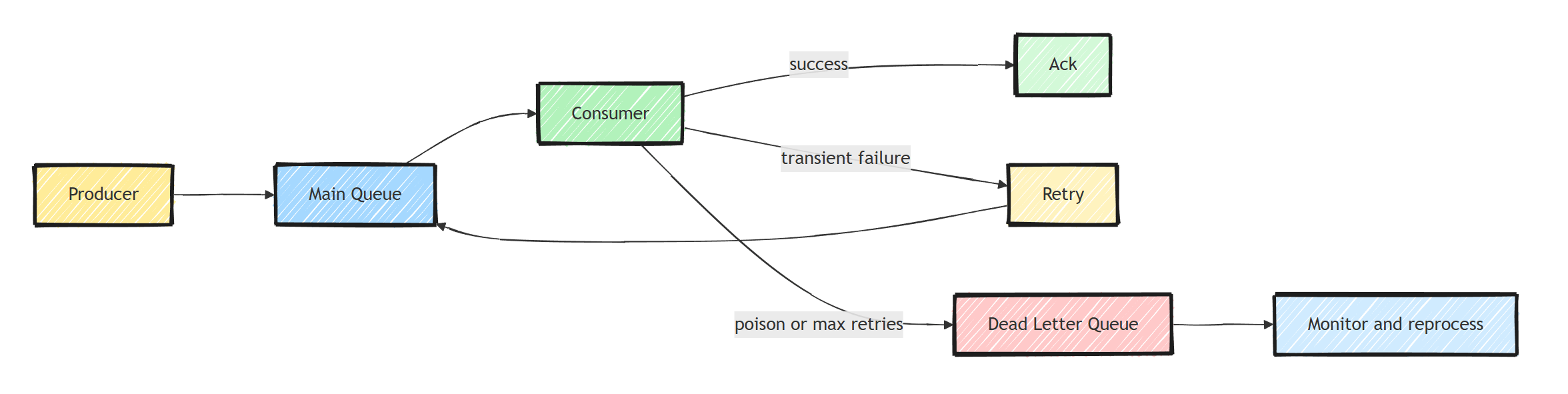
A dead letter queue stores messages that cannot currently be processed, separating them from healthy traffic. In RabbitMQ, a dead-letter exchange routes rejected or expired messages to a queue; MassTransit instead moves failed deliveries to an endpoint error queue. Both need monitoring, retained failure context, and controlled replay after the underlying problem is fixed.
What Is a Dead Letter Queue?
A DLQ gives failed work a place to remain while someone investigates. It does not repair the message or prove that replay is safe. Define who owns each queue, how long failures are retained, and which conditions trigger an alert.
That operating process belongs beside the delivery and idempotency rules of your event-driven architecture.
Why Messages End Up Dead-Lettered
Messages fail for various reasons:
- Deserialization errors: The message format changed and the consumer can't parse it
- Business logic failures: Invalid data that violates business rules
- Transient failures: Database timeouts, network errors (these should be retried first)
- Poison messages: Messages that will never succeed, no matter how many times you retry
- TTL expiration: Messages that sat in the queue too long
- Queue overflow: The queue exceeded its maximum length
The key distinction: transient failures should be retried before dead-lettering. A recoverable outage can also exhaust the retry budget and produce dead letters. The queue records a failed attempt history, not proof that the payload is permanently invalid.
RabbitMQ Dead Letter Configuration
Run RabbitMQ 4 locally and add RabbitMQ.Client version 7.2.2 to a console project, as shown in the RabbitMQ beginner's guide.
The following Program.cs configures a separate local demonstration queue:
using RabbitMQ.Client;

var factory = new ConnectionFactory { HostName = "localhost" };
await using var connection = await factory.CreateConnectionAsync();
await using var channel = await connection.CreateChannelAsync();

// Declare the dead letter exchange and queue
await channel.ExchangeDeclareAsync(
    "dlq-demo-dlx", ExchangeType.Direct, durable: true);

await channel.QueueDeclareAsync(
    "dlq-demo-failed", durable: true, exclusive: false, autoDelete: false);

await channel.QueueBindAsync("dlq-demo-failed", "dlq-demo-dlx", "dlq-demo-orders");

// Declare the main queue with dead-letter configuration
var queueArguments = new Dictionary<string, object?>
{
    { "x-dead-letter-exchange", "dlq-demo-dlx" },
    { "x-dead-letter-routing-key", "dlq-demo-orders" },
    { "x-message-ttl", 300000 } // 5 minutes TTL
};

await channel.QueueDeclareAsync(
    "dlq-demo-orders",
    durable: true,
    exclusive: false,
    autoDelete: false,
    arguments: queueArguments);
Use policies for production dead-letter settings where possible: hard-coded queue arguments are difficult to change on existing queues. RabbitMQ documents the dead-letter safety limits: default dead-letter forwarding can lose messages when its target is unavailable. Quorum queues support an opt-in at-least-once dead-letter strategy with additional configuration.
With a working dead-letter route, messages are forwarded when:
- A consumer rejects the message with
requeue: false - The message TTL expires
- The queue exceeds its maximum length
Managed brokers have the same concept built in: Azure Service Bus gives every queue and subscription its own dead letter subqueue (I covered the specifics in Azure Service Bus topics, filters, and DLQs), and SQS uses a redrive policy with maxReceiveCount.
MassTransit Error Handling
MassTransit moves failed deliveries to an _error queue after its configured retry policy.
This is transport middleware behavior; it does not require the raw queue's dead-letter arguments above.
Messages with no matching consumer instead go through the skipped-message transport.
In a MassTransit 8.5.11 application with OrderCreatedConsumer registered, configure the receive endpoint inside UsingRabbitMq:
cfg.ReceiveEndpoint("order-processing", e =>
{
    e.UseMessageRetry(r =>
    {
        r.Ignore<ArgumentException>();
        r.Intervals(TimeSpan.FromSeconds(1), TimeSpan.FromSeconds(5));
    });
    e.ConfigureConsumer<OrderCreatedConsumer>(context);
});
The competing-consumers worker provides the complete host, package, contract, and consumer setup for this endpoint. Replace its endpoint block with this one; do not register the same endpoint twice. Validation errors go directly to fault handling, while other failures get two short retries.
Long delays should use redelivery instead of holding a concurrency slot in retry middleware.
RabbitMQ delayed redelivery requires compatible broker scheduling support, such as the delayed-message exchange plugin for MassTransit v8; the stock RabbitMQ image does not enable that plugin.
Do not add UseDelayedRedelivery and assume a broker without that capability can schedule messages.
Monitor Without Removing Messages
Use broker metrics for alerts on queue depth and oldest-message age. If you need a simple .NET depth probe for the demo, put this after the topology declarations:
var count = await channel.MessageCountAsync("dlq-demo-failed");
Console.WriteLine($"Ready dead letters: {count}");
This reports ready messages without consuming them; it excludes deliveries already held unacknowledged by a receiver. A monitor that consumes and acknowledges messages has become a second storage system. Do that only after durable archival succeeds, with a tested restore and replay process.
Avoid logging entire message bodies, which can contain customer data or credentials. Record identifiers and sanitized failure metadata, and keep the payload in an access-controlled broker or archive.
Reprocessing Dead Letters
Replay only an inspected batch after fixing the cause.
The following class uses RabbitMQ.Client and Microsoft.Extensions.Logging; inject the existing long-lived IConnection and a logger.
It waits for a publisher confirm and rejects unroutable publications before acknowledging the source delivery:
using RabbitMQ.Client;
using Microsoft.Extensions.Logging;

public class DeadLetterReprocessor
{
    private readonly IConnection _connection;
    private readonly ILogger<DeadLetterReprocessor> _logger;

    public DeadLetterReprocessor(
        IConnection connection,
        ILogger<DeadLetterReprocessor> logger)
    {
        _connection = connection;
        _logger = logger;
    }

    public async Task ReprocessAsync(
        string dlqName, string targetQueue, int maxMessages, CancellationToken ct = default)
    {
        if (maxMessages <= 0) throw new ArgumentOutOfRangeException(nameof(maxMessages));
        await using var channel = await _connection.CreateChannelAsync(
            new CreateChannelOptions(true, true), ct);
        int processed = 0;

        while (processed < maxMessages && !ct.IsCancellationRequested)
        {
            var result = await channel.BasicGetAsync(dlqName, autoAck: false, cancellationToken: ct);

            if (result is null) break;

            try
            {
                // Republish to original queue
                // (copy the read-only properties into a writable instance)
                await channel.BasicPublishAsync(
                    exchange: string.Empty,
                    routingKey: targetQueue,
                    mandatory: true,
                    basicProperties: new BasicProperties(result.BasicProperties),
                    body: result.Body,
                    cancellationToken: ct);

                await channel.BasicAckAsync(result.DeliveryTag, false);
                processed++;

                _logger.LogInformation(
                    "Reprocessed dead letter {Number} to {Queue}",
                    processed, targetQueue);
            }
            catch (Exception ex)
            {
                _logger.LogError(ex, "Failed to reprocess dead letter");
                await channel.BasicNackAsync(result.DeliveryTag, false, true);
                break;
            }
        }

        _logger.LogInformation(
            "Reprocessed {Count} dead letters from {DLQ} to {Queue}",
            processed, dlqName, targetQueue);
    }
}
A crash between the confirmed publish and the source acknowledgment can still create a duplicate.
Preserve the business/message identity and make the destination consumer idempotent.
maxMessages bounds one invocation; record replay attempts durably if you need a limit across repeated operator runs.
For topics, prefer replay to the affected subscriber rather than broadcasting again to subscribers that already succeeded.
Read the Failure Metadata
RabbitMQ adds death headers when its dead-letter mechanism moves a message.
AMQP string values can arrive as UTF-8 byte arrays, so calling ToString() can produce System.Byte[] instead of the reason.
Use a decoder such as:
using System.Text;

static string ReadHeader(IDictionary<string, object?>? headers, string name)
{
    if (headers is null || !headers.TryGetValue(name, out var value))
        return "unknown";

    return value switch
    {
        byte[] bytes => Encoding.UTF8.GetString(bytes),
        string text => text,
        _ => Convert.ToString(value) ?? "unknown"
    };
}
Inspect x-first-death-reason for the first broker death and the x-death entries for queue/reason histories.
rejected alone does not distinguish a malformed payload from an exhausted transient retry.
Use application exception metadata and the payload's business validity to decide what to fix.
MassTransit error queues carry their own exception headers; do not expect RabbitMQ x-death headers on every framework error message.
Summary
Retry only failures that may recover, then dead-letter messages that need inspection or a code fix. Preserve failure metadata, classify the reason, and alert on both arrival rate and queue age. Reprocessing must be a controlled operation with an idempotent consumer and a cap that prevents the same poison message from looping forever.
Frequently Asked Questions
What is a dead letter queue?
A separate queue where the broker moves messages that cannot be processed: rejected too many times, expired, or overflowing the main queue. It separates failed work for inspection and controlled replay; avoiding loss also depends on broker configuration and monitoring.
What is a poison message?
A message that will never process successfully no matter how often it is retried, typically due to malformed data or a bug in the producer. Poison messages should be dead-lettered immediately instead of retried, or they block the queue.
When should a message be retried versus dead-lettered?
Retry transient failures: timeouts, deadlocks, temporary network errors. Dead-letter permanent failures: deserialization errors, validation failures, and anything where retrying cannot change the outcome.
How does MassTransit handle failed messages?
After configured retries and delayed redelivery are exhausted, MassTransit moves the message to an _error queue named after the receive endpoint, with the exception details in headers. Messages with no matching consumer go to a _skipped queue.
Should dead letter queues be monitored?
Yes, actively. A growing DLQ means production failures nobody has looked at. Alert on DLQ depth greater than zero (or a small threshold), log the dead-letter reason, and review regularly.
